1. Kupu Whakataki
The Peaktech P2170 is a digital LCR meter with Equivalent Series Resistance (ESR) measurement capabilities. Designed for both component testing in professional environments and for service and maintenance tasks, its compact design and advanced features ensure precise measurements.
Key features include an illuminated multifunction display with a bargraph and a high measurement frequency of up to 100 kHz. The device also supports PC connectivity for data storage and analysis using the included software.
2. Nga korero haumaru
Kia mau tonu ki nga whakaritenga haumaru e whai ake nei hei aukati i te whara, i te kino ranei o te taputapu:
- Pānuihia te pukapuka katoa i mua i te whakahaere i te taputapu.
- Do not operate the meter if it appears damaged or if the insulation is compromised.
- Ensure correct battery installation and replacement.
- Avoid contact with live circuits when connecting or disconnecting test leads.
- Do not exceed the maximum input ratings specified for each function.
- Kia maroke, kia ma te taputapu.
3. Hua Neke Atuview
The Peaktech P2170 LCR Meter is a handheld device designed for measuring inductance (L), capacitance (C), and resistance (R), along with other parameters like ESR, DCR, Dissipation Factor (D), Quality Factor (Q), and Phase Angle (θ).
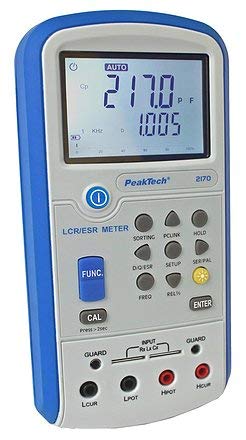
Whakaahua 1: Mua view of the Peaktech P2170 LCR Meter, showing the display, function buttons, and input terminals.
3.1 Nga Waahanga me nga Waahanga
Kei roto i te kete paerewa ngā tūemi e whai ake nei:
- Peaktech P2170 LCR Meter
- taura atanga USB
- rorohiko rorohiko
- Kelvin clips (test leads)
- He pouaka kawe tiaki
- AAA batteries (6x 1.5V)
- He pukapuka tohutohu
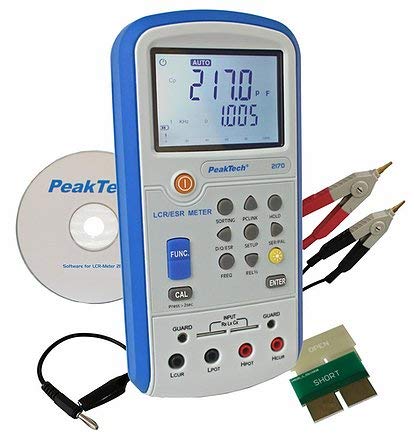
Figure 2: Peaktech P2170 LCR Meter shown with its included accessories, including Kelvin clips, USB cable, and software CD.
4. Tatūnga
4.1 Tāuta Pūhiko
The device operates on 6 x 1.5V AAA batteries. To install or replace batteries:
- Me whakarite kua whakawetohia te hiko o te mita.
- Kimihia te uhi o te wahanga pākahiko kei muri o te taputapu.
- Open the cover and insert 6 AAA batteries, observing the correct polarity markings.
- Katia kia mau te uhi o te wahanga pākahiko.
An optional 12V 500mA power adapter can also be used for external power.
4.2 Te hono i nga kaiarahi Whakamātautau
Use the provided Kelvin clips for accurate measurements. Connect them to the input terminals as follows:
- Connect the red Kelvin clip to the Hpot a Hcur mutunga.
- Connect the black Kelvin clip to the Lpot a Lcur mutunga.
- For 2-wire measurements, connect the test leads to Hpot a Lpot.
- Ensure a secure connection to minimize measurement errors.
4.3 Software Installation (PC Link)
The included PC software allows for data logging and analysis. Follow these steps to install:
- Insert the software CD into your computer's optical drive.
- Whaia nga tohutohu i runga-mata hei whakaoti i te whakaurunga.
- Connect the meter to your PC using the supplied USB interface cable.
- Launch the software and establish communication with the device. Refer to the software's help documentation for detailed usage.
5. Nga Tohutohu Whakahaere
5.1 Kei te Hiko / Weto
Pehia te MANA button to turn the meter on or off.
5.2 Aratau Ine
The P2170 supports various measurement modes. Press the Puapuaki button to cycle through the primary measurement parameters:
- Ls (Series Inductance)
- Cs (Series Capacitance)
- Lp (Parallel Inductance)
- Cp (Parallel Capacitance)
- DCR (DC Resistance)
- ESR (Equivalent Series Resistance)
- Rp (Parallel Resistance)
- D (Dissipation Factor)
- Q (Quality Factor)
- θ (Phase Angle)
The illuminated display will show the selected mode and measurement results.
5.3 Measurement Frequency Selection
Pehia te FREQ button to select the desired test frequency. Available frequencies include 100 Hz, 120 Hz, 1 kHz, 10 kHz, and 100 kHz. The chosen frequency will be displayed on the screen.
5.4 Taumahi Pupuri Raraunga
Pehia te KAUPAPA button to freeze the current measurement reading on the display. Press it again to release the hold function.
5.5 Whakariterite
To perform a calibration, ensure no component is connected to the input terminals. Press and hold the CAL button for approximately 2 seconds. Follow any on-screen prompts.
6. Tiaki
6.1 Te horoi
Horoia te mita casing me te ngohengohe, damp kakahu. Kaua e whakamahia he kaihoroi whakakoi, he wai whakarewa rānei. Me whakaweto te taputapu, ā, me momotu mai i tētahi pūtake hiko i mua i te horoinga.
6.2 Whakakapinga Pūhiko
When the low battery indicator appears on the display, replace all 6 AAA batteries as described in Section 4.1.
6.3 Rokiroki
If the meter is not used for an extended period, remove the batteries to prevent leakage. Store the device in its protective carrying case in a cool, dry place, away from direct sunlight and extreme temperatures.
7. Te Raru
If you encounter issues with your Peaktech P2170, refer to the following common problems and solutions:
- Kāore te mita e whakakā: Check battery installation and ensure batteries are not depleted. Try replacing with new batteries.
- Ko nga panui kore tika:
- Me whakarite kia hono tika ngā taura whakamātautau, ā, kia kaua e pakaru.
- Perform a calibration (Section 5.5).
- Verify the correct measurement mode and frequency are selected for the component being tested.
- Ensure the component is properly connected to the Kelvin clips.
- Kāore te pūmanawa rorohiko e hono ana:
- Tirohia te hononga taura USB.
- Ensure the software drivers are correctly installed.
- Restart both the meter and the PC.
If the problem persists, contact Peaktech customer support.
8. Whakatakotoranga
Detailed technical specifications for the Peaktech P2170 LCR Meter:
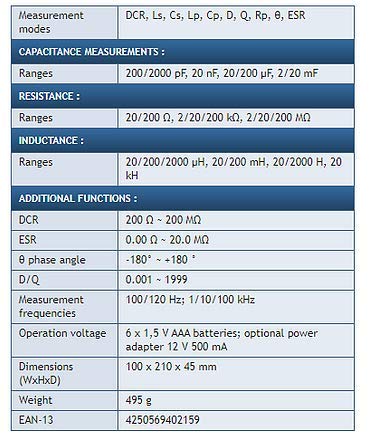
Figure 3: Detailed specifications table for the Peaktech P2170 LCR Meter, including measurement modes, ranges, frequencies, and physical characteristics.
| Tawhā | Uara |
|---|---|
| Aratau Ine | DCR, Ls, Cs, Lp, Cp, D, Q, Rp, θ, ESR |
| Capacitance Ranges | 200/2000 pF, 20 nF, 20/200 µF, 2/20 mF |
| Awhe Parenga | 20/200 Ω, 2/20/200 kΩ, 2/20/200 MΩ |
| Inductance Ranges | 20/200/2000 µH, 20/200 mH, 20/2000 H, 20 kH |
| DCR Range | 200 Ω ~ 200 MΩ |
| ESR Range | 0.00 Ω ~ 20.0 MΩ |
| Phase Angle (θ) | -180° ~ +180° |
| D/Q Resolution | 0.001 ~ 1999 |
| Measurement Frequencies | 100/120 Hz; 1/10/100 kHz |
| Te Tika Tika | 0.3 % |
| Mahinga Mahi Voltage | 6 x 1.5 V AAA batteries; optional power adapter 12 V 500 mA |
| Ahu (WxHxD) | 100 x 210 x 45 mm |
| Taumaha | 495 g |
| Kaihanga | Peaktech |
9. Pūtāhui me te Tautoko
For warranty information, technical support, or service inquiries, please contact Peaktech directly or refer to their official webpae. Puritia to riiki hoko hei tohu mo te hoko.


