Varmilo VBS108 Lure Bot Mechanical Keyboard
Pukapuka Tohutohu
Kupu Whakataki
Thank you for choosing the Varmilo VBS108 Lure Bot Mechanical Keyboard. This keyboard is designed for versatility and durability, featuring triple mode connectivity (Bluetooth 5.0, 2.4GHz Wireless, and USB-C), high-quality PBT dye-sub keycaps, and Cherry MX Brown switches for a tactile typing experience. This manual provides detailed instructions for setup, operation, maintenance, and troubleshooting to ensure optimal performance and longevity of your keyboard.
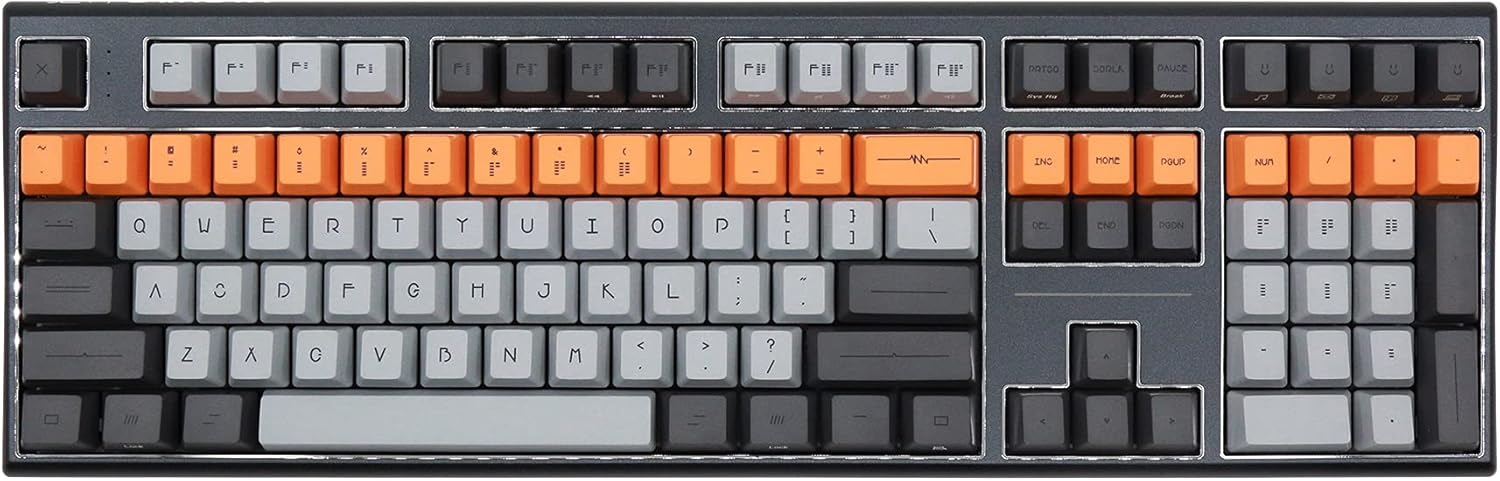
Figure 1: Varmilo VBS108 Lure Bot Mechanical Keyboard
Ihirangi mokete
Me whakarite kei roto katoa nga taonga kei roto i te kete:
- Varmilo VBS108 Lure Bot Mechanical Keyboard
- USB-C ki USB-A Cable
- 2.4GHz Wireless Dongle (typically stored in the keyboard's battery compartment or a dedicated slot)
- Keycap Puller (may be included)
- Pukapuka Kaiwhakamahi (tenei tuhinga)
Tatūnga
The Varmilo VBS108 offers three connectivity modes: USB-C wired, 2.4GHz wireless, and Bluetooth 5.0.
1. Hononga Waea USB-C
- Locate the USB-C port on the keyboard (usually on the top edge).
- Connect one end of the provided USB-C cable to the keyboard.
- Connect the other end (USB-A) to an available USB port on your computer.
- Ka mohio aunoa te papapātuhi ka reri mo te whakamahi.
2. 2.4GHz Hononga Ahokore
- Kimihia te dongle ahokore 2.4GHz.
- Monohia te dongle ki tetahi tauranga USB e waatea ana ki to rorohiko.
- Ensure the keyboard is in 2.4GHz mode (refer to the keyboard's function key combinations or a physical switch if available).
- Me hono aunoa te papapātuhi.
3. Hononga Nihokikorangi 5.0
- Ensure the keyboard is in Bluetooth pairing mode. This typically involves holding down a specific Fn key combination (e.g., Fn + 1, Fn + 2, or Fn + 3 for different profiles) until an indicator light flashes. Consult your keyboard's specific key legend for Bluetooth pairing.
- I runga i to rorohiko, i to taputapu ranei, whakatuwhera i nga tautuhinga Nihokikorangi.
- Rapua new devices and select "Varmilo VBS108" or a similar name from the list.
- A pee i nga tohu o runga-mata hei whakaoti i te tukanga takirua.
Te whakahaere
The Varmilo VBS108 keyboard includes various function key combinations for enhanced control.
Function Key Combinations (Fn + Key)
- Fn + F1-F12: Multimedia controls (play/pause, volume up/down, mute, etc.). Refer to the keycap legends for specific functions.
- Fn + Wini: Maukati/Wewete te kī Windows.
- Fn + Left Alt: Switch between macOS and Windows layouts (if supported).
- Fn + Q/W/E: Switch between Bluetooth profiles (mehemea e tika ana).
- Fn + R: Switch to 2.4GHz wireless mode.
- Fn + T: Switch to USB-C wired mode.
- Fn + Backlight Keys: Adjust backlight brightness or effects (if applicable).
Adjustable Flip-out Feet
Kei te papapātuhi he 3-stage adjustable flip-out feet on the underside, allowing you to customize the typing angle for ergonomic comfort.

Figure 2: Adjustable Flip-out Feet
Te tiaki
Proper maintenance ensures the longevity and performance of your Varmilo keyboard.
Te horoi i te papapātuhi
- Pūmatua: Use a keycap puller to carefully remove keycaps. Clean them with a mild soap solution and a soft cloth, then rinse thoroughly and air dry completely before reattaching.
- Take: Wipe the keyboard case with a soft, slightly damp, kakahu kore-miro. Āta karohia te whakamahi i ngā matū kino, i ngā rauemi whakakoi rānei.
- I waenganui i ngā kī: Use compressed air to remove dust and debris from between the key switches. A small brush can also be used for stubborn particles.

Figure 3: PBT Dye-Sub Keycaps
Raparongoā
If you encounter issues with your Varmilo VBS108 keyboard, try the following solutions:
- Kāore te papapātuhi e whakautu (Waea): Me whakarite kia hono pai te taura USB-C ki te papapātuhi me te rorohiko. Whakamātauria tētahi atu tauranga USB, taura rānei.
- Keyboard not responding (Wireless/Bluetooth):
- Tirohia te taumata pākahiko.
- Ensure the keyboard is in the correct mode (2.4GHz or Bluetooth).
- For 2.4GHz, ensure the dongle is properly inserted and try a different USB port.
- For Bluetooth, unpair and re-pair the keyboard with your device. Ensure your device's Bluetooth is enabled.
- Kāore ngā kī e rēhita ana: Remove the keycap and check for any obstructions around the switch. Clean the area with compressed air.
- Hononga mokowhiti: Ensure there are no major sources of interference (e.g., other wireless devices) near the keyboard or dongle.
- Whakahoutanga Firmware: Check the official Varmilo website for any available firmware updates for your model, which can resolve known issues.
Whakatakotoranga
| Āhuahira | Taipitopito |
|---|---|
| Waitohu | Varmilo |
| Tauira | VBS108 Lure Bot |
| Hangarau Hononga | Bluetooth 5.0, 2.4GHz Wireless, USB-C |
| Momo Whakawhiti | Parauri Cherry MX |
| Rauemi Matua | PBT Dye-Sub |
| Te maha o nga Kī | 104 |
| Pūrere Hototahi | PC |
| Tae | Cherry MX Brown (keyboard color scheme) |
| Āhuahira Motuhake | 3-Stage Adjustable Flip-out Feet |
Pūtāhui me te Tautoko
Varmilo products are designed for quality and reliability. For information regarding warranty coverage, technical support, or service, please refer to the warranty card included with your product or visit the official Varmilo website. You may also contact the retailer from whom you purchased the product for assistance.


