1. Kupu Whakataki
This manual provides essential information for the safe and effective operation, setup, and maintenance of your JAMARA 404980 JCB Loader. Please read these instructions carefully before using the product to ensure proper function and longevity.

Image 1.1: The JAMARA 404980 JCB Loader and its remote control.
2. Nga korero haumaru
- Whakatupato: Hei whakamahi i raro i te mataki tika a te pakeke.
- Whakatupato: Not suitable for children under 36 months. Contains small parts that can be swallowed. Choking hazard. Keep away from small children.
- Always operate the vehicle in a safe environment, away from obstacles, people, and pets.
- Kaua e whakamahia ki te taha o te wai, i ngā wāhi mākū rānei, hei ārai i ngā kino hiko.
- Me whakarite kia whakauruhia nga pākahiko me te polarity tika.
- Kaua e hanumi nga pākahiko tawhito me nga pākahiko hou, nga momo pākahiko rereke ranei.
- Tangohia ngā pākahiko me te mana mamao i te waka ina kore e whakamahia mō te wā roa.
3. He aha kei roto i te Pouaka
- Model (JCB Loader)
- Remote control 2.4 GHz
- Pukapuka Tohutohu
4. Tatūnga
4.1 Tāuta Pūhiko
- Waka: Locate the battery compartment on the underside of the JCB Loader. Open the cover, insert the required batteries (not included) ensuring correct polarity (+/-), and close the cover securely.
- Mana Mamao: Locate the battery compartment on the back of the remote control. Open the cover, insert the required batteries (not included) ensuring correct polarity (+/-), and close the cover securely.
4.2 Whakahoahoa i te Mana Mamao
The 2.4 GHz remote control typically pairs automatically with the vehicle upon power-up. Ensure both the vehicle and the remote control have fresh batteries installed and are switched ON. If pairing does not occur, switch both devices OFF, then ON again, keeping them close to each other.

Image 4.1: The 2.4 GHz Remote Control.
5. Nga Tohutohu Whakahaere
The JAMARA 404980 JCB Loader offers realistic functions controlled via the 2.4 GHz remote control.
5.1 Ngā Mana Taraiwa
- Use the left joystick to control forward/backward movement.
- Use the right joystick to control left/right steering.
- The vehicle features 2-wheel drive for maneuverability.
5.2 Loader and Excavator Functions
- Front Shovel: Use designated buttons on the remote control to lift, lower, and tilt the front shovel.
- Rear Shovel: The rear shovel can be manually lifted, lowered, and tilted.
- Rear Excavator: The rear excavator arm can be manually moved left and right.
- Retractable Boom: The boom of the excavator is manually retractable.
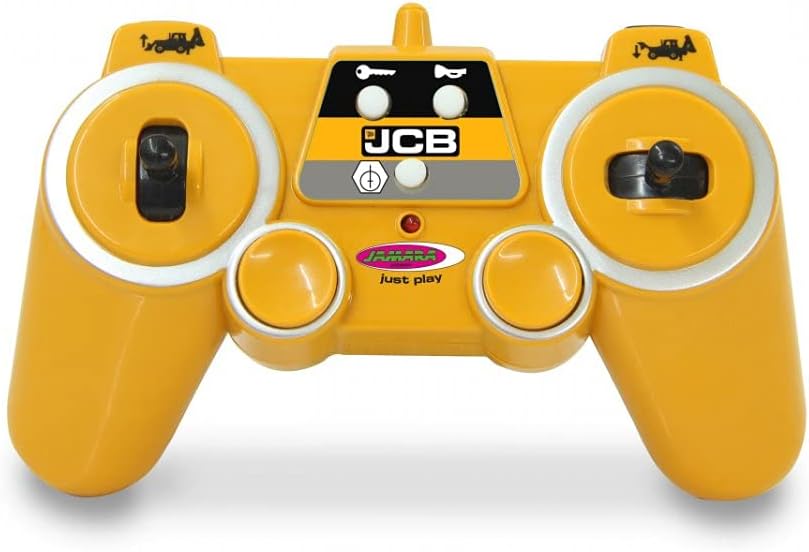
Image 5.1: JCB Loader with front shovel raised.

Image 5.2: JCB Loader with rear excavator extended.
5.3 Sound and Light Features
- Oro Mihini: The model features a realistic engine sound, which can be switched off via the remote control.
- Haona: Activate the horn sound using the designated button.
- Reversing Warning Sound: A warning sound will activate when the vehicle is driven in reverse.
- Tohu: The vehicle is equipped with an indicator light.
5.4 Āhuatanga Arā Atu Anō
- Nga Mahi Whakatakataka: The remote control allows for programmable functions with a repeat function. Refer to the remote control diagram for specific button assignments.
- Aratau Tatari Aunoa: The vehicle may enter an auto standby mode after a period of inactivity to conserve battery life.
- Aratau Whakaaturanga: A demo mode may be available to showcase the vehicle's functions.
6. Tiaki
- Te horoi: Wipe the vehicle and remote control with a soft, dry cloth. Do not use water or chemical cleaners.
- Rokiroki: Whakaorangia te hua ki te waahi makariri, maroke atu i te ra tika ina kore e whakamahia.
- Tiaki Pūhiko: Tango pākahiko ki te kore e whakamahia te hua mo te wa roa kia kore ai e pakaru.
- Tirotiro i nga wa katoa mo nga wiri kua marara, nga waahanga pakaru ranei.
7. Te Raru
| Raruraru | Take pea | Rongoā |
|---|---|---|
| Kāore te waka e whakautu mai | Low batteries in vehicle or remote; Not paired; Power switch OFF | Replace batteries; Re-pair vehicle and remote; Ensure power switches are ON |
| Awhe mana poto | Low batteries; Interference | Replace batteries; Move to an area with less electronic interference |
| Functions (shovel/excavator) not working | Low batteries; Mechanical obstruction | Replace batteries; Check for any physical obstructions and clear them carefully |
| Engine sound not working | Sound function switched off; Low batteries | Activate sound via remote; Replace batteries |
8. Whakatakotoranga
- Tau tauira: 404980
- Waitohu: Jamara
- Tauine: 1:20
- Auautanga Mana: 2.4 GHz
- Rahi Hua: 24.02 x 5.51 x 6.5 inihi
- Taumaha Tūemi: 2.95 pauna
- Reanga Manakohia: 6 tau ki runga ake
- Puku: 2 Wira Puku
- Āhuatanga: Lift/Lower/Tilt Shovel, Manual Rear Shovel/Excavator, Realistic Engine Sound (switchable), Horn, Reversing Warning Sound, Indicator, Programmable Functions, Auto Standby Mode, Demo Mode.
9. Pūtāhui me te Tautoko
For warranty information and customer support, please refer to the official Jamara webpae, whakapā atu ranei ki to kaihoko. Puritia to riiki hoko hei tohu mo te hoko.
For more information, visit the official product page: JAMARA 404980 Product Page


