1. Kupu Whakataki
This manual provides instructions for the Sharp Digital Alarm Clock, Model SPC547AJAMZ. This device features an easy-to-read LED display, a high-speed USB charging port, and essential alarm functions. Please read this manual thoroughly before use to ensure proper operation and to maximize the product's lifespan.

Figure 1: Sharp Digital Alarm Clock (Model SPC547AJAMZ) front view.
2. Nga Hua o te Hua
The Sharp Digital Alarm Clock offers the following key features:
- Whakaaturanga ngawari ki te panui: Large, clear green LED digits for visibility from a distance.
- High-Speed USB Charging Port: A 2 AMP USB port for rapid charging of compatible devices such as smartphones and tablets.
- Rōrahi Whakaoho Whakaritea: Select between high and low alarm volume settings.
- Mahi ngawari: Intuitive button controls for setting time and alarm.
- Pūrua Pūhiko: Ka mau tonu i te wa me nga tautuhinga whakaoho i te wa o te hiko outages (requires 2 AAA batteries, not included). The display will be blank during battery backup mode, but the internal clock will continue to run, and the alarm will sound at the set time.

Figure 2: Alarm clock with a smartphone connected to the USB charging port.
3. Ihirangi mokete
Manatokona kei roto katoa nga mea kei roto i te kete:
- Sharp Digital Alarm Clock (Model SPC547AJAMZ)
- Pouaka AC
- Pukapuka Kaiwhakamahi (tenei tuhinga)
Note: 2 AAA batteries for backup are not included and must be purchased separately.
4. Nga korero haumaru
Kia mau ki nga whakaritenga haumaru e whai ake nei:
- Kaua e tukuna te waeine ki te wai, ki te makuku nui ranei.
- A ape i te whakanoho i te waeine ki te taha o nga puna wera, ki te ra tika ranei.
- Use only the provided AC power adapter.
- Kaua e ngana ki te wetewete, ki te whakarereke ranei i te waahanga.
- Kaua e taea e nga tamariki.
- Me whakarite kia tika te hau huri noa i te waahanga.
5. Tatūnga
5.1 Hononga Hiko
- Plug the AC power adapter into the DC IN jack located on the back of the alarm clock.
- Plug the other end of the AC power adapter into a standard wall outlet (120V AC, 60Hz).
- The display will illuminate, and the clock will be ready for time setting.
5.2 Tāuta Pūrua Pūhiko
To ensure time and alarm settings are retained during a power outage:
- Kimihia te wahanga pākahiko kei raro o te waeine.
- Whakatuwheratia te uhi o te wahanga pākahiko.
- Insert two (2) new AAA batteries, observing the correct polarity (+ and -) as indicated inside the compartment.
- Katia kia mau te uhi o te wahanga pākahiko.
Note: Batteries are for backup only. The clock display will not be lit during a power outage when operating on battery backup, but the internal clock will continue to run, and the alarm will sound at the set time.
6. Nga Tohutohu Whakahaere
Familiarize yourself with the control buttons located on the top of the unit:
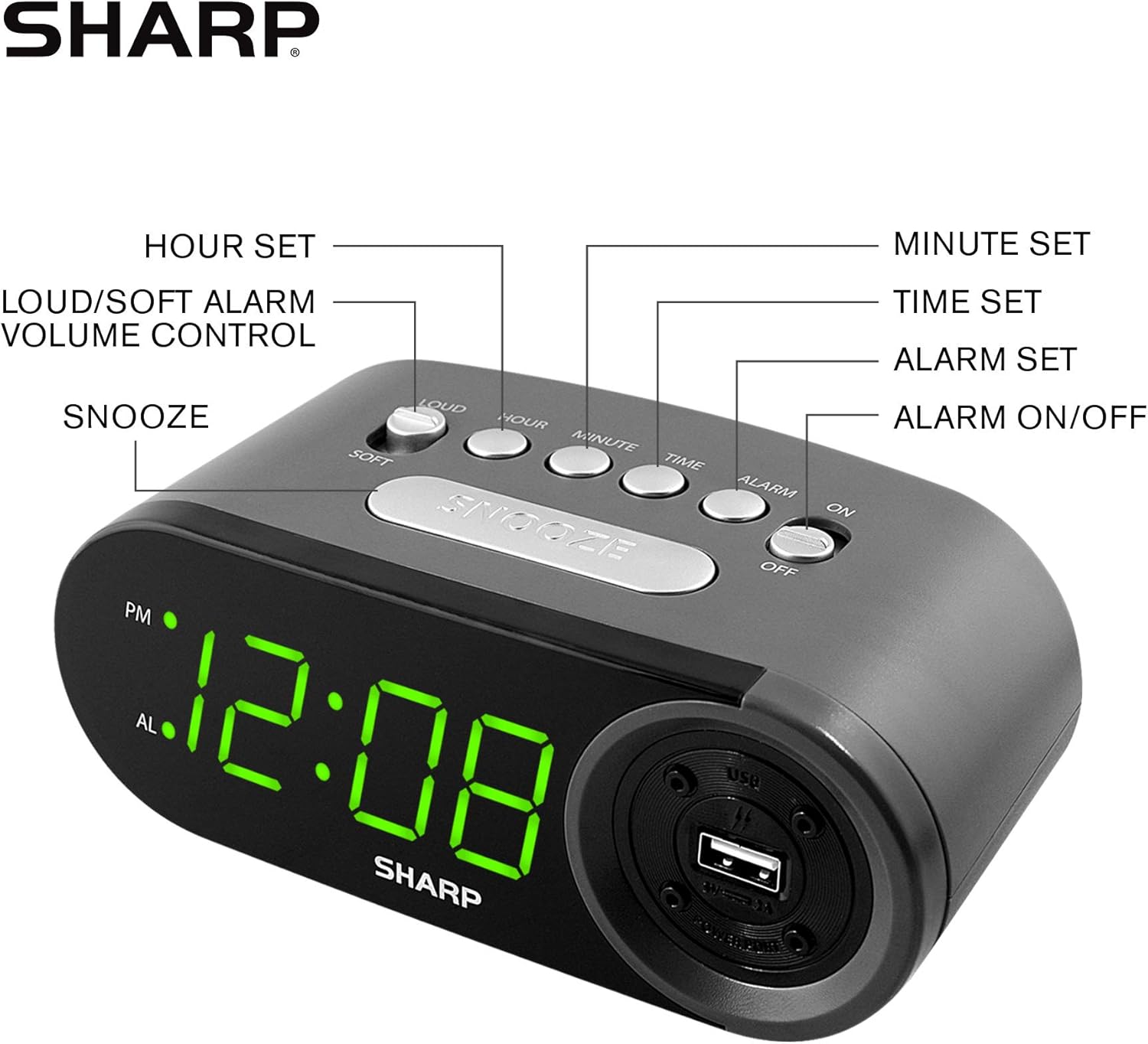
Figure 3: Top panel controls and their functions.
6.1 Setting the Current Time
- Patohia me te pupuri i te WĀ button until the display begins to flash.
- Pehia te HOUR te paatene ki te tautuhi i te haora. Tirohia te tohu PM mo nga haora o te ahiahi.
- Pehia te MINI te paatene ki te tautuhi i nga meneti.
- Kia whakaritea te wā e hiahiatia ana, pēhi i te pātene WĀ te paatene ano ki te whakaū me te puta i te aratau tautuhinga wa.
6.2 Setting the Alarm Time
- Patohia me te pupuri i te ohooho button until the alarm time display begins to flash. The "AL" indicator will also flash.
- Pehia te HOUR button repeatedly to set the alarm hour. Observe the PM indicator.
- Pehia te MINI button repeatedly to set the alarm minutes.
- Once the desired alarm time is set, press the ohooho button again to confirm and exit alarm setting mode.
6.3 Activating/Deactivating the Alarm
- To turn the alarm ON, paheke te PANUWHIRI ON / WAWHI switch to the "ON" position. The "AL" indicator will appear on the display.
- To turn the alarm WATE, paheke te PANUWHIRI ON / WAWHI switch to the "OFF" position. The "AL" indicator will disappear.
6.4 Mahi Koura
Ka tangi te whakaoho, pehia te rahi Whakatā pātene. Ka mutu te whakaoho ka tangi ano i muri tata ki te 9 meneti.
6.5 Whakamutua te Whakaoho
To stop the alarm completely after it sounds (without using snooze), slide the PANUWHIRI ON / WAWHI switch to the "OFF" position. The alarm will reset for the next day if the switch is moved back to "ON".
6.6 Te Whakaritea i te Rarahi Whakaoho
Pehia te LOUD/SOFT button to toggle between high and low alarm volume settings.
6.7 Using the USB Charging Port
Ko te 2 AMP USB charging port is located on the right side of the unit.
- Connect your device's USB charging cable (not included) to the USB port on the alarm clock.
- Honoa te tahi pito o te taura ki to waea atamai, papa, ki tetahi atu taputapu hiko USB hototahi.
- Ensure the alarm clock is connected to AC power for the USB port to function.
Note: Charging speed may vary depending on your device and cable.
7. Tiaki
To keep your alarm clock in optimal condition:
- Te horoi: Horoia te waeine ki te kakahu ngohengohe, maroke. Kaua e whakamahi i nga kai horoi me nga whakarewa.
- Whakakapinga Pūhiko: Replace AAA backup batteries annually or when the battery low indicator (if present) appears, to ensure reliable backup functionality.
- Rokiroki: If storing the unit for an extended period, remove the backup batteries to prevent leakage.
8. Te Raru
| Raruraru | Take pea | Rongoā |
|---|---|---|
| Ko te whakaaturanga karaka kei te waatea. | No AC power; power outage; unit unplugged. | Ensure AC adapter is securely plugged into the unit and a working wall outlet. Check for power outages. |
| Kare e tangi te whakaoho. | Alarm is not activated; alarm time is incorrect; volume is too low. | Slide ALARM ON/OFF switch to "ON". Verify alarm time is set correctly. Adjust alarm volume using the LOUD/SOFT button. |
| Ko te tauranga utu USB kaore e mahi. | Clock not connected to AC power; device not compatible; faulty cable. | Ensure the clock is plugged into AC power. Try a different USB cable or device to confirm compatibility. |
| Ngā tautuhinga wā/whakaoho i ngaro i muri i te whakawetonga hikotage. | Kua mate, kua kore ranei e whakauruhia nga pākahiko taapiri. | Install two fresh AAA batteries in the battery compartment, ensuring correct polarity. |
9. Whakatakotoranga
- Waitohu: koi
- Tauira: SPC547AJAMZ
- Momo Whakaatu: Digital LED (Green)
- Puna Hiko: Corded Electric (AC 120V, 60Hz)
- Pūrua Pūhiko: 2 x AAA pākahiko (kaore i whakauruhia)
- Tauranga Kaihoko USB: 2 AMP (5V)
- Rahi Hua: Approximately 6.2" W x 2.3" H x 3.25" D
- Taumaha Tūemi: Tata ki te 9.6 hekere
- Rauemi: Kirihou
- UPC: 049353006000

Whakaatu 4: Te rahi o te hua.
10. Raihana me te Tautoko
10.1 Nga Korero Whakaputanga
This Sharp product is covered by a limited manufacturer's warranty. For specific warranty terms and conditions, please refer to the warranty card included with your purchase or visit the official Sharp webpae. Puritia to riiki hoko hei tohu mo te hoko.
10.2 Tautoko Kiritaki
If you have any questions, require assistance, or need to report an issue with your Sharp Digital Alarm Clock, please contact Sharp customer support. Contact details can typically be found on the official Sharp webte waahi kei runga ranei i te kohinga hua.
Mo etahi atu korero, tirohia te Toa Sharp i runga i a Amazon.


