1. Kupu Whakataki
This user manual provides essential information for the safe and efficient operation of your Redmi Smart LED TV X55. Please read this manual thoroughly before using the product and retain it for future reference.
The Redmi Smart LED TV X55 offers a 55-inch 4K Ultra HD display, powered by Android TV, and features advanced audio and visual technologies for an immersive entertainment experience.
2. Nga Korero Haumaru Nui
Me whai tonu i nga whakaritenga haumaru taketake ina whakamahi i tenei hua hei whakaiti i te tupono o te ahi, te ru hiko, me te whara.
- Kaua e tukuna te pouaka whakaata ki te ua, ki te makuku ranei.
- Kaua e whakatuwheratia te pouaka whakaata casing; tirohia nga ratonga katoa ki nga kaimahi whai tohu.
- Me whakarite kia tika te hau huri noa i te pouaka whakaata.
- Use only the power cord and accessories supplied by the manufacturer.
- Tiakina te pouaka whakaata mai i te ra tika, nga puna wera, me nga papa autō kaha.
- Horoia te pouaka whakaata me te kakahu ngohengohe, maroke. Kaua e whakamahi i te wai, i te horoi aerosol ranei.
3. Ihirangi mokete
Ina wetewetehia, tirohia kei te noho nga taonga katoa kei raro nei kei te pai te ahua:
- 1 x Redmi Smart LED TV X55
- 2 x Tūranga Tūnga Ripanga
- 1 x Mana Mamao
- 4 x Tiu mo te huinga tu
- 1 x Manual Kaiwhakamahi (tenei tuhinga)
- 1 x Waea Mana
4. Hua Neke Atuview
The Redmi Smart LED TV X55 is designed to deliver a premium viewing and audio experience. Below are its key features and components.
4.1. Visual Features
Experience stunning clarity and vibrant colors with the 55-inch 4K LED panel. Advanced technologies enhance your viewkei:
- 4K LED Panel: Delivers ultra-high-definition resolution for sharp images.
- Dolby Vision & HDR10: Provides superior contrast, brightness, and color depth.
- HLG (Hybrid Log-Gamma): Supports broadcast HDR content.
- Reality Flow & Vivid Picture Engine: Enhances motion smoothness and picture quality.
- MEMC (Motion Estimation, Motion Compensation): Reduces motion blur for fast-paced scenes.

Whakaahua 1: Mua view of the Redmi Smart LED TV X55.

Whakaatu 2: Neke Atuview of key visual features including Dolby Vision, 4K HDR, and Vivid Picture Engine.
4.2. Āhuatanga Ororongo
Immerse yourself in rich, powerful sound with the integrated audio system:
- 30W Output Speakers: Delivers clear and robust sound.
- Dolby Audio: Provides enhanced sound quality for movies and music.
- DTS Mariko:X: Ka waihanga i tētahi wheako oro maha-ahu.
- Dolby Atmos Pass-through via eARC: Allows for advanced audio formats to be sent to compatible sound systems.
- DTS-HD: High-definition audio decoding for a cinematic sound.
4.3. Smart Features & Performance
The Redmi Smart LED TV X55 runs on Android TV 10, offering a user-friendly interface and access to a vast ecosystem of apps.
- TV Android 10: Provides a smooth and intuitive smart TV experience.
- PatchWall 4 with IMDb Integration: A curated content platform with smart recommendations and IMDb ratings.
- Tukatuka Matawhāwhā: Ensures seamless performance and quick app loading.
- 2GB RAM + 16GB Storage: Ample memory and storage for apps and system operations.
- Built-in Wi-Fi (2x2 Dual Band) & Chromecast: Easy wireless connectivity and content casting from mobile devices.
- Ok Google: Voice control for searching content, controlling smart home devices, and more.
- Aratau Roopu Haka Aunoa (ALLM): Ka arotau i nga tautuhinga mo te petipeti, ka whakaheke i te takamuri whakauru.
- Miracast: Wireless display mirroring from compatible devices.
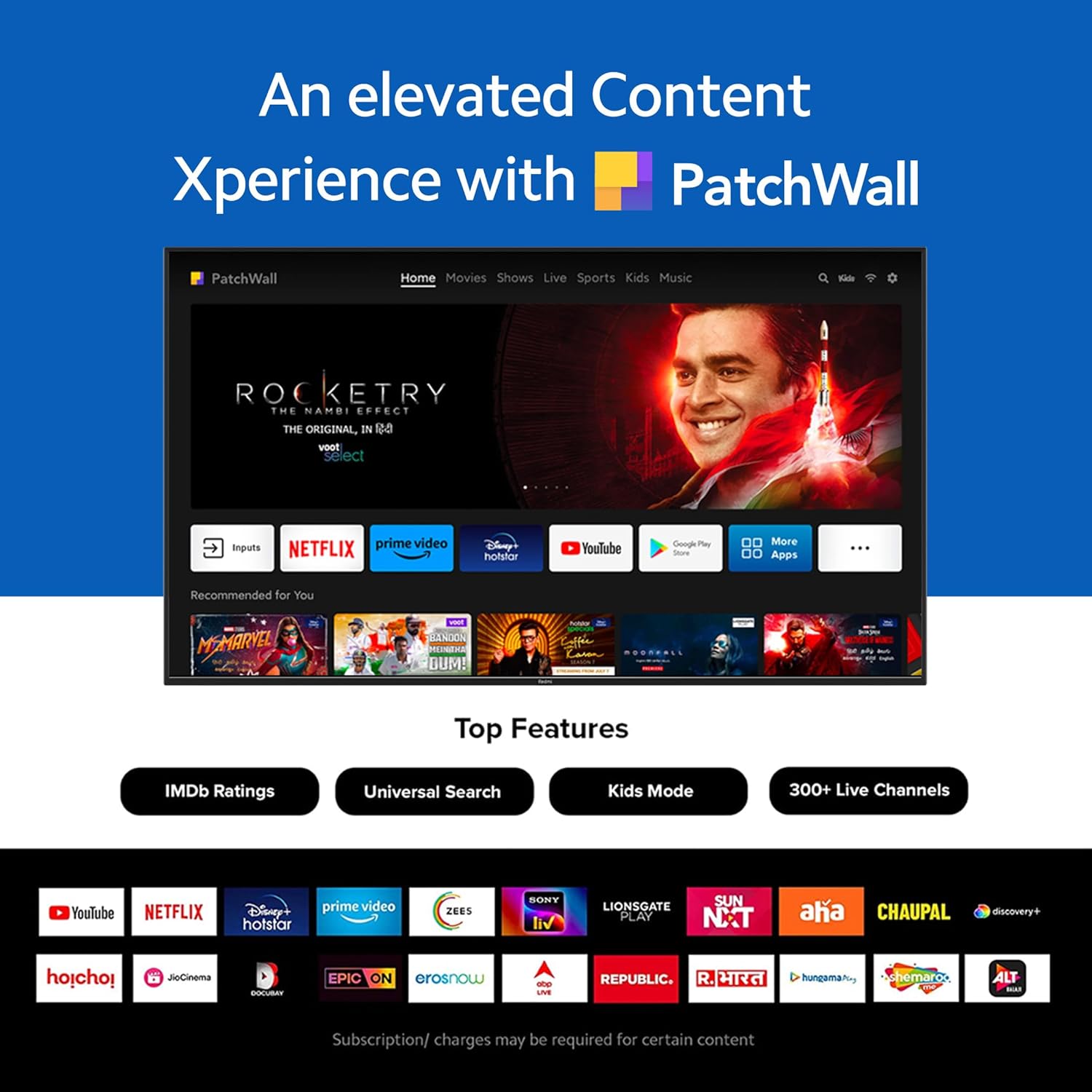
Figure 3: The PatchWall interface displaying various streaming apps and content.

Figure 4: Details on the TV's performance, including 2GB RAM, 16GB Storage, and Quad-core A55 processor.

Figure 5: Android TV 10 interface with Google Play, Ok Google, and Chromecast built-in.
4.4. Hononga
The TV offers multiple connectivity options for various devices:
- Atanga 2.1: Multiple ports for high-definition audio and video input, supporting eARC.
- USB 2.0: Hei hono i ngā taputapu rokiroki o waho.
- Itarangi: Hononga whatunga waea.
- Tauranga Optik: Putanga ororongo matihiko.
- Tauranga Ororongo 3.5mm: Mo nga taringa, nga kaikorero o waho ranei.
- Bluetooth 5.0 with BLE: Wireless connectivity for audio devices and accessories.

Whakaahua 6: Whakamuri view of the Redmi Smart TV X55 highlighting various input/output ports.

Figure 7: Close-up of the TV's ports, including HDMI 2.1, USB 2.0, Ethernet, Optical, and Headphone Jack.
5. Aratohu Tatūnga
5.1. Tāutanga Tinana
Your Redmi Smart LED TV X55 can be installed on a table stand or wall-mounted.
- Tāutanga Tūnga Tēpu: Attach the two provided table stand bases to the bottom of the TV using the included screws. Ensure the TV is placed on a stable, flat surface.
- Tautanga Maunga Taiepa: For wall mounting, use a compatible VESA wall mount kit (sold separately). Follow the instructions provided with the wall mount kit and ensure professional installation for safety.

Figure 8: Dimensions of the Redmi Smart TV X55 for planning installation.
5.2. Te Hiko Tuatahi me te Hononga Whatunga
- Honoa te taura hiko ki te pouaka whakaata me te putanga hiko.
- Patohia te paatene mana i runga i te mana mamao, i te TV ranei.
- Follow the on-screen instructions to select your language, country, and connect to your Wi-Fi network or plug in an Ethernet cable.
- Sign in with your Google account to access Android TV features and the Play Store.
5.3. Setting Up Alexa Control
You can control your Redmi TV hands-free with Alexa devices. Follow these steps to set up Alexa:
Video 1: Instructions on how to set up Alexa control for your Redmi Smart TV.
To enable advanced settings for Alexa control, refer to the following video guide:
Video 2: Guide to enabling advanced settings on Redmi TV for Alexa control.
6. Nga Tohutohu Whakahaere
6.1. Mana Mamao
The sleek remote control provides quick access to essential functions:
- Oho Tere: Whakakāhia te pouaka whakaata i roto i te iti iho i te 5 hēkona.
- Wahangu Tere: Double-tap the volume down button to mute.
- Tautuhinga Tere: Long press the PatchWall button to enter the quick settings menu.

Figure 9: The sleek remote control for the Redmi Smart TV X55, highlighting quick access features.
6.2. Navigating the Smart TV Interface
Use the remote's directional pad and OK button to navigate through the Android TV and PatchWall interfaces. Access apps, settings, and content recommendations easily.
6.3. Using Voice Control
Press the dedicated voice assistant button on your remote and speak commands to control your TV, search for content, or interact with connected smart home devices via Ok Google or Alexa.
6.4. App Usage and Casting
The TV supports popular streaming services like Prime Video, Netflix, Disney+ Hotstar, YouTube, and Apple TV. You can also cast content from your mobile devices using Chromecast built-in or Miracast.
7. Tiaki
- Te horoi: Gently wipe the screen and TV body with a soft, dry, lint-free cloth. Do not use abrasive cleaners or solvents.
- Whakahōu Pūmanawa: Ensure your TV's software is up to date for optimal performance and security. Navigate to Settings > Device Preferences > About > System update to check for updates.
- Whakahaere Hiko: Wewetehia te pouaka whakaata i te wa e uira ana te tupuhi, i te wa ranei e kore e whakamahia mo nga wa roa.
8. Te Raru
If you encounter issues with your Redmi Smart LED TV X55, refer to the following common problems and solutions:
| Raruraru | Rongoa pea |
|---|---|
| Karekau he kaha | Check if the power cable is securely connected and the power outlet is working. Try a different outlet. |
| Karekau he pikitia, engari he oro | Ensure the correct input source is selected. Check HDMI cable connections. |
| Karekau he oro, engari he pikitia kei reira | Check volume levels and mute status. Verify audio output settings (e.g., internal speakers, external soundbar). |
| Ko te mana mamao kaore e mahi | Replace batteries. Ensure no obstructions between the remote and the TV. Re-pair the remote if necessary. |
| Nga take hononga whatunga | Restart your router and modem. Check Wi-Fi password. Try connecting via Ethernet. |
9. Whakatakotoranga
Detailed technical specifications for the Redmi Smart LED TV X55:
| Āhuahira | Whakatakotoranga |
|---|---|
| Waitohu | Redmi |
| Ingoa Tauira | X55 |
| Rahi Mata | 55 Inihi |
| Hangarau Whakaatu | LED-LCD |
| Whakatau | 3840 x 2160 pika (4K) |
| Rere tāmata | 60 Hz |
| Pūnaha Mahi | TV Android 10 |
| Tukatuka | Matawhāu A55 |
| RAM | 2 GB |
| Rokiroki | 16 GB |
| Putanga Ororongo | 30 Watts |
| Hangarau Hononga | HDMI, USB, Wi-Fi (2x2 Dual Band), Ethernet, Bluetooth 5.0 |
| Tauranga HDMI | 3 (HDMI 2.1, eARC compatible) |
| Tauranga USB | 2 (USB 2.0) |
| Viewing Koki | 178 Waeine |
| Aspect Ratio | 16:9 |
| Taumaha Tūemi | 15 kg 300 g |
| Momo Whakaeke | Wall Mount; Table Mount |
10. Pūtāhui me te Tautoko
Your Redmi Smart LED TV X55 comes with a standard brand warranty. For specific warranty terms, duration, and service procedures, please refer to the warranty card included in your package or visit the official Redmi support webpae.

Figure 10: Information regarding Mi Extended Warranty, offering benefits like zero documentation, genuine spare parts, cashless repairs, authorized service centers, and on-site support.
For installation services, Amazon will coordinate with the brand within 48 hours of delivery. Scheduled delivery options are available in select cities. Installation charges may apply.