1. Kupu Whakataki
Thank you for choosing the Qlima PH635 Portable Reversible Air Conditioner. This manual provides essential information for the safe and efficient operation, maintenance, and troubleshooting of your appliance. Please read it thoroughly before use and keep it for future reference.
The Qlima PH635 is a versatile unit designed to provide comfort in various conditions, offering cooling, heating, dehumidification, and fan functions. It features automatic stop, programming backup in case of power interruption, and adjustable ventilation.
2. Nga Tohutohu Haumaru
Hei aukati i te whara o te kaiwhakamahi tetahi atu tangata ranei me nga taonga o te rawa, me whai nga tohutohu e whai ake nei. Ko te mahi he na te kore e aro ki nga tohutohu ka pa he kino, he kino ranei.
- Me whakarite kia whakatakotoria te taputapu ki runga i te mata papatahi, pumau hoki hei ārai i te takahuri.
- Do not operate the unit with a damaged power cord or plug. If the supply cord is damaged, it must be replaced by the manufacturer, its service agent, or similarly qualified persons to avoid a hazard.
- Kaua e kuhu mai i nga maihao me nga mea kee ki roto i nga kokoru hau me nga putanga.
- Kia matara atu te waeine mai i nga rawa muramura me te mura ahi.
- Ensure proper ventilation around the unit; do not block air vents.
- Wewetehia te taputapu i mua i te horoi, te whakahaere ranei i tetahi mahi tiaki.
- Ka taea te whakamahi i tenei taputapu e nga tamariki 8 tau, neke atu ranei, me nga tangata he iti te kaha o te tinana, te tairongo, te hinengaro, te kore wheako me te mohiotanga mena kua tukuna ki a ratou te tirotiro me te tohutohu mo te whakamahi i te taputapu i runga i te haumaru me te mohio ki nga aitua e pa ana. .
- Me mataki nga tamariki kia kore ai ratou e takaro ki te taputapu.
3. Ihirangi mokete
Tena koa tirohia kei te noho nga taonga katoa i te wa e wetewete ana:
- Qlima PH635 Portable Air Conditioner Unit
- Ngongo ngongo
- Window Sealing Kit (adaptor, window slide bar)
- Mana Mamao
- Pukapuka Kaiwhakamahi (tenei tuhinga)
4. Hua Neke Atuview
4.1 Waehanga
Familiarize yourself with the main parts of your Qlima PH635 unit:
- Control Panel (top of unit)
- Air Outlet (front, adjustable louvers)
- Air Inlet (rear/sides, with air filter)
- Exhaust Air Outlet (rear, for hose connection)
- Continuous Drainage Port (rear, for dehumidification)
- Casters (bottom, for mobility)
- Waea hiko
4.2 Whakaahua Hua
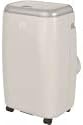
Image showing the Qlima PH635 portable reversible air conditioner from a slight angle, highlighting its compact, rectangular design with a light-colored casing and top control panel. The unit is equipped with casters for easy movement.
5. Tatūnga
5.1 Te Wetewete
- Āta tango i te waeine mai i tōna tākai.
- Tangohia nga taonga whakakakahu katoa me te tuku tika.
- Ensure no parts are missing or damaged.
5.2 Whakanoho
- Place the air conditioner on a firm, level surface in a location that allows for proper air circulation.
- Maintain a minimum distance of 30 cm (12 inches) from walls or other objects to ensure adequate airflow.
- A ape i te whakatakoto i te waeine ki te ra tika, ki te tata ranei ki nga puna wera.
5.3 Te Whakataunga Hose Whakamutunga
- Attach one end of the exhaust hose to the exhaust air outlet on the rear of the unit. Twist clockwise until secure.
- Extend the exhaust hose to the nearest window or vent opening. Keep the hose as short and straight as possible to maximize efficiency.
5.4 Tāuta Kete Matapihi
For optimal performance, use the provided window sealing kit to prevent hot air from re-entering the room.
- Adjust the window slide bar to fit your window opening.
- Secure the slide bar in the window.
- Connect the other end of the exhaust hose to the adaptor on the window kit.
- Ensure all connections are sealed to prevent air leakage.
5.5 Drainage Setup (Dehumidification Mode)
When using the dehumidification function, continuous drainage is recommended. Connect a drainage hose (not supplied) to the continuous drainage port on the rear of the unit and lead it to a suitable drain or container.
6. Nga Tohutohu Whakahaere
6.1 Paewhiri Mana me te Mana Mamao
The unit can be operated via the control panel on top of the unit or the supplied remote control. The functions are generally identical.
6.2 Hiko / Whakaweto
Pehia te MANA pātene hei whakakā, whakaweto rānei i te kōwae.
6.3 Kōwhiringa Aratau
Pehia te MODE pātene ki te huri i roto i nga aratau e waatea ana:
- Aratau whakamatao: Mo te whakamahana i te ruma. Tautuhia te pāmahana e hiahiatia ana.
- Aratau Whakawera: Mo te whakamahana i te ruma. Tautuhia te pāmahana e hiahiatia ana.
- Aratau whakamakuku: Removes moisture from the air. Fan speed is typically fixed in this mode.
- Aratau Fan: Ka huri i te hau me te kore whakamatao, whakamahana ranei.
6.4 Te Whakarereketanga o te Pawera
In Cooling or Heating mode, use the UP a RARO arrow buttons to set your desired temperature. The temperature range is typically 16°C to 30°C (61°F to 86°F).
6.5 Tere Tere
Pehia te KAUPAPA KAUPAPA button to select between Low, Medium, or High fan speeds. This function is available in Cooling, Heating, and Fan modes.
6.6 Mahi Matama
The timer allows you to set a specific time for the unit to turn on or off automatically.
- Pehia te WAIATA pātene.
- Whakamahia te UP a RARO arrow buttons to set the desired time (in hours).
- Perehi WAIATA ano ki te whakau.
6.7 Aratau Moe
Activate Sleep Mode for quieter operation and gradual temperature adjustment during sleep. Press the MOE pātene.
6.8 Automatic Stop and Programming Backup
The Qlima PH635 features an automatic stop function when the desired temperature is reached or the water tank is full (in dehumidification mode). In case of a power cut, the unit will automatically resume operation with the last settings once power is restored, thanks to its programming backup feature.
7. Tiaki
Ko te tiaki i nga wa katoa ka tino pai te mahi me te whakaroa i te roanga o to hau.
7.1 Te Whakapai i te Waeine
- Wewetehia te waeine i mua i te horoi.
- Horoia te waho ki te ngohengohe, damp kakahu. Kaua e whakamahi i nga matū kino me nga horoi horoi.
- Me whakarite kia kore te wai e uru ki nga waahanga hiko.
7.2 Te Horoi i ngā Tātari Hau
Me horoi ngā tātari hau i ia rua wiki, i ia wā rānei, i runga i te whakamahinga me te kounga o te hau.
- Whakawetohia ka wetekina te waeine.
- Locate and remove the air filters from the rear/sides of the unit.
- Wash the filters under running water (warm, not hot) or use a vacuum cleaner to remove dust.
- Tukua kia maroke katoa nga whiriwhiringa i mua i te whakauru ano.
7.3 Rokiroki Kaupeka
Mena kaore e whakamahia te waahanga mo te wa roa:
- Horoia nga wai whakaemi mai i te waahanga.
- Clean the air filters and the exterior.
- Store the unit in a dry, cool place, covered to protect it from dust.
8. Te Raru
I mua i te whakapā atu ki te tautoko kiritaki, tirohia te ripanga e whai ake nei mo nga take noa me o raatau otinga.
| Raruraru | Take pea | Rongoā |
|---|---|---|
| Karekau te waeine e ka ana | No power supply; Power cord not plugged in; Fuse blown; Water tank full (in dehumidification) | Check power outlet; Plug in power cord firmly; Replace fuse; Empty water tank. |
| No cooling/heating | Air filter clogged; Exhaust hose blocked or disconnected; Room temperature already reached; Doors/windows open; Room too large | Clean air filter; Check exhaust hose connection and ensure it's not blocked; Adjust desired temperature; Close doors/windows; Consider room size limitations. |
| Te rerenga wai | Drainage plug loose; Unit not level; Continuous drainage hose blocked | Ensure drainage plug is secure; Place unit on a level surface; Check and clear continuous drainage hose. |
| Mahi haruru | Unit not on a level surface; Air filter clogged; Foreign object in fan | Ensure unit is on a level surface; Clean air filter; Turn off and unplug, then check for obstructions (if safe to do so). |
9. Whakatakotoranga
Key technical specifications for the Qlima PH635 Portable Reversible Air Conditioner:
| Āhuahira | Whakatakotoranga |
|---|---|
| Waitohu | Qlima |
| Ingoa Tauira | PH635 |
| Ahu (L x W x H) | 71 x 33 x 44 cm |
| Taumaha | 31 Kirokaramu |
| Te Whakamaoho | 3200 Watts (tata ki te 12000 BTU) |
| Te Raukaha Whakawera | 3500 Watts (e ai ki te taitara hua) |
| Taumata Haruru | 55 Decibels |
| Voltage | 240 Volts |
| Nga waahanga motuhake | Heating and Cooling Function, Programmable, Automatic Stop, Programming Backup |
| Tauwehenga Pungao o te Kaupeka (SEER) | 6.1 |
| Momo Tāuta | Kawe |
| Puna Mana | Hiko Hiko |
10. Pūtāhui me te Tautoko
For warranty information and customer support, please refer to the documentation provided with your purchase or contact your retailer. Information regarding the availability of spare parts is currently unavailable.
When contacting support, please have your model number (PH635) and purchase details ready.