1. Kupu Whakataki
This manual provides comprehensive instructions for the installation, programming, and operation of the Finder 12.A4.8.230.0010 NFC Weekly Time Clock. This electronic astronomical time switch features a weekly program, an analog output, and can be programmed via a joystick or an NFC-enabled smartphone using the Finder Toolbox app.
2. Nga korero haumaru
Please read these safety instructions carefully before installation and operation. Failure to follow these instructions may result in electric shock, fire, or damage to the device.
- Ko te whakaurunga me mahi e tetahi tohunga hiko i runga i nga ture waea a rohe.
- Me whakarite kia momotu te pūnaha hiko i mua i te tāutanga, i te mahi tiaki rānei.
- Kaua e whakaatuhia te taputapu ki te makuku, ki ngā pāmahana tino kino, ki ngā taiao waikura rānei.
- I hangaia te taputapu mo te whakamahi o roto anake.
3. Hua Neke Atuview
The Finder 12.A4.8.230.0010 is an electronic time switch designed for DIN rail mounting. It offers precise time control with a weekly program and astronomical function.

Whakaahua 1: Mua view of the Finder 12.A4.8.230.0010 Time Clock, showing the LCD display, joystick, and NFC symbol.
Āhuatanga matua:
- Weekly program for flexible scheduling.
- 1 analog output: 0-10 V or PWM.
- 1 changeover contact for 16 A / 250 V AC (AC1).
- Tukuna voltage: 110-230 V AC/DC.
- LCD display for clear information.
- Programming via joystick or NFC-enabled smartphone with Finder Toolbox app (Android and iOS).
- Astronomical time control: automatic switching at sunrise and sunset based on postcode or coordinates.
- Adjustable time offset for sunrise/sunset.
4. Tatūnga me te Tāuta
This device is designed for DIN rail mounting. Follow these steps for proper installation:
- Momotu Hiko: Ensure the main power supply to the installation area is completely disconnected before proceeding.
- Whakapiki: Whakamaua te pana wā ki runga i tētahi rēra DIN paerewa.
- Waea waea: Connect the power supply (110-230 V AC/DC) to terminals A1 and A2. Connect the load to the changeover contact terminals (NO, NC, COM) and the analog output (W, O, Y) as required. Refer to the wiring diagram below.
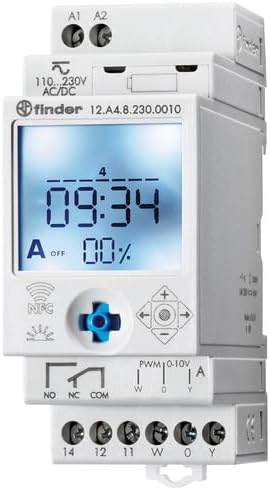
Whakaatu 2: Taipitopito view of the wiring terminals for power input (A1, A2), relay output (NO, NC, COM), and analog output (W, O, Y).
Tuhipoka: The device features safe separation between the power supply and contacts.
5. Nga Tohutohu Whakahaere
5.1 Whakanui-a-Tamatanga
Once wired, restore power. The LCD display will illuminate. You may need to set the current date and time if it's the first use or after a prolonged power outage.
5.2 Programming via Joystick
The integrated joystick allows for direct programming on the device:
- Whakaterenga: Use the joystick to move through menu options (up, down, left, right).
- Selection/Confirmation: Press the joystick inwards to select an option or confirm a setting.
- Follow the on-screen prompts to set the current time, date, weekly program, and astronomical functions.
5.3 Programming via NFC (Finder Toolbox App)
For maximum flexibility, program the time switch using an NFC-enabled smartphone and the Finder Toolbox app:
- Tikiake App: Download the "Finder Toolbox" app from the Google Play Store (Android) or Apple App Store (iOS).
- Create/Load Program: Open the app and create a new program or load an existing one. The app allows for detailed configuration of weekly schedules, astronomical settings, and special functions.
- Whakawhiti Raraunga: To transfer the program, hold your smartphone close to the NFC symbol on the time switch. The app will guide you through the data transfer process.
- Read Program: You can also read an existing program from the time switch to your smartphone for editing or backup.
5.4 Astronomical Time Control
The device can automatically switch based on sunrise and sunset times:
- Tautuhinga Tauwāhi: Set your location by entering a postcode or geographical coordinates in the programming menu (via joystick or app).
- Wāhikē: You can set a selectable time offset for both sunrise and sunset times to adjust switching points.
- Astro ON/OFF: Configure specific ON/OFF times during the astronomical ON period if needed.
6. Tiaki
The Finder 12.A4.8.230.0010 is designed for maintenance-free operation. However, periodic checks are recommended:
- Te horoi: Horoia te taputapu ki te kakahu maroke, ngawari. Kaua e whakamahi i nga kai horoi me nga whakarewa.
- Hononga: Periodically check terminal connections to ensure they are secure.
- Whakahōu Firmware: Check the Finder webpaetukutuku, taupānga rānei mō ngā whakahōunga pūmanawa e wātea ana hei whakapai ake i te mahi, hei whakatika hapa rānei.
7. Te Raru
| Raruraru | Take pea | Rongoā |
|---|---|---|
| Pūrere kaore i te hiko. | Kāore he pūtake hiko, he hē rānei te waea. | Check power connections (A1, A2) and ensure power is supplied. Verify wiring against the diagram. |
| Program not executing. | Incorrect program settings or manual override active. | Review program settings via joystick or app. Check for any active manual override functions. Ensure current date/time is correct. |
| NFC transfer fails. | Smartphone not NFC-enabled, app not open, or poor contact. | Ensure your smartphone has NFC enabled. Open the Finder Toolbox app. Hold the phone directly over the NFC symbol on the device. |
| Astronomical function inaccurate. | Incorrect location (postcode/coordinates) or time zone setting. | Verify the entered postcode or coordinates. Check the time zone setting. |
If the problem persists, please contact Finder technical support.
8. Whakatakotoranga Hangarau
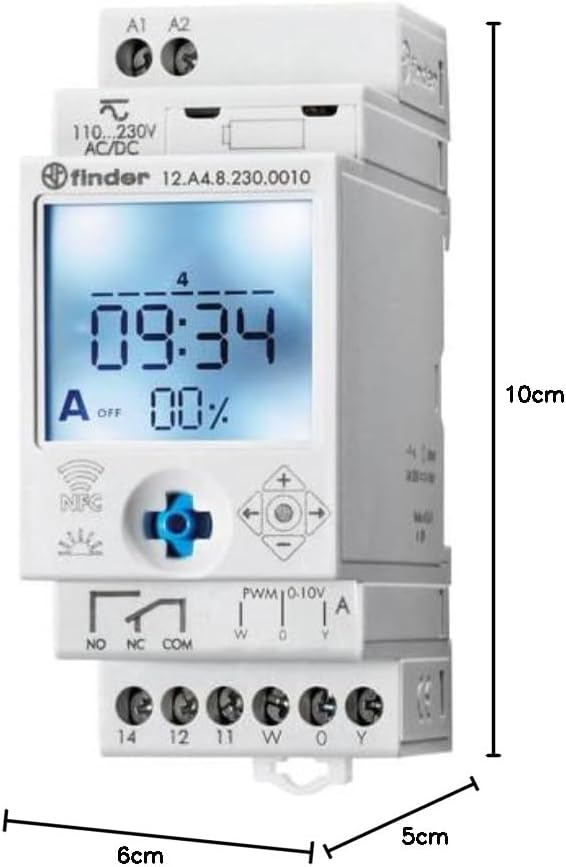
Figure 3: Dimensions of the Finder 12.A4.8.230.0010 Time Clock, showing approximate measurements of 10cm height, 6cm width, and 5cm depth.
| Āhuahira | Taipitopito |
|---|---|
| Waitohu | Kai kimi |
| Tau tauira | 12.A4.8.230.0010 |
| Ahu (H x W x D) | 10 x 6 x 5 cm |
| Taumaha | 70 g |
| Tukuna Voltage | 110-230 V AC/DC |
| Panui Whakaputa | 1 changeover contact, 16 A / 250 V AC (AC1) |
| Putanga tairitenga | 0-10 V or PWM |
| Rauemi Whakapā | AgSnO2 |
| Max. Runganui o naianei | 120 A mo te 5 ms |
| Min. Switching Time | 1 meneti |
| Max. Switching Power (230 V AC1) | 4000 VA |
| Whakauru Atanga Tangata | Buttons (Joystick) |
| Nga Pikohiko e hiahiatia ana | Kao |
| Hototahi ki | Power supplies/ballasts with 0-10 V or PWM inputs, or Slave dimmers Type 15.11 |
9. Pūtāhui me te Tautoko
For warranty information and technical support, please refer to the official Finder webte waahi, whakapā atu ranei ki to kaitoha o to rohe. Puritia to riiki hoko hei tohu mo te hoko.
Kaihanga: Kai kimi
Product on Amazon.es since: Haratua 24, 2021


