1. Kupu Whakataki
The AODELAN Flash Trigger Receiver is designed to wirelessly trigger external flashes and studio strobes. It operates on a 2.4GHz frequency, offering 8 channels for reliable communication up to 200 meters (656 feet) with a maximum sync speed of 1/250s. This receiver features a universal hot shoe, making it compatible with a wide range of camera brands including Canon, Nikon, Sony (with metal hot shoe), Olympus, Panasonic, Pentax, Fuji, and Samsung.
2. Ihirangi mokete
Tirohia koa ko nga mea katoa kei raro nei kei roto i to kete:
- Kaiwhiwhi x 1
- 3.5 to 3.5 mm Sync Cable x 1
- 3.5 mm to PC Plug Cable x 1
- 1/4" Mono Plug Socket x 1
- Ngā taura here x 1

Image: Package contents of the AODELAN Flash Trigger Receiver.
3. Hua Neke Atuview
Familiarize yourself with the components of the AODELAN Flash Trigger Receiver:

Image: Labeled components of the AODELAN Flash Trigger Receiver.
- LED Tūnga: Indicates power and trigger status.
- Channel Adjustment Buttons (CH +/-): Used to select the operating channel.
- Channel Numbers (1-8): Ka whakaatu i te hongere kua tohua inaianei.
- 3.5mm Output Port (FLASH): Connects to flashes or strobes via sync cable.
- Wāhanga Pūhiko: Houses the AA batteries.
- Whakawhiti Hiko (KA/OFF): Ka whakakā, whakaweto rānei i te kaikawe.
- DC Power Port (DC 5V): For external power supply (if applicable, not included).
- Mowhiti Maukati: Secures the receiver to a hot shoe or light stand.
- Cold Shoe 1/4"-20 Tripod Lug: For mounting on light stands or tripods.
4. Tatūnga
4.1 Tāuta Pūhiko
- Locate the battery compartment on the receiver.
- Whakatuwheratia te uhi o te wahanga pākahiko.
- Whakauruhia nga pākahiko AA e rua, kia tika te polarity (+/-).
- Katia kia mau te uhi o te wahanga pākahiko.
4.2 Connecting to a Flash Unit
The receiver can connect to a flash unit in two ways:
- Via Hot Shoe: Slide your flash unit onto the universal hot shoe of the receiver. Ensure it is securely seated.
- Via Sync Cable: For flashes or studio strobes with a 3.5mm sync port, connect one end of the provided 3.5 to 3.5 mm sync cable to the receiver's 3.5mm Output Port and the other end to your flash/strobe's sync port. For PC sync ports, use the 3.5 mm to PC plug cable.

Image: Steps for connecting a flash to the receiver via hot shoe and sync cable.
4.3 Te Whakaeke i te Kaiwhiwhi
The receiver can be mounted on a light stand or tripod using its 1/4"-20 tripod lug, or placed on a flat surface.
4.4 Te Whakatakoto i ngā Hongere
Ensure the receiver and your AODELAN flash trigger transmitter (sold separately) are set to the same channel (1-8) for proper communication. Use the Channel Adjustment Buttons (CH +/-) on the receiver to select the desired channel.
5. Nga Tohutohu Whakahaere
5.1 Kei te Hiko / Weto
Slide the Power Switch to the "ON" position to turn on the receiver. The Status LED will illuminate. To turn off, slide the switch to "OFF".
5.2 Wireless Flash Triggering
Once the receiver is powered on, connected to a flash, and set to the same channel as your transmitter, it is ready to receive trigger signals. When the transmitter sends a signal, the receiver will trigger the connected flash unit. The maximum sync speed is 1/250s.
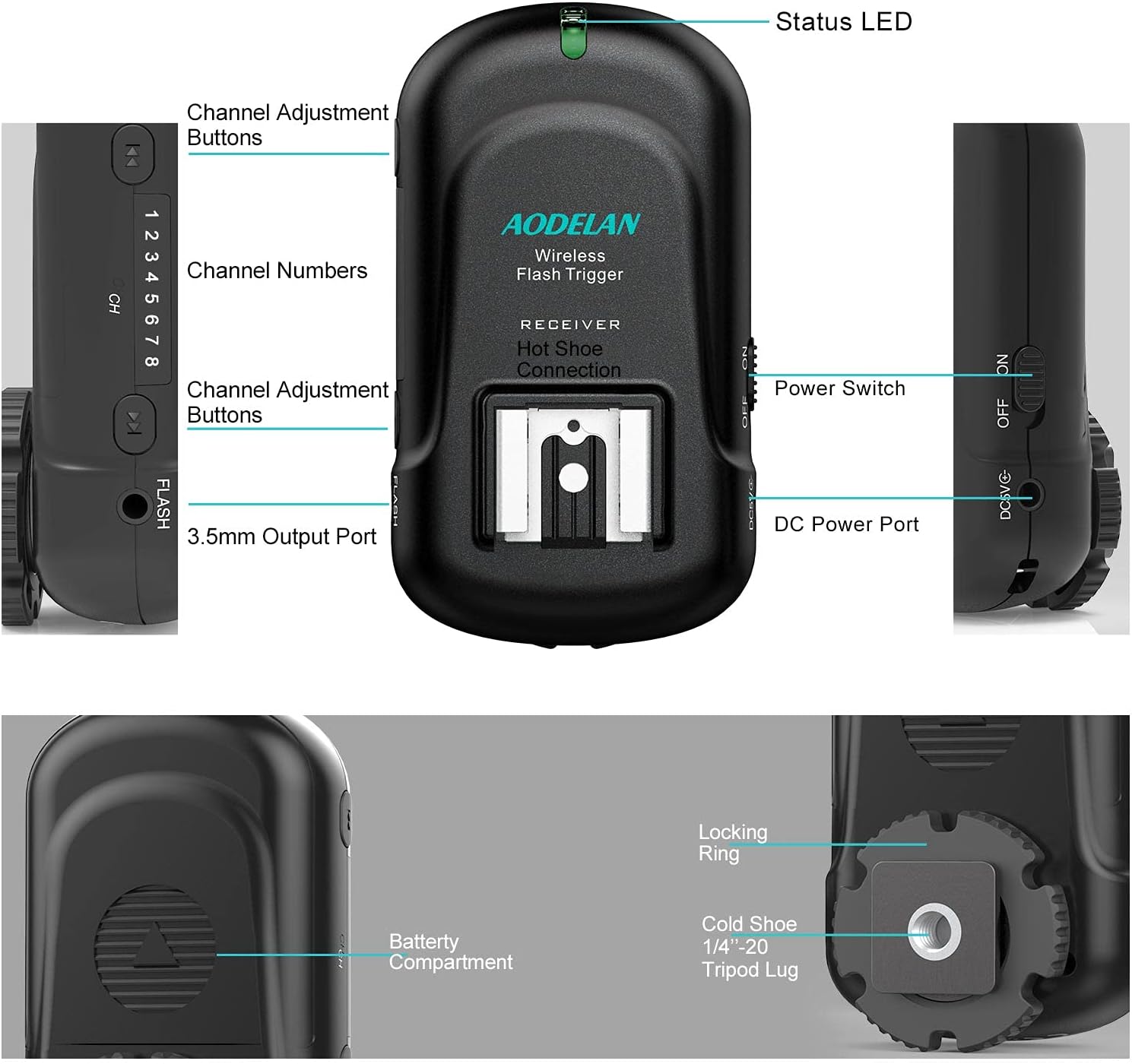
Image: Multiple receivers in a studio environment, demonstrating multi-flash control.
5.3 Ngā Tuhipoka Hototahi
The receiver is compatible with most hot shoe flashes, with the exception of Sony flashes that use a proprietary hot shoe design. For Sony cameras with a metal hot shoe, the receiver itself is compatible, but specific Sony flash units may not be directly compatible with the receiver's hot shoe.
6. Tiaki
To ensure the longevity and optimal performance of your AODELAN Flash Trigger Receiver:
- Keep the device dry and clean. Avoid exposure to moisture, dust, and extreme temperatures.
- Horoia te waho ki te kakahu ngohengohe, maroke. Kaua e whakamahi i nga matū kino, i nga horoi horoi ranei.
- Tango pākahiko ki te kore te taputapu e whakamahia mo te wa roa kia kore ai e pakaru.
- Whakaorangia ki te waahi makariri, maroke atu i te ra tika.
7. Te Raru
If you encounter issues with your receiver, please refer to the following common problems and solutions:
| Raruraru | Take pea | Rongoā |
|---|---|---|
| Kohiko kore e pupuhi | 1. Kua weto te kaiwhiwhi. 2. Low or dead batteries. 3. Incorrect channel. 4. Loose connection to flash. 5. Transmitter not working or out of range. | 1. Whakakāhia te kaikawe. 2. Whakakapihia nga papahiko. 3. Ensure receiver and transmitter are on the same channel. 4. Securely attach flash to hot shoe or sync cable. 5. Check transmitter functionality and reduce distance. |
| Limited range or intermittent triggering | 1. Obstructions between transmitter and receiver. 2. Te pokanoa hiko. 3. Batteries low. | 1. Ensure clear line of sight. 2. Move away from sources of interference. 3. Whakakapihia nga papahiko. |
| Flash sync issues | Shutter speed exceeds max sync speed. | Ensure camera shutter speed is 1/250s or slower. |
8. Whakatakotoranga
- Tauira: AODELAN-XXXX
- Rahi Hua: 1.34 x 2 x 3.4 inihi
- Taumaha Tūemi: 2.08 hekere
- Aurere Ahokore: 2.4GHz
- Hongere: 8
- Awhe Whakawhitiwhiti: Tae atu ki te 200 mita (656 putu)
- Max Sync Speed: 1/250s
- Puna Hiko: 2 x AA pākahiko (kaore i whakauruhia)
- Whakapaipai Hototahi: Universal Hot Shoe (compatible with Canon, Nikon, Sony (metal hot shoe), Olympus, Panasonic, Pentax, Fuji, Samsung)
- Nga Waahanga Kei roto: Receiver, 3.5 to 3.5mm sync cable, 3.5mm to PC plug cable, 1/4" mono plug socket, Lanyards

Image: Key features and included cables.
9. Pūtāhui me te Tautoko
For warranty information or technical support, please refer to the official AODELAN webpae, whakapā atu ranei ki to kaihoko. Puritia to riiki hoko hei tohu mo te hoko.


