Kupu Whakataki
This user manual provides comprehensive instructions for the PHILIPS 43PUS7556/12 4K UHD LED Smart TV. Please read this manual carefully before using your television to ensure proper setup, operation, and maintenance. Keep this manual for future reference.
Nga Korero Haumaru Nui
Me whai tonu i nga tikanga tiaki haumaru ina whakamahi i tenei pouaka whakaata hei whakaiti i te tupono o te ahi, te ru hiko, me te whara.
- Kaua e tukuna te pouaka whakaata ki te ua me te makuku.
- Kaua e aukati i nga tomokanga hau.
- Me whakarite te turanga tika.
- Momotuhia te pouaka whakaata i te wā e uira ana, e kore rānei e whakamahia mō te wā roa.
- Tukuna nga ratonga katoa ki nga kaimahi ratonga whai tohu.
Ihirangi mokete
Manatokona kei roto katoa nga mea kei roto i te kete:
- PHILIPS 43PUS7556/12 4K UHD LED Smart TV
- Mana Mamao
- Waea hiko
- Tabletop Stand (if applicable)
- Aratohu Timata Tere
- Safety and Legal Leaflet
- Pūhiko mo te Mana Mamao
Tatūnga
1. Te Whakapiri i te Tu
If you are not wall-mounting the television, attach the tabletop stand as follows:
- Carefully place the television face down on a soft, flat surface to prevent screen damage.
- Align the stand with the mounting holes on the bottom of the television.
- Whakapaia te turanga ma te whakamahi i nga wiri kua whakaratohia. Me whakarite kia mau te turanga.

Whakaahua: Rear view of the television, illustrating the stand attachment points and various input/output ports. This image helps in identifying where to connect the stand and external devices.
2. Te hono i nga taputapu o waho
The PHILIPS 43PUS7556/12 TV offers multiple connectivity options. Refer to the image below for port locations.
- HDMI: Connect Blu-ray players, game consoles, or set-top boxes. This model features 3 HDMI ports.
- USB: Connect USB storage devices for media playback. This model features 2 USB ports.
- Antenna/Cable: Honoa to antenna, pouaka pouaka whakaata ranei.
- Itarangi: For a wired internet connection. Wi-Fi is also available.

Whakaahua: Taipitopito view of the television's rear panel, highlighting the HDMI, USB, and other connectivity ports. This visual aid assists users in correctly identifying and connecting their external devices.
3. Kei te Hiko Nei
- Connect the power cord to the television and then to a wall outlet.
- Press the power button on the remote control or on the television itself.
- Whāia ngā tohutohu kei te mata mō te tatūnga tuatahi, tae atu ki te kōwhiringa reo, te hononga whatunga (Wi-Fi, Ethernet rānei), me te matawai hongere.
Nga Tohutohu Whakahaere
Nga Mahi Mana Mamao
Kia mohio koe ki nga patene mana mamao mo te whakatere ngawari.
- Mana: Ka whakakā, whakaweto rānei i te pouaka whakaata.
- Puna: Selects input sources (HDMI 1, HDMI 2, TV, etc.).
- Patene Whakaterenga (Runga/Raro/Maui/Matau): Whakatere i nga tahua me nga whiringa.
- OK: Ka whakamana i nga whiringa.
- Hoki/Putaatu: Ka hoki ki te tahua o mua, ka puta ranei i te tahua o naianei.
- Rōrahi +/-: Whakaritea te taumata oro.
- Channel +/-: Hurihia nga hongere pouaka whakaata.
- TV Ataata/Kainga: Accesses the Smart TV interface (SAPHI OS).
Smart TV Features (SAPHI OS)
The PHILIPS 43PUS7556/12 runs on the SAPHI operating system, providing access to various apps and streaming services.

Image: Screenshot of the Philips Smart TV home screen, displaying the SAPHI OS interface with icons for popular streaming applications such as YouTube, Netflix, and Prime Video. This illustrates the user interface for accessing smart features.
- Pehia te TV atamai or Kainga pātene i runga i to mamao.
- Use the navigation buttons to browse through available applications.
- Select an app (e.g., Netflix, YouTube, Amazon Prime Video) and press OK ki te whakarewa.
- Ensure your TV is connected to the internet for optimal Smart TV functionality.

Whakaahua: Tetahi view of the Philips Smart TV interface, specifically highlighting the logos of popular streaming services like Netflix, Rakuten TV, YouTube, and Amazon Prime Video. This confirms the availability of these services on the TV.
Tautuhinga Pikitia me te Oro
Whakaritehia to viewTe wheako me te whakarongo:
- Aratau Pikitia: Access settings to adjust brightness, contrast, color, and sharpness. Pre-set modes like Standard, Vivid, Movie, and Game are available.
- Aratau oro: Adjust audio settings, including bass, treble, and balance. This TV supports Dolby Atmos for immersive sound.
- Dolby Vision: The TV supports Dolby Vision for enhanced HDR content. Ensure your content source also supports Dolby Vision for the best experience.

Image: The Philips 43PUS7556/12 television screen displaying a dynamic, colorful image, accompanied by icons indicating key features such as LED display technology, Dolby Vision Atmos, and UltraHD HDR. This visually represents the TV's display capabilities.
Te tiaki
Te horoi i te pouaka whakaata
- Always unplug the television before cleaning.
- Whakamahia he kakahu ngohengohe, kore karekau hei muru marie i te mata me te rūnanga.
- Mo nga tohu pakeke, dampen the cloth with a small amount of water or a mild, non-abrasive screen cleaner. Do not spray cleaner directly onto the screen.
- Avoid using alcohol, solvents, or ammonia-based cleaners, as these can damage the screen.
Whakakapinga Pūhiko Mana Mamao
When the remote control's performance decreases, replace the batteries:
- Whakatuwherahia te taupoki wehenga puhiko kei muri o te mana mamao.
- Tangohia nga pākahiko tawhito.
- Insert new batteries, ensuring correct polarity (+ and -).
- Katia te uhi o te wahanga pākahiko.
Raparongoā
Mena ka raru koe ki to pouaka whakaata, tirohia nga otinga e whai ake nei:
Karekau he Mana
- Me whakarite kei te hono tika te taura hiko ki te pouaka whakaata me te putanga hiko ki te pakitara.
- Tirohia mehemea kei te mahi te putanga o te pakitara ma te hono atu ki tetahi atu taputapu.
- Whakamātauria te pēhi i te pātene hiko i runga i te pouaka whakaata, kaua ko te mamao anake.
Karekau he Pikitia, Engari ko te Oro kei reira
- Manatokohia kua tohua te puna whakauru tika (hei tauira, HDMI 1, TV).
- Tirohia ngā hononga taura i waenga i te pouaka whakaata me ngā taputapu o waho.
- Adjust picture settings (brightness, contrast).
Karekau he Oro, Engari kei te Pikitia
- Kia mōhio kei te whakaitihia te oro, kei te kore rānei e whakatakotoria ki te kore.
- Tirohia nga hononga taura ororongo.
- Verify sound output settings on the TV (e.g., internal speakers, external audio system).
Mana Mamao Kaore i te Mahi
- Whakakapihia nga pākahiko i te mana mamao.
- Me whakarite karekau he arai i waenga i te mamao me te pukoro IR o te pouaka whakaata.
- Tohua te mamao ki te pouaka whakaata.
Smart TV Apps Not Loading or Slow
- Check your internet connection (Wi-Fi or Ethernet).
- Tīmata anō te pouaka whakaata mā te momotu mai i te putanga hiko mō ētahi meneti, kātahi ka mono anō.
- Me whakarite kei te hou tonu te rorohiko o te TV.
Whakatakotoranga
The following table outlines the key technical specifications for the PHILIPS 43PUS7556/12 TV.
| Āhuahira | Whakatakotoranga |
|---|---|
| Waitohu | PILIPI |
| Tau tauira | 43PUS7556/12 |
| Rahi Mata | 43 Inihi |
| Hangarau Whakaatu | LED |
| Whakatau | 4K (3840 x 2160) |
| Rere tāmata | 60 Hz |
| Pūnaha Mahi | HAPHI |
| Hononga | Nihokikorangi, Wi-Fi |
| Tauranga HDMI | 3 |
| Tauranga USB | 2 |
| Putanga Ororongo | 20 W |
| Nga waahanga motuhake | Dolby Vision, Dolby Atmos, Freeview HD |
| Tae | Pango |
| Ahu (kare he tu) | 82.1 mm (Hohonu) |
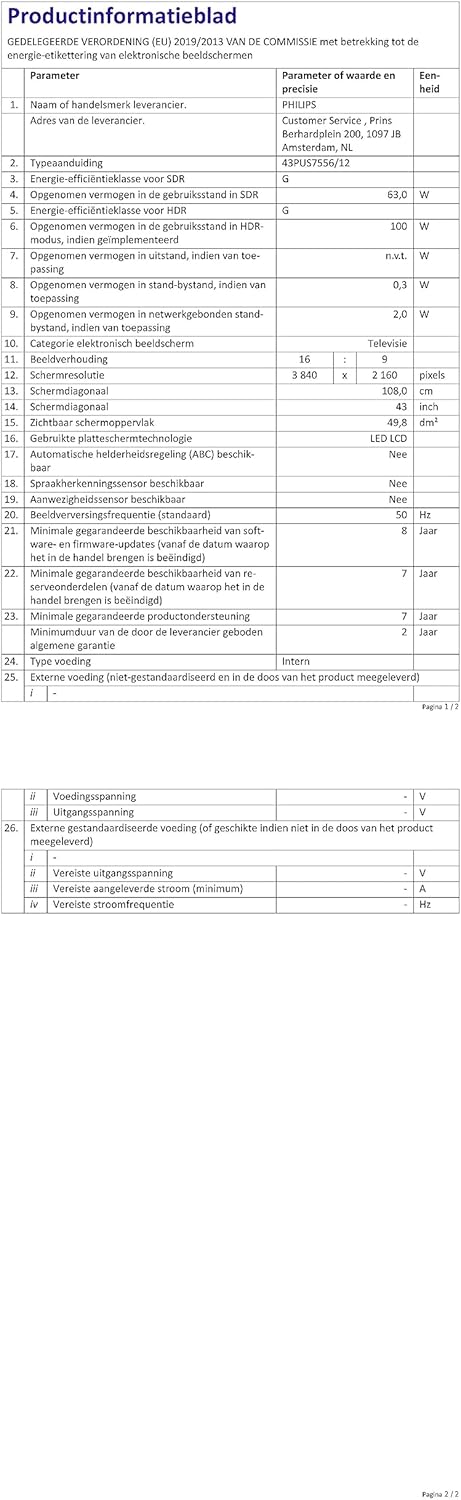
Image: A technical specification sheet for the Philips 43PUS7556/12 television, detailing various parameters and values. This document provides comprehensive technical data for the product.

Image: Another technical specification sheet for the Philips 43PUS7556/12 television, presented in Dutch, listing detailed product information and performance metrics. This provides additional technical context.

Image: A diagram illustrating the physical dimensions of the 43-inch Philips 43PUS7556/12 television, including width, height, and depth measurements. This helps users understand the TV's physical footprint.
Pūtāhui me te Tautoko
Nga korero Whakaputanga
This product comes with a manufacturer's warranty. Please refer to the warranty card included in your package for specific terms and conditions. The typical warranty period for consumer electronics is 2 years from the date of purchase.
- Ko te iti rawa o nga waahanga mokowhiti kua whakamanahia: 7 tau
- Tautoko hua taurangi iti: 7 tau
Tautoko Kiritaki
For further assistance, technical support, or service inquiries, please contact PHILIPS customer support. You can find contact details on the official PHILIPS webpae, i roto ranei i nga tuhinga e whakaratohia ana me to pouaka whakaata.
When contacting support, please have your model number (43PUS7556/12) and serial number ready.


