1. Kupu Whakataki
The Keystone Energy Star 50-Pint Portable Dehumidifier is designed to efficiently remove excess moisture from the air, creating a more comfortable and healthier indoor environment. This unit is ideal for basements, garages, living rooms, and other extra-large rooms up to 4,500 square feet. Its advanced features, including a built-in pump for continuous draining, auto-shutoff, and an LED display, ensure convenient and reliable operation.

Whakaahua 1.1: Mua view o te Whakamaroke Kawe Keystone 50-Pint.
2. Nga korero haumaru
Pānuihia ngā tohutohu haumaru katoa i mua i te whakamahi i te whakamaroke haumākū hei ārai i te whara, i te kino rānei. Puritia tēnei pukapuka hei tirotiro māu ā muri ake nei.
- Haumaru Hiko: Always plug the unit into a direct, dedicated electrical outlet. Do not use extension cords or adapter plugs. Ensure the power cord is not pinched or damaged.
- Turanga: Position the dehumidifier vertically on a stable, level surface. Maintain at least 7.9 inches (20 cm) of clearance on all sides of the unit to ensure proper airflow and prevent overheating.
- Tāke Wai: Do not drink the collected water. Always empty the water tank when the 'Full Bucket' indicator illuminates to prevent overflow.
- Tiaki Tātari: Me horoi i nga wa katoa te tātari hau kia mau tonu te mahi me te kounga o te hau.
- Nga Tikanga Mahi: Do not operate the unit in extremely cold temperatures (below 41°F / 5°C) as it may affect performance.
WARNING: This product contains chemicals known to the State of California to cause cancer and birth defects or other reproductive harm. For more information, please refer to the Proposition 65 warning in the included manual.
3. Hua Neke Atuview
3.1 Nga waahanga matua
- Raukaha Teitei: Ka tangohia ake ki te 50 pints o te makuku ia ra.
- Kapi Whānui: Effective in areas up to 4,500 sq.ft.
- Pūngao pai: Kua whakamanahia te Energy Star mo te whakaiti i te whakapau kaha.
- Te whakahekenga tonu: Features a built-in pump for continuous upward drainage, eliminating the need for manual emptying.
- Mana-hoa-kaiwhakamahi: Electronic controls with an LED display for easy setting adjustments.
- Āhuatanga Haumaru: Auto-shutoff when the water tank is full and auto-restart after a power outage.
- Te kawe: Equipped with four omni-directional caster wheels for easy movement.
- Mahi Ataahua: Ka mahi i te taumata haruru iti o te 55dB.

Figure 3.1: The dehumidifier helps prevent excessive dampness, musty odors, and high humidity.
3.2 Waehanga
- Main Dehumidifier Unit
- Removable Water Tank (1.8-gallon capacity)
- Tātari Mata Ka taea te horoi
- Threaded Adaptor with Small Internal Drain Hose (for pump drainage)
- Pukapuka Kaiwhakamahi

Figure 3.2: Illustration of the removable water tank and built-in pump for continuous drainage.
3.3 Paewhiri Mana
Ko te paewhiri mana kei te tihi o te waahanga me te whakaatu i te whakaaturanga LED me nga momo paatene mo te mahi.

Figure 3.3: Close-up of the control panel with LED display and function buttons.
- Pātene Hiko: Whakahurihia te waeine ki runga/Weto.
- Patene Aratau: Cycles through Normal, Turbo, and Auto-Defrost settings.
- Pātene Matawā: Ka tautuhi i te matawā 24-haora mo te mahi aunoa.
- Pātene Tere Kiri: Whakaritea ai te tere o te paahi (Teitei/Paaka).
- Humidity Adjustment Buttons: Ka whakanui, ka whakaiti rānei i te taumata makuku e hiahiatia ana.
- Whakatūpato Tātari: Ka tiaho ina hiahia te tātari ki te horoi.
- Full Bucket Alert: Ka whakamarama ina kiki te taika wai.
4. Tatūnga
4.1 Te Wetewete me te Whakanoho
- Āta tango i te whakamahu wai mai i tōna tākai.
- Place the unit upright on a firm, level floor.
- Me whakarite kia 7.9 inihi (20 henemita) te iti rawa o te wāhi wātea huri noa i ngā taha katoa o te waeine kia pai ai te rere o te hau.
- Plug the power cord directly into a dedicated 120V AC, 60Hz grounded wall outlet. Do not use an extension cord.

Figure 4.1: Proper placement of the dehumidifier in a room, ensuring adequate clearance.
4.2 Continuous Drainage Setup (with Pump)
This model includes a built-in pump for continuous drainage, allowing you to drain water upwards or to a distant drain without manually emptying the bucket.
- Locate the continuous drain outlet on the back of the unit.
- Attach a standard garden hose (not included) to the threaded adaptor.
- Ensure the hose is securely connected and points towards the desired drain location.
- For optimal pump longevity, a gradual incline for the hose is recommended over a complete vertical incline, though some vertical lift is possible.
Video 4.1: This video demonstrates the unpacking and installation process, including how to set up the continuous drainage feature with the built-in pump.
5. Nga Tohutohu Whakahaere
5.1 Mahi Taketake
- Pehia te Mana button to turn the unit on. The LED display will show the current humidity level.
- Whakamahia te Whakatikatika i te haumākū buttons (up/down arrows) to set your desired humidity level (e.g., 45% for optimal comfort).
- The unit will automatically operate to reach and maintain the set humidity level.
5.2 Tautuhinga Aratau
Pehia te Aratau button to cycle through the following settings:
- Pūnoa: Standard dehumidification operation.
- Turbo: Increases fan speed for faster moisture removal.
- Whakarewa-Aunoa: Automatically activates when frost builds up on the evaporator coils, ensuring efficient operation in cooler environments.
5.3 Mahi Matama
Ko te matawā 24-haora ka taea e koe te hotaka i te waeine kia whakaka, whakaweto aunoa ranei.
- To set the auto-off timer: With the unit running, press the Matawā button and use the humidity adjustment arrows to select the desired number of hours (1-24) before the unit turns off.
- To set the auto-on timer: With the unit off, press the Matawā button and use the humidity adjustment arrows to select the desired number of hours (1-24) before the unit turns on.
Video 5.1: This video highlights the LED display, 24-hour timer, and auto-shutoff features of the dehumidifier.
6. Tiaki
Mā te tiaki auau ka roa te ora me te mahi whai hua o tō whakamaroke hau.
6.1 Te Putea i te Taake Wai
If not using the continuous drain option, the water tank will need to be emptied manually when it is full. The 'Full Bucket' indicator light will illuminate, and the unit will automatically shut off.
- Tōia mārire te tāke wai mai i te taha mua o te waeine.
- Āta kawe te tāke ki te totohu, ki te waikeri rānei.
- Ringihia te wai kua kohia.
- Whakahokia te taika wai kau ki roto i te waeine kia pao noa ki te waahi. Ka mahi ano te waeine.
6.2 Te horoi i te Tātari Hau
The 'Check Filter' alert will remind you to clean the mesh filter regularly (approximately every 250 hours of operation).
- Whakawetohia te whakamahana ka wetewete mai i te putanga hiko.
- Tangohia te tātari hau mai i te tuara o te waeine.
- Horoia te tātari ki te wai mahana, hopipi.
- Horoia rawatia ka waiho kia maroke rawa te hau i mua i te whakauru ano.
- Once the filter is reinstalled, plug in the unit and press the 'Filter' button to reset the filter alert.
7. Te Raru
Mena ka pa ki a koe nga raru me to whakamaarama, tirohia nga raru me nga otinga e whai ake nei:
| Raruraru | Take pea | Rongoā |
|---|---|---|
| Karekau te waeine e ka ana | No power; Power cord unplugged; Water tank full or not properly seated. | Tirohia te hononga hiko; Whakakorehia te wai, ka tāuta anō i te tāke wai. |
| Kaore he wai i kohia | Humidity level too low; Room temperature too low; Air filter clogged. | Adjust humidity setting; Ensure room temperature is above 41°F (5°C); Clean air filter. |
| Ka rere tonu te waeine | Humidity setting too low; Room is too large; Continuous drain hose is kinked or blocked. | Increase humidity setting; Ensure unit is sized correctly for the room; Check continuous drain hose for obstructions. |
| Haruru nui i te wa e mahi ana | Waeine kaore i te taumata; Ko te tātari hau kua purua; Te aukati i roto i te tahi. | Whakanohoia te waeine ki runga i te mata taumata; tātari rangi ma; Tirohia me te tango i nga arai. |
| 'Check Filter' light on | Me horoi te tātari hau. | Clean the air filter and reset the filter alert. |
| 'Full Bucket' light on | Water tank is full or not properly seated. | Empty the water tank and re-seat it correctly. |
For further assistance, please refer to the complete troubleshooting section in the included user manual or contact Keystone customer support.
8. Whakatakotoranga
| Whakatakotoranga | Taipitopito |
|---|---|
| Waitohu | Kohatu matua |
| Ingoa Tauira | Keystone Energy Star 50-Pint Portable Dehumidifier |
| Tau tauira | KSTAD506PE |
| Raukaha Whakakorea | 50 Pints ia Ra |
| Te Rahi o te Papa | Tae atu ki te 4500 Puawai Tapawha |
| Rōrahi Tāke Wai | 1.8 Gallons (7.2 Quarts) |
| Rahi Hua (D x W x H) | 11.1"D x 15.43"W x 24.25"H |
| Taumaha Tūemi | 42.1 Pauna |
| Tae | Mā |
| Rauemi | Kirihou |
| Wattage | 720 watts |
| Te maha o nga tere | 2 |
| Nga waahanga motuhake | Continuous Draining, Automatic Restart, Automatic Defrost, Quiet Operation, Automatic Shutoff |
| Nga Whakamahinga Manakohia | Whare noho |
| UPC | 840148702455 |
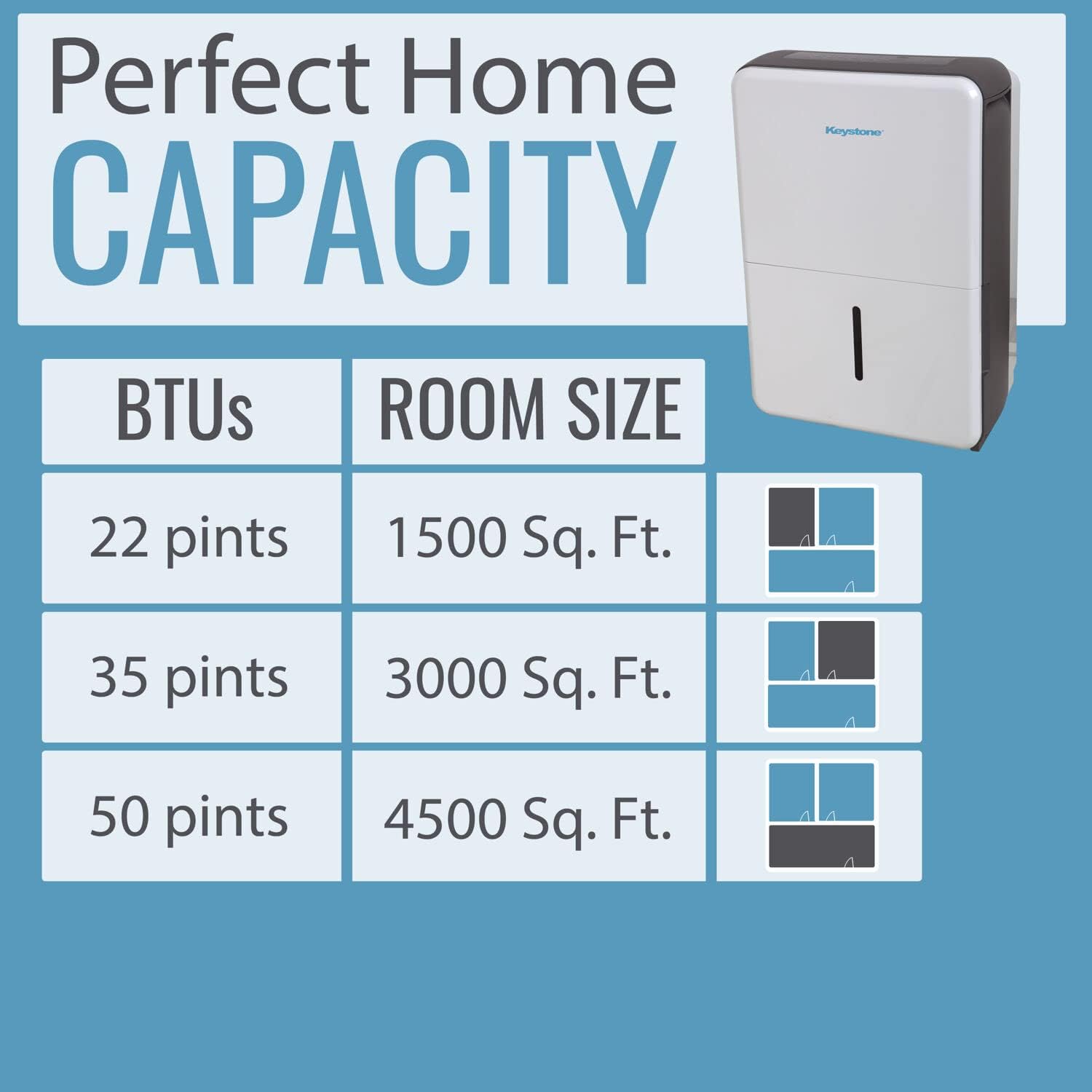
Figure 8.1: Dehumidification capacity based on room size.
9. Pūtāhui me te Tautoko
Your Keystone dehumidifier comes with a manufacturer's warranty. For detailed information regarding warranty coverage, terms, and conditions, please refer to the warranty card included in your product packaging or the full user manual. For technical support, troubleshooting assistance, or to inquire about replacement parts, please contact Keystone customer service through the contact information provided in your manual or on the official Keystone webpae.


