1. Kupu Whakataki
The Sonel CMM 30 is an advanced industrial multimeter engineered for versatility, modern functionality, and exceptional durability. This device integrates 11 fundamental measurement functions along with additional features, providing a broad spectrum of applications for professionals. Its robust design includes drop protection and an IP67 rated casing, ensuring reliable performance even in challenging environments.
Key features include a smartphone application for remote reading and data saving via wireless communication, an automatically adjusting backlight for optimal screen visibility, and a built-in flashlight for illumination in dark conditions. This manual provides essential information for the safe and effective use of your CMM 30 multimeter.
2. Nga korero haumaru
Always adhere to the following safety precautions to prevent electric shock, injury, or damage to the meter or equipment under test.
- Read and understand all instructions and safety information in this manual before operating the meter.
- Kaua e whakamahia te mita ki te ahua kua pakaru, ki te whakararu ranei te whakamaarama o te arataki whakamatautau.
- Momotuhia i nga wa katoa te hiko ki te ara iahiko ka tuku i nga puia teitei katoatage capacitors before making resistance, continuity, diode, or capacitance measurements.
- Kia tupato ki te mahi tahi me te voltagkei runga ake i te 30V AC RMS, te tihi 42V, te 60V DC ranei. Ko enei voltaghe morearea ohorere.
- Kaua e neke ake i nga tepe whakaurunga morahi mo tetahi mahi.
- Ensure the function switch is in the correct position for the desired measurement before connecting the test leads to the circuit.
- Replace batteries as soon as the low battery indicator appears to ensure accurate readings.
- Kaua e whakahaerehia te mita i roto i ngā taiao pahū hau, kohu, puehu rānei.
3. Ihirangi mokete
Manatokohia kei te wātea katoa ngā taonga kua whakarārangihia i raro nei, ā, kāore he pakaru i te wā e whakatuwherahia ai te kete:
- Sonel CMM 30 Industrial Multimeter
- Nga Tohu Whakamatau (Whero me te Pango)
- Temperature Probe (K-type thermocouple)
- 4 x AAA Batteries (pre-installed or separate)
- Pukapuka Kaiwhakamahi (tenei tuhinga)
Mena kei te ngaro, kua pakaru ranei etahi taonga, tena koa whakapiri atu ki to kaiwhakarato.
4. Hua Neke Atuview
Familiarize yourself with the components of your Sonel CMM 30 multimeter:
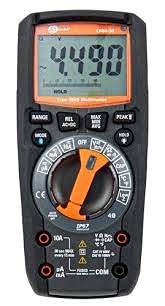
Whakaahua 4.1: Mua view of the Sonel CMM 30 Industrial Multimeter. This image displays the device's main components, including the digital display, the central rotary function switch, and the various input terminals for test leads.
4.1. Whakaatu
The large LCD shows measurement readings, units, function indicators, and battery status. It features an automatic backlight that adjusts to ambient light conditions for optimal visibility.
4.2. Whakawhiti Mahi Rotary
This central switch is used to select the desired measurement function (e.g., Voltage, Current, Resistance, Capacitance, Temperature, Frequency).
4.3. Patene Mahi
Various buttons provide additional controls and features:
- RANGE: Toggles between manual and automatic ranging.
- AHUNGA: Selects sub-functions within a main rotary switch position (e.g., AC/DC voltage, Diode/Tonu).
- Tohu: Whakatio i te panui whakaatu onāianei.
- MAX/MIN/AVG: Records maximum, minimum, and average readings.
- REL: Relative mode, subtracts a stored value from subsequent measurements.
- Bluetooth/Light: Activates Bluetooth connectivity for the smartphone app and controls the built-in flashlight.
4.4. Input Jacks
These are the connection points for the test leads:
- COM: Common terminal for the black test lead.
- VΩHzCAP°C: Whakauru mo te voltage, resistance, frequency, capacitance, and temperature measurements (red test lead).
- mAµA: Tāuru mō te miriampere me te moroitiampngā inenga o ia au (te mata whakamātautau whero).
- 10A: Input for up to 10 Ampngā inenga o ia au (te mata whakamātautau whero).
5. Tatūnga
5.1. Tāuta Pūhiko
The Sonel CMM 30 requires 4 AAA batteries. These may be pre-installed or included separately.
- Me whakaweto te mita maha.
- Locate the battery compartment on the rear of the meter.
- Whakamahia he tīwiri hei wetekina i ngā tīwiri e mau ana i te taupoki pākahiko.
- Tangohia te taupoki pākahiko.
- Insert the 4 AAA batteries, observing the correct polarity (+ and -) as indicated inside the compartment.
- Whakahokia te taupoki pākahiko, ka whakaukia kia mau ngā tīwiri.
Tuhipoka: Always use fresh batteries of the same type. Remove batteries if the meter is not used for an extended period to prevent leakage.
6. Nga Tohutohu Whakahaere
6.1. Te Whakakaha/Weto
Turn the rotary function switch from the OFF position to any desired measurement function to power on the meter. To power off, turn the switch back to the OFF position.
6.2. Basic Measurement Procedures
Before any measurement, ensure the test leads are correctly inserted into the appropriate input jacks for the selected function.
6.2.1. Rererangitage Inenga (AC/DC)
- Insert the black test lead into the COM jack and the red test lead into the VΩHzCAP°C jack.
- Tahurihia te pana hurihuri ki te V~ (AC Voltage) rānei V- (DC Voltage) position. If both are combined, use the MODE button to select AC or DC.
- Honoa ngā taura whakamātautau kia whakarara puta noa i te ara iahiko, i te wāhanga rānei e inehia ana.
- Pānuihia te voltage uara kei runga i te whakaaturanga.
6.2.2. Inenga o nāianei (AC/DC)
Tupato: Never connect the meter in parallel for current measurement. Always connect in series with the circuit.
- Insert the black test lead into the COM jack. For currents up to 10A, insert the red test lead into the 10A jack. For smaller currents (mA/µA), insert the red test lead into the mAµA jack.
- Turn the rotary switch to the A~ (AC Current) or A- (DC Current) position, or the mA/µA position as appropriate. Use the MODE button to select AC or DC if needed.
- Open the circuit where current is to be measured and connect the meter in series.
- Pānuihia te uara o nāianei i te whakaaturanga.
6.2.3. Te Ine Ātete
- Insert the black test lead into the COM jack and the red test lead into the VΩHzCAP°C jack.
- Turn the rotary switch to the Ω (Resistance) position.
- Ensure the circuit or component is de-energized before connecting the test leads across it.
- Panuihia te uara aukati kei runga i te whakaaturanga.
6.2.4. Te Inenga Raukaha
- Insert the black test lead into the COM jack and the red test lead into the VΩHzCAP°C jack.
- Turn the rotary switch to the CAP (Capacitance) position.
- Ensure the capacitor is fully discharged before connecting the test leads across it.
- Panuihia te uara capacitance kei runga i te whakaaturanga.
6.2.5. Te Ineina o te Hahana
- Insert the temperature probe into the VΩHzCAP°C and COM jacks, observing polarity if applicable.
- Turn the rotary switch to the °C/°F (Temperature) position.
- Whakatakotoria te pito o te ine pāmahana ki runga, ki te taha rānei o te mea e inehia ana te pāmahana.
- Pānuihia te uara pāmahana kei runga i te whakaaturanga.
6.3. Āhuatanga Arā
6.3.1. True RMS Measurement
The CMM 30 features True RMS for AC voltage and current measurements, providing accurate readings for non-sinusoidal waveforms.
6.3.2. Wireless Communication and Smartphone App
The CMM 30 can connect wirelessly to a smartphone application, allowing for remote reading and saving of measurements. This is particularly useful in hard-to-reach or hazardous locations.
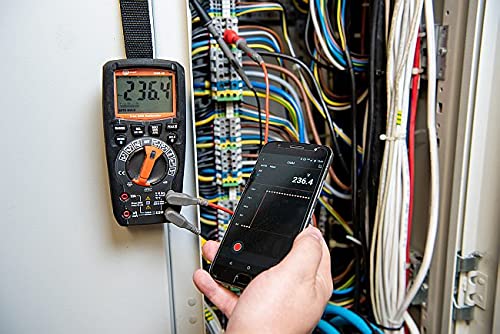
Figure 6.1: The Sonel CMM 30 Multimeter connected to an electrical panel, demonstrating its wireless communication feature. A smartphone displays the measurement reading remotely, highlighting the convenience for inaccessible areas.
Hei whakamahi i tenei ahuatanga:
- Download the official Sonel CMM app from your smartphone's app store.
- Whakahohehia te Nihokikorangi i runga i to waea atamai.
- Press the Bluetooth button on the multimeter to activate its wireless communication.
- Follow the app's instructions to pair with your CMM 30 and begin remote monitoring.
6.3.3. Ko te rama rama-i roto
The integrated flashlight assists in illuminating measurement areas, especially in low-light conditions. Activate it by pressing the dedicated light button.
6.4. Durability and IP67 Rating
The CMM 30 is designed with an IP67 rating, signifying its protection against dust ingress and immersion in water up to 1 meter for 30 minutes. This makes it suitable for demanding industrial environments.
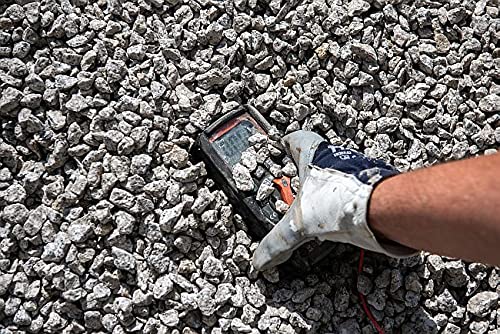
Figure 6.2: The Sonel CMM 30 Multimeter partially submerged in gravel, illustrating its robust construction and resistance to dust and debris, a testament to its IP67 rating.
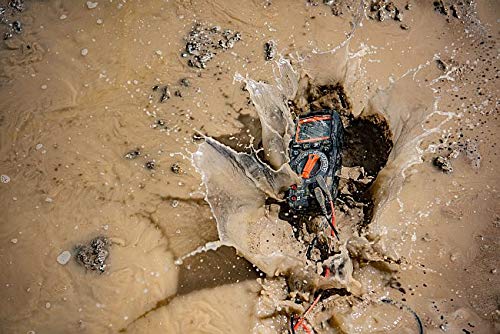
Figure 6.3: The Sonel CMM 30 Multimeter creating a splash as it impacts a muddy puddle, demonstrating its exceptional water resistance and ability to withstand harsh, wet conditions.
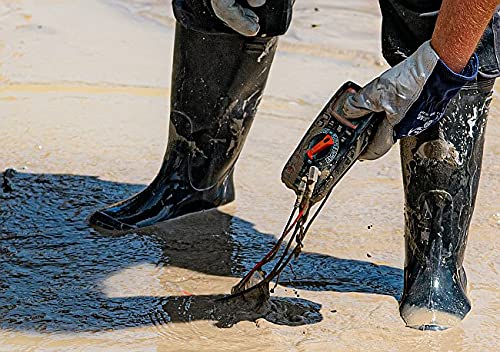
Figure 6.4: A person, wearing protective boots and gloves, retrieves the Sonel CMM 30 Multimeter from a muddy environment. This image emphasizes the device's resilience and ease of handling even after exposure to challenging conditions.
7. Tiaki
7.1. Te horoi
Horoia te mita casing me te panuiamp he kakahu me te horoi ngawari. Kaua e whakamahi i te abrasive me te whakarewa. Me whakarite kua maroke katoa te mita i mua i te whakamahi.
7.2. Whakakapinga Pūhiko
Refer to Section 5.1 for battery replacement instructions. Replace batteries promptly when the low battery indicator appears on the display.
7.3. Rokiroki
When not in use for extended periods, store the multimeter in a dry, cool place, away from direct sunlight and extreme temperatures. Remove the batteries to prevent leakage.
8. Te Raru
| Raruraru | Take pea | Rongoā |
|---|---|---|
| Kaore te mita i te hiko. | Nga pākahiko kua mate, kua he ranei te whakaurunga. | Tirohia te polarity pākahiko whakakapi ranei pākahiko. |
| Karekau he panui, he "OL" ranei (Te nui te utaina) i whakaatuhia. | Incorrect function selected; open circuit; measurement exceeds range. | Select correct function; check circuit continuity; switch to a higher range or auto-range. |
| Ko nga panui kore tika. | Low battery; dirty test leads/jacks; external interference. | Replace batteries; clean leads/jacks; move away from strong electromagnetic fields. |
| Nga take hononga Nihokikorangi. | Bluetooth not enabled on meter/phone; app issues; distance. | Ensure Bluetooth is on; restart app/phone; reduce distance between devices. |
9. Whakatakotoranga
| Āhuahira | Whakatakotoranga |
|---|---|
| Waitohu | Sonel |
| Tau tauira | SON001 |
| Tae | Pango |
| Taumaha Tūemi | 418 g |
| Ahu mōkihi | 30 x 15 x 10 cm |
| Pūhiko | 4 nga pākahiko AAA e hiahiatia ana (kei roto) |
| Nga Mahi Ine | AC / DC Voltage, AC/DC Current, Resistance, Capacity, Temperature, Duty Cycle, Frequency |
| Awheawhe | A-ringa me te Aunoa |
| RMS pono | Yes (for AC voltage me nāianei) |
| Whakatauranga Whakamarutanga (IP). | IP67 |
| Hononga | Wireless (Smartphone App) |
| Nga waahanga taapiri | HOLD function, Built-in flashlight, Backlight auto-adjustment |
10. Pūtāhui me te Tautoko
10.1. Nga Korero Whakaputanga
Sonel products are manufactured to high standards and are warranted against defects in materials and workmanship for a period specified by your regional distributor from the date of purchase. This warranty does not cover damage caused by misuse, unauthorized modification, accident, or neglect. Please retain your proof of purchase for warranty claims.
10.2. Tautoko Hangarau
For technical assistance, troubleshooting beyond this manual, or warranty inquiries, please contact your local Sonel distributor or the authorized service center. Contact information can typically be found on the Sonel official webpae, na roto ranei i to waahi hoko.
When contacting support, please have your product model number (SON001) and purchase date readily available.