Ka mutu te huaview
The Mytrix Pink RGB LED Gaming Mouse Pad is an extra-large gaming mousepad designed to enhance your gaming and office experience with its vibrant RGB lighting and durable construction. Featuring a unique Sakura pink cherry blossoms design, this mouse pad brings a distinctive aesthetic to your desktop.

Image: The Mytrix Pink RGB LED Gaming Mouse Pad, showcasing its Sakura cherry blossom design and illuminated RGB edges.
Ko nga ahuatanga matua ko:
- Sakura Pink Cherry Blossoms Design: A Japanese cherry theme with RGB light, providing a unique and aesthetically pleasing look.
- 14 Aratau Rarama RGB: Offers a variety of LED lighting profiles, including breathing and flashing effects, with 2-Zone RGB dynamic illumination.
- Mata parewai: The micro-woven smooth surface is waterproof, optimizing mouse accuracy and resisting spills.
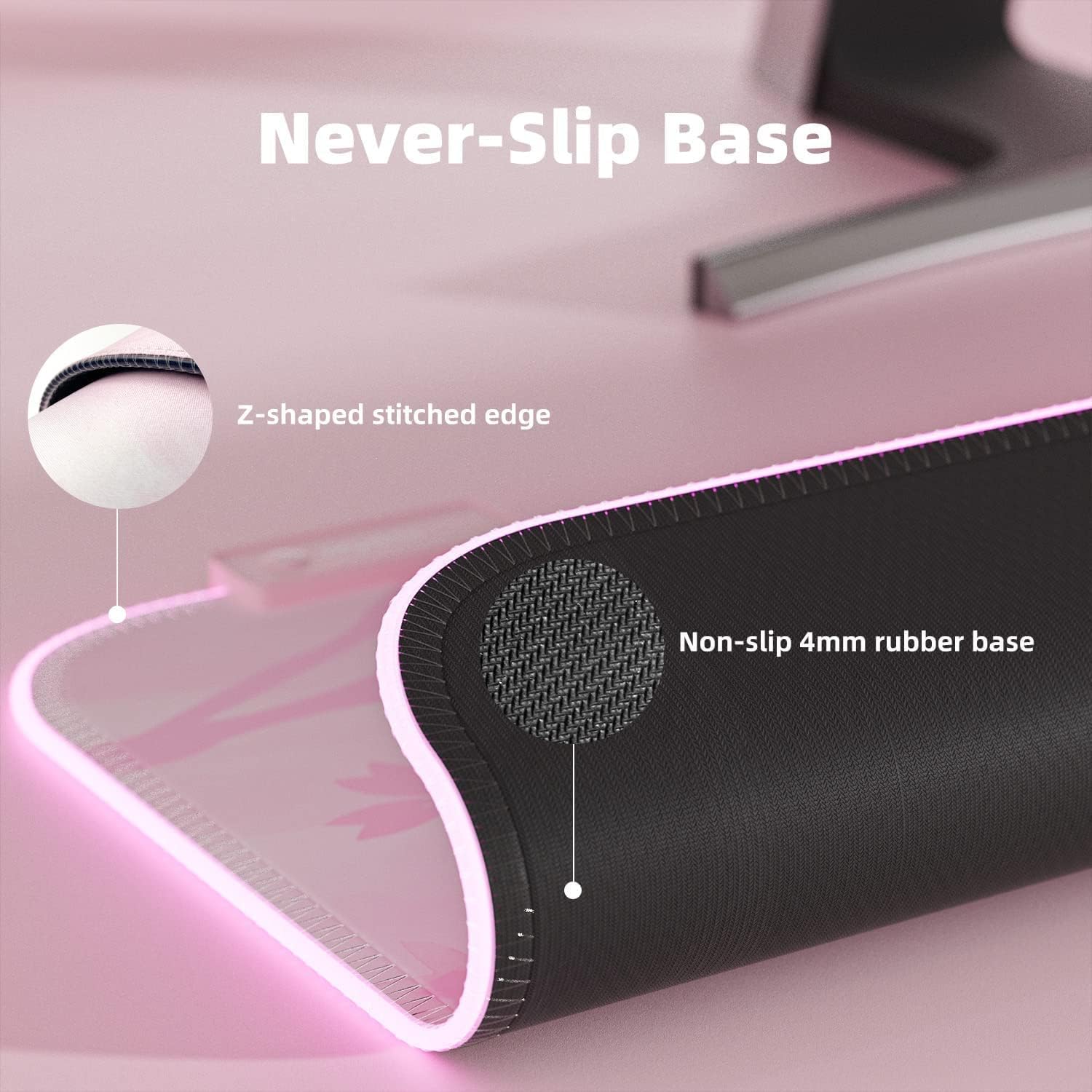
- Turanga rapa kore-paheke: A durable, non-slip rubber base ensures stability during intense use.
- Mono & Purei: No driver installation required; powered by USB.
- Large Gaming Mousepad: Measures 800 x 300 x 4 mm (31.5 x 11.8 x 0.16 inch), providing ampte waahi mo to papapātuhi me to kiore.
Tohutohu Tatūnga
Setting up your Mytrix RGB LED Gaming Mouse Pad is a straightforward process due to its plug-and-play design.
- Unroll the Mouse Pad: Carefully unroll the mouse pad and place it on a flat, clean surface. Allow some time for it to flatten completely if it retains any curl Tuhinga ka whai mai.
- Tūhono ki te USB: Locate the USB-C port on the mouse pad's control module and connect the provided USB cable.
- Mono ki te Puna Hiko: Plug the other end of the USB cable into an available USB port on your computer or a USB wall adapter. The mouse pad will automatically power on and illuminate.

Whakaahua: Kati-ake view of the USB-C connection and control button on the Mytrix mouse pad, illustrating the plug-and-play setup.
Nga Tohutohu Whakahaere
The Mytrix RGB LED Gaming Mouse Pad features an intuitive control button for managing its lighting effects.
- Changing RGB Lighting Modes: Press the control button once to cycle through the 14 available LED RGB lighting profiles. These modes include various static colors, breathing effects, flashing patterns, and more.
- Whakaritea Tirohanga: Press the control button twice in quick succession to change the brightness level of the RGB illumination.
- Hiko Whakaka/Weto: To power the mouse pad on or off, press and hold the control button for 3 seconds.

Pikitia: He hoahoa whakaahua e whakaatu anaasing the 14 distinct RGB lighting modes that can be selected on the mouse pad.

Image: The large gaming mouse pad with its dimensions clearly marked, indicating its extended size for keyboard and mouse.
Te tiaki
Proper care will ensure the longevity and performance of your Mytrix RGB LED Gaming Mouse Pad.
- Te horoi i te Mata: The mouse pad features a waterproof surface. For minor spills or dust, gently wipe the surface with a damp cloth. For more stubborn stains, use a mild soap solution and a soft cloth, then wipe dry. Ensure the USB connection point is not exposed to liquids.
- Maintaining the Base: The non-slip rubber base requires minimal maintenance. Keep it free from excessive dust or debris to ensure optimal grip on your desk surface.
- Edge Care: The stitched edges are designed to prevent fraying. Avoid sharp objects or excessive pulling on the edges to maintain their integrity.
- Rokiroki: When not in use for extended periods, it is recommended to gently roll the mouse pad (design side out) and store it in a cool, dry place to prevent creasing.
Whakaahua: He tata view demonstrating the waterproof surface of the mouse pad, with water beads visible.

Whakaahua: He taipitopito view of the mouse pad's non-slip rubber base and the reinforced Z-shaped stitched edge.
Raparongoā
If you encounter any issues with your Mytrix RGB LED Gaming Mouse Pad, refer to the following common solutions:
| Raruraru | Take pea | Rongoā |
|---|---|---|
| RGB lights are not turning on. | No power, loose USB connection, or unit is off. |
|
| Lights flicker or change unexpectedly. | Unstable power supply or loose connection at the control module. |
|
| Nga take aroturuki kiore. | Dirty surface or incompatible mouse sensor. |
|
Whakatakotoranga
| Āhuahira | Taipitopito |
|---|---|
| Hunga Hua | 31.5 x 12 x 0.16 inihi (800 x 300 x 4 mm) |
| Taumaha Tūemi | 1.25 pauna |
| Waitohu | Mytrix |
| Tae | Mawhero |
| Rauemi | Rubber (Base), Micro-woven cloth (Surface) |
| Āhuahira Motuhake | Waterproof, RGB Lighting, Non-slip Base |
| Nga Whakamahinga Manakohia | petipeti, Tari |
| Aratau Rama | 14 aratau RGB |
| Hononga | USB (Plug & Play) |
Pūtāhui me te Tautoko
For warranty information, product support, or to inquire about returns, please refer to the following:
- Kaupapa Whakahoki: This product is eligible for a 30-day return/replacement policy from the date of purchase. Please refer to your retailer's specific return guidelines.
- Tautoko Kaihanga: For technical assistance or further inquiries, please visit the official Mytrix webpaetukutuku, whakapā atu ranei ki a raatau tautoko kaihoko.
- Pukapuka Kaiwhakamahi (PDF): An official user manual in PDF format is available for download konei.
- Manual Tāuta (PDF): An installation manual in PDF format is available for download konei.


