Kupu Whakataki
This user manual provides detailed instructions for the safe and effective operation of your Tadeto Digital Moisture Meter WM700. This device is designed to accurately measure moisture content in various materials, including wood and building materials, and also provides ambient temperature and humidity readings. Please read this manual thoroughly before use and retain it for future reference.
He aha kei roto
- 1 x Tadeto Digital Moisture Meter WM700
- 1 x Pukapuka Kaiwhakamahi
- 1 x Puke Tiaki
- 2 x 1.5V AAA Pūhiko
Ka mutu te huaview
The Tadeto Digital Moisture Meter WM700 is a compact and lightweight tool equipped with high-precision pins for accurate moisture detection. It features a backlit LCD for clear readings in various lighting conditions and offers two primary measurement modes for different material types.

Figure 1: Tadeto Digital Moisture Meter WM700, showing the device, protective cap, and two AAA batteries.
Waehanga
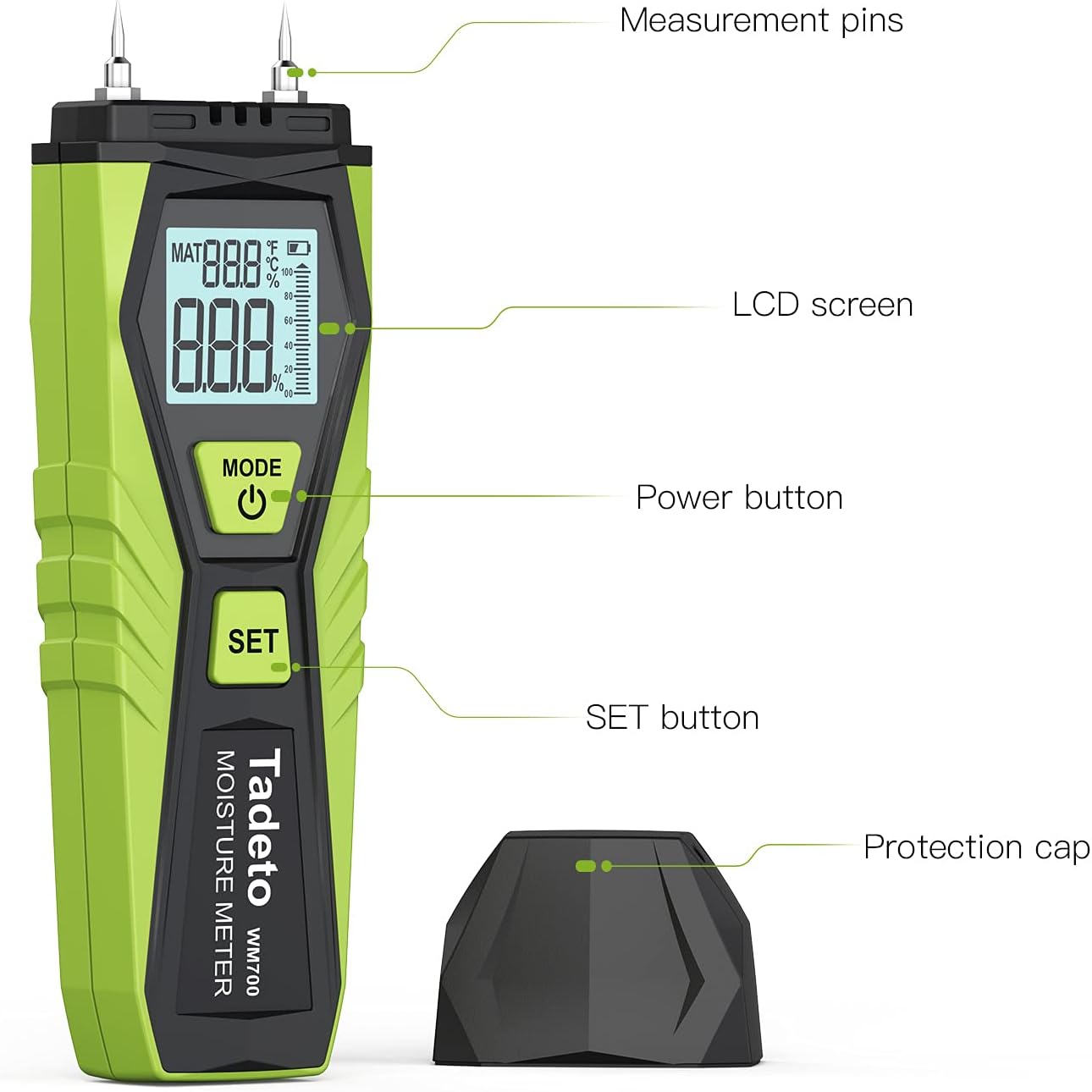
Figure 2: Key components of the moisture meter, including measurement pins, LCD screen, Power button, SET button, and protective cap.
- Measurement Pins: Two high-precision pins for penetrating materials to detect moisture.
- Mata LCD: Digital display with backlight for clear readings of moisture content, temperature, and humidity.
- MODE/Power Button: Used to power the device on/off and to switch between display modes (e.g., ambient temperature/humidity).
- PATU Whakatakotoria: Used to select material types for moisture measurement and to switch temperature units (°C/°F).
- Potae Tiaki: Covers the measurement pins when not in use and serves as a calibration aid.
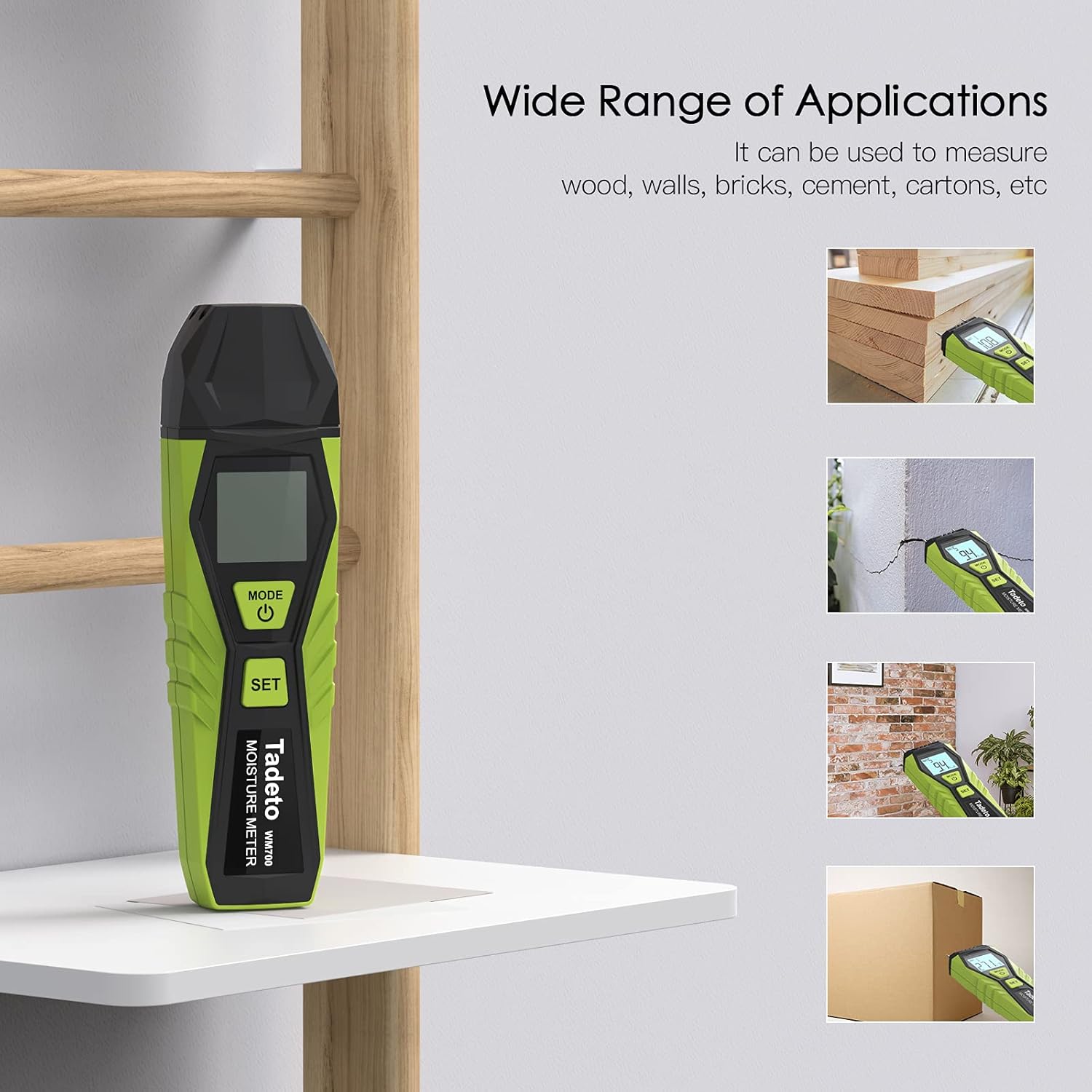
Figure 3: Wide range of applications for the moisture meter, including wood, walls, bricks, cement, and cartons.
Tatūnga
Tāuta Pūhiko
The Tadeto Digital Moisture Meter WM700 requires two 1.5V AAA batteries (included). To install or replace batteries:
- Kimihia te wahanga pākahiko kei muri o te taputapu.
- Whakatuwheratia te uhi o te wahanga pākahiko.
- Whakauruhia nga pākahiko AAA e rua, kia tika te polarity (+ me te -).
- Katia kia mau te uhi o te wahanga pākahiko.
When the battery is low, the LCD will display a low voltage symbol, indicating that the batteries need to be replaced.
Nga Tohutohu Whakahaere
Te Hiko / Whakaweto
Patohia me te pupuri i te ARATU/Mana button to turn the device on or off. The device features an automatic shutdown function after approximately 10 minutes of inactivity to conserve battery life.

Figure 4: Powering on the device by pressing the MODE/Power button.
Selecting Measurement Mode (Material Type)
The meter offers two main measurement modes: Wood and Building Materials. These are further categorized into 7 material groups (MAT 1-7) for enhanced accuracy.
- I muri i te whakakaha, pehia te SET button repeatedly to cycle through the material groups (MAT 1 to MAT 7).
- Refer to the table below or the device's quick reference guide for the appropriate material group for your measurement.
- MAT 1-3: For various types of wood.
- MAT 4-7: For different building materials (e.g., concrete, plaster, brick).

Figure 5: Selecting the material measurement mode (MAT) using the SET button.
Taking a Moisture Measurement
- Ensure the protective cap is removed from the measurement pins.
- Kōwhiria te aratau rauemi e tika ana mā te whakamahi i te SET pātene.
- Carefully push the measurement pins into the material you wish to test. Ensure both pins are fully inserted for an accurate reading.
- Read the moisture content percentage whakaaturia ana ki te mata LCD.
- After measurement, gently pull the pins out and replace the protective cap.

Figure 6: Measuring moisture content by inserting pins into wood.

Figure 7: Detecting moisture in a wall, indicating potential water leaks or dampTuhinga.
Ambient Temperature and Humidity Measurement
The device can also display the current ambient temperature and humidity.
- After powering on, briefly press the ARATU/Mana button. The display will switch to show ambient temperature and humidity.
- Hei whakawhiti i waenga i ngā wae pāmahana Celsius (°C) me Fahrenheit (°F), pēhi i te pātene SET button while the ambient temperature is displayed.
Te whakatikatika
The protective cap includes a built-in test board for quick calibration to ensure measurement accuracy.
- Tangohia te potae whakamarumaru mai i nga titi inenga.
- Insert the measurement pins into the two holes on the test board located on the inside of the protective cap.
- The display should show a reference value (e.g., T-52% / B-27% ±5%). If the reading deviates significantly, the device may require service.

Figure 8: Using the protective cap's test board for calibration.
Measurement Ranges and Accuracy
Understanding the measurement ranges and accuracy is crucial for interpreting readings correctly.

Whakaatu 9: Neke Atuview of the device's measurement capabilities and precision.
| Tawhā | Awhe | Tika |
|---|---|---|
| Wood Moisture (MAT 1-3) | 3.7% - 82% | ±5% |
| Building Material Moisture (MAT 4-7) | 0.1% - 80% | ±5% |
| Te Paemahana Ambient | -10°C ki te 60°C (-50°F ki te 140°F) | ±1.5°C/°F |
| Haumākū Ambient | 0% - 100% | ±5% |
Te tiaki
- Te horoi: Horoia te taputapu ki te kakahu ngohengohe, maroke. Kaua e whakamahi i nga kai horoi me nga whakarewa.
- Rokiroki: Store the moisture meter in a dry, cool place, away from direct sunlight and extreme temperatures. Always replace the protective cap over the pins when storing.
- Whakakapinga Pūhiko: Replace batteries promptly when the low battery indicator appears to ensure accurate readings and prevent battery leakage.
- Pin Care: The measurement pins are sharp. Handle with care. If pins become bent or damaged, contact customer support for assistance.
Raparongoā
| Raruraru | Take pea | Rongoā |
|---|---|---|
| Kaore te taputapu i te hiko. | Nga pākahiko kua mate, kua he ranei te whakaurunga. | Tirohia te polarity pākahiko. Whakakapihia ki nga pākahiko AAA hou. |
| Low battery indicator displayed. | He iti nga pākahiko. | Whakakapihia nga pākahiko AAA e rua. |
| Ko nga panui kaore i te tika, kaore ranei i te rite. | Incorrect material mode selected, pins not fully inserted, or device needs calibration. | Ensure correct material mode is selected. Insert pins completely. Perform calibration using the protective cap. |
| LCD backlight not working. | He ngoikore te pākahiko, te hapa rānei o te taputapu. | Whakakapia ngā pākahiko. Mena ka mau tonu te raruraru, whakapā atu ki te tautoko kiritaki. |
Whakatakotoranga
- Tauira: WM700
- Waitohu: Tadeto
- Ahu (L x W x H): 7.5 x 3.8 x 15.7 cm (2.95 x 1.5 x 6.18 inihi)
- Taumaha: 170 karamu (0.37 lbs)
- Puna Hiko: 2 x 1.5V AAA Pūhiko (kei roto)
- Whakaatu: Whakamuri LCD
- Whakaweto Aunoa: Tata ki te 10 meneti te kore mahi
- UPC: 768358146985
- Tae: Kakariki
Pūtāhui me te Tautoko
Ka tuku a Tadeto a 12-marama whakamana on this product from the date of purchase. This warranty covers manufacturing defects and workmanship. It does not cover damage caused by misuse, accident, unauthorized modification, or normal wear and tear.
For warranty claims, technical support, or any questions regarding your Tadeto Digital Moisture Meter WM700, please contact our customer service department. Please have your purchase receipt and product model number (WM700) available when contacting support.