1. Kupu Whakataki
This manual provides essential information for the safe and efficient use of your Aligator A675 Senior Double SIM 2G Mobile Phone. Please read it carefully before using the device and keep it for future reference. The Aligator A675 is designed for ease of use, featuring large buttons and a clear display, making it ideal for senior users.
2. Ihirangi mokete
Me mohio kei roto katoa nga mea kei roto i te kete:
- Waea Pūkoro Aligator A675
- Pūhiko
- Kaitohu
- Pukapuka Kaiwhakamahi (tenei tuhinga)
Mena kua ngaro, kua pakaru rānei tetahi o ngā taonga, tēnā whakapā atu ki tō kaihokohoko.
3. Pūrere Neke Atuview
Kia mōhio koe ki ngā wāhanga matua o tō waea Aligator A675.

Whakaahua 3.1: Mua me muri view of the Aligator A675 mobile phone. The front shows the display, keypad, and navigation buttons. The back features the speaker and camera module.
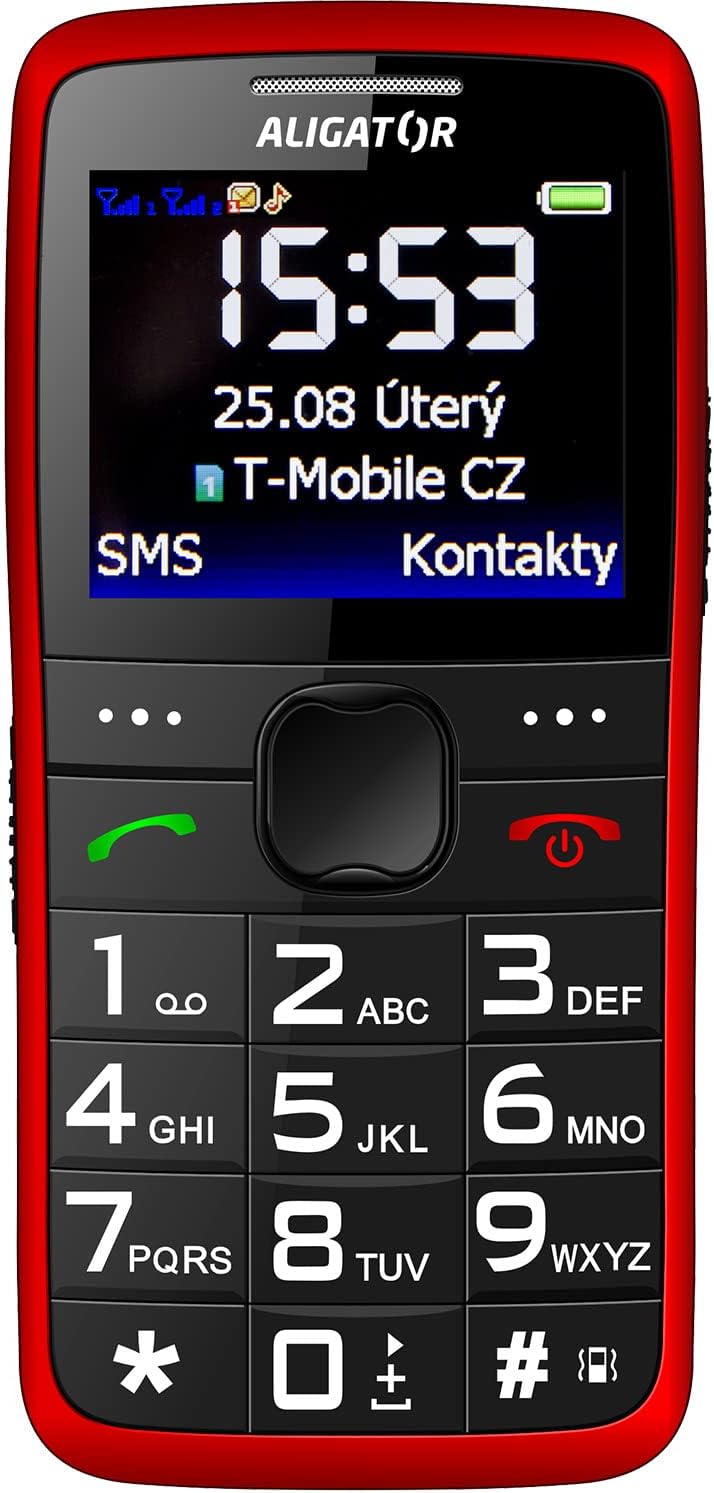
Whakaahua 3.2: Tuhinga o mua view of the Aligator A675 mobile phone, highlighting the large display, clear numeric keypad, and dedicated call/end buttons.
3.1 Tuhinga o mua View
- Whakaatu: Shows time, date, network status, battery level, and menu options.
- Kī Whakaterenga: Whakamahia hei panuku i ngā tahua me ngā kōwhiringa.
- Patene Waea (Kakariki): Initiates calls and answers incoming calls.
- Pātene Mutunga/Mana (Whero): Ends calls, returns to the home screen, and powers the phone on/off.
- Papapātuhi: Numeric keys (0-9), asterisk (*), and hash (#) for dialing and text input.
3.2 Hoki View
- Kaikorero: For ringtones and hands-free calls.
- Kāmera: For basic photo capture.
- Pātene SOS: A dedicated button for emergency calls/SMS (refer to section 5.4 for setup).
4. Tatūnga
Follow these steps to prepare your phone for first use.
4.1 Te Whakauru Kāri SIM
- Tangohia te uhi o muri o te waea ma te ata wherahia mai i te kakari.
- If the battery is inserted, remove it.
- Locate the SIM card slots. The Aligator A675 supports two SIM cards (Dual SIM).
- Carefully insert your 2G GSM SIM card(s) into the designated slot(s) with the gold contacts facing down, ensuring they are correctly oriented.
- Ensure the SIM cards are securely in place.
4.2 Te whakauru i te Pūhiko
- Align the battery contacts with the contacts in the phone's battery compartment.
- Gently press the battery into place until it fits snugly.
- Whakahokia te uhi o muri, me te whakarite kia pāwhiritia ki tōna tūranga tika.
4.3 Te Whakautu i te Waea
- Connect the charger cable to the charging port on the phone (usually located at the bottom).
- Monohia te rihi ki te putanga hiko.
- Mā te ata pākahiko kei runga i te mata e whakaatu te tūnga utu.
- Allow the phone to charge completely before first use. This typically takes a few hours.
5. Te Whakahaere i te Waea
Basic functions and features of your Aligator A675.
5.1 Kei te Hiko / Weto
- Hei Whakahiko: Patohia me te pupuri i te End/Power Button (red button) until the screen lights up.
- Hei Whakaweto: Patohia me te pupuri i te End/Power Button until the power-off options appear, then confirm.
5.2 Te Waea me te Whiwhi Waea
- Hei Waea: Tāuruhia te nama waea mā te whakamahi i te papapātuhi, kātahi ka pēhi i te Waea Pātene (green button).
- Hei Whakautu Waea: Pehia te Waea Pātene ka tangi te waea.
- Hei Whakamutu Waea: Pehia te End/Power Button.
5.3 Te Tuku me te Whiwhi SMS
- Navigate to the 'Messages' menu using the navigation key.
- Tīpakohia 'Tuhi Karere' hei tito i tētahi SMS hou.
- Whakauruhia te nama o te kaiwhiwhi, tohua ranei mai i nga hoapaki.
- Type your message using the keypad. Press the appropriate key multiple times for different letters (e.g., '2' for A, B, C).
- Tīpakohia 'Tukuna'.
- Incoming messages will be displayed on the screen and stored in the 'Inbox'.
5.4 Mahi SOS
Mā te mahi SOS ka taea e koe te whakapā atu ki ngā nama ohorere kua whakaritea i mua.
- Te Whakatū i ngā Tau SOS: Go to 'Settings' > 'SOS Settings'. Add up to 5 emergency contact numbers.
- Whakahohe SOS: Patohia me te pupuri i te Patene SOS i te tuara o te waea mō ētahi hēkona.
- The phone will automatically send an emergency SMS to the pre-set numbers and then start dialing them one by one until a call is answered.
5.5 Hoapā
- Tāpiri Hoapā: Go to 'Contacts' > 'Add New'. Enter the name and phone number, then save.
- Searching for a Contact: Go to 'Contacts' and use the navigation key to scroll or type the first letters of the name.
6. Tiaki me te Tiaki
Proper care ensures the longevity of your Aligator A675 phone.
- Te horoi: Whakamahia he kakahu ngohengohe, maroke hei horoi i te mata o te waea. Āta karohia ngā wai horoi, ngā rauemi whakakoi rānei.
- Tiaki Pūhiko: Do not expose the battery to extreme temperatures. Avoid fully discharging the battery frequently.
- Rokiroki: Rokirokihia te waea ki te wāhi hauhautanga, maroke, kia matara atu i te rā tika me te makuku.
- Ātete wai: Kāore tēnei waea e ātete ki te wai. Āta karohia te pā ki ngā wai.
7. Te Raru
Nga take noa me o raatau otinga.
| Raruraru | Take pea | Rongoā |
|---|---|---|
| Karekau te waea i te hiko | Pūhiko iti; Kaore i tika te whakaurunga o te pākahiko | Charge the battery; Reinsert the battery correctly |
| Kāore e taea te waea/whiwhi waea | No network signal; SIM card not inserted; SIM card not activated | Move to an area with better signal; Reinsert SIM card; Contact your network provider |
| Karekau he oro i te wa e waea ana | Volume too low; Speaker blocked | Increase call volume; Check if speaker is obstructed |
| Kāore te mahi SOS e mahi | SOS numbers not set; No network signal | Set up SOS numbers in settings; Ensure network coverage |
Mena kei te haere tonu te raru, me waea atu ki te tautoko a nga kaihoko.
8. Whakatakotoranga
Key technical details of the Aligator A675.
- Waitohu: ALIGATOR
- Tauira: A675
- Kawe Ahokore: Wewete
- Hangarau Whatunga Ahokore: GSM (2G)
- Rahi Mata: 3 inihi
- Tāuru Atanga Tangata: Papapātuhi
- Tautoko SIM: Sim rua
9. Pūtāhui me te Tautoko
Your Aligator A675 phone is covered by a standard manufacturer's warranty. Please refer to the warranty card included in your package for specific terms and conditions, including the warranty period and coverage details.
For technical support, service, or warranty claims, please contact your retailer or the official Aligator customer service. Contact information can typically be found on the manufacturer's webte pae, te runga rānei i te takai.
Puritia tō taunakitanga hoko (rīhiti, nama rānei) nā te mea ka hiahiatia tēnei mō tētahi ratonga pūtāhui.


