Kupu Whakataki
Thank you for choosing the Mistral MSF1650R 16-inch Stand Fan. This manual provides important information regarding the assembly, operation, maintenance, and troubleshooting of your new fan. Please read it thoroughly before use and retain it for future reference.
Nga Tohutohu Haumaru Nui
- Always ensure the fan is placed on a stable, level surface to prevent it from tipping over.
- Kaua e whakahaeretia te powhiriwhiri me te taura pakaru, te mono ranei. Mena kua pakaru te taura, me whakakapi e te kaihanga, tana kaihoko ratonga, etahi tangata whai tohu pera ranei kia kore ai e tupono.
- Unplug the fan from the power outlet before cleaning, assembling, or disassembling parts.
- Keep fingers, pencils, or any other objects out of the fan guard when it is operating.
- Kaua e whakamahia te pā hau i te taha o te wai, i roto rānei i ngā taiao makuku rawa.
- Ko tenei taputapu ehara i te mea mo te whakamahi ma te hunga (tae atu ki nga tamariki) he iti te kaha o te tinana, te tairongo, te hinengaro, te kore wheako me te mohiotanga, mena ka tukuna atu ki a raatau te tirotiro, te tohutohu ranei mo te whakamahi i te taputapu e te tangata whai mana mo to raatau haumaru.
- Me mataki nga tamariki kia kore ai ratou e takaro ki te taputapu.
Waehanga Hua
Familiarize yourself with the main parts of your Mistral MSF1650R stand fan.
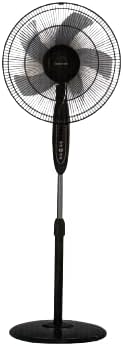
Whakaahua 1: Mua view of the Mistral MSF1650R 16-inch Stand Fan, showing the fan head, control panel, adjustable stand, and round base.

Figure 2: The Mistral MSF1650R stand fan accompanied by its remote control, illustrating the convenience of remote operation.
- Tuhinga o mua
- Fan Blade (5 ABS blades)
- Kaitiaki Whakamuri
- Whare Motini
- Paewhiri Mana
- Pou Tūnga Whakarite
- Turanga
- Mana Mamao
Nga Tohutohu Huihuinga
Whāia ēnei mahi hei hanga i tō pā hau tū:
- Whakapirihia te turanga: Place the stand pole onto the base and secure it using the provided screw and washer from underneath the base.
- Install the Rear Guard: Position the rear guard onto the motor housing, ensuring it aligns with the locating pins. Secure it with the guard nut.
- Mount the Fan Blade: Slide the fan blade onto the motor shaft, aligning the notch on the blade with the pin on the shaft. Secure it with the blade cap, turning it counter-clockwise.
- Tāpirihia te Ārai o Mua: Place the front guard onto the rear guard, aligning the clips. Secure the guards together using the guard ring and clip, ensuring it is tightly fastened around the perimeter.
- Whakarite Teitei: Loosen the height adjustment knob on the stand pole, extend or retract the pole to the desired height, and then tighten the knob securely.
Nga Tohutohu Whakahaere
Your Mistral MSF1650R fan can be operated via the control panel on the fan body or the remote control.
Nga Mahi Paewhiri Mana:
- Pātene ON/OFF: Pēhia kia whakakā, whakaweto rānei te pā.
- Pātene tere: Press repeatedly to cycle through fan speeds: Low, Medium, High.
- Pātene MODE: Press to select between Normal, Natural, and Sleep modes.
- Pātene TAIMA: Press to set the operating timer (up to 7.5 hours). Each press adds 0.5 hours.
- Pātene OSC (Oscillation): Press to start or stop the fan head oscillating horizontally.
Nga Mahi Mana Mamao:
The remote control duplicates all functions available on the fan's control panel for convenient operation from a distance.
- Me whakarite kia tika te whakaurunga o nga pākahiko ki te mana mamao.
- Point the remote control towards the fan's receiver when operating.
- Buttons on the remote correspond to the functions described above (ON/OFF, SPEED, MODE, TIMER, OSC).
Te tiaki me te horoi
Mā te horoi i ia wā ka āwhina i te pupuri i te mahi a te pā hau me te whakaroa i tōna roanga ora.
- Wewetehia i mua i te horoi: Always disconnect the fan from the power supply before attempting any cleaning or maintenance.
- Te Horoia o ngā Papa o Waho: Wipe the fan's exterior surfaces with a soft, damp kakahu. Kaua e whakamahi i nga kai horoi me nga whakarewa.
- Clean Fan Blades and Guards: To clean the fan blades and inside the guards, you may need to carefully remove the front guard. Use a soft cloth or a vacuum cleaner with a brush attachment to remove dust. Ensure all parts are dry before reassembling.
- Rokiroki: If storing the fan for an extended period, cover it to protect it from dust and store it in a dry, cool place.
Raparongoā
Tirohia te ripanga i raro nei mo nga take noa me o raatau otinga.
| Raruraru | Take pea | Rongoā |
|---|---|---|
| Kare te Fan e huri. | Karekau he hiko. Kāore i monohia te pā hau. Kaore i pehia te paatene hiko. | Tirohia te putanga hiko. Me whakarite kia whakauruhia te mono. Patohia te paatene ON/OFF. |
| Te rere hau ngoikore. | He iti rawa te huinga tere o te pa. Dust accumulation on blades/guards. | Whakanuia te tere tere. Clean fan blades and guards as per maintenance instructions. |
| Ka haruru rerekee te Fan. | Nga waahanga wewete. Te aukati i roto i nga matatahi tahi. | Ensure all assembly screws and nuts are tight. Momotuhia te mono, ka tirohia mēnā he mea ke. |
| Kaore e mahi te mana mamao. | Nga pākahiko mate. He ārai i waenganui i te mana mamao me te pā hau. | Whakakapihia nga pākahiko. Ensure clear line of sight to the fan's receiver. |
Whakatakotoranga
Technical details for the Mistral MSF1650R 16-inch Stand Fan.

Figure 3: Detailed specifications of the Mistral MSF1650R stand fan, including dimensions, power, and features.
| Tauira | MSF1650R |
| Fanataata | 5 ABS Fan Blade |
| Voltage | 220-240V ~ 50Hz |
| Mana | 55W |
| Rōrahi Hau | 66.49 m³/mene |
| Te Rerenga Hau | 3.45 m/s |
| Hunga Hua | 45 x 15 x 57 cm (D x W x H) |
| Irirangi Rawa | 1.3m (Adjustable) |
| Taumaha Kupenga | 5.85 kg |
| Nga waahanga motuhake | Adjustable Height, Remote Controlled, 7.5 Hours Timer, 3 Speed Selection, Normal/Natural/Sleep Modes |
Pūtāhui me te Tautoko
For warranty information or technical support, please refer to the warranty card included with your purchase or contact Mistral customer service. Keep your proof of purchase for warranty claims.
For further assistance, please visit the official Mistral webpaetukutuku, whakapā atu ranei ki o raatau pokapū ratonga whai mana.


