1. Kupu Whakataki
This manual provides comprehensive instructions for the installation, operation, and maintenance of your COUGAR Archon 2 RGB Mid Tower Case. Please read this manual carefully before beginning installation to ensure proper setup and to maximize the performance and longevity of your product.

Whakaahua 1.1: Koki view of the COUGAR Archon 2 RGB Mid Tower Case, showcasing the tempered glass side panel and front RGB fans.
2. Nga Hua o te Hua
The COUGAR Archon 2 RGB Mid Tower Case is designed for PC enthusiasts seeking a balance of aesthetics, airflow, and functionality. Key features include:
- Elegant Design with Tempered Glass: A sleek black finish combined with a tempered glass side panel allows for a clear view o ngā wāhanga o roto me te rama RGB.
- Rererangi kua arotauhia: Supports multiple fan configurations and includes three pre-installed 120mm ARGB fans at the front for efficient cooling.
- Whānui Hototahi: Accommodates Mini ITX, Micro ATX, and ATX motherboards.
- AmpNgā Kōwhiringa Rokiroki: Provides bays for both 3.5" HDDs and 2.5" SSDs.
- Te Whakauru/Whakaputa o mua e watea ana: Features USB 3.0 and USB 2.0 ports for easy peripheral connectivity.
- Mana Rarama RGB: Integrated ARGB fans offer customizable lighting effects.

Whakaahua 2.1: Mua view of the COUGAR Archon 2 RGB case, highlighting the three pre-installed ARGB fans.
3. Aratohu Tatūnga
Follow these steps to properly install your components into the COUGAR Archon 2 RGB case.
3.1. Rarangi Arowhai i mua i te whakaurunga
- Ensure you have all necessary components: motherboard, CPU, RAM, GPU, power supply, storage drives, and appropriate tools (screwdriver, zip ties).
- Mahi i runga i tētahi mata ma, kāore he paturopi. Whakaarohia te whakamahi i tētahi whitiki ringaringa ārai-paturopi.
3.2. Te Whakatuwheratanga o te Take
- Carefully remove the tempered glass side panel by unscrewing the thumbscrews located at the rear of the case. Set the panel aside on a soft, flat surface to prevent scratches.
- Remove the opposite metal side panel by unscrewing its thumbscrews and sliding it backward.
3.3. Whakauranga Papa Matua
- Tāutahia te whakangungu I/O (mēnā kāore anō kia tāpirihia ki tō papahoahoa) ki roto i te pūaha o muri o te pouaka.
- Align your motherboard with the standoffs inside the case. Ensure all standoffs match the screw holes on your motherboard.
- Whakamaua te papahoahoa mā te whakamahi i ngā tīwiri kua whakaratohia. Kaua e whakakī rawa.
3.4. Te Waenga Whakawhiwhi Hiko (PSU).
- Locate the PSU mounting area at the bottom rear of the case.
- Slide your PSU into the designated bay from the rear of the case, ensuring the fan faces downwards for optimal cooling (if the case has a bottom vent).
- Whakaorangia te PSU me nga wiri mai i muri o te keehi.
3.5. Tāutanga Puku Rokiroki
The Archon 2 RGB supports both 3.5" HDDs and 2.5" SSDs.
- For 3.5" HDDs: Locate the drive cage usually beneath the PSU shroud. Slide the HDD into the drive bay and secure it with screws.
- For 2.5" SSDs: Mount SSDs to the designated mounting points on the back of the motherboard tray or within the drive cage, securing them with screws.
3.6. Tāutanga Kāri Whakawhanui (GPU)
- Tangohia nga uhi mokamoka PCIe e tika ana mai i muri o te keehi.
- Insert your graphics card or other expansion cards into the appropriate PCIe slot on the motherboard.
- Secure the card with screws to the case.
3.7. Te Whakahaere Taura me ngā Hononga Paewhiri o Mua
Route all power and data cables neatly behind the motherboard tray. Connect the front panel I/O cables (USB, audio, power switch, reset switch, LED indicators) to their respective headers on the motherboard according to your motherboard manual.

Figure 3.1: Dimensions of the COUGAR Archon 2 RGB case, useful for planning component fit and space.
4. Nga Tohutohu Whakahaere
4.1. Kei te Hiko Nei
Once all components are installed and cables are connected, replace both side panels. Connect your monitor, keyboard, mouse, and power cable to the PSU. Press the power button on the top panel of the case to start your system.
4.2. Mana Rarama RGB
The pre-installed ARGB fans are typically controlled via a dedicated button on the case's front I/O panel or through your motherboard's RGB software (if connected to an ARGB header). Refer to your motherboard manual for software-based control options.
5. Tiaki
Ko te tiaki i nga wa katoa ka awhina i te mahi tino pai me te roa o nga waahanga PC.
- Whakapai puehu: Periodically clean dust filters (if present) and internal components using compressed air. Ensure the system is powered off and unplugged before cleaning.
- Whakaha Uepu: Ensure cables are neatly routed to avoid obstructing airflow.
- Tirohanga Kaiwhai: Check fans for dust buildup or obstructions that could impede their operation.
6. Te Raru
Mena ka raru koe, tirohia nga mahi rapurongoā noa e whai ake nei:
- Kāore te Pūnaha i te Hiko:
- Check all power connections, including the PSU to the wall outlet, PSU to motherboard (24-pin and CPU 8-pin), and front panel power switch header.
- Me whakarite kei te tūranga 'ON' te pana PSU.
- Kāore ngā Pā e Hurihuri ana / Kāore te RGB e Mahi:
- Verify fan power cables are securely connected to the motherboard or fan controller.
- Check ARGB headers for proper connection to the motherboard or RGB controller.
- Ensure RGB software or case button is correctly configured.
- Kore Putanga Whakaatu:
- Confirm the monitor cable is connected to the graphics card (not the motherboard integrated graphics, unless no dedicated GPU is present).
- Tautuhi anō i te kāri whakairoiro me ngā kōwae RAM.
7. Whakatakotoranga
Detailed specifications for the COUGAR Archon 2 RGB Mid Tower Case:
| Āhuahira | Taipitopito |
|---|---|
| Ingoa Tauira | ARCHON 2 RGB |
| Momo Take | Huarahi Maaka |
| Papamatua Hototahi | Mini ITX, Micro ATX, ATX |
| Ahu (LxWxH) | 14.96 x 8.27 x 18.5 inihi (380 x 210 x 470 mm) |
| Taumaha Tūemi | 11.37 pauna (5.17 kg) |
| Rauemi | Maamaa, Karaehe Tempered |
| Tae | Pango |
| Paanui kua whakauruhia i mua | 3 x 120mm ARGB fans (Front) |
| Tautoko Pā (Mua) | 3 x 120mm, 2 x 140mm ranei |
| Tauranga I/O | 1 x USB 2.0, 2 x USB 3.0, Audio In/Out |
| Momo Whakaeke Hiko Hiko | Maunga Raro |
| Tikanga whakamatao | Te hau |
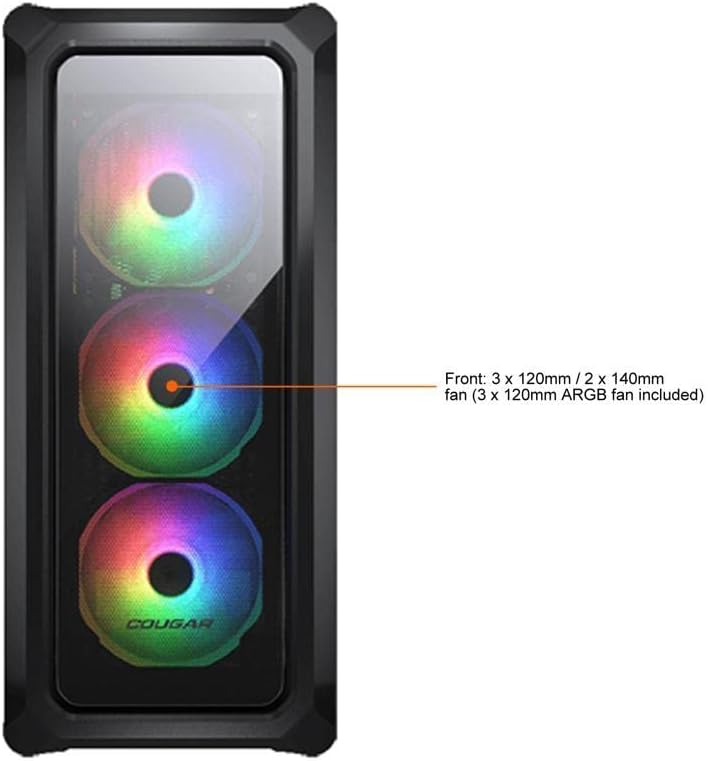
Figure 7.1: Front panel fan configuration and size options for the COUGAR Archon 2 RGB case.
8. Pūtāhui me te Tautoko
For warranty information and technical support, please refer to the official COUGAR webpaetukutuku, whakapā atu ranei ki ta raatau tari ratonga kaihoko. Puritia to tohu hoko mo nga kereme whakamana.
COUGAR Official Webpae: cougargaming.com


