Kupu Whakataki
The Segway Ninebot eKickScooter ZING A6 is designed to enhance a child's sense of balance and control. This 2-wheel riding toy features a power-assisted motor that activates by kicking to start and accelerate, providing a smooth and enjoyable riding experience.
Nga waahanga matua
- Mahinga: The ZING A6 can reach speeds up to 7.5 mph and travel up to 3.1 miles on a single charge. It supports a maximum load of 88 lbs and is suitable for children with a height between 3'5'' and 4'7'' (105–140 cm).
- Safety & Control: An intelligent foot-board sensor automatically powers on the scooter when a child steps on it and kicks to move forward. Power is automatically cut off when the rider steps off, and the scooter powers off after 30 seconds of inactivity, ensuring user safety.
- Tere e taea te whakarite: Features three distinct speed gears to accommodate different skill levels. Riders can switch gears by lightly treading the rear fender.
- First gear: 4.9 mph
- Second gear: 6.2 mph
- Third gear: 7.5 mph
- Te kawe: Weighing only 10.1 lbs, the A6 is lightweight and easy for children to carry. Its foldable design allows for convenient storage and transport, fitting easily into a car.
- Durable Wheels: Equipped with a PU front tire and a rubber rear tire, providing excellent shock absorption and wear resistance for various terrains.
Tatūnga
The Segway Ninebot eKickScooter ZING A6 comes with the scooter, charger, and an accessory box. Minimal assembly is required to get started.
- Wewete ana: Kia ata tangohia nga waahanga katoa mai i te kete.
- Āpitihanga Pae kakau: Attach the handlebar to the main body of the scooter. Ensure it clicks securely into place.
- Akona Tuatahi: Before first use, fully charge the scooter. The charging port is located on the side of the scooter. Lift the protective cover and plug in the charger.
- Kōpaki/Wehewehe: The scooter is designed for easy folding. Locate the folding mechanism near the base of the handlebar. Follow the instructions to fold or unfold the scooter for transport or storage.
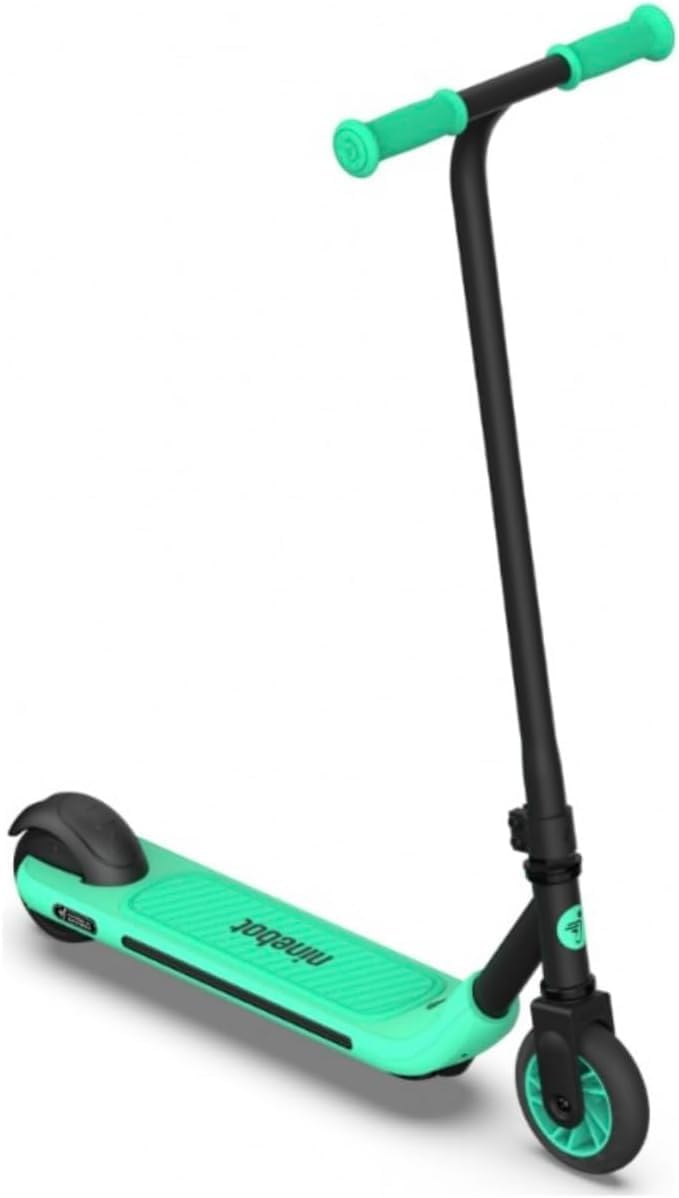
Figure 1: The Segway Ninebot eKickScooter ZING A6, showcasing tona hoahoa kiato.
Nga Tohutohu Whakahaere
The ZING A6 is designed for intuitive operation, allowing the rider to control the speed through their actions.
- Whakahiko: Simply step onto the foot-board. The intelligent sensor will detect the rider and automatically power on the scooter, illuminating the lights on the footboard and wheels.
- Starting Movement: To begin riding, kick off the ground with one foot. The power-assisted motor will activate once the scooter reaches approximately 1.2 km/h (0.75 mph).
- Te Whakahaere Tere: The scooter's speed is controlled by the rider's kicking action. The faster the rider kicks, the faster the scooter will go, up to its maximum speed for the selected gear. It will maintain the speed set by the rider's kicking.
- Changing Speed Gears: To switch between the three speed gears, lightly tread on the rear fender. Each tread will cycle through the available speeds (4.9 mph, 6.2 mph, 7.5 mph).
- Ka mutu: To stop the scooter, simply step on the rear fender. This acts as the brake, bringing the scooter to a controlled stop.
- Weto Whakakore: The scooter will automatically power off after 30 seconds of inactivity or when the rider steps off the foot-board.

Figure 2: A child demonstrating the use of the Segway Ninebot eKickScooter ZING A6.
Whakamaumahara Haumaru: Always wear appropriate safety gear, including a helmet, knee pads, and elbow pads, when operating the eKickScooter. Ensure the riding area is safe and free from obstacles. Adult supervision is recommended for young riders.
Te tiaki
Proper maintenance ensures the longevity and safe operation of your Segway Ninebot eKickScooter ZING A6.
- Kei te utu: Regularly charge the scooter's battery. Use only the official charger provided. Avoid overcharging or completely draining the battery to prolong its lifespan.
- Tiaki Tire: The scooter features durable PU front and rubber rear tires. Periodically inspect them for wear and tear. While designed for wear resistance, replace them if significant damage or flattening occurs.
- Te horoi: Whakapai i te kuta me te whakatairangaamp cloth. Avoid using harsh chemicals or excessive water, especially near electronic components.
- Rokiroki: When not in use for extended periods, store the scooter in a cool, dry place. Ensure it is fully charged before storage and recharge it every few months to maintain battery health.
Raparongoā
If you encounter issues with your Segway Ninebot eKickScooter ZING A6, refer to the following common troubleshooting steps:
- Kaore te Kuta e Ka ana:
- Me whakarite kei te utaina te pākahiko.
- Verify that you are stepping firmly on the foot-board to activate the sensor.
- Scooter Not Moving/Accelerating:
- Confirm the scooter is powered on.
- Ensure you are kicking off the ground to initiate movement and activate the motor. The motor only engages after reaching a minimum speed.
- Check for any obstructions around the wheels.
- Nga take utu:
- Verify the charger is properly connected to both the scooter and a working power outlet.
- Tirohia te tauranga utu mo nga otaota, he pakaru ranei.
- If the scooter stops charging after a few months, as some users have reported, this may indicate a battery or charger issue. Please refer to the warranty section for support.
- Nga Raiti Kaore e Mahi:
- Ensure the scooter is powered on by stepping on the foot-board.
- If lights remain off, contact customer support.
For persistent issues or problems not listed here, please contact Segway customer support.
Whakatakotoranga
| Āhuahira | Taipitopito |
|---|---|
| Waitohu | Segway |
| Ingoa Tauira | ZING A6 |
| Tae | Kerei |
| Awhe Tau (Whakaahuatanga) | Rangatahi |
| Taumata Taumaha | 88 Pauna |
| Taumaha Tūemi | 8.8 Pauna |
| Tuhinga o mua | 2 |
| Rauemi wira | Polyurethane, Nitrile |
| Rauemi Tāpare | Korotahi Steel |
| Momo Pae kakau | Whakaritea |
| Rahi wira | 4 Inihi |
| Momo wira | Mārō |
| Kāhua Parai | Te Pēki Whakamuri |
| Awhe Tawhiti Morahi | 3.1 Maero |
| Nga Waahanga kei roto | Scooter, Charger, Accessory Box |
| Rahi Tūemi (LxWxH) | 25.6 x 12.6 x 33.5 inihi |
Pūtāhui me te Tautoko
The Segway Ninebot eKickScooter ZING A6 comes with a 1-tau iti pūtāhui for the scooter and a 180-ra whakamana for specific parts. For detailed warranty information, please refer to the documentation included with your product.
If you experience any problems or have questions regarding your eKickScooter, please contact Segway customer support for assistance. You can often find support contact information on the official Segway webpae, i roto ranei i to putunga hua.


