Kupu Whakataki
Thank you for choosing the Xtorm XP300U Portable Power Station. This device is designed to provide reliable and portable power for various applications, from home use to outdoor camping. With a 300W output and multiple charging options, it ensures your devices stay powered wherever you are. This manual provides essential information on the safe operation, setup, maintenance, and troubleshooting of your power station.
Nga korero haumaru
Please read all safety warnings and instructions before using this product to ensure safe operation and prevent damage. Keep this manual for future reference.
- Kaua e wetewete, e whakatika, e whakarerekē rānei i te waeine. Mēnā ka hē te whakakotahitanga anō, ka pā he ahi, ka whara rānei.
- Kaua e whakaaturia te waeine ki te ahi, ki ngā pāmahana tiketike rānei (neke atu i te 60°C/140°F).
- Kaua e whakamahia, rokiroki ranei i te waahanga i roto i te ra tika, i nga waahi wera ranei.
- Kaua e whakamahi, e penapena ranei i te waahanga i roto i te kaukau, i nga waahi ka kitea ki te wai, ki te makuku ranei.
- Do not drop, hit, or subject the unit to strong impacts.
- Kaua e taea e nga tamariki.
- Whakamahia anake ngā taura me ngā urutau utu taketake, kua whakamanahia rānei.
- Ensure proper ventilation during use and charging. Do not cover the unit.
- In case of leakage from the battery, do not allow the liquid to come into contact with skin or eyes. If contact occurs, wash with plenty of water and seek medical advice.

Image: Safety features of the Xtorm XP300U, highlighting Pure Sine Wave, Short Circuit Protection, Temperature Control, Overcharge Protection, APM Chip, A-Class Batteries, and High Efficiency.
Ihirangi mokete
Tirohia ngā mea kei roto i te kete i te wā e whakatuwheratia ana. Mēnā kua ngaro, kua pakaru rānei ētahi taonga, whakapā atu ki tō kaihokohoko.
- Xtorm XP300U Portable Power Station
- AC Kaihoko Kaari
- Uera Miihini Motuka
- MC4 to DC Cable (for solar panel connection, solar panel not included)
- Pukapuka Kaiwhakamahi

Image: The Xtorm XP300U Portable Power Station displayed with its included accessories: AC wall charger, car charger cable, and MC4 to DC cable.
Ka mutu te huaview
Familiarize yourself with the different parts of your Xtorm XP300U Power Station.
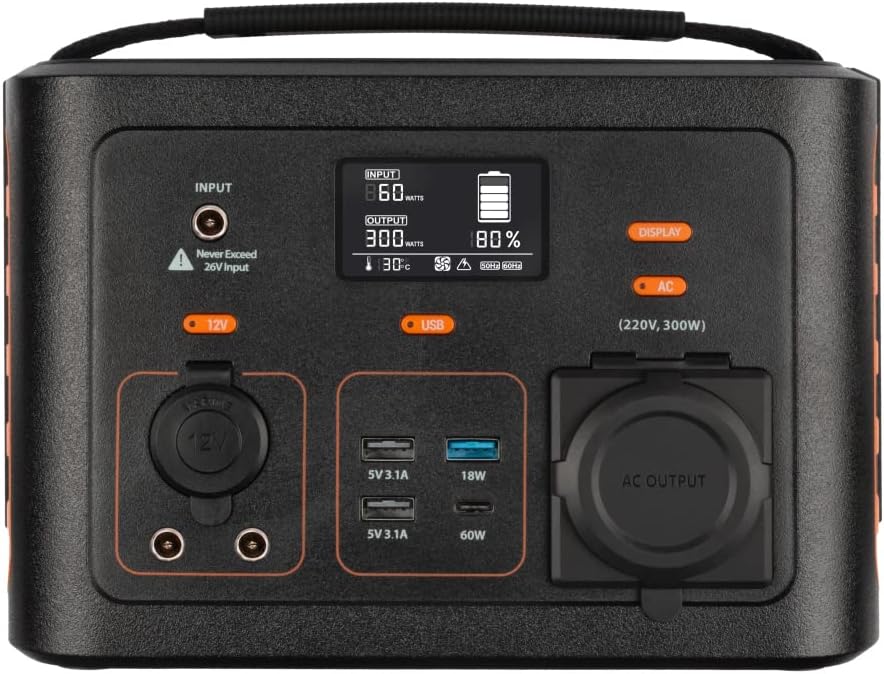
Whakaahua: Kati-ake view of the Xtorm XP300U's front panel, showing the digital display, input port, 12V DC output, USB-A and USB-C ports, and AC output socket.
Ngā Āhuatanga Paewhiri Mua:
- Whakaaturanga LCD: E whakaatu ana i te taumata pākahiko, te mana tāuru/putanga, me ngā tohu tūnga.
- Tauranga Whakauru: Mō te utu i te teihana hiko mā te urutau AC, te rihi waka, te papa rā rānei.
- 12V DC Huaputa: For powering 12V devices.
- Tauranga USB-A: Multiple USB-A outputs for charging various devices (e.g., 5V 3.1A, 18W Quick Charge).
- Tauranga PD USB-C: High-speed USB-C Power Delivery output (up to 60W).
- Putunga Putanga AC: Standard AC outlet for powering household appliances (220V, 300W).
- Patene Mana: Buttons for turning on/off specific outputs (e.g., AC, DC, USB).

Whakaahua: Runga view of the Xtorm XP300U, highlighting its integrated carrying handle for portability.

Whakaahua: Rear view of the Xtorm XP300U, featuring the Xtorm brand logo and "Portable Power Station 300" text.
Tatūnga
Before first use, it is recommended to fully charge your Xtorm XP300U Power Station.
- Wewete: Me ata tango te teihana hiko me nga taputapu katoa mai i te kete.
- Initial Charge (AC Wall Charger):
- Connect the AC wall charger to the input port on the power station.
- Plug the AC wall charger into a standard wall outlet.
- The LCD display will show the charging status. Charge until the battery indicator shows 100%.
- Turanga: Place the power station on a stable, flat surface in a well-ventilated area, away from direct sunlight or heat sources.
Nga Tohutohu Whakahaere
The Xtorm XP300U offers multiple ways to charge and power your devices.
Te Whakataki i te Teihana Hiko:
The XP300U can be recharged using four different methods:
Image: Visual representation of the four charging methods for the Xtorm XP300U: via wall socket, USB-C PD, solar panel (not included), and 12V car charger.
- Via Wall Socket (AC Charger): Connect the included AC wall charger to the input port and a wall outlet.
- Via USB-C PD: Use a compatible USB-C Power Delivery charger (not included) to charge the unit via its USB-C port.
- Ma te Paewhiri Solar: Connect a compatible solar panel (not included) to the input port using the provided MC4 to DC cable. Ensure the solar panel is placed in direct sunlight for optimal charging.
- Via 12V Car Charger: Connect the included car charger cable to the input port and your vehicle's 12V cigarette lighter socket.
Ka whakaatuhia te inenga whakauru e te mata LCDtage and battery charge status during charging. You can use the outputs even while the power station is charging (pass-through charging).
Using the Outputs:
The XP300U provides various output ports to power different types of devices.

Image: The Xtorm XP300U demonstrating its universal compatibility with icons representing various devices and output types: 1x AC 300W/220V, 1x USB-C PD 60W, 2x DC 5.5mm 60W, 2x USB QC3.0 18W, 1x USB 18W, and 1x 12V Car 120W.
- AC Output (220V, 300W):
- Press the "AC" button to activate the AC output. The AC indicator on the display will light up.
- Plug your device's power cord into the AC outlet.
- Ensure your device's power consumption does not exceed 300W.
- Press the "AC" button again to turn off the AC output when not in use.
- Putanga DC (12V):
- Press the "12V" button to activate the DC output. The DC indicator will light up.
- Connect your 12V device to the DC port.
- Press the "12V" button again to turn off the DC output.
- USB Outputs (USB-A, USB-C PD):
- The USB outputs are typically always active when the unit is on.
- Connect your USB-powered devices to the appropriate USB-A or USB-C PD ports.
- The display will show the output wattage mō ngā pūrere hono.
The power station can provide power for extended periods, depending on the connected devices' power consumption.

Whakaahua: Examples of device runtimes with the Xtorm XP300U: 17.5 hours for a 10W LED light, 5.5 hours for a 30W small TV, 4 hours for a 40W small coolbox, and 6 hours for a 40W small coolbox (via 12V carplug output).
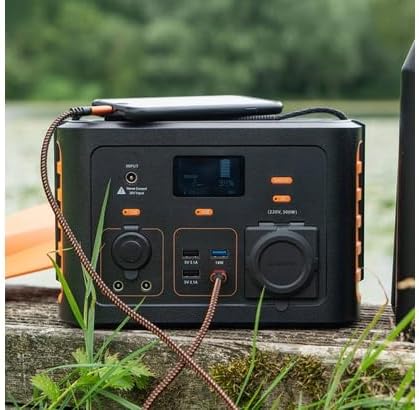
Image: The Xtorm XP300U Portable Power Station being used outdoors on a wooden surface, charging a smartphone, demonstrating its portability and utility in various environments.
Te tiaki
Ko te tiaki tika ka whakarite i te roa me te tino mahi o to teihana hiko.
- Te horoi: Whakamahia he kakahu ngohengohe, maroke hei horoi i waho o te waahanga. Kaua e whakamahi i nga kai horoi me nga whakarewa.
- Rokiroki:
- Whakaorangia te teihana hiko ki te waahi makariri, maroke, kia matara atu i te ra tika me te wera nui.
- Mo te rokiroki mo te wa roa, utuhia te waahanga ki te 50-80% ia 3-6 marama ki te pupuri i te hauora o te pākahiko.
- Āta karohia te penapena ki ngā taiao he nui te makuku.
- Tiaki Pūhiko: Do not fully discharge the battery frequently, as this can reduce its lifespan. Recharge promptly when the battery level is low.
Raparongoā
If you encounter issues with your Xtorm XP300U, refer to the following common problems and solutions.
| Raruraru | Take pea | Rongoā |
|---|---|---|
| Kāore te waeine e kā ana. | Kua pau katoa te pākahiko. | Connect the power station to an AC wall outlet and charge it for at least 30 minutes. |
| Ko te putanga AC kaore e mahi. | AC output not activated; device exceeds 300W; overheating. | Press the "AC" button to activate. Check device wattagTukua te waeine kia whakamatao mēnā ka wera rawa. |
| Ko nga tauranga USB kaore i te utu. | Device not compatible; cable faulty. | Ensure device is compatible. Try a different USB cable. |
| Puturi te utu. | Using a low-power charger; environmental factors (e.g., cloudy for solar). | Use the original AC charger or a higher wattage USB-C PD charger. Optimize solar panel placement. |
If the problem persists, please contact Xtorm customer support.
Whakatakotoranga
Detailed technical specifications for the Xtorm XP300U Portable Power Station.
| Āhuahira | Taipitopito |
|---|---|
| Ingoa Tauira | XP300U |
| Waitohu | Xtorm |
| Te Mana Putanga | 300 Wāti (AC) |
| Whakauru Voltage | 12 Volts (DC) |
| Puna Mana | AC Wall, USB-C PD, Solar, Car Charger |
| Nga Whakamahinga Manakohia | Home, Camping |
| Taumaha | 3300 Karamu (3.3 kg) |
| Tae | Karaka |
| Nga Waahanga kei roto | 1 package (Power Station, AC Charger, Car Charger, MC4 to DC Cable) |

Image: Dimensions of the Xtorm XP300U Portable Power Station (240mm x 154mm x 142mm) and its weight (3.3 kg), highlighting its convenient travel size.
Pūtāhui me te Tautoko
Xtorm products come with a standard warranty. Please refer to the warranty card included in your package or visit the official Xtorm webpae mo nga tikanga me nga tikanga whakamana.
For technical support, troubleshooting assistance, or warranty claims, please contact Xtorm customer service:
- Webpae: www.xtorm.eu (Tirohia ngā taipitopito whakapā tautoko)
- Īmēra: Refer to the Xtorm webpae mo nga wahitau imeera tautoko motuhake.
- Waea: Refer to the Xtorm webpae tukutuku mō ngā nama waea tautoko ā-rohe.
When contacting support, please have your product model (XP300U) and purchase details ready.


