Kupu Whakataki
Thank you for choosing the Baseus True Wireless Earphones Bowie E3. These earphones are designed to provide a high-quality audio experience with advanced features such as low latency, fast charging, and IP64 dust and water resistance. This manual will guide you through the setup, operation, maintenance, and troubleshooting of your new earphones.
Ka mutu te huaview

The Baseus Bowie E3 True Wireless Earphones, shown here in their open charging case, highlighting their compact and sleek white design.

Illustration demonstrating the Baseus Dual Channel Connection and Low Latency feature, indicating a delayed time of less than 0.06 seconds for fast response.

Visual representation of the Baseus Flash Charge capability, showing that 10 minutes of charging provides 2 hours of music playback.

Kati-ake view of the 13mm Titanium Vibrating Diaphragms, designed for well-balanced triple frequency and clear sound quality.
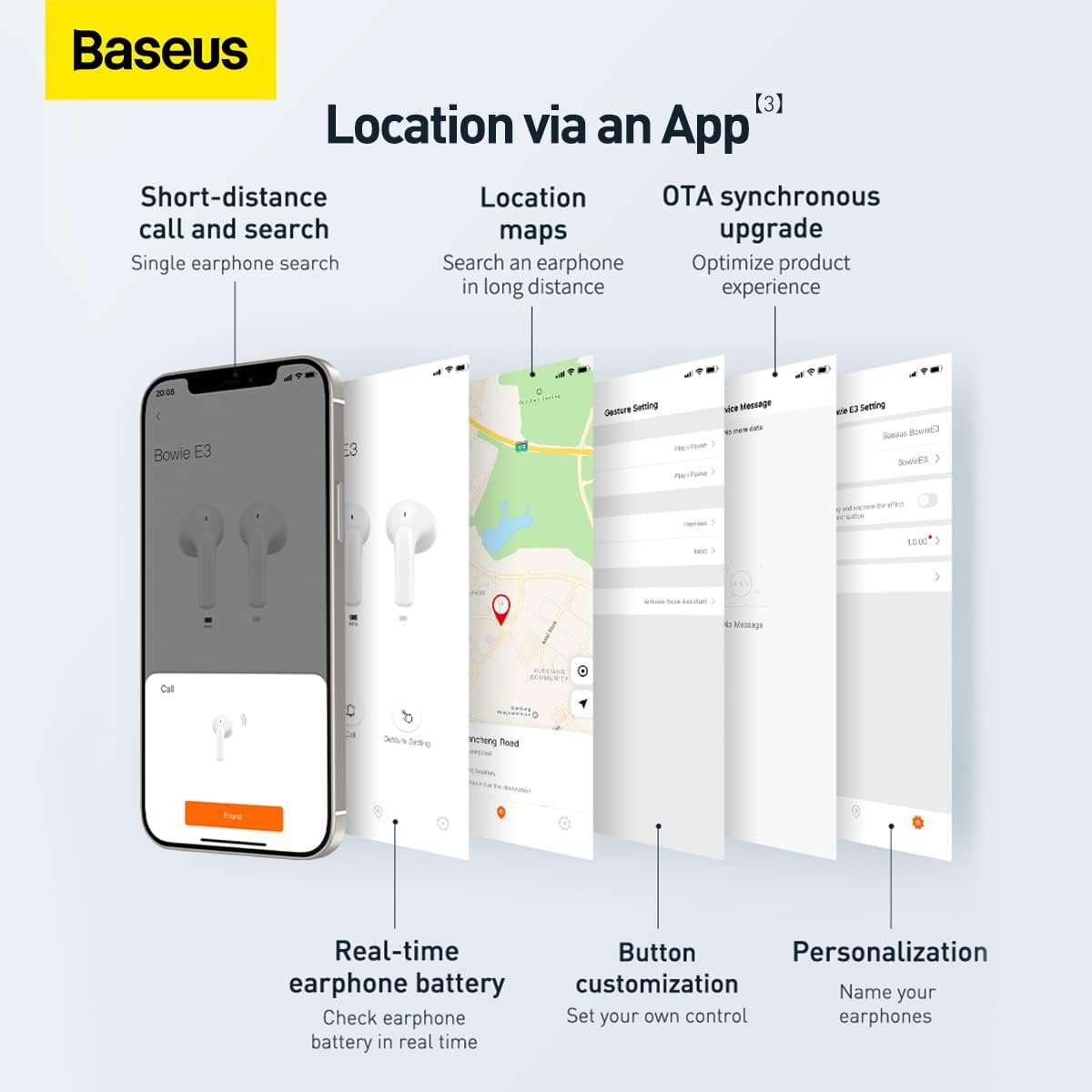
Screenshots illustrating the Baseus app features, including short-distance call and search, location maps, OTA synchronous upgrade, real-time earphone battery check, button customization, and personalization options.

Diagram showing the internal chip for Wireless 5.2 Stable Connection, indicating improved transmission rate and stability.

Summary of key features for Pure Music and Fast Response, including flash charge, 13mm PU+Titanium Moving Coils, 0.06 second delay, and location tracking via the app.

The retail packaging for the Baseus Bowie E3 True Wireless Earphones, displaying the product name and brand logo.
Tatūnga
1. Te Whakataki i nga Waea taringa me te Puhi
Before first use, fully charge the earphones and the charging case. Connect the charging case to a USB power source using a compatible USB-C cable. The indicator light on the case will show charging status.
- Flash Charge: Ma te utu 10-meneti e tata ana ki te 2 haora te purei puoro.
- Ensure the earphones are properly seated in the charging case for them to charge.
2. Tauhoa ki to Pūrere
- Whakatuwheratia te pouaka utu. Ka uru aunoa ngā taringa ki te aratau takirua.
- I runga i to taputapu (waea atamai, papa, aha atu), whakaahei i a Nihokikorangi.
- Rapua "Baseus Bowie E3" in the list of available Bluetooth devices.
- Select "Baseus Bowie E3" to connect. Once connected, a voice prompt will confirm successful pairing.
- Mō ngā whakamahinga o muri mai, ka hono aunoa ngā taringa ki te pūrere whakamutunga i honoa ina tangohia mai i te pouaka.
Nga Tohutohu Whakahaere
Mana Pa
The Baseus Bowie E3 earphones feature touch-sensitive controls on each earbud. The following actions are typically supported:
- Purei/Tatari: Paoa rua ki tetahi purongo.
- Riu Panuku: Patohia-toru te purongo taringa matau.
- Riu o mua: Patohia-toru te purongo maui.
- Whakautu/Whakamutu Waea: Paoa rua ki tetahi purongo.
- Whakakore Waea: Patohia me te pupuri i tetahi purongo mo te 2 hēkona.
- Whakahohe i te Kaiawhina Reo: Patohia me te pupuri i tetahi purongo mo te 3 hēkona.
Note: Specific touch controls may be customizable via the Baseus app.
Te whakamahi i te Taupānga Baseus
Download the official Baseus app from your device's app store to unlock additional features and customization options:
- Earphone Location: Use the app to locate your earphones if misplaced.
- Tūnga Pūhiko: Check the real-time battery level of each earbud.
- Whakaritenga Patene: Personalize touch controls to your preference.
- OTA Synchronous Upgrade: Receive firmware updates to optimize product experience.
- Whakawhaiaro: Name your earphones within the app.
Te tiaki
- Te horoi: Regularly clean the earphones and charging case with a soft, dry, lint-free cloth. Do not use abrasive cleaners or solvents.
- Ātete wai: The earphones are IP64 dustproof and waterproof. This means they are protected from dust ingress and splashing water from any direction. Do not submerge them in water or expose them to strong jets of water.
- Rokiroki: When not in use, store the earphones in their charging case to protect them and keep them charged. Store in a cool, dry place away from direct sunlight and extreme temperatures.
- Tiaki Pūhiko: Hei whakaroa i te ora o te pākahiko, kaua e tukua kia pau katoa te pākahiko o ngā taringa. Utuhia i ia wā, ahakoa kāore e whakamahia tonutia.
Raparongoā
| Raruraru | Take pea | Rongoā |
|---|---|---|
| Ko nga taringa kaore i te takirua | Bluetooth is off; earphones not in pairing mode; interference. | Ensure Bluetooth is on. Place earphones back in case, close, then reopen. Try pairing again. Move away from other wireless devices. |
| Karekau he oro mai i tetahi pukoro | Low battery; earbud not connected; dirty contacts. | Charge both earphones. Re-pair the earphones. Clean the charging contacts on the earbud and in the case. |
| Raro iti | Device volume too low; earbud placement; dirty earbud mesh. | Increase volume on your device. Adjust earbud position. Gently clean the earbud mesh. |
| Nga take utu | Cable or adapter fault; dirty charging port/contacts. | Try a different USB-C cable and power adapter. Clean the charging port and earbud contacts. |
| App not connecting to earphones | Earphones not paired to phone; app permissions. | Ensure earphones are connected via Bluetooth. Check app permissions in phone settings. Restart app. |
Whakatakotoranga
- Tauira: NGTW080002
- Waitohu: Baseus
- Hononga: Nihokikorangi 5.2
- Whakatakoto Taringa: I te Taringa
- Tauwehe Puka: I te Taringa
- Arataki: 32 Aue
- Mana Haruru: Wehenga oro
- Kaitaraiwa: 13mm Titanium Vibrating Diaphragms
- Rooputanga: 0.06 seconds (low latency)
- Kei te utu: Flash charge (10 min charge for 2h playback)
- Ātete wai: IP64 Te puehu me te parewai
- Pūhiko: 1 Lithium Ion battery required (per earbud, case has its own)
- Rahi Hua: 3.8 x 9.2 x 9.2 cm (packaging/case); 100 g
- Kaihanga: Baseus
- Whenua Taketake: Haina
- Wātea Tuatahi: 1 Maehe 2022
Pūtāhui me te Tautoko
Nga korero Whakaputanga
This product comes with a standard manufacturer's warranty. For specific warranty terms and conditions, please refer to the warranty card included in the product packaging or visit the official Baseus website. Extended warranty plans may also be available for purchase, such as 1-Year or 2-Year Extended Warranty Plans.
Tautoko Kiritaki
For technical assistance, troubleshooting beyond this manual, or warranty claims, please contact Baseus customer support through their official website or the contact information provided in your product documentation. Please have your product model number (NGTW080002) and purchase details ready when contacting support.
Rauemi ipurangi:
- Baseus Whaimana Webpae: www.baseus.com (Tirohia koa ngā āhuatanga ā-rohe webngā pae mō te tautoko motuhake)
- Baseus App: Available on iOS App Store and Android Google Play Store.


