Kupu Whakataki
This manual provides detailed instructions for the safe installation, operation, and maintenance of your bimar Wi-Fi Ceiling Fan, Model 1 (Ø 132). Please read this manual thoroughly before using the product and retain it for future reference.
Whakamahinga Whakamahinga: This high-performance ceiling fan is designed for ventilation in indoor domestic environments. Any other use is considered improper and potentially hazardous. The manufacturer cannot be held responsible for any damages resulting from improper use or repairs performed by unqualified personnel.
Nga Tohutohu Haumaru Nui
Hei whakaiti i te tupono o te ahi, te wiri hiko, te wharanga ranei o nga tangata, me titiro ki enei e whai ake nei:
- Pānuihia ngā tohutohu katoa i mua i te tāutanga o te pā hau.
- Ko te whakaurunga me mahi e tetahi tohunga hiko i runga i nga tikanga katoa o te rohe me te motu.
- Ensure the installation site can support the fan's weight (approximately 6.2 kg).
- Momotuhia i nga wa katoa te hiko i te waahi ara iahiko matua i mua i te whakaurunga, te ratonga ranei.
- Kaua e whakahaerehia te pā hau mēnā kua pakaru te taura hiko, te mono rānei.
- Keep hands, hair, and clothing away from moving blades.
- Do not insert any objects into the fan blades while it is operating.
- Ko tenei taputapu ehara i te mea mo te whakamahi ma te hunga (tae atu ki nga tamariki) he iti te kaha o te tinana, te tairongo, te hinengaro, te kore wheako me te mohiotanga, mena ka tukuna atu ki a raatau te tirotiro, te tohutohu ranei mo te whakamahi i te taputapu e te tangata whai mana mo to raatau haumaru.
- Me mataki nga tamariki kia kore ai ratou e takaro ki te taputapu.
He aha kei roto i te Pouaka
Your bimar Wi-Fi Ceiling Fan package includes the following components:
- bimar Wi-Fi Ceiling Fan unit (with 3 blades)
- Mana Mamao
- Mounting hardware (screws, brackets, etc.)
- Pukapuka Tohutohu (tenei tuhinga)

Image: The bimar Wi-Fi Ceiling Fan, featuring three light-colored wooden blades and a brushed metal motor housing and downrod.
Tatūnga me te Tāuta
1. Fan Tāuta
Professional installation by a qualified electrician is strongly recommended. Ensure the ceiling structure can safely support the fan's weight and that all wiring complies with local electrical codes.
- Whakapaia te Tauwāhi Whakapuru: Whakawetohia te hiko i te whati hiko. Āpitihia te pūmau whakapiri ki te tuanui, ki te pouaka putanga hau rānei.
- Assemble the Downrod and Motor: Whakapirihia te poupou ki te whare motopaika powhiriwhiri.
- Whakairihia te Pahi: Whakaarahia te hui tahi ka whakairihia mai i te awhi whakapuru.
- Waea te Poho: Connect the electrical wires (live, neutral, ground) from the ceiling to the fan's wiring, following the wiring diagram provided in the separate installation guide (if applicable).
- Whakapirihia nga Matatahi: Securely fasten the three blades to the motor housing.
- Whakaorangia te Pouaka: Raise the canopy to cover the wiring and mounting bracket, securing it in place.

Whakaahua: Taha view of the bimar ceiling fan, illustrating the angle of the light wood blades and the connection to the downrod.
2. Wi-Fi me te Hononga Taupānga
The bimar Wi-Fi Ceiling Fan is compatible with the Bimar Live Smart app for advanced control and scheduling.
- Tikiake i te Taupānga: Rapua "Bimar Live Smart" in your smartphone's app store (iOS or Android) and install it.
- Waihanga Pūkete: Whakatuwheratia te taupānga ka whai i nga tohutohu i runga-mata hei hanga i tetahi kaute kaiwhakamahi hou, takiuru ranei mena kei a koe tetahi.
- Tāpiri Pūrere: Power on the ceiling fan. In the Bimar Live Smart app, tap "Add Device" or the "+" icon. Select "Ceiling Fan" or the appropriate device type.
- Tūhono ki Wi-Fi: Follow the app's instructions to put the fan into pairing mode (usually by pressing a button on the fan or remote for a few seconds). Connect the fan to your home 2.4GHz Wi-Fi network.
- Whakaingoatia te Pūrere: Once connected, you can name your fan for easy identification within the app.

Image: A modern living room featuring the bimar ceiling fan installed, with a smartphone displaying the Bimar Live Smart app interface, indicating Wi-Fi and voice control capabilities.
Nga Tohutohu Whakahaere
Your bimar Wi-Fi Ceiling Fan offers multiple control options for convenience.
1. Te Whakahaere Mana Mamao
The included remote control allows direct access to all fan functions.
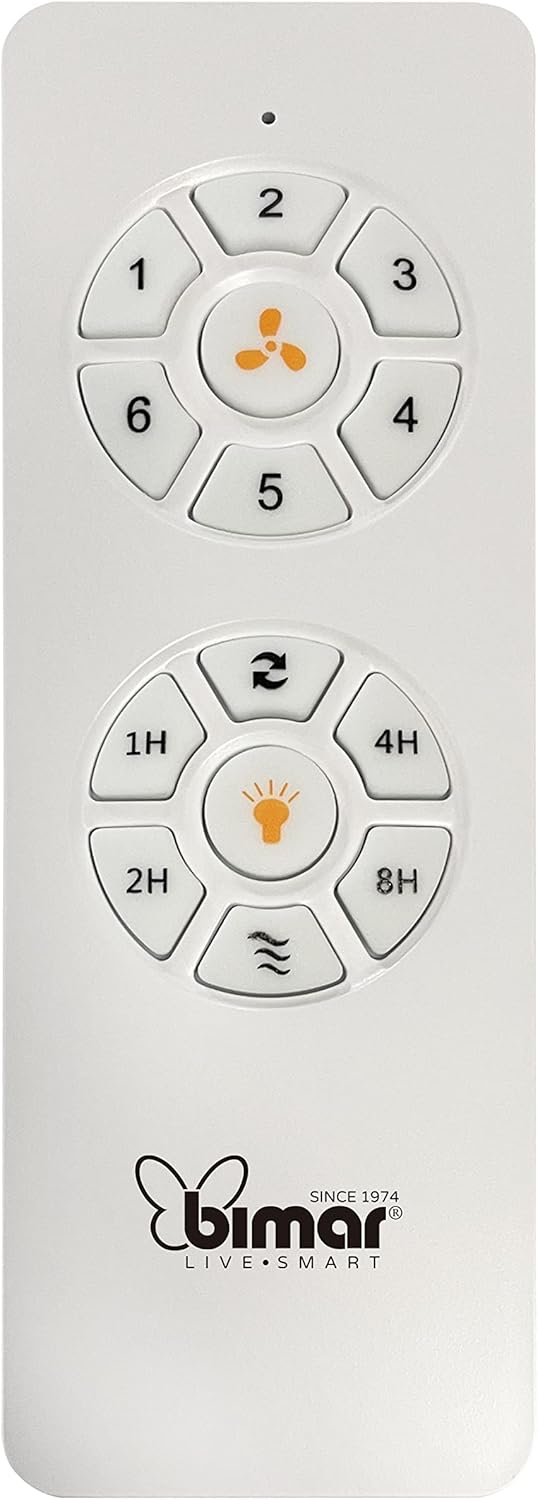
Image: The white remote control for the bimar ceiling fan, showing buttons for fan speed (1-6), fan on/off, timer (1H, 2H, 4H, 8H), mode selection, and reverse function.
- Hiko Whakaka/Weto: Pēhia te pātene ata pā hei whakakā, hei whakaweto rānei i te pā.
- Whakatikatika Tere: Use buttons 1-6 to select one of the six available fan speeds.
- Taumahi Matawā: Press 1H, 2H, 4H, or 8H to set the fan to automatically turn off after the selected duration.
- Kōwhiringa Aratau: Use the mode button (often represented by waves or arrows) to cycle through Normal, Natural, Sleep, and Breeze modes.
- Aratau Raumati/Hotoke: The reverse button (often two arrows forming a circle) changes the blade rotation direction.
2. App Control (Bimar Live Smart)
Once connected to the Bimar Live Smart app, you can access enhanced features:
- Mahi Mamao: Control all fan functions from anywhere with an internet connection.
- Whakahōtaka: Program daily and weekly on/off times for automated operation.
- Matawā: Adjust the timer from 1 to 8 hours.
- Mode and Speed Selection: Easily switch between the 6 speeds and 4 operating modes.
3. Mana Reo
The bimar Wi-Fi Ceiling Fan is compatible with popular voice assistants like Amazon Alexa and Google Assistant. After connecting the fan to the Bimar Live Smart app, link your Bimar account to your voice assistant app (e.g., Alexa app or Google Home app).
Example Reo Tono:
- "Alexa, whakakāhia te powhiri tuanui."
- "Hey Google, whakatauhia te tere o te peera tuanui ki te 3."
- "Alexa, turn off the ceiling fan in 1 hour."
4. Operating Modes and Speeds
- 6 Ventilation Speeds: Adjust the airflow intensity to your preference.
- Aratau Pūnoa: Te rere o te hau ōrite i te tere kua tohua.
- Aratau taiao: Ka whakatauira i ngā hau māori mā te whakarerekē i te tere o te pā.
- Aratau Moe: Operates at a lower, quieter speed for undisturbed rest.
- Aratau hau: Provides a gentle, intermittent airflow.
5. Summer/Winter Function
The reversible blade function allows for year-round use:
- Aratau Raumati (Hurihanga ki te taha maui): Ka waihanga i te hau e rere ana ki raro, ka puta he hau whakamatao.
- Aratau Hotoke (Hurihanga karaka): Creates an upward airflow, circulating warm air trapped near the ceiling, improving heating efficiency.

Image: A diagram illustrating the airflow patterns for summer (indirect ventilation, pushing air upwards) and winter (direct ventilation, pulling air downwards) modes of a ceiling fan.
Te tiaki
Ko te tiaki i nga wa katoa ka whakarite i te mahi tino pai me te roa o to powhiri tuanui.
- Te horoi: Before cleaning, ensure the fan is turned off and power is disconnected at the circuit breaker. Use a soft, damp cloth to wipe down the blades and motor housing. Do not use abrasive cleaners or solvents.
- Tirohanga Mata: Periodically check the blades for any signs of damage or warping. Ensure all blade screws are tight.
- Whakahinuhinu motuka: The fan's DC motor is designed for maintenance-free operation and does not require lubrication.
- Whakatikitia nga Piripiri: Over time, some fasteners may become loose. Check and tighten all screws and connections annually.

Whakaahua: He tata view of the bimar ceiling fan's brushed metal motor housing and the attachment points for the light wood blades, highlighting areas for cleaning and inspection.
Raparongoā
| Raruraru | Take pea | Rongoā |
|---|---|---|
| Kaore e timata te Fan | No power supply; Remote control battery low; Incorrect wiring. | Check circuit breaker and wall switch. Replace remote batteries. Verify wiring connections (consult electrician). |
| Ka wiri te Fan | Matatahi wetekina, taputapu whakapuru ranei; Matatahi kore taurite. | Ensure all blade screws and mounting screws are tight. Use a balancing kit (not included) if necessary. |
| Ko te mana mamao kaore e mahi | He iti te pākahiko; He ārai i waenga i te mana mamao me te kaiwhiwhi; Kāore te mana mamao i honoa. | Replace remote batteries. Ensure clear line of sight. Refer to pairing instructions in the full manual. |
| Nga take hononga Wi-Fi | Incorrect Wi-Fi password; Router too far; 5GHz network selected. | Verify Wi-Fi password. Move router closer or use a Wi-Fi extender. Ensure you are connecting to a 2.4GHz network. Reset fan and re-attempt pairing. |
| Ka haruru te Fan | Ngā tīwiri wetekina; Ngā mata e pā ana ki tētahi mea ārai; He raruraru mō te mōtini. | Check and tighten all screws. Ensure nothing is obstructing the blades. If noise persists, contact customer support. |
Whakatakotoranga
| Āhuahira | Taipitopito |
|---|---|
| Waitohu | bimara |
| Tau tauira | 1 |
| Hunga Hua | 132 x 132 x 27.5 cm (Diameter x Diameter x Height) |
| Taumaha | 6.2 kg |
| Te maha o nga Matatahi | 3 |
| Rauemi | Te rakau |
| Tae | Black (Note: Blades are light wood finish as shown in images) |
| Momo Motuka | DC (Brushless, energy-saving) |
| Whakamahi Hiko | 35W |
| Nga Tikanga Whakahaere | Remote Control, Bimar Live Smart App, Voice Control (Amazon Alexa, Google Assistant) |
| Nga Tere o te Kaiwhaiwhai | 6 |
| Aratau Mahi | Normal, Natural, Sleep, Breeze |
| Matawā | 1 ki te 8 haora |
| Nga waahanga taapiri | Silent operation, Summer/Winter mode (reversible blades) |
| Puna Mana | Hiko |
| Momo Tāuta | Maunga Pouaka |

Image: The three light wood fan blades, detached and laid flat, showcasing their design and texture.


Whakaahua: Rua views of the bimar ceiling fan, illustrating different downrod lengths: one with a 25 cm downrod and another with a 13 cm downrod, affecting the overall height of the fan.
Pūtāhui me te Tautoko
For warranty information, technical support, or service inquiries, please refer to the warranty card included with your product or visit the official bimar webpae. Puritia to tohu hoko mo nga kereme whakamana.
Kaihanga: Bimar S.r.l.
Whakapā: Tena tirohia the bimar store on Amazon or the official bimar webpae mo nga korero whakapiri.


