1. Kupu Whakataki
The Guardo Fit Coach Explore is an advanced activity tracker designed to monitor various aspects of your health and fitness. This manual provides essential information for setting up, operating, and maintaining your device to ensure optimal performance and longevity.
2. Ihirangi mokete
Tena koa tirohia kei roto katoa nga taonga kei roto i to kete:
- Guardo Fit Coach Explore Activity Tracker
- Uera Whakatau
- Pukapuka Kaiwhakamahi (tenei tuhinga)
3. Tatūnga
3.1 Te Whakataki i te Pūrere
Before first use, fully charge your Guardo Fit Coach Explore. Connect the charging cable to the charging port on the back of the device and plug the other end into a USB power source (e.g., computer, USB wall adapter). The device will display a charging indicator.

Whakaahua: Rear view of the activity tracker highlighting the charging contacts and sensors, alongside a display showing blood pressure readings.
3.2 Taupānga Tāuta me te Tauhoa
- Download the official Guardo Fit Coach app from your smartphone's app store (compatible with Android operating systems).
- Me mohio kei te whakahohea te Nihokikorangi i runga i to waea atamai.
- Whakatuwheratia te taupānga ka whai i nga tohutohu i runga-mata hei hanga i tetahi kaute, takiuru ranei.
- Tīpakohia 'Tāpiri Pūrere' ranei 'Tauhoa Pūrere Hou' i roto i te taupānga.
- The app will search for your Guardo Fit Coach Explore. Select your device from the list to initiate pairing.
- Confirm the pairing request on both your smartphone and the activity tracker if prompted.

Image: The activity tracker worn on a wrist, showing a watch face with icons for different applications, indicating smartphone connectivity.
4. Nga Tohutohu Whakahaere
4.1 Whakaterenga Taketake
The Guardo Fit Coach Explore features a touchscreen display for interaction. Swipe left, right, up, or down to navigate through menus and features. Tap to select an option or confirm an action. The device may also have physical buttons for specific functions like power on/off or returning to the home screen.

Image: The activity tracker's display showing a customizable watch face with a unique spiral graphic.
4.2 Te Whiwhi Pānui
Once paired with your smartphone, the activity tracker can display notifications for incoming calls, messages, and app alerts. Ensure notification permissions are granted in your smartphone's settings and within the Guardo Fit Coach app.

Image: The activity tracker's screen showing an incoming call notification with the caller's number and options to answer or reject the call.
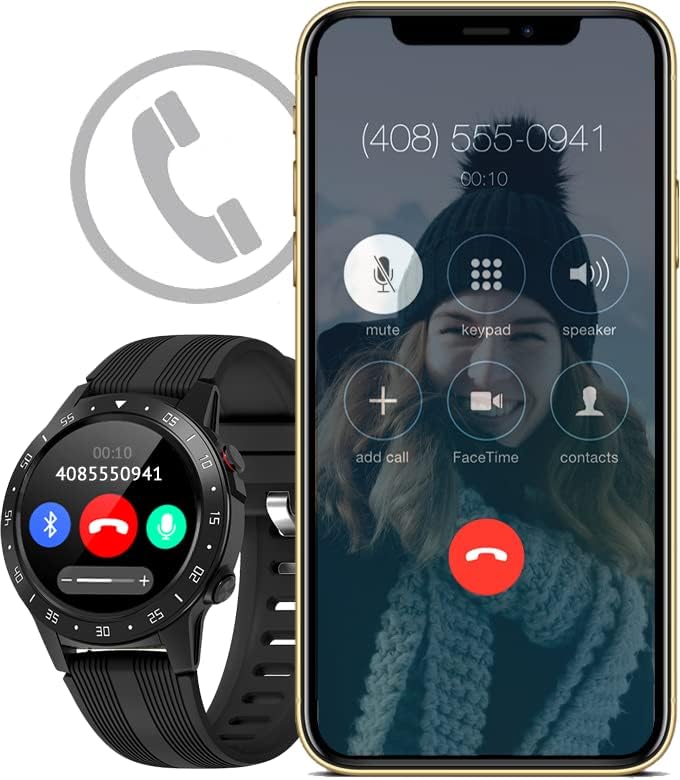
Image: The activity tracker and a smartphone side-by-side, both indicating an incoming call, demonstrating call notification synchronization.
4.3 Mana Waiata
Control music playback on your paired smartphone directly from your activity tracker. This feature allows you to play, pause, skip tracks, and adjust volume without needing to access your phone.

Image: The activity tracker and a smartphone displaying synchronized music playback interfaces, allowing remote control of audio.
5. Nga ahuatanga
The Guardo Fit Coach Explore offers a range of features to support your active lifestyle:
- Aroturuki hakinakina maha: Track various activities such as indoor and outdoor sports, cycling, and climbing.
- Custom Activity Tracking: Monitor specific activities with tailored settings.
- GPS: Built-in GPS for accurate tracking of routes and distances during outdoor activities.
- Aroturuki Reiti Manawa: Aroturuki tonu i to reanga ngakau.
- Kaupane Toto Toto: Measure your blood pressure directly from the device.
- Whakamōhiotanga: Whiwhi matohi mo nga waea, karere, me nga whakamohiotanga taupānga.
- Kāpehu: Integrated digital compass for navigation.
- inenga whakatere: Measures movement and activity.
- Altimeter: Measures altitude, useful for hiking and climbing.
- Barometer: Measures atmospheric pressure, aiding in weather prediction and altitude accuracy.

Image: The activity tracker's display surrounded by icons symbolizing its diverse functionalities, including communication and utility features.

Image: The activity tracker's screen showing real-time GPS data, such as distance covered, pace, and heart rate, overlaid on a map.
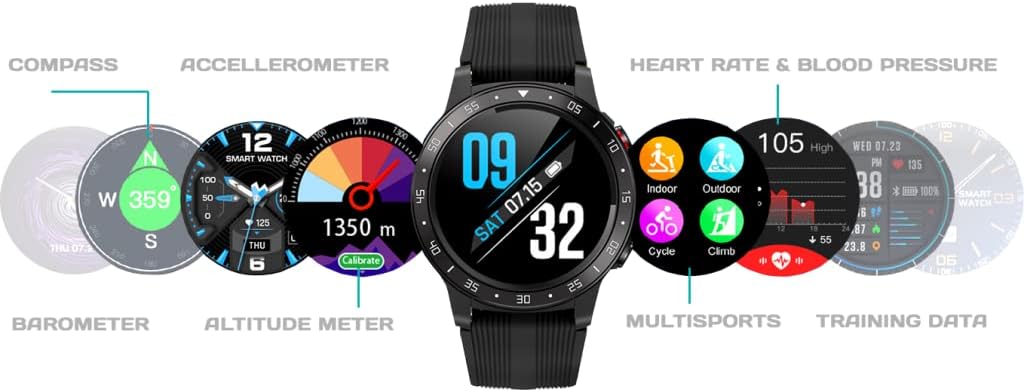
Whakaahua: He matawhānui view of the activity tracker's display, showcasing various data points from its integrated sensors, including environmental and health metrics.
6. Tiaki
6.1 Te horoi
Regularly clean your activity tracker to prevent skin irritation and maintain device functionality. Use a soft, damp, lint-free cloth to wipe the screen and strap. Avoid harsh chemicals or abrasive materials.
6.2 Tiaki Pūhiko
To prolong battery life, avoid exposing the device to extreme temperatures. Charge the device regularly, but avoid leaving it fully charged or fully depleted for extended periods.
7. Te Raru
7.1 Kaore te Pūrere e Huri ana
- Me whakarite kia utua katoatia te taputapu. Honoa ki te rihi mō te iti rawa 30 meneti.
- Press and hold the power button (if applicable) for 10-15 seconds to attempt a forced restart.
7.2 Nga Take Takirua
- Ensure Bluetooth is enabled on your smartphone and the device is within range.
- Restart both your smartphone and the activity tracker.
- Forget the device in your smartphone's Bluetooth settings and attempt to pair again through the Guardo Fit Coach app.
- Tirohia mēnā kua whakahōungia te taupānga ki te putanga hōu.
7.3 Nga Panui Tikanga
- Ensure the device is worn snugly on your wrist, about one finger's width above your wrist bone.
- Horoia ngā pūoko kei muri o te taputapu.
- Mō te GPS, kia mōhio kei roto koe i tētahi wāhi tuwhera, mārama hoki view o te rangi.
8. Whakatakotoranga
| Āhuahira | Whakatakotoranga |
|---|---|
| Waitohu | Ka mau ahau |
| Tauira | Torotoro |
| Pūrere Hototahi | Smartphone (Android OS) |
| Momo Whakaatu | LCD |
| Rahi Mata | 40 Mirimita |
| Hononga Ahokore | Nihokikorangi |
| GPS | GPS kua whakaurua |
| Pūrere Whakauru | Hopuoro, Mata pā |
| Kei roto nga Pikohiko Rechargeable | Ae |
| Nga waahanga motuhake | Custom activity tracking, Blood pressure monitor, GPS, Notifications, Multisport Tracker |
9. Nga korero haumaru
- Kaua e ngana ki te whakatuwhera, ki te wetewete ranei i te taputapu.
- Tiakina te taputapu mai i nga wera nui, te ra tika, me te makuku.
- This device is not a medical instrument. The data provided is for reference only and should not be used for medical diagnosis or treatment.
- Consult your doctor before starting any new exercise regimen or if you have any health concerns.
- Makahia te taputapu me tona pākahiko kia rite ki nga ture o te rohe.


