1. Kupu Whakataki
This manual provides comprehensive instructions for the setup, operation, maintenance, and troubleshooting of your SteelSeries Arctis Nova 3 Multi-Platform Gaming Headset. Please read this manual thoroughly before using the product to ensure optimal performance and longevity.
The Arctis Nova 3 headset features the custom-designed Nova Acoustic System with High Fidelity Drivers, 360° Spatial Audio, and a 10-band Parametric EQ. It includes an AI-powered noise-cancelling ClearCast Gen 2 microphone and dynamic RGB lighting. Designed for multi-platform compatibility, it connects via USB-C to PC, PlayStation, Xbox Series X|S, Switch, and mobile devices.
2. Hua Neke Atuview
2.1 Ihirangi mokete
- SteelSeries Arctis Nova 3 Gaming Headset
- USB-C ki USB-C Cable
- USB-C ki te USB-A Adapter Cable
- USB-C ki 3.5mm Ororongo Cable
- Tuhinga (tenei pukapuka)
2.2 Ngā Wāhanga o te Paneoro
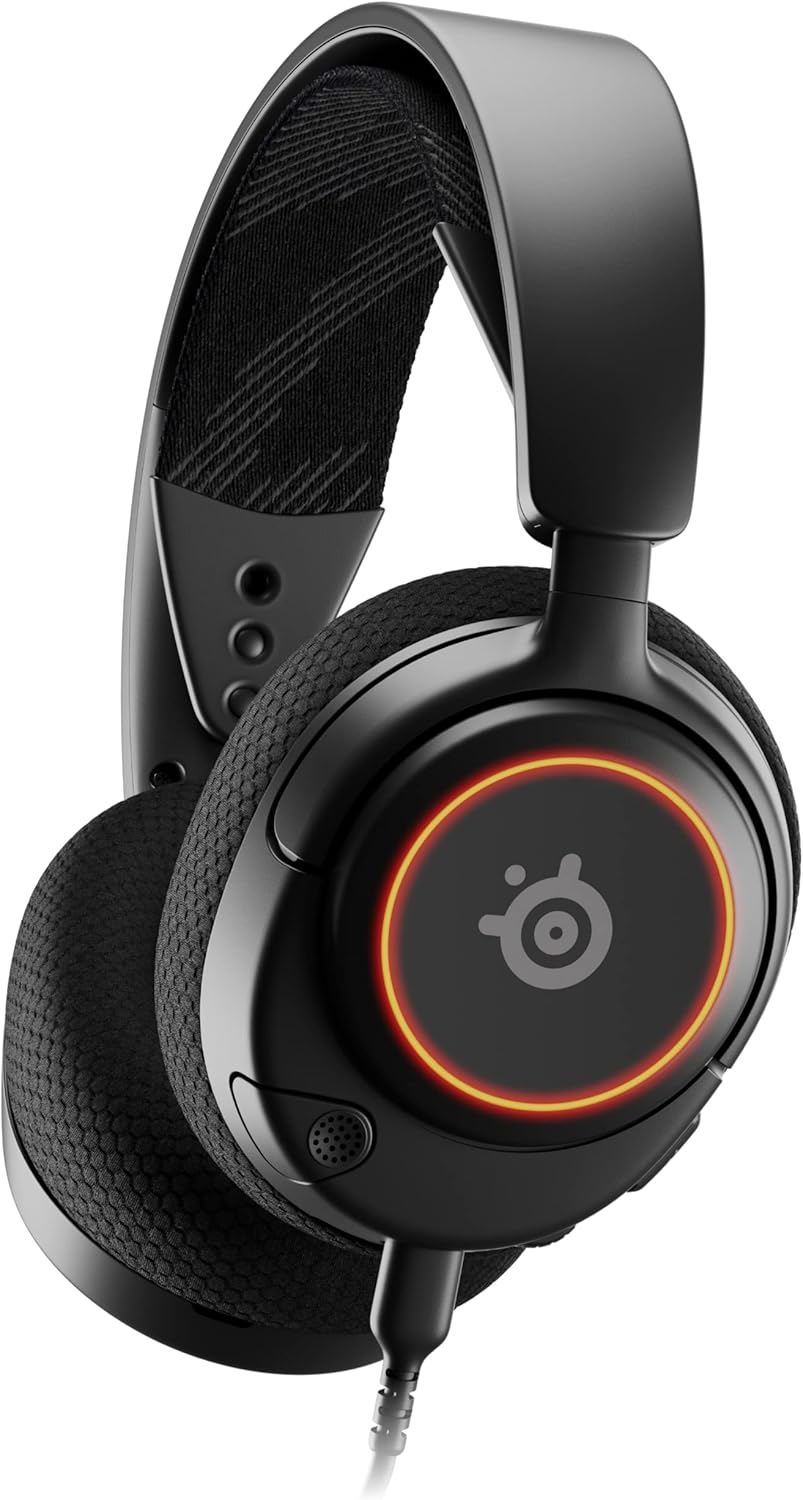
Whakaahua 1: Mua view of the Arctis Nova 3 headset.

Whakaahua 2: Key features of the Arctis Nova 3, including ComfortMAX System, 360° Spatial Audio, Dual-Zone RGB, Nova Acoustic System, ClearCast Gen 2 AI-Powered Noise-Cancelling Mic, and Multi-Platform Support.
- Pūnaha ComfortMAX: Features height-adjusting, rotating earcups with AirWeave Memory Foam cushions and a stretchy band for comfortable wear.
- ClearCast Gen 2 Mic: AI-powered noise-cancelling microphone, fully retractable into the earcup.
- Dual-Zone RGB Lighting: Customizable 16.8 million color options on the earcups.
- Nova Acoustic System: Custom-designed with High Fidelity Drivers for superior sound.
- Mana: Volume wheel and microphone mute switch located on the earcup.
- Connectivity Port: USB-C port for various cable connections.
3. Tatūnga
3.1 Te Hononga i te Paneoro
The Arctis Nova 3 offers versatile connectivity options:
- Hononga USB-C: Use the provided USB-C to USB-C cable to connect directly to devices with a USB-C port (e.g., PC, PlayStation 5, Nintendo Switch, mobile devices).
- Hononga USB-A: For devices with only USB-A ports, use the USB-C to USB-A adapter cable. Connect the USB-C end to the headset and the USB-A end to your device.
- Hononga Ororongo 3.5mm: For devices requiring a 3.5mm audio jack (e.g., Xbox controllers, older consoles, some mobile devices), use the USB-C to 3.5mm audio cable. Connect the USB-C end to the headset and the 3.5mm jack to your device.
Ataata 1: Ka mutu te huaview demonstrating various connectivity options and features of the Arctis Nova 3 headset.
Ataata 2: He 360-tohu view of the Arctis Nova 3 Black headset, showcasintōna hoahoa me ngā āhuatanga mai i ngā koki katoa.
3.2 Te Whakatikatika i te Taunga
The ComfortMAX System allows for personalized fit:
- Whakatikatika Pane: The elastic suspension band can be adjusted to different lengths using the three holes on each side of the headband, ensuring a comfortable fit that distributes weight evenly.
- Te Hurihanga o te Kapu Taringa: The earcups can rotate 90 degrees, allowing the headset to lay flat for storage or comfortable resting around the neck.

Whakaahua 3: The adjustable headband and rotating earcups of the Arctis Nova 3 for a personalized and comfortable fit.

Whakaahua 4: The super lightweight design (253g) of the Arctis Nova 3 with memory foam earcup cushions for extended comfort.
4. Nga Tohutohu Whakahaere
4.1 Ngā Mana Ororongo
- Wīra Rōrahi: Rotate the wheel on the left earcup up or down to adjust the headset's audio volume.
- Whakawhiti Wahangu hopuoro: Slide the switch on the left earcup to mute or unmute the ClearCast Gen 2 microphone. An orange indicator will be visible when muted.
4.2 Whakamahinga Waorooro
- Toro/Whakahokia: The ClearCast Gen 2 microphone is fully retractable. Gently pull it out from the left earcup for use and push it back in for storage.
- Turanga: Whakatakotoria te hopuoro kia tata ki te 1-2 inihi te tawhiti mai i tō waha kia tino mārama ai te reo.

Whakaahua 5: The ClearCast Gen 2 mic, which silences background noise and fully retracts into the earcup.
4.3 RGB Lighting Customization (PC Only)
Dynamic RGB lighting can be customized via the SteelSeries Engine software on PC. This allows for 16.8 million color options and reactive lighting effects.

Whakaahua 6: Customizable PrismSync RGB lighting with 16.8 million colors on the Arctis Nova 3 headset.
5. Tiaki
- Te horoi: Whakamahia he kakahu ngohengohe, maroke hei horoi i te pane whakarongo. Āta karohia ngā kaihoroi whakakoi, ngā whakarewa rānei.
- Rokiroki: Whakaorangia te pane ki te waahi makariri, maroke atu i te ra tika me te wera nui.
- Tiaki taura: A ape i nga piko koi, te toia nui ranei o nga taura kia kore ai e pakaru.
6. Te Raru
| Raruraru | Take pea | Rongoā |
|---|---|---|
| Kaore he ororongo mai i te pane | Incorrect connection, low volume, muted device. | Ensure cables are securely connected. Check headset volume wheel and device audio settings. Confirm device is not muted. |
| Kaore e mahi ana te hopuoro | Microphone muted, incorrect input device selected, mic not extended. | Check microphone mute switch (orange indicator means muted). Ensure microphone is fully extended. Verify correct input device is selected in your system's sound settings. |
| RGB lighting not working (PC) | Software issue, incorrect USB connection. | Ensure SteelSeries Engine software is installed and updated. Confirm headset is connected via USB-C or USB-A (RGB not supported via 3.5mm). |
| Te mamae i te wa e whakamahia ana | He pai te pai. | Adjust the elastic headband and earcup positions for optimal comfort. |
7. Whakatakotoranga
| Āhuahira | Taipitopito |
|---|---|
| Ingoa Tauira | SteelSeries Arctis Nova 3 Multi-Platform Gaming Headset |
| Tau tauira | 61631 |
| Hangarau Hononga | USB-C (includes USB-A and 3.5mm adapters) |
| Momo Atekōkiri Ororongo | Dynamic Driver (Nova Acoustic System) |
| Whakautu auau | 20-22000 Hz |
| Te aukati | 36 Aue |
| hopuoro | ClearCast Gen 2 AI-Powered Noise-Cancelling, Retractable |
| Ororongo Mokowā | 360° Spatial Audio (compatible with Tempest 3D Audio for PS5 / Microsoft Spatial Sound) |
| Taumaha | 8.3 hekere (tata ki te 235g) |
| Ahu (LxWxH) | 7.32 x 6.82 x 3.47 inihi |
| Rauemi | Foam, Aluminum |
| Rarama RGB | Dynamic 16.8 million color options (PrismSync RGB) |
| Pūrere Hototahi | PC, PlayStation 5|4, Xbox Series X|S, Switch, Mobile |
8. Pūtāhui me te Tautoko
For warranty information and technical support, please visit the official SteelSeries webpaetukutuku, whakapā atu ranei ki ta raatau ratonga kaihoko. Puritia to tohu hoko mo nga kereme whakamana.
Official SteelSeries Webpae: SteelSeries Store on Amazon


