1. Kupu Whakataki
Thank you for choosing the Baseus Super Energy Air Car Jump Starter. This device is a versatile and essential tool for any vehicle owner, combining the functionality of a powerful car jump starter with a portable power bank. It is designed to provide reliable emergency starting power for 12V vehicles and can also charge your electronic devices on the go. Please read this manual carefully before use to ensure safe and optimal performance.

Image: The Baseus Super Energy Air Car Jump Starter unit, showing the main power bank, smart clamps, and a USB charging cable.
2. Ihirangi mokete
- Baseus Super Energy Air Car Jump Starter Unit
- Smart Jump Starter Clamps (Whero mō te pai, Mangu mō te kino)
- Taura Whakatau USB (Momo-C)
- Pukapuka Kaiwhakamahi (Tenei tuhinga)

Image: The retail packaging for the Baseus Super Energy Air Car Jump Starter, indicating the product inside.
3. Hua Neke Atuview
Familiarize yourself with the components of your jump starter:
- Waeine Matua: Contains the battery, control circuitry, and charging ports.
- Pātene Hiko: Activates the device and checks battery level.
- Whakaatu LED: Whakaatu ai i te pene puhikotage.
- Tauranga Huaputa USB-A: For charging external devices (5V/2.4A Max).
- Tauranga Whakauru/Tuhinga USB-C: For charging the jump starter or external devices (5V/2.4A Max).
- Tauranga Tīmatanga Peke: Connects to the smart clamps.
- Rama LED ohorere: Mahi rama whakauru.
- Cl atamaiamps: Whero (+) me te Pango (-) clamps with built-in safety features.
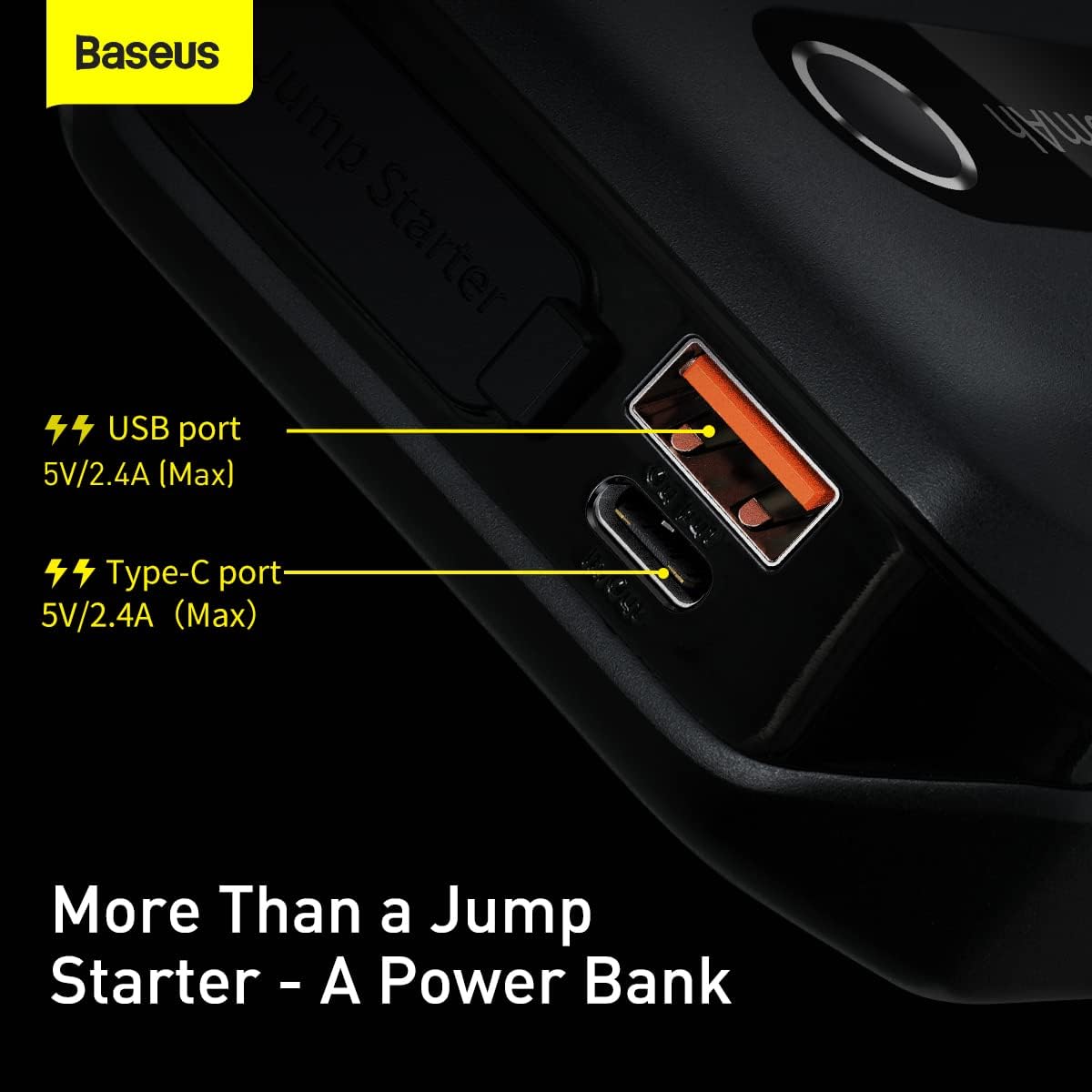
Whakaahua: He taipitopito view of the Baseus Jump Starter's side, highlighting the USB-A and USB-C ports for charging external devices and the unit itself.
4. Te Whakahau i te Tīmatanga Peke
Before first use, fully charge the jump starter. It is recommended to keep the unit charged above 50% for optimal performance and longevity.
- Connect the provided USB-C charging cable to the USB-C input port on the jump starter.
- Connect the other end of the USB-C cable to a USB wall adapter (not included) or a car charger.
- The LED display will show the charging progress. The unit is fully charged when the display shows 100%.
He maha nga haora ka pau te utu ki runga i te puna hiko.
5. Operating Instructions: Vehicle Jump Starting
This device is designed to jump start 12V vehicles with dead batteries, even in low temperatures.

Image: The Baseus Jump Starter connected to a car battery, demonstrating its ability to jumpstart even at -20°C.
Steps to Jump Start Your Vehicle:
- Whakaritea te Haumaru: Park your vehicle in a safe location, engage the parking brake, and turn off all electrical accessories.
- Hono Clamps to Jump Starter: Whakauruhia te mono kikorangi o te rama atamaiamps into the jump start port on the main unit. Ensure it is fully inserted.
- Hono Clampki te Pūhiko:
- Honoa te Whero (+) clamp ki te pai (+) te pūwāhi o te pākahiko o tō waka.
- Honoa te KOREHI (-) clamp ki te koretake (-) te pūwāhi o te pākahiko o tō waka.
Ensure a good connection. The smart clamps have indicator lights that will show connection status.
- Tīmata Waka: Kotahi te clamps are correctly connected and the indicator light on the smart clamps is solid green, start your vehicle's engine.
- Tango Clamps: As soon as the engine starts, immediately remove the smart clamps from the vehicle battery, then disconnect the clampmai i te waeine tīmata peke.
Ki te kore te waka e tīmata i te nganatanga tuatahi, tatari kia 30 hēkona pea i mua i te ngana anō. Kaua e ngana ki te neke atu i te 3 ngā tīmatanga peke karapīpiti me te kore e tuku i te waeine kia whakamatao.
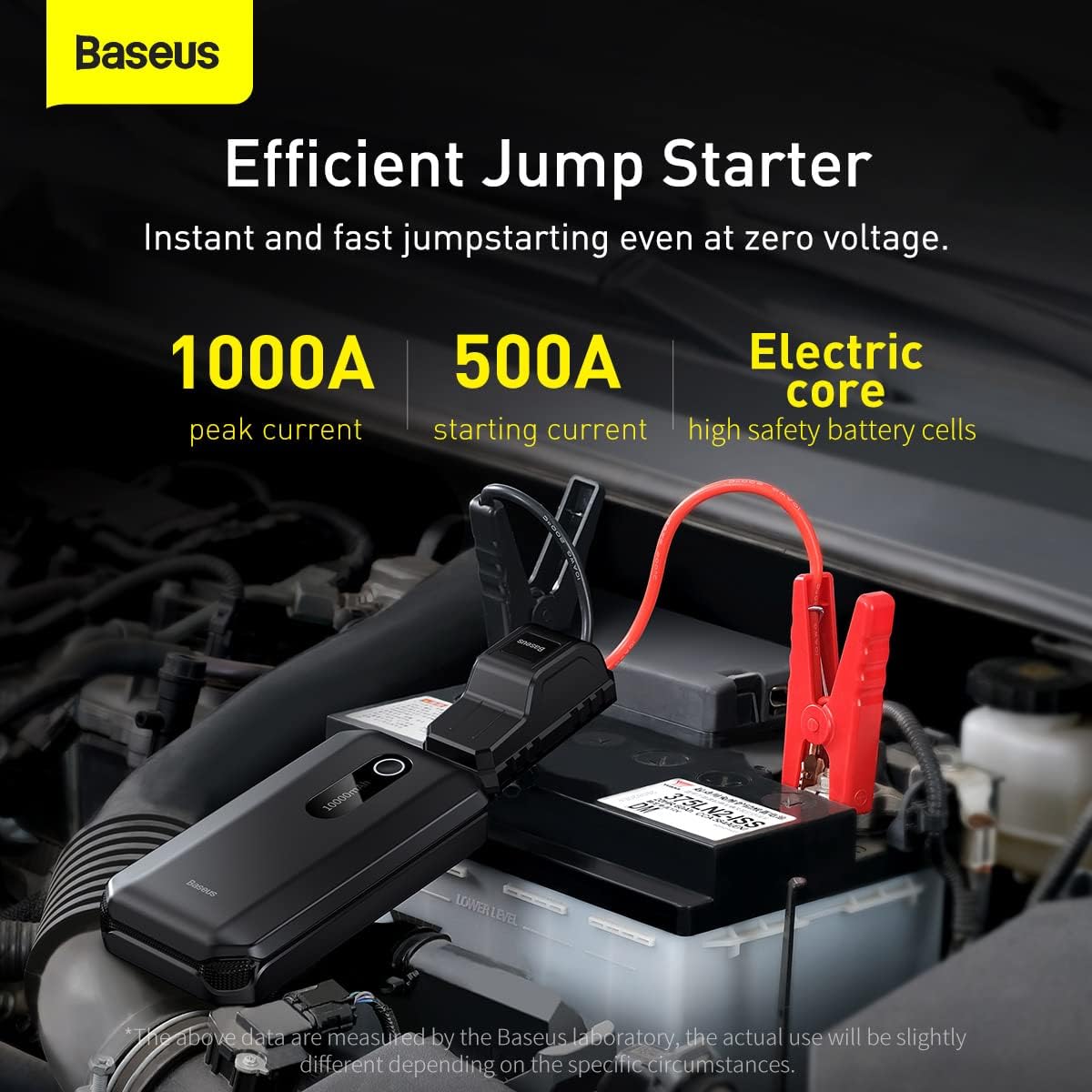
Image: The Baseus Jump Starter connected to a car battery, illustrating its efficient jumpstarting capabilities with 1000A peak current and 500A starting current.
6. Operating Instructions: Power Bank Function
The Baseus Super Energy Air Car Jump Starter can also function as a portable power bank to charge your electronic devices.
- Connect your device's USB charging cable to either the USB-A or USB-C output port on the jump starter.
- Ka tīmata aunoa te peke tīmata ki te utu i tō pūrere.
- Hei whakamutu i te utu, momotu noa i tō pūrere.
The unit provides 5V/2.4A (Max) output from both USB-A and USB-C ports.
7. Whakatupato Haumaru
Kia mau ki nga aratohu haumaru e whai ake nei:
- Do not short-circuit the jump starter.
- Kaua e wetewetehia te waeine.
- Do not expose the unit to extreme temperatures (above 60°C or below -20°C).
- Kaua e rukuhia te waeine ki te wai.
- Kaua e taea e nga tamariki.
- Ensure proper polarity when connecting to a vehicle battery (Red to +, Black to -). Reverse polarity can damage the unit and/or vehicle.
- Do not use the jump starter if it is damaged or swollen.
- Remove the jump starter from the vehicle battery immediately after the engine starts.
8. Te Whakatikatika me te Penapena
- Kei te utu: Recharge the unit every 3-6 months, even if not used, to maintain battery health.
- Te horoi: Wipe the unit with a dry, soft cloth. Do not use harsh chemicals or abrasive cleaners.
- Rokiroki: Store the jump starter in a cool, dry place, away from direct sunlight and flammable materials.

Whakaahua: He tata view of the internal battery layers, illustrating the long-lasting battery design of the Baseus Jump Starter.
9. Te Raru
| Raruraru | Take pea | Rongoā |
|---|---|---|
| Kāore te waka e tīmata. | Low battery on jump starter; Incorrect clamp connection; Vehicle battery completely dead. | Ensure jump starter is fully charged; Check clamp connections for proper polarity and secure contact; Try again after 30 seconds. If battery is completely dead, it may require professional assistance. |
| Kāore te tīmatanga peke e utu ana. | Faulty charging cable or adapter; Loose connection. | Try a different USB-C cable and/or wall adapter; Ensure cable is securely plugged into both the jump starter and power source. |
| Cl atamaiamps indicator light is red/flashing. | Reverse polarity; Short circuit; Over-temperature. | Disconnect immediately and re-connect clamps with correct polarity; Check for any metal objects causing a short; Allow unit to cool down if it's hot. |
10. Whakatakotoranga
- Tauira: CGNL020101
- Waitohu: Baseus
- Taumata o nāianei: 1000A
- Tīmata Onāianei: 500A
- Momo Pūhiko: Hikahiko Polymer
- Tāuru (USB-C): 5V / 2.4A Max
- Putanga (USB-A): 5V / 2.4A Max
- Putanga (USB-C): 5V / 2.4A Max
- Rahi Hua: 3.94 x 1.97 x 1.18 inihi (hua)
- Taumaha Tūemi: 1.1 pauna (hua)
- Te Waahi Mahi: -20°C ki te 60°C
11. Pūtāhui me te Tautoko
Baseus products are designed and manufactured to the highest quality standards. For warranty information, technical support, or service inquiries, please refer to the warranty card included with your product or visit the official Baseus webpae. Tena koa pupurihia to tohu mo te hoko mo nga kereme whakamana.
Kaihanga: Baseus
Tau tauira: CGNL020101
Te Ra Tuatahi Wātea: Pipiri 5, 2024


