1. Hua Neke Atuview
The Sinotimer TM618N-2 is a versatile 7-day weekly digital programmable timer designed for automated control of electrical equipment. It allows users to set specific daily or weekly schedules for turning devices on and off, ensuring efficient energy management and convenience. This timer is suitable for a wide range of applications, including controlling lighting, heating, ventilation, and other electrical appliances.

Whakaahua 1: Mua view of the Sinotimer TM618N-2 Digital Timer, showing the display and control buttons.
2. Nga waahanga matua
- Weekly Programmable: Allows up to 16 ON/OFF programs per day or week.
- Mahi-maha: Includes Clock display, Timer, Countdown, Automatic weekly time deviation correction, and Sleep mode.
- Raukaha Teitei: Tautoko 16 Amp / 220 Volt AC loads.
- Whanui Voltage Hototahitanga: Operates with 220V, 230V, 240V AC.
- Pūhiko Hanga-roto: Ka pupuri i nga tautuhinga i te wa o te hiko outages (Lithium battery type).
- Nga tono maha: Ideal for controlling dryers, defrosting equipment, swimming pool pumps, gates, lighting, and more.
3. Whakatakotoranga
| Āhuahira | Taipitopito |
|---|---|
| Tauira | TM618N-2 |
| Waitohu | Sinotimer |
| Voltage | 220V / 230V / 240V AC |
| Whakatauranga o naianei | 16 Amp |
| Te maha o nga Papatono | 16 nga kaupapa ON/OFF |
| Rauemi | Kirihou |
| Momo Pūhiko | Lithium (internal, non-replaceable by user) |
| Tae | Multi-color (typically white/grey) |
4. Tāutanga
Panui Haumaru Nui: Installation should only be performed by a qualified electrician. Ensure power is disconnected before attempting any wiring.
- Whakapiki: The TM618N-2 is designed for DIN rail mounting or screw mounting. Secure the timer in a suitable electrical enclosure.
- Waea waea: Refer to the wiring diagram on the back of the unit.
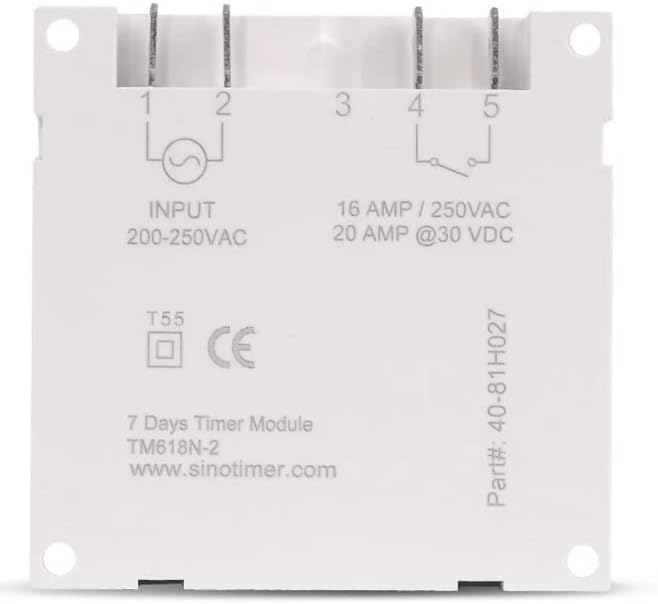
Whakaahua 2: Hoki view of the Sinotimer TM618N-2, showing input/output terminals and wiring diagram.
- Input (Terminals 1 & 2): Connect your 200-250VAC power supply to these terminals.
- Output (Terminals 3, 4, & 5):
- Teihana 3: Noa (COM)
- Terminal 4: Normally Open (NO) - Connect your load here for switched power.
- Terminal 5: Normally Closed (NC) - (Less commonly used for timer applications, but available).
- Whakahiko: Once wiring is complete and secure, restore power to the circuit. The timer display should illuminate.

Figure 3: Technical drawing showing the dimensions of the Sinotimer TM618N-2 timer.
5. Nga Tohutohu Whakahaere
5.1. Nga Mahi Patene
- KAraka: Used to set the current time and day.
- PROG: Enters/exits programming mode for ON/OFF schedules.
- WIKI: Selects the day(s) of the week during time or program setting.
- HOUR: Adjusts the hour during time or program setting.
- MIN: Adjusts the minute during time or program setting.
- WHAKAMAHI: Recalls or cancels a program setting.
- MANUAL: Manually overrides the timer's current state (ON/AUTO/OFF).
- R (Tautuhi Anō): Small button (requires a pointed object) to reset the timer to factory defaults.
5.2. Te Tautuhinga Wā me te Rā o nāianei
- Patohia me te pupuri i te KARAKA pātene.
- I te wa e mau ana KARAKA, perehi WIKI to set the current day (MO, TU, WE, TH, FR, SA, SU).
- I te wa e mau ana KARAKA, perehi HOUR ki te whakarite i te haora o naianei.
- I te wa e mau ana KARAKA, perehi MIN ki te tautuhi i te meneti o naianei.
- Tukua te KARAKA paatene hei whakaora i nga waahi.
5.3. Programming ON/OFF Schedules
The timer supports up to 16 ON and 16 OFF programs. Each program can be set for a specific day or group of days.
- Pehia te MAUI kotahi te paatene. Ka whakaatu te whakaaturanga "1 ON".
- Perehi WIKI repeatedly to select the desired day(s) for this program (e.g., MO, TU, WE, TH, FR, SA, SU; MO-FR; SA-SU; MO-SA; etc.).
- Perehi HOUR to set the desired ON hour.
- Perehi MIN to set the desired ON minute.
- Perehi MAUI ano. Ka whakaatu te whakaaturanga "1 OFF".
- Whakahokia ngā taahiraa 2-4 hei whakarite i te wā OFF e hiahiatia ana mō te hōtaka tuatahi.
- Perehi MAUI to move to the next program ("2 ON", "2 OFF", etc.) and repeat the process for up to 16 programs.
- Hei puta atu i te aratau hōtaka me te tiaki i ngā tautuhinga, pēhi i te pātene KARAKA pātene.
5.4. Whakakahoretanga A-Ringa
Pehia te MANUAL button to cycle through the output modes:
- ON: Output is continuously ON, ignoring programs.
- MOTO: Output follows the programmed schedules.
- WATE: Output is continuously OFF, ignoring programs.
Me whakarite kei roto te matawā AUTO mode for programmed operation.
5.5. Resetting the Timer
To clear all settings and return the timer to its factory default state, insert a pointed object (like a paperclip) into the small R (Reset) hole and press gently.
6. Tiaki
The Sinotimer TM618N-2 requires minimal maintenance.
- Kia noho ma te taputapu kia kore e pehu. Whakamahia he kakahu ngohengohe, maroke mo te horoi.
- Kaua e whakamahi i nga kai horoi me nga whakarewa.
- Ensure the timer is installed in a dry environment, away from direct moisture or extreme temperatures.
- The internal battery is designed for long life and is not user-replaceable. If the display goes blank or settings are not retained after a power outage, the battery may need professional service.
7. Te Raru
| Raruraru | Take pea | Rongoā |
|---|---|---|
| He waatea te whakaaturanga. | No power supply; internal battery depleted. | Check power connections. If power is present, the internal battery may need charging (leave connected to power for several hours) or replacement (professional service required). |
| Timer not switching ON/OFF as programmed. | Timer is not in AUTO mode; incorrect program settings; wiring issue. | Perehi MANUAL kia whakaaturia rā anō te "AUTO".view and correct program settings. Verify wiring connections. |
| Ka ngaro ngā tautuhinga i muri i te whakawetonga hikotage. | Kua pau te pākahiko o roto, kua hē rānei. | Leave the timer connected to power for at least 4 hours to charge the internal battery. If the problem persists, the battery may need replacement (professional service recommended). |
| Kare e aro mai nga paatene. | Temporary software glitch; unit needs reset. | Perform a full reset using the R button. If the issue continues, contact support. |
8. Pūtāhui me te Tautoko
Mō ngā mōhiohio pūtāhui me te tautoko hangarau, tirohia ngā tuhinga i whakaratohia me tō hoko, whakapā atu rānei ki tō kaihokohoko. Puritia tō taunakitanga hoko mō ngā kereme pūtāhui.
Manufacturer: Sinotimer