Thank you for choosing the HATOKU Stylus Pen. This high-performance stylus is designed to enhance your digital experience on compatible iPad models, offering precision, smooth writing, and intuitive features. Please read this manual carefully to ensure proper use and to maximize the potential of your new stylus.
Image: The HATOKU Stylus Pen in Cool White, showcasing its sleek design and included replaceable tips.
2. Hototahi
The HATOKU Stylus Pen is specifically designed for a wide range of iPad models released from 2018 to 2025. Please verify your iPad model before use to ensure full functionality.
Tauira iPad Hototahi:
iPad (6th, 7th, 8th, 9th, 10th, 11th Generation)
iPad Air (3rd, 4th, 5th Generation, M2, M3)
iPad Mini (5, 6 o ngā Whakatipuranga)
iPad Pro 11" (1st, 2nd, 3rd, 4th Generation, M4)
iPad Pro 12.9" (3rd, 4th, 5th, 6th Generation)
iPad Pro 13" (M4)
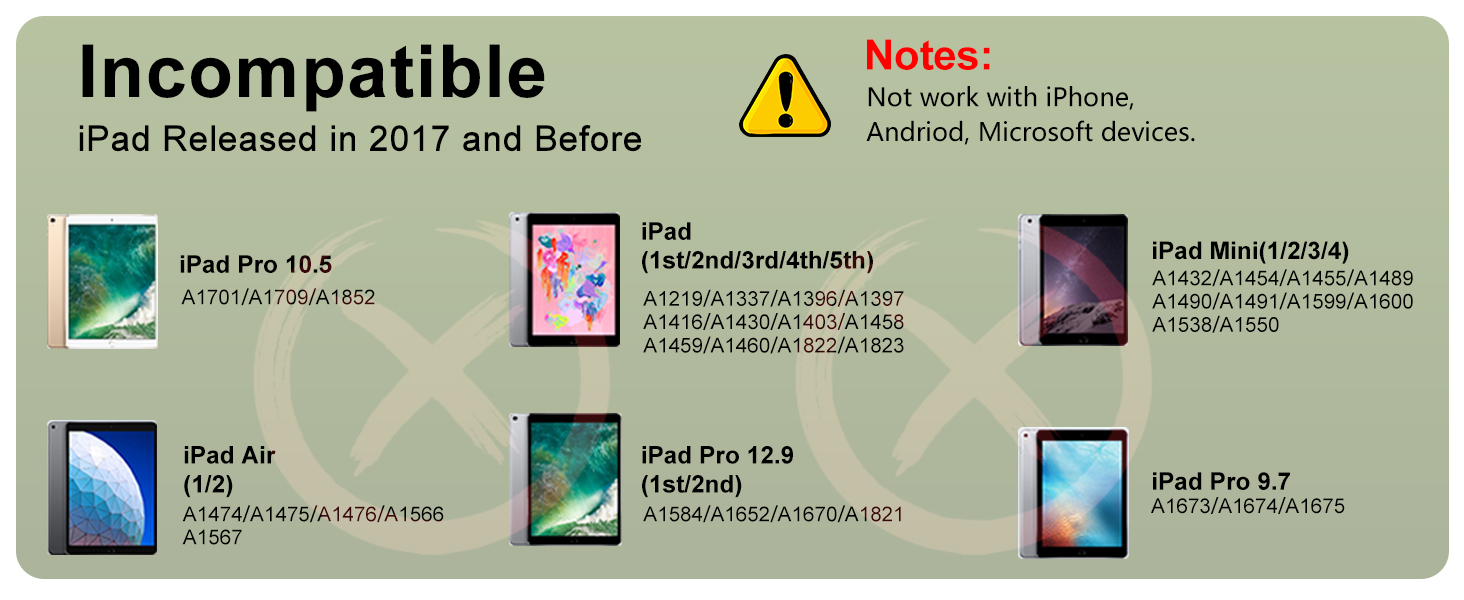
Incompatible iPad Models:
iPad Pro 12.9" (1st/2nd Gen)
iPad Pro 10.5"/9.7"
iPad (1st/2nd/3rd/4th/5th Generation)
iPad Mini (1st/2nd/3rd/4th/7th Generation)
iPad Air (1st/2nd Generation)
Not compatible with iPhone, Android, or Microsoft devices.
Image: A detailed chart illustrating compatible iPad models and their corresponding model numbers.
Image: A visual guide showing iPad models that are not compatible with the HATOKU Stylus Pen.
How to Recognize Your iPad Model:
To check your iPad model, go to Tautuhinga > Whānui > Mō. Look for 'Model Name' and 'Model Number'.
Image: A step-by-step visual guide on how to locate your iPad's model information within the settings menu.
3. Ihirangi mokete
Upon opening your HATOKU Stylus Pen package, you will find the following items:
1 x HATOKU Stylus Pen (1st Generation)
3 x Replaceable Pen Tips (1.5mm POM)
1 x Momo-C Uira Kaiha
1 x Pukapuka Kaiwhakamahi
Whakaahua: Kua mutuview of all items included in the HATOKU Stylus Pen package: the pen, extra tips, charging cable, and user manual.
4. Tatūnga
4.1. Whakataki Tuatahi
Before first use, it is recommended to fully charge your HATOKU Stylus Pen.
Connect the provided Type-C charging cable to the stylus's charging port.
Plug the other end of the cable into a USB power source (e.g., computer, wall adapter).
The stylus features a new, improved battery that allows up to 8 hours of writing and drawing time on a full charge in approximately 15 minutes.
Tohu Pūhiko:
3 Blue Lights: 70% to Full charge
2 Blue Lights: 30% ki te 70% utu
1 Blue Light: 5% ki te 30% utu
Nga Rarama Kahurangi e Raana ana: Battery remaining <5%, requires charging.
Image: The stylus connected to a charging cable, illustrating the fast charging capability and the meaning of the blue LED battery indicator lights.
4.2. Whakakahuria/Weto
The HATOKU Stylus Pen features a smart touch switch for easy operation.
Hei Whakakā: Simply tap the top button of the stylus. The blue indicator lights will illuminate.
Hei Whakakore: Tap the top button again. The stylus will also automatically turn off after 5-10 minutes of inactivity to conserve power.
No Bluetooth pairing or app connection is required for basic functionality.
Image: A diagram highlighting the 1.5mm fine tip, aluminum alloy body, indicator lights, USB-C port, and the top button for turning the pen on/off.
5. Nga Tohutohu Whakahaere
5.1. Whakamahi Taketake
Once powered on, the HATOKU Stylus Pen is ready for immediate use. Simply touch the tip to your compatible iPad screen to write, draw, mark, sign, or take notes.
5.2. Te Whakakorenga o te Nikau
The stylus supports palm rejection technology, allowing you to rest your hand naturally on the iPad screen without worrying about accidental marks or interference while writing or drawing.
Image: A hand drawing on an iPad with the palm resting on the screen, illustrating the effective palm rejection feature.
5.3. Te aro ki te piko
The HATOKU Stylus Pen features tilt sensitivity, which means the thickness of the line you draw or write can vary based on the angle at which you hold the pen. This allows for more natural and expressive strokes, similar to using a traditional pencil.
Image: Visual representation of how the stylus's tilt angle (60°, 30°, 15°) affects the thickness of the drawn line.
5.4. Adsorption aukume
For convenient storage and to prevent loss, the stylus can magnetically attach to the side of compatible iPad models. This feature works with iPad Pro 12.9" (3rd/4th/5th Gen), iPad Pro 11"/13", iPad Air (M2/M3/4th/5th Gen), and iPad Mini 6.
Image: The stylus attached magnetically to the side of an iPad, demonstrating its convenient storage feature.
5.5. Nga tono
The HATOKU Stylus Pen is versatile for various tasks:
Te tuhi tuhipoka: Ideal for handwritten notes in digital notebooks.
Tātuhi: Perfect for digital art and sketching.
Making Charts: Useful for creating diagrams and flowcharts with precision.
Image: A composite image demonstrating the stylus's utility across various applications, including note-taking, drawing, and creating charts.
5.6. Ataata Whakaaturanga Hua
Video: An official product video from HATOKU demonstrating the stylus pen's features, including unboxing, power on/off, tilt sensitivity, high precision, palm rejection, and charging.
Video: An official product video from HATOKU highlighting the stylus as a great alternative to the Apple Pencil, showcasing its various functionalities and ease of use.
6. Tiaki
6.1. Replacing Pen Tips
The HATOKU Stylus Pen comes with replaceable 1.5mm POM tips, which are highly conductive and abrasion resistant. If your tip becomes worn or damaged, follow these steps to replace it:
Gently twist the old tip counter-clockwise to remove it.
Align a new tip with the stylus and twist it clockwise until it is securely in place.
Image: A visual guide demonstrating the process of replacing the stylus pen tip by twisting it off and on.
6.2. Te horoi
To maintain optimal performance, wipe the stylus body and tip with a soft, dry, lint-free cloth. Avoid using harsh chemicals or abrasive materials.
7. Te Raru
If you encounter any issues with your HATOKU Stylus Pen, please refer to the following common solutions:
Raruraru
Rongoa pea
Kare a Stylus e whakautu
Ensure the stylus is charged and turned on. Verify iPad compatibility. Restart your iPad.
Inaccurate or delayed response
Check if the pen tip is securely attached. Replace the pen tip if it appears worn. Ensure your iPad screen is clean.
Karekau te Stylus e utu ana
Ensure the Type-C cable is properly connected to both the stylus and the power source. Try a different USB port or power adapter.
Kaore i te mahi te urunga aukume
Confirm your iPad model supports magnetic adsorption (iPad Pro 12.9" 3rd/4th/5th, iPad Pro 11"/13", iPad Air M2/M3/4th/5th, iPad Mini 6).
8. Whakatakotoranga
Āhuahira
Taipitopito
Tau tauira
ID732
Hunga Hua
0.28 x 0.28 x 6.54 inihi
Taumaha Tūemi
0.49 hekere
Rauemi
Plastic (Body), POM (Tip)
Momo Pūhiko
1 pākahiko Lithium Polymer (kei roto)
Waa Whakatau
Tata ki te 15 meneti hei utunga katoa
Wā Mahi
Tae atu ki te 8 haora (i runga i te utu katoa)
Wā tūtatari
1 Tau
Whakaweto Aunoa
After 5-10 minutes of inactivity
Hononga
No Bluetooth or app required
9. Raihana me te Tautoko
9.1. Nga Korero Whakaputanga
The HATOKU Stylus Pen comes with a 1-year warranty from the date of purchase. This warranty covers manufacturing defects and ensures your satisfaction with the product.
9.2. Tautoko Kiritaki
For any questions, concerns, or assistance with your HATOKU Stylus Pen, please do not hesitate to contact our customer service team. We offer 24/7 online support to ensure all our customers are satisfied. We are committed to providing refunds or replacements for any issues you may encounter.
Mōhiohio Whakapā:
Please refer to the contact details provided on the product packaging or our official webpae.
HATOKU 9-i-1 USB C Hub Kaiwhakamahi Manual me nga Whakatakotoranga He aratohu matawhānui ki te HATOKU 9-in-1 USB C Hub, e whakaatu ana i ona ahuatanga, i nga korero, me nga paatai aua. Ka whakawhānuihia e tenei tari te hononga mo nga rorohiko rorohiko me etahi atu taputapu me te tauranga USB-C, e tuku ana i te HDMI, te USB 3.0, te USB 2.0, nga kaipānui kaari SD / TF, me te whakaputa oro.
HATOKU USB 3.0 & Momo-C waho CD/DVD Drive Manual Kaiwhakamahi Aratohu matawhānui ki te puku CD/DVD waho o HATOKU, e whakaatu ana i te USB 3.0 me te hononga Momo-C, te panui kaari SD/TF, me nga tauranga USB rua. Ako mo te tatūnga, te mahi, me te rapurongoā mo Windows, macOS, me Linux.