1. Kupu Whakataki
Thank you for choosing the WORKPRO Pink Cordless Drill Driver Set. This 12V electric power drill is designed for household tasks, offering versatility and ease of use for various DIY projects. Its lightweight design and adjustable settings make it suitable for tasks such as hanging pictures, assembling furniture, and tightening screws.

Image: The WORKPRO Pink Cordless Drill Driver Set, showcasing the drill, various drill bits, and the Type-C charging cable.
2. Nga korero haumaru
Kia mau tonu ki nga whakaritenga haumaru taketake ina whakamahi taputapu hiko hei whakaiti i te tupono o te ahi, te ru hiko, me te whara whaiaro.
- Wear appropriate personal protective equipment, including eye protection (safety glasses or goggles) and hearing protection.
- Kia ma to waahi mahi me te whakamarama pai. Ko nga waahi pouri, nga waahi pouri ranei ka pa mai nga aitua.
- Kaua e whakamahia nga taputapu hiko i roto i nga hau pupuhi, penei i te waahi o te wai ka mura, te hau, te puehu ranei.
- Tiakina nga tamariki me nga tangata e tu ana i te wa e whakahaere ana i te taputapu hiko. Ka taea e nga whakararu ka ngaro koe i te mana whakahaere.
- Kaua e tīmata noa. Me whakarite kei te tūnga whakaweto te pana i mua i te hono atu ki te pākahiko, te tango ake, te kawe rānei i te taputapu.
- Whakamahia te taputapu tika mo to tono. Kaua e kaha te taputapu.
- Kia mau ki nga taputapu me te tupato. Kia koi, kia ma hoki nga taputapu tapahi.
- Momotuhia te putea pākahiko mai i te taputapu hiko i mua i te whakarereketanga, te whakarereke i nga taputapu, te penapena taputapu hiko ranei.
- Whakaorangia nga taputapu hiko mangere kia kore e taea e nga tamariki, kaua hoki e tukua te hunga tauhou ki te taputapu hiko, ki enei tohutohu ranei ki te whakahaere i te taputapu hiko.
3. Nga Waahanga me nga Ihirangi mokete
Your WORKPRO Pink Cordless Drill Driver Set includes the following items:
- 1 x WORKPRO 12V Cordless Drill Driver
- 6 x Drill Bits (various sizes)
- 1 x Taura Utu Momo-C

Image: A detailed diagram of the WORKPRO Pink Cordless Drill, highlighting its key components such as the keyless chuck, torque adjustment collar, variable speed switch, LED light, and Type-C charging port. The included drill bits and screwdriver bits are also shown.
4. Tatūnga
4.1 Attaching Drill Bits / Screwdriver Bits
The drill features a 3/8-inch keyless chuck for quick and easy bit changes. To attach a bit:
- Ensure the drill is off and the forward/reverse switch is in the neutral (locked) position.
- Hurihia te pūwero ki te taha maui hei whakatuwhera i ngā kauae.
- Insert the desired drill bit or screwdriver bit into the chuck, ensuring it is seated firmly.
- Twist the chuck clockwise to tighten the jaws securely around the bit. The automatic spindle lock assists in one-handed tightening.
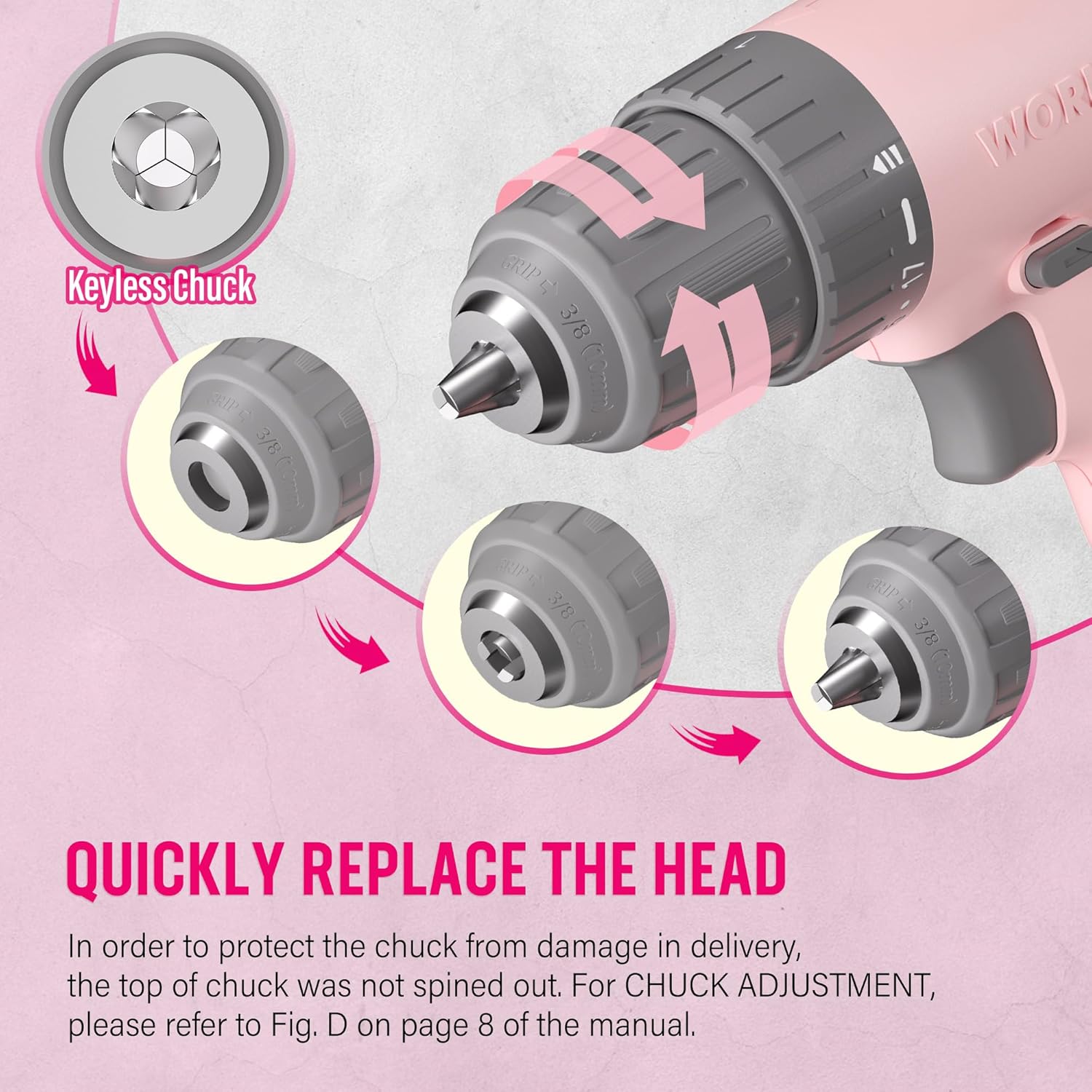
Image: A close-up illustration demonstrating the operation of the keyless chuck, showing how to open and close it to quickly replace drill or screwdriver bits.
4.2 Te Whakataki i te Pūhiko
The drill is equipped with an integrated 12V Lithium-Ion battery and charges via a Type-C USB cable. Use a 5V/1A charger for optimal charging.
- Connect the Type-C end of the charging cable to the drill's charging port.
- Connect the USB-A end of the cable to any compatible USB power source (e.g., computer, power bank, USB wall adapter, car charger).
- Monitor the battery capacity indicator lights on the drill to check the charging status.
- A blinking light indicates the battery needs recharging. Multiple solid lights indicate charge level.

Image: The WORKPRO Pink Cordless Drill connected to a laptop via its Type-C charging cable, illustrating its USB rechargeable feature.
5. Nga Tohutohu Whakahaere
5.1 Mana Tere Taurangi
The drill features a variable speed trigger, allowing you to control the rotational speed from 0 to 750 RPM based on the pressure applied.
- Pēhanga Māmā: For slower speeds, ideal for starting holes or driving screws precisely.
- Heavy Pressure: For faster speeds, suitable for drilling into materials.
- Releasing the trigger will automatically stop the drill.

Image: A hand holding the WORKPRO Pink Cordless Drill, illustrating how the variable speed switch operates based on trigger pressure (0-750 RPM).
5.2 Tautuhinga Torque (17+1)
The 17+1 torque adjustable design allows you to select the appropriate torque for different tasks and materials, preventing over-driving screws or damaging surfaces. The maximum torque can reach 19 Newton Meters (168 IN-LBS).
- Rotate the torque adjustment collar located behind the chuck to select the desired setting.
- Lower settings are for driving small screws or working with soft materials.
- Higher settings are for driving larger screws or drilling into harder materials like wood, PVC, or metal.
- The "+1" setting is for drill mode, providing maximum torque for drilling applications.
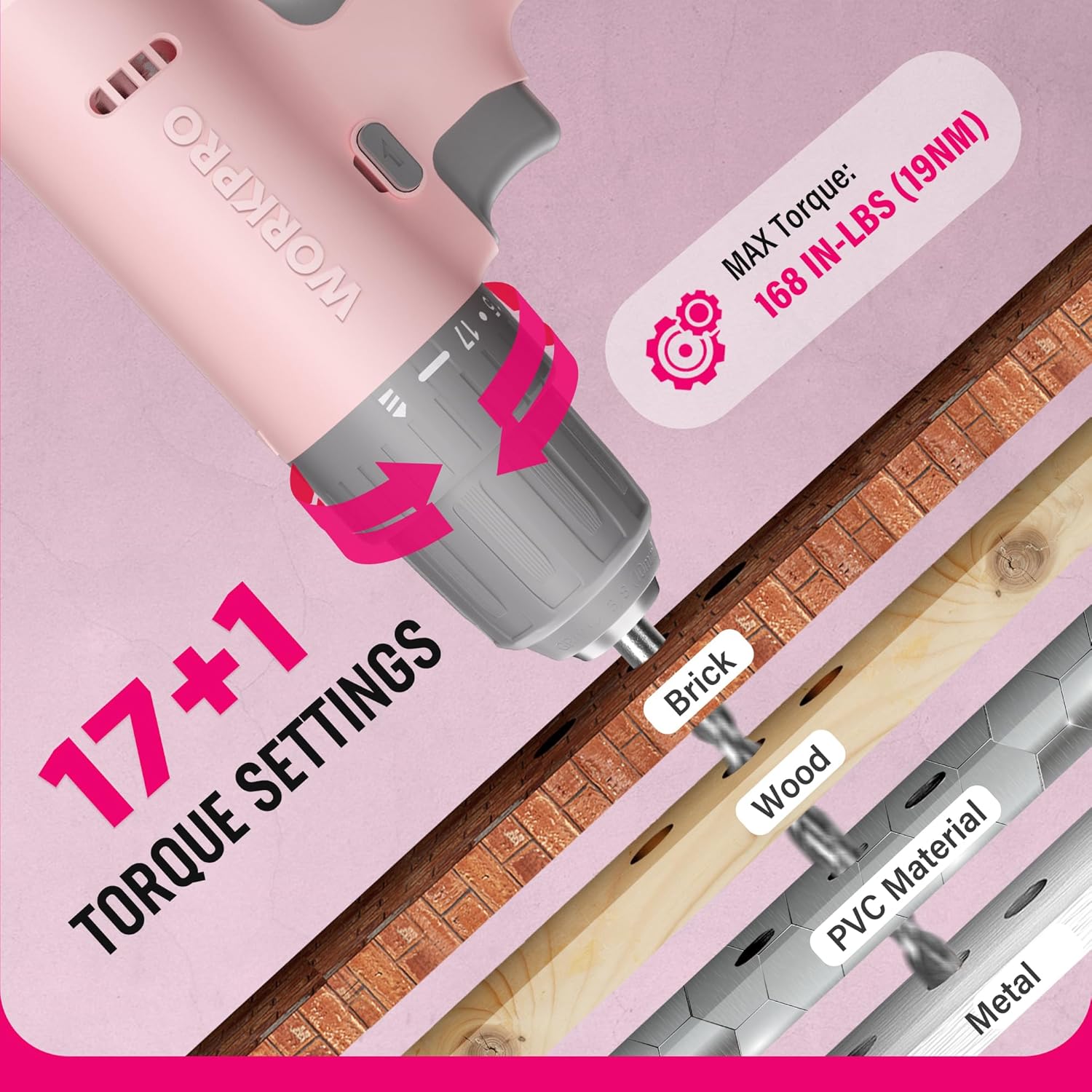
Whakaahua: He tata view of the WORKPRO Pink Cordless Drill's 17+1 torque settings, indicating suitable materials like brick, wood, PVC, and metal for different torque levels.
5.3 Whakawhiti Whakamua/Whakamuri
The forward/reverse switch allows you to change the direction of rotation for driving or removing screws and bits.
- Push the switch to the left for forward rotation (driving screws/drilling).
- Push the switch to the right for reverse rotation (removing screws/bits).
- Center the switch to lock the trigger and prevent accidental operation.
5.4 Maama Mahi LED
The integrated LED light activates when the trigger is pressed, illuminating the work area for improved visibility in dark or confined spaces.

Image: The WORKPRO Pink Cordless Drill in use, with its LED work light brightly illuminating the area, making it easier to work in dark environments.
6. Tiaki
Proper maintenance ensures the longevity and optimal performance of your drill.
- Te horoi: Regularly wipe down the drill with a soft, damp kakahu. Kaua e whakamahi i nga matū kino, i nga horoi horoi ranei. Puritia nga tuwhera hau ki te puehu me te otaota.
- Rokiroki: Store the drill in a dry place, away from direct sunlight and extreme temperatures. Ensure the battery is partially charged before long-term storage.
- Tiaki Pūhiko: Avoid fully discharging the battery frequently. Recharge the battery before it is completely depleted to prolong its lifespan.
- Tiaki Chuck: Me horoi i ia wa nga kauae mahanga kia pai ai te mau o nga paraire.
7. Te Raru
| Raruraru | Take pea | Rongoā |
|---|---|---|
| Drill does not turn on. | Kua pau te pākahiko. Forward/reverse switch is in the locked (center) position. | Charge the battery using the provided Type-C cable. Move the forward/reverse switch to the forward or reverse position. |
| He iti te kaha, te tere ranei. | Te utu iti o te papahiko. Incorrect torque setting for the task. | Whakaorangia te pākahiko. Adjust the torque collar to a higher setting or switch to drill mode. |
| Ka paheke te moka ki roto i te maaka. | Kaore i tino tika te kati. Kua paru, kua pakaru rānei te kakau o te mata. | Retighten the chuck firmly. Clean or replace the bit. |
8. Whakatakotoranga
| Āhuahira | Taipitopito |
|---|---|
| Waitohu | WORKPRO |
| Tau tauira | W122061 |
| Puna Mana | Pūhiko Powered |
| Voltage | 12 Volts |
| Tere Hurihuri Morahi | 750 RPM |
| Torque Morahi | 19 Newton Meters (168 IN-LBS) |
| Tautuhinga Torque | 17 + 1 (Drill Mode) |
| Rahi Huka | 3/8 Inches (Keyless) |
| Momo Pūhiko | Ritiuma Āniota (Kei roto) |
| Tauranga Whakatau | Type-C USB (5V-9V input) |
| Nga waahanga motuhake | Tere Rerekē, Rama Mahi LED |
| Rauemi | ABS Plastic + TPE |
| Taumaha Tūemi | 1.37 Kirokaramu (tata ki te 3.01 lbs) |
| Hunga Hua | 9.37 x 2.87 x 9.92 inihi |
9. Pūtāhui me te Tautoko
For warranty information or technical support, please refer to the contact details provided with your product packaging or visit the official WORKPRO webpae. Puritia to riiki hoko hei tohu mo te hoko.
WORKPRO Tools is committed to quality and customer satisfaction. Additionally, a portion of this product's purchase supports the NATIONAL BREAST CANCER FOUNDATION, INC., aiding in early detection, education, and support services.


