Kupu Whakataki
The Rapoo M650 is a portable dual-mode wireless mouse designed for versatile connectivity and comfortable use. It supports Bluetooth 3.0, Bluetooth 5.0, and 2.4G USB receiver connections, allowing seamless switching between multiple devices. Its silent click design and high-precision tracking engine enhance productivity in various environments.

Image: The Rapoo M650 wireless mouse in rose pink, showcasing its compact design and the accompanying USB receiver.
Aratohu Tatūnga
1. Te Wetewete me te Tāutanga Pūhiko
The Rapoo M650 mouse comes with one pre-installed AA battery. To activate the mouse, locate the battery compartment, typically under a magnetic top cover. Remove the protective pull tab from the battery to establish power connection.

Image: The underside of the Rapoo M650 mouse with the top cover removed, revealing the AA battery compartment and the storage slot for the USB receiver.
2. Te hono atu mā te Kaiwhiwhi USB 2.4G
- Tangohia te kaikawe USB mai i tana mokamoka rokiroki i roto i te kiore.
- Whakauruhia te kaiwhiwhi USB ki tetahi tauranga USB e waatea ana i runga i to rorohiko, i to taputapu ranei.
- Turn on the mouse using the ON/OFF switch located on the underside. The mouse should automatically connect to your device.
3. Connecting via Bluetooth (BT 3.0/5.0)
- Whakakāhia te kiore mā te whakamahi i te pātene ON/OFF kei raro.
- Press and hold the Bluetooth pairing button (often located on the underside or top of the mouse) for approximately 3 seconds until the indicator light flashes, indicating pairing mode.
- I runga i tō pūrere (rorohiko, papahiko, waea atamai), whakatere ki ngā tautuhinga Nihokikorangi.
- Rapua available devices and select "RAPOO M650" (or similar) from the list to pair.
- A pee i nga tohu o runga-mata hei whakaoti i te tukanga takirua.
Video: This video demonstrates the multi-mode wireless connection capabilities of the Rapoo M650 mouse, including Bluetooth pairing and switching between devices.
4. Te Whakawhiti i waenga i ngā Pūrere Honohono
The Rapoo M650 supports connection to up to three devices simultaneously (one via 2.4G USB receiver, two via Bluetooth). To switch between connected devices, short press the dedicated switch button on the mouse (usually on the underside or top). The indicator light will change to show which channel is active.
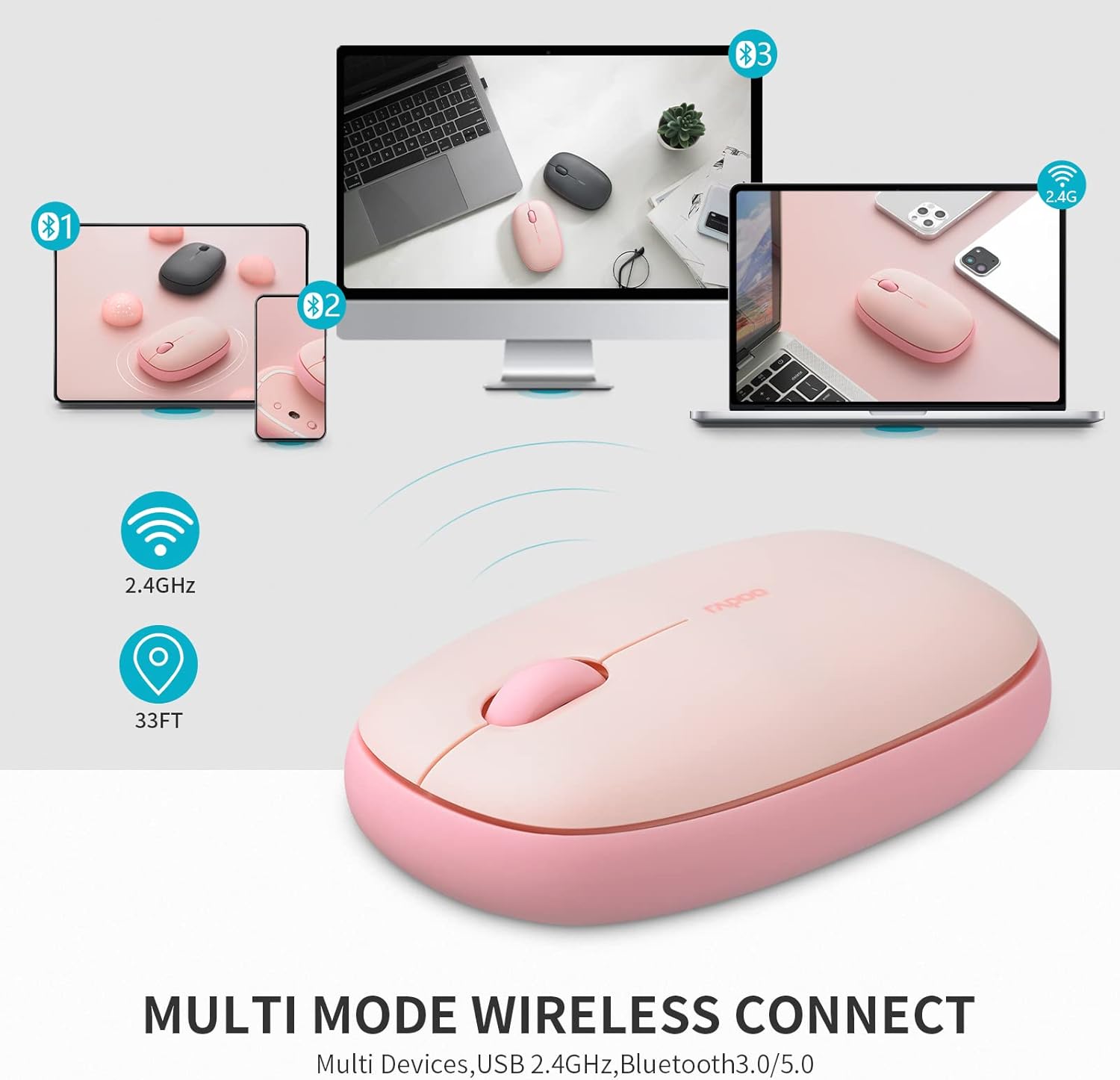
Image: A visual representation of the Rapoo M650 mouse's multi-device connectivity, illustrating its ability to connect to a laptop, tablet, and smartphone via 2.4G and Bluetooth.
Nga Tohutohu Whakahaere
1. Nga Mahi Awhina
- Pāwhiri Mauī: Kōwhiringa tuatahi me te whakahohe.
- Pāwhiri Matau: Ka uru ki nga tahua horopaki.
- Panuku Wira: Panuku poutū ki roto i nga tuhinga me te web wharangi.
2. Silent Click Design
The Rapoo M650 features silent switches, significantly reducing click noise. This allows for a quieter working environment, minimizing distractions for both the user and those nearby.

Image: A person using the Rapoo M650 mouse, emphasizing its quiet operation due to the silent click design.
3. High-Precision Tracking
Equipped with a 1300 DPI optical tracking engine, the M650 provides precise cursor control. It is designed to work effectively on various surfaces, including leather, cloth, paper, and wood, often eliminating the need for a mouse pad.

Image: The Rapoo M650 mouse shown on different surfaces like wood, fabric, and paper, illustrating its high-precision optical tracking capabilities without a mouse pad.
4. Hoahoa Ergonomic
The mouse features an ergonomic, slim, and pebble-shaped design that fits comfortably in the hand, reducing fatigue during extended use. Its ambidextrous design makes it suitable for both left and right-handed users.

Image: A diagram illustrating the dimensions of the Rapoo M650 mouse and a hand holding it, highlighting its ergonomic and slim design.
Te tiaki
1. Whakakapinga Pūhiko
The Rapoo M650 uses one AA battery, providing up to 9 months of battery life under normal conditions. When the mouse's performance degrades or the indicator light suggests low power, replace the AA battery. To do so, gently remove the magnetic top cover, replace the old battery with a new AA battery, and reattach the cover.
2. Te horoi
To maintain optimal performance and appearance, regularly clean the mouse. Use a soft, dry cloth to wipe the exterior. For stubborn dirt, a slightly damp cloth can be used, ensuring no moisture enters the internal components. The anti-fingerprint and sweat-proof outer shell simplifies cleaning.
Raparongoā
- Kaore te kiore e whakautu: Ensure the mouse is turned on and the battery has sufficient charge. Check if the USB receiver is securely plugged in or if Bluetooth is properly paired.
- Nga take hononga: For 2.4G connection, try plugging the USB receiver into a different USB port. For Bluetooth, unpair and re-pair the mouse with your device. Ensure no other wireless devices are causing interference.
- Intermittent tracking: Clean the optical sensor on the underside of the mouse. Ensure you are using the mouse on a suitable surface; avoid highly reflective or transparent surfaces.
- Difficulty switching devices: Ensure you are pressing the switch button correctly and holding it for the appropriate duration if required for pairing.
Whakatakotoranga
| Āhuahira | Taipitopito |
|---|---|
| Tauira | M650 |
| Hangarau Hononga | Bluetooth 3.0/5.0, 2.4G Wireless |
| Hangarau Hangarau Nekehanga | Optical |
| DPI | 1300 |
| Momo Pūhiko | 1 Pūhiko AA (kei roto) |
| Ora Pūhiko | Tae atu ki te 9 marama |
| Hunga Hua | 2.36 x 1.18 x 4.33 inihi |
| Taumaha Tūemi | 1.76 hekere |
| Nga waahanga motuhake | Multi-device connectivity, Silent clicks, Ergonomic design |
Pūtāhui me te Tautoko
Rapoo provides a one-year warranty for the M650 mouse. Additionally, a 30-day return and refund or replacement policy is offered. For support or warranty claims, please refer to the official Rapoo webpaetukutuku, whakapā atu ranei ki ta raatau ratonga kaihoko.


