Kupu Whakataki
The Dogtra CUE Add-On E-Collar is designed to expand your existing Dogtra CUE remote training system, allowing you to train up to three dogs simultaneously. This waterproof, rechargeable receiver collar offers a simple yet effective way to reinforce training commands with your dog. It features three training modes, 24 adjustable training levels, a Safety Level Lock, and a Boost Correction option, all managed via a clear LCD screen on the separately sold transmitter.
This manual provides essential information for the proper setup, operation, and maintenance of your Dogtra CUE Add-On E-Collar to ensure safe and effective use.

Image: The Dogtra CUE Add-On E-Collar receiver and its packaging, indicating it is an additional receiver collar only.
Waehanga Hua
- Waterproof Receiver Collar (Black/Grey)
- Biothane Collar Strap
- Plastic Contact Points (pre-installed or included)
- Charging Cable (typically included with the main CUE system)
Note: The remote transmitter is sold separately and is required for operation.
Nga korero haumaru
- Panuitia nga Tohutohu Katoa: Before using the e-collar, read and understand all instructions in this manual and the main CUE transmitter manual.
- Ehara mo nga kuri pukuriri: Do not use this product on aggressive dogs. Consult a professional dog trainer for aggressive behavior.
- Irirangi kiri: Prolonged wear or improper fit can cause skin irritation. Check your dog's neck regularly for signs of redness or sores. Remove the collar for several hours daily.
- Whakauru Tika: The collar should fit snugly, allowing two fingers to slide under the strap. The contact points must touch the dog's skin.
- Whakamahinga Tiaki: Always supervise your dog when the e-collar is in use.
- Haumaru wai: While the receiver is waterproof, ensure the charging port is sealed before water exposure.
Aratohu Tatūnga
1. Charging the Receiver
The Dogtra CUE Add-On Receiver uses a Lithium Polymer battery. It is recommended to fully charge the receiver before first use. A full charge typically takes approximately 2 hours.
- Connect the charging cable to the charging port on the receiver.
- Monohia te rihi ki roto i te putanga hiko paerewa.
- The LED indicator on the receiver will show charging status (refer to your main CUE manual for specific LED indications).
- Kia kī katoa te utu, momotuhia te taputapu utu, ā, kia tino kati te taupoki o te tauranga utu kia kore ai e ārai i te wai.
2. Te Whakauru i te Kara
Proper collar fit is crucial for consistent and effective correction, as well as for your dog's comfort and safety. The receiver features a convertible design to fit various neck sizes and shapes.

Image: Convertible receiver fitting options for different dog neck types.
- Position the receiver on your dog's neck, ensuring the contact points are underneath and making direct contact with the skin.
- Adjust the Biothane strap so it is snug but not overly tight. You should be able to slide two fingers comfortably under the strap.
- For dogs with sensitive skin, the CUE receiver comes with plastic contact points. Ensure these are making good contact.

Image: Close-up of the plastic contact points designed for sensitive skin.
3. Pairing and Setting Correction Levels (with Transmitter)
Since this is an add-on receiver, it must be paired with your Dogtra CUE remote transmitter (sold separately). Refer to your main CUE transmitter manual for detailed pairing instructions. Once paired, you can set the base and boost correction levels.
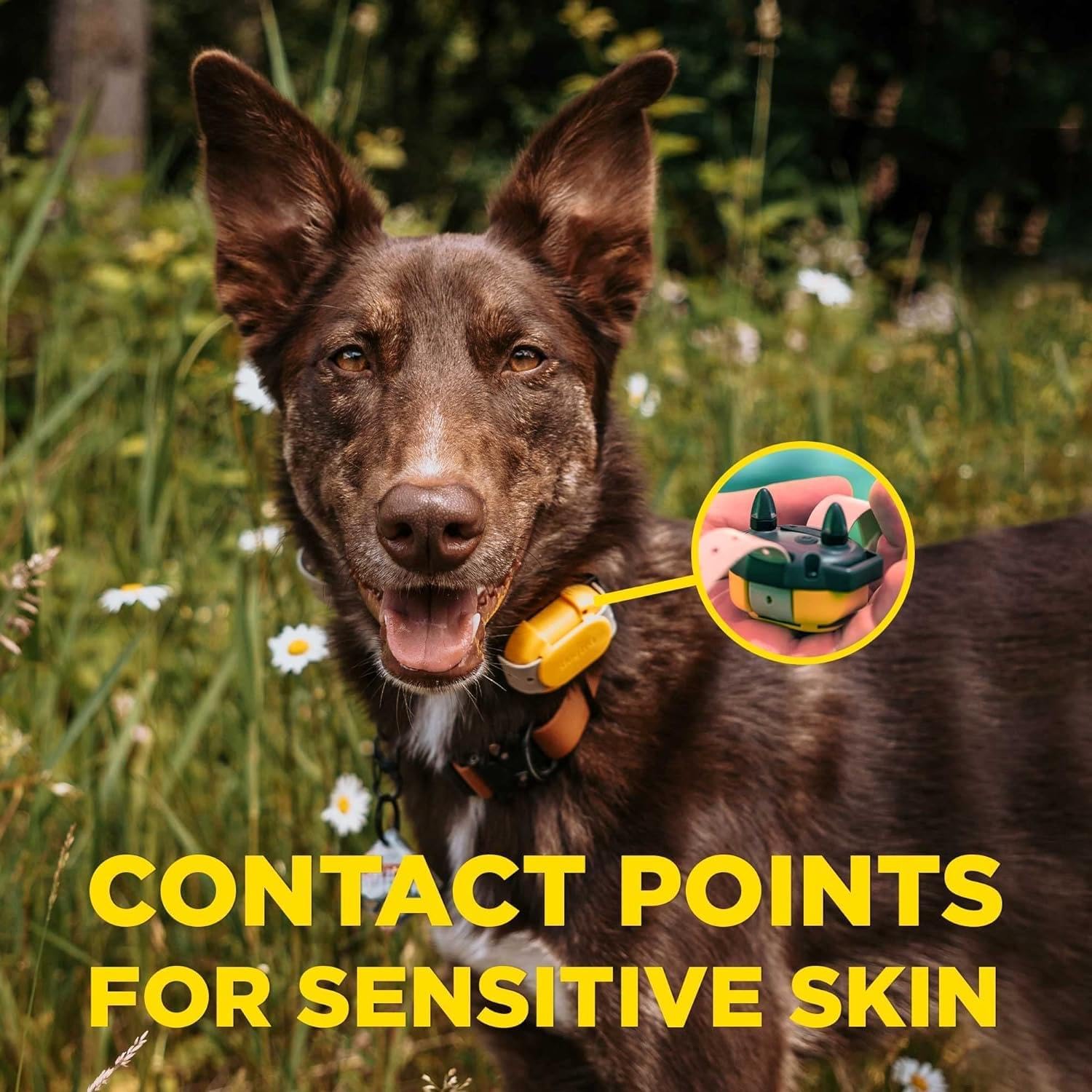
Image: Quick setup guide for setting base and boost levels.
- Set Base Level:
- Hold the Power button for 3 seconds on the transmitter to turn it on.
- Hold the Power button for 3 seconds on the receiver to turn it on.
- Use the +/- buttons on the transmitter to adjust the desired base correction level (1-24).
- The Base button on the transmitter will apply this selected level.
- Set Boost Level:
- Set the correction level to zero on the transmitter.
- Hold the Boost button on the transmitter for 5 seconds until the LCD screen blinks.
- Use the +/- buttons to set the incremental correction level you want for the boost.
- Tap the Boost button to save the setting. The Boost button will now apply the boosted continuous correction level for urgent corrections.
Operating the Dogtra CUE Add-On E-Collar
The Dogtra CUE system offers a range of features to assist in effective dog training. The add-on receiver responds to commands from the CUE transmitter.
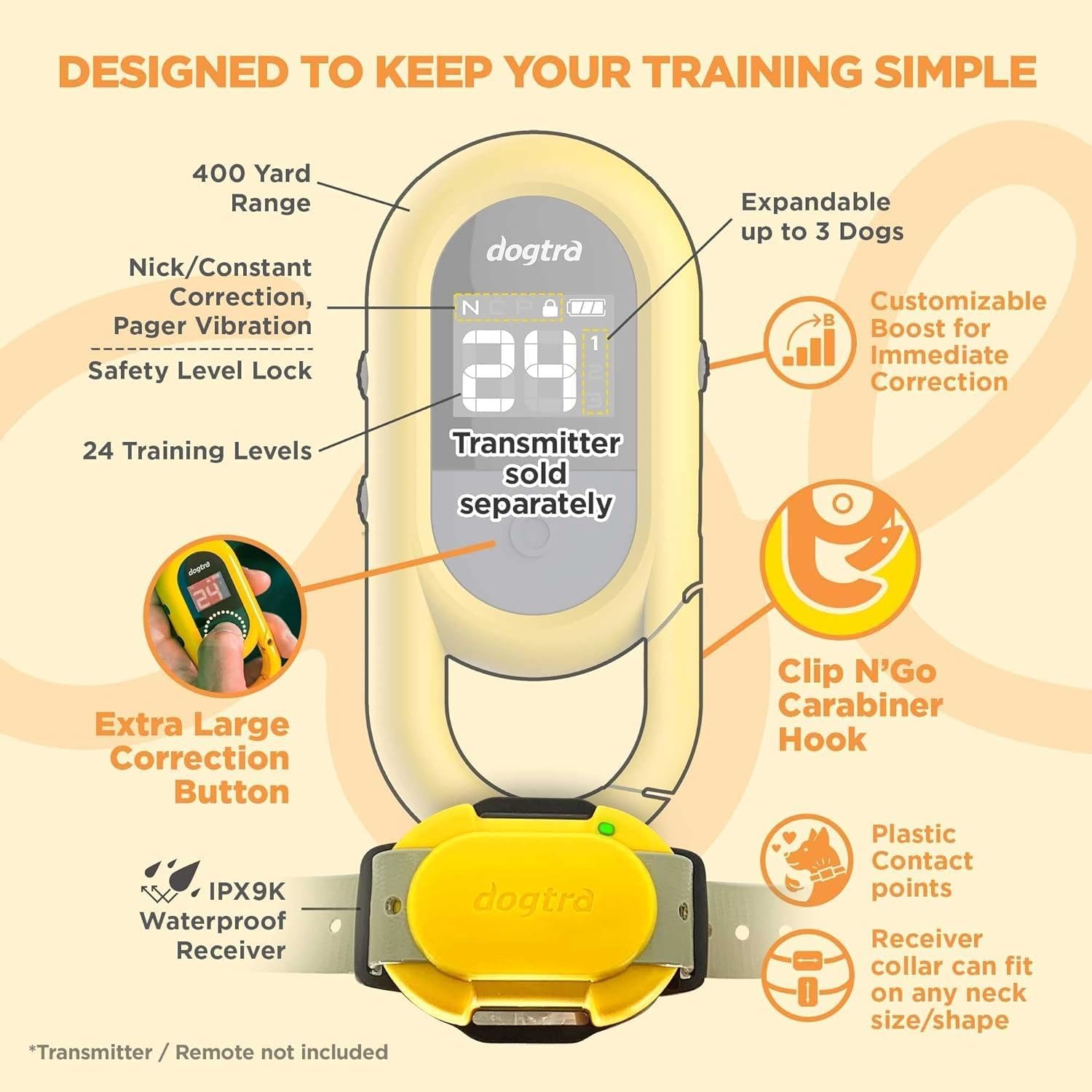
Whakaahua: Ka mutuview of Dogtra CUE system features.
Aratau whakangungu
- Nick Correction: A brief, momentary stimulation.
- Constant Correction: Continuous stimulation for up to 12 seconds (or until the button is released).
- Pager Vibration: A non-stimulating vibration to get your dog's attention.
Maukati Taumata Haumaru
The transmitter features a Safety Level Lock to prevent accidental changes to the correction level, ensuring consistent and safe training.
Boost Correction
The customizable Boost Correction provides an immediate, higher level of stimulation for urgent situations, as configured during the setup process.
Expanding to Multiple Dogs
The Dogtra CUE system is expandable up to 3 dogs. Each add-on receiver can be paired and assigned a custom training mode and memorized training levels tailored for that specific dog.

Image: The Dogtra CUE system is designed for individual dog needs, offering tailored training settings.
Hoahoa parewai
The CUE Add-On Receiver is fully waterproof (IPX9K rated), making it suitable for use in various environments, including wet conditions.

Image: The Dogtra CUE collar is waterproof, suitable for dogs in wet environments.
Te tiaki
Te horoi i te Kaiwhiwhi
- Horoia te kaiwhiwhi me ngā pūwāhi whakapā i ia wā ki te pānuitangaamp kakahu.
- Ensure no dirt or debris accumulates around the contact points, as this can affect performance and cause skin irritation.
- Kaua e whakamahi i nga matū kino, i nga mea awhiowhio ranei mo te horoi.
Tiaki Pūhiko
- Recharge the battery when the indicator light shows low battery.
- Kaua e tukua kia tino mimiti te pākahiko mō te wā roa kia roa ai tōna ora.
- If storing the unit for a long time, charge it periodically (e.g., every 3-4 months) to maintain battery health.
Rokiroki
- Store the receiver in a cool, dry place away from extreme temperatures.
- Kaua e taea e nga tamariki me nga kararehe.
Raparongoā
If you encounter issues with your Dogtra CUE Add-On E-Collar, try the following troubleshooting steps:
- Receiver Not Turning On: Ensure the battery is fully charged. Check the power button on the receiver.
- No Correction/Vibration:
- Verify the receiver is turned on and properly paired with the transmitter.
- Check that the contact points are making good contact with your dog's skin.
- Increase the correction level on the transmitter.
- Ensure the transmitter battery is charged.
- Awhe Poto:
- Ensure there are no large obstacles (buildings, dense trees) between the transmitter and receiver.
- Check for sources of radio interference.
- Ensure both transmitter and receiver batteries are fully charged.
- Irirangi kiri: Remove the collar immediately. Clean the area and allow it to heal. Ensure proper fit and rotation of wear time when resuming use. Consider using different contact points if available.
If these steps do not resolve the issue, please contact Dogtra customer support.
Whakatakotoranga
| Āhuahira | Taipitopito |
|---|---|
| Taumaha Tūemi | 6.4 hekere |
| Rahi Tūemi (LxWxH) | 1.71 x 1.91 x 2.48 inihi |
| Tau tauira | 644622020901 |
| Pūhiko | 1 te pākahiko Lithium Polymer e hiahiatia ana (kei roto) |
| Rauemi | Biothane Collar Strap |
| Tae | Black / Gray |
| Kāhua | KUI |
| Nga Waahanga kei roto | Waterproof Receiver Collar |
| Te hunga whakarongo | Dogs, 10 lbs and up |
| Whakatauranga parewai | IPX9K |
Pūtāhui me te Tautoko
Nga korero Whakaputanga
The Dogtra CUE Add-On E-Collar is covered by a 1 Tau Kaihanga Rarangi. This warranty is handled by Dogtra USA. Please retain your proof of purchase for warranty claims.
Image: Official warranty notification from Dogtra USA.
Tautoko Kiritaki
For technical assistance, warranty claims, or any questions regarding your Dogtra CUE Add-On E-Collar, please contact Dogtra customer support directly. Visit the official Dogtra webpaetukutuku mō ngā taipitopito whakapā me ētahi atu rauemi.


