1. Kupu Whakataki
The AIHOOR A4ANC Wireless Earbuds offer a premium audio experience with advanced features designed for daily use and active lifestyles. Key features include Hybrid Active Noise Cancelling, wireless charging capability, deep bass sound, and enhanced call clarity.

Figure 1: AIHOOR A4ANC Wireless Earbuds and Charging Case. The image shows the dark blue earbuds resting in their open charging case, highlighting their sleek design and compact form factor.
Āhuatanga matua:
- Hybrid Active Noise Cancelling (ANC): Long press for 2 seconds to activate ANC, canceling ambient noise by 30dB for an immersive listening experience.
- Whakataunga Ahokore: Conveniently charge your earbuds and case wirelessly.
- Shocking Deep Bass: Expertly tuned sound delivering high-quality stereo with extra bass, rounded vocals, and surprising highs.
- Enhanced Calls: Six microphones with Environmental Noise Cancellation (ENC) technology ensure clear voice pickup.
- Hototahi Ao: Easily pair with iOS/Android phones, Mac or Windows laptops/desktops, or smart TVs via Bluetooth 5.1.
2. He aha kei roto i te Pouaka
- 1 x Pair of Bluetooth Earbuds (Left & Right)
- 1 x USB-C Charging Case
- 1 x USB-C Charging Cable (20cm/0.8in)
- 4 x Pairs of Eartips (L*2, M*2 (Installed), S*2, XS*2)
- 1 x Gift Carton Packaging
3. Tatūnga
3.1 Te Whakataki i nga Paorooro me te Puhi
Before first use, fully charge the earbuds and charging case. The case can be charged via the included USB-C cable or wirelessly using a compatible wireless charging pad.
- Waa Whakahaa Whakatangitangi: Approximately 15 minutes for 5 hours of playtime (when placed in the charging case).
- Wā Whakataunga Take: Tata ki te 2 haora mo te utu katoa.
- The charging case provides up to 3 full charges for the earbuds.

Figure 2: The AIHOOR A4ANC earbuds charging wirelessly on a charging pad, alongside a smartphone and smartwatch also charging. This illustrates the convenience of wireless charging for the earbuds.
Video 1: Experience Using AIHOOR A4 ANC Bluetooth Wireless Earbuds. This video demonstrates the charging process and general usage of the earbuds, including placing them in the charging case and observing the indicator lights.
3.2 Tauhoa ki to Pūrere
The earbuds are designed for universal compatibility with various Bluetooth-enabled devices.
- Me whakarite kua utuhia nga purongo ka tuu ki roto i te putunga utu.
- Whakatuwheratia te pouaka utu. Ka uru aunoa ngā pane taringa ki te aratau takirua (e tohuhia ana e ngā rama e kimo ana i runga i ngā pane taringa).
- On your device (smartphone, laptop, etc.), go to Bluetooth settings.
- Select "AIHOOR A4" from the list of available devices to connect.
- Once connected, you will hear an audio prompt, and the earbud lights will stop flashing.
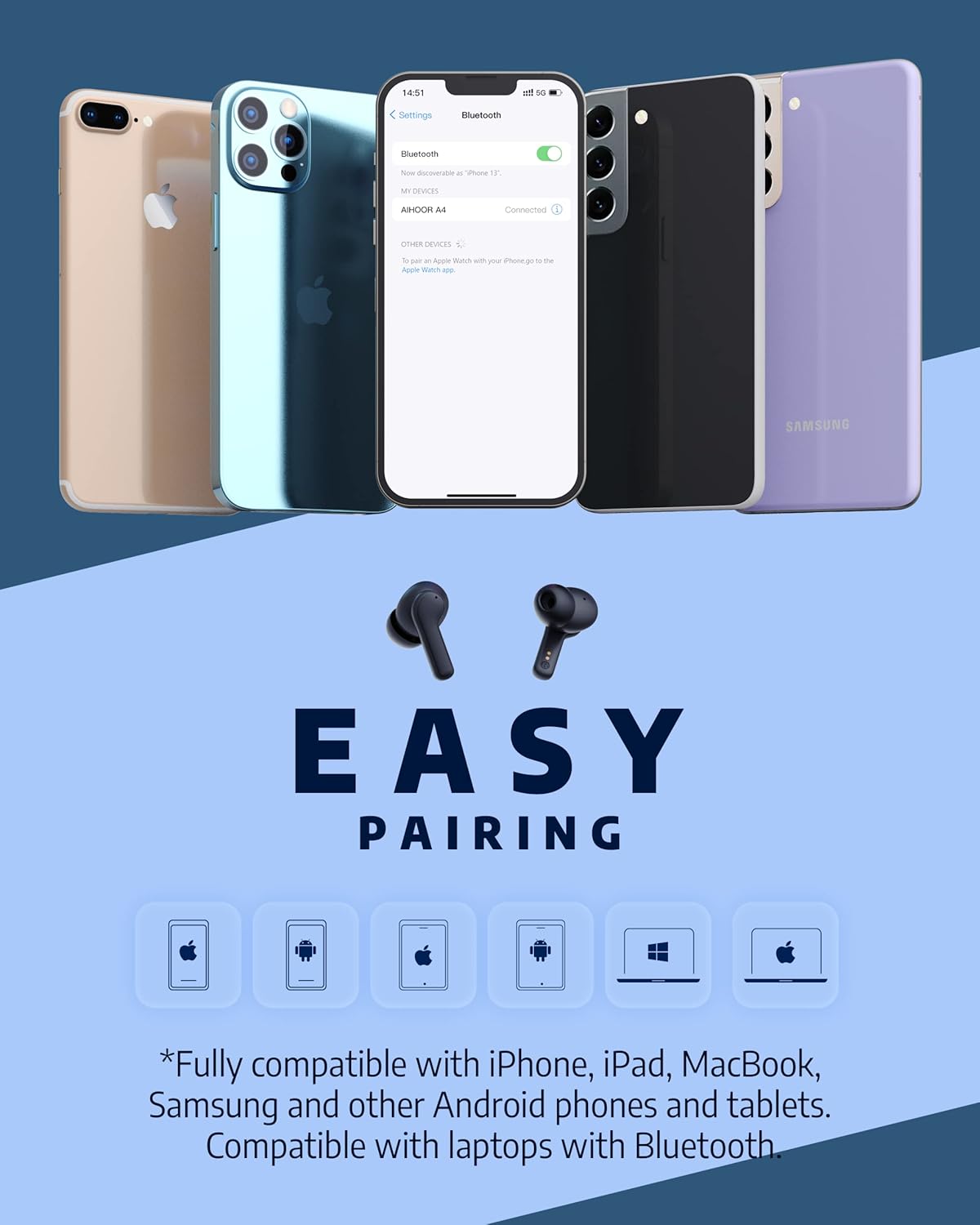
Figure 3: The AIHOOR A4ANC earbuds demonstrating easy pairing with various devices including iPhones, Android phones, and laptops. This image highlights the broad compatibility of the earbuds.
4. Nga Tohutohu Whakahaere
4.1 Mana Pa
The AIHOOR A4ANC earbuds feature intuitive touch controls on each earbud for easy management of audio and calls.
- Purei/Tatari: Pao kotahi ki tetahi purongo.
- Riu Panuku: Pato rua te purongo katau.
- Riu o mua: Pato rua te purongo maui.
- Runga Runga: Long press the right earbud.
- Raro Raro: Long press the left earbud.
- Whakahohehia te Kaiāwhina Reo (Siri/Kaiāwhina Google): Takitoru te pao ki tetahi purongo.
Ataata 2: Te Whakahoutanga Ponoview & Touch Control Demonstration. This video provides a clear demonstration of the touch controls for managing music playback, volume, and calls directly from the earbuds.
4.2 Whakahaere Waea
The earbuds are equipped with 6 microphones and Environmental Noise Cancellation (ENC) for clear hands-free calls.
- Whakautu/Whakamutu Waea: Pao kotahi ki tetahi purongo.
- Whakakore Waea: Pēhi roa i tetahi purongo mo te 2 hēkona.
4.3 Whakakore Haruru Hohe (ANC)
Activate ANC to minimize ambient noise and enhance your listening experience.
- Whakahohe ANC: Long press either earbud for 2 seconds. You will hear an audio prompt confirming ANC activation.
- ANC reduces ambient noise by up to 30dB.

Figure 4: A visual representation of the earbuds' Active Noise Cancelling feature, showing a person enjoying quiet on an airplane. The image emphasizes the ability to reduce 35dB of ambient noise.
5. Tiaki
Proper maintenance ensures the longevity and optimal performance of your AIHOOR A4ANC earbuds.
- Te horoi: Horoia ngā pane taringa me te pouaka utu i ia wā ki te kakahu ngohengohe, maroke, kore-miro. Āta karohia te whakamahi i ngā matū kaha, i ngā mea whakakoi rānei.
- Matapaki taringa: Tangohia, ka horoia ngā pito taringa i ia wā ki te wai me te hopi ngawari. Me whakarite kia maroke rawa i mua i te tāpiri anō.
- Ātete wai: The earbuds have an IPX5 water resistance level, meaning they are protected against low-pressure water jets from any direction. They are not designed for submersion in water. Avoid exposing them to excessive moisture or liquids.
- Rokiroki: Mena karekau e whakamahia, penapenahia nga purongo ki roto i to pukoro hei tiaki kia mau tonu te utu.
6. Te Raru
6.1 Nga Take Hononga
- Karekau e honoa nga taringa: Ensure both earbuds are in the charging case, then open the lid to activate pairing mode. Check your device's Bluetooth settings to ensure "AIHOOR A4" is visible.
- Kotahi anake te pane taringa e hono ana: Place both earbuds back into the charging case, close the lid, wait a few seconds, then open it again. This often resets the connection. If the issue persists, try forgetting the device on your phone's Bluetooth settings and re-pairing.
- Hononga mokowhiti: Ensure your device is within the Bluetooth range (10 meters/33 feet) and there are no significant obstacles between the earbuds and your device.
6.2 Nga Raruraru Toha
- Kāore ngā taringaoro e utu ana mēnā: Ensure the charging contacts on both the earbuds and inside the case are clean and free of debris. Make sure the earbuds are properly seated in the case.
- Kāore te pouaka e utu ana: Verify the USB-C cable is securely connected to both the case and the power source. If using wireless charging, ensure the case is correctly positioned on the charging pad.
6.3 Nga Take Kounga oro
- Low volume or poor sound: Ensure the eartips are the correct size for a snug fit in your ear canal. Clean the earbud mesh to remove any wax or debris that might be obstructing sound. Adjust volume on both your device and the earbuds.
- Distorted audio: Move closer to your connected device to avoid interference. Try disconnecting and reconnecting the earbuds.
7. Whakatakotoranga
| Āhuahira | Whakatakotoranga |
|---|---|
| Ingoa Tauira | A4-FT001 |
| Hangarau Hononga | Ahokore (Nihokikorangi 5.1) |
| Mana Haruru | Whakakahoretanga Noise Kaha (ANC) |
| Nga hopuorooro | 6 (with ENC) |
| Te ora o te Pūhiko (Ngā taringa) | Tae atu ki te 5 haora mo ia utu |
| Wā Takaro Tapeke (me te Puhi) | Tae atu ki te 30 haora |
| Wā Whakatau (Puhi) | 2 haora |
| Whakatau Ahokore | Tautokohia |
| Taumata Atete Wai | IPX5 |
| Tikanga Mana | Paa |
| Te Whakanoho Taringa | I te Taringa |
| Hunga Hua | 2.28 x 1.93 x 1.18 inihi |
| Taumaha Tūemi | 2.39 hekere |
8. Pūtāhui me te Tautoko
AIHOOR products are designed with quality and reliability in mind. For warranty information, technical support, or any inquiries regarding your AIHOOR A4ANC Wireless Earbuds, please refer to the contact information provided in your product packaging or visit the official AIHOOR webpae.
Kia mōhio: Tērā pea ka rerekē ngā tikanga me ngā herenga motuhake o te pūtāhui i runga i te rohe. Puritia tō taunakitanga hoko mō ngā kereme pūtāhui.