1. Kupu Whakataki
Thank you for choosing the Gembird USB-C Gigabit Network Adapter with 3-Port USB 3.1 Hub. This device is designed to expand the connectivity of your USB-C enabled laptop, tablet, or computer, providing both high-speed Gigabit Ethernet and additional USB 3.1 ports. This manual provides essential information for setting up, operating, and maintaining your device.
2. Nga Hua o te Hua
- Hononga USB-C: Connects to your host device via a reversible USB-C port.
- Tauranga Itarangi Gigabit: Provides a stable and fast wired network connection up to 1000 Mbps.
- Pūnaha USB 3.1 3-Waahanga: Adds three USB 3.1 ports for connecting peripherals such as external hard drives, flash drives, keyboards, and mice.
- Whakawhiti Raraunga Tere-Teitei: USB 3.1 ports support data transfer rates up to 5 Gbps.
- Mono me te Purei: No driver installation required for most modern operating systems.
3. Ihirangi mokete
Please ensure the following items are included in your package:
- Gembird USB-C Gigabit Network Adapter with 3-Port USB 3.1 Hub (Model A-CMU3-LAN-01)
4. Hua Neke Atuview
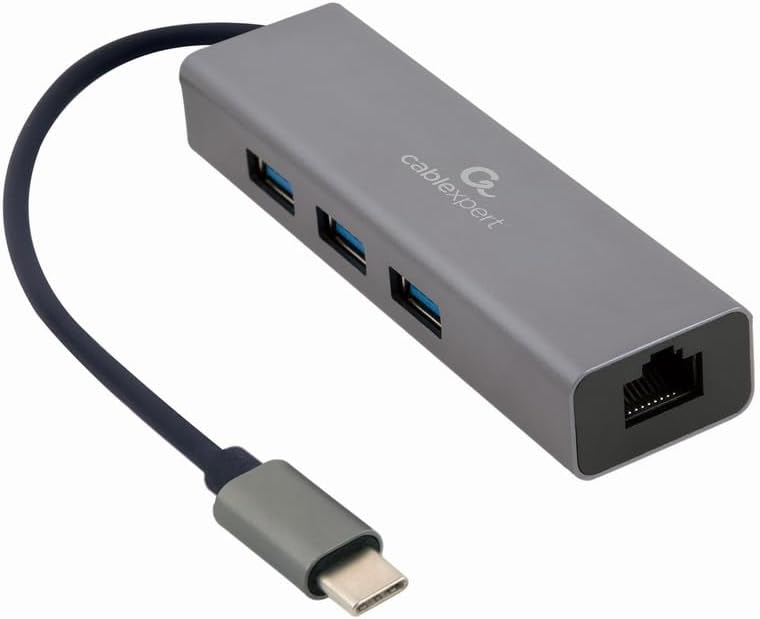
Whakaahua 1: Mua view of the Gembird USB-C Gigabit Network Adapter, showing the USB-C cable, three USB 3.1 ports, and the RJ45 Gigabit Ethernet port.

Whakaahua 2: Retail packaging for the Gembird USB-C Gigabit Network Adapter, highlighting key features like USB Type-C, USB 3.1 x 3, RJ45, Gigabit, 1000 Mbps, and Plug & Play.
5. Tatūnga
Follow these steps to set up your Gembird USB-C Gigabit Network Adapter:
- Tūhono ki te Pūrere Kaihautū: Plug the USB-C connector of the adapter into an available USB-C port on your laptop, tablet, or computer.
- Hono atu ki te Whatunga: Insert an Ethernet cable (RJ45) from your router or modem into the Gigabit Ethernet port on the adapter.
- Tūhono Pikitia USB: Plug your USB devices (e.g., flash drives, external hard drives, mouse, keyboard) into the three available USB 3.1 ports on the adapter.
- Tāuta Atekōkiri: The adapter is typically plug-and-play. Your operating system (Windows, macOS, Linux, Chrome OS) should automatically detect and install the necessary drivers. If prompted, allow the system to install drivers.
6. Nga Tohutohu Whakahaere
Once connected, the adapter functions automatically:
- Urunga Whatunga: Your host device should now have a wired network connection. You can verify this in your operating system's network settings.
- USB Device Access: Connected USB peripherals will be recognized by your host device and function as if directly connected.
7. Te Raru
Mena ka raru koe, tirohia nga raru me nga otinga e whai ake nei:
- Kore Hononga Whatunga:
- Ensure the Ethernet cable is securely connected to both the adapter and your router/modem.
- Check your router/modem for proper operation.
- Manatokohia ngā tautuhinga whatunga i runga i tō pūrere manaaki.
- Ngāna ki te hono i te urutau ki tētahi atu tauranga USB-C i runga i tō pūrere manaaki.
- Nga Pūrere USB Kaore i te Mohiotia:
- Ensure USB devices are properly plugged into the adapter's USB 3.1 ports.
- Try connecting the USB device directly to your host computer to confirm it is functional.
- Some high-power USB devices may require an external power source if your host device's USB-C port does not provide sufficient power (this adapter does not have a dedicated power input).
- Tere Whatunga Puturi:
- Ensure your Ethernet cable is rated for Gigabit speeds (Cat5e or higher).
- Verify your internet service provider's speed and your router's capabilities.
- Ensure your host device's USB-C port supports USB 3.0/3.1 speeds.
8. Whakatakotoranga
| Tau tauira | A-CMU3-LAN-01 |
| Atanga Pūmārō | USB-C (Host), USB 3.1 (Hub), RJ45 (Ethernet) |
| Tauranga USB katoa | 3 (USB 3.1) |
| Tauranga Itarangi | 1 (Gigabit RJ45) |
| Data Transfer Rate (USB) | Tae atu ki te 5 Gbps (USB 3.1) |
| Data Transfer Rate (Ethernet) | 10/100/1000 Mbps |
| Hunga Hua | 10 x 2 x 2.7 inihi |
| Taumaha Tūemi | 2.46 hekere |
9. Tiaki
Hei whakarite i te roa o te ora me te mahi tino pai o tō urutau:
- Te horoi: Use a soft, dry cloth to clean the exterior of the device. Avoid liquid cleaners or solvents.
- Rokiroki: Whakaorangia te whāurutau ki te waahi hauhautanga, maroke atu i te ra tika me te wera nui ina kore e whakamahia.
- Te whakahaere: Avoid dropping or subjecting the device to strong impacts. Do not attempt to disassemble the adapter.
10. Pūtāhui me te Tautoko
This Gembird product comes with a e rua tau te whakamana mo nga hapa wheketere. Tena koa pupurihia to tohu mo te hoko mo nga kereme whakamana.
For technical support or warranty inquiries, please contact your retailer or visit the official Gembird webpae mo nga korero whakapā.


