1. Kupu Whakataki
Thank you for choosing the ERICKHILL EWM03 Pin-Type Moisture Meter. This device is designed for accurate measurement of moisture content in various materials, including wood and building materials. It features a clear LCD display with backlight, multiple material modes, and convenient functions like data hold and auto-off. Please read this manual thoroughly before use to ensure proper operation and to extend the life of your device.
2. Nga korero haumaru
- The measurement pins are sharp. Handle with care to avoid injury.
- Do not insert the pins into live electrical circuits or materials.
- Keep the device away from water and high humidity environments to prevent damage.
- Kaua e ngana ki te wetewete, ki te whakarereke ranei i te taputapu. Ma nga kaimahi mohio anake e whakatika.
- Tango pākahiko ki te kore te taputapu e whakamahia mo te wa roa kia kore ai e pakaru.
3. Hua Neke Atuview
Familiarize yourself with the components of your ERICKHILL EWM03 moisture meter:
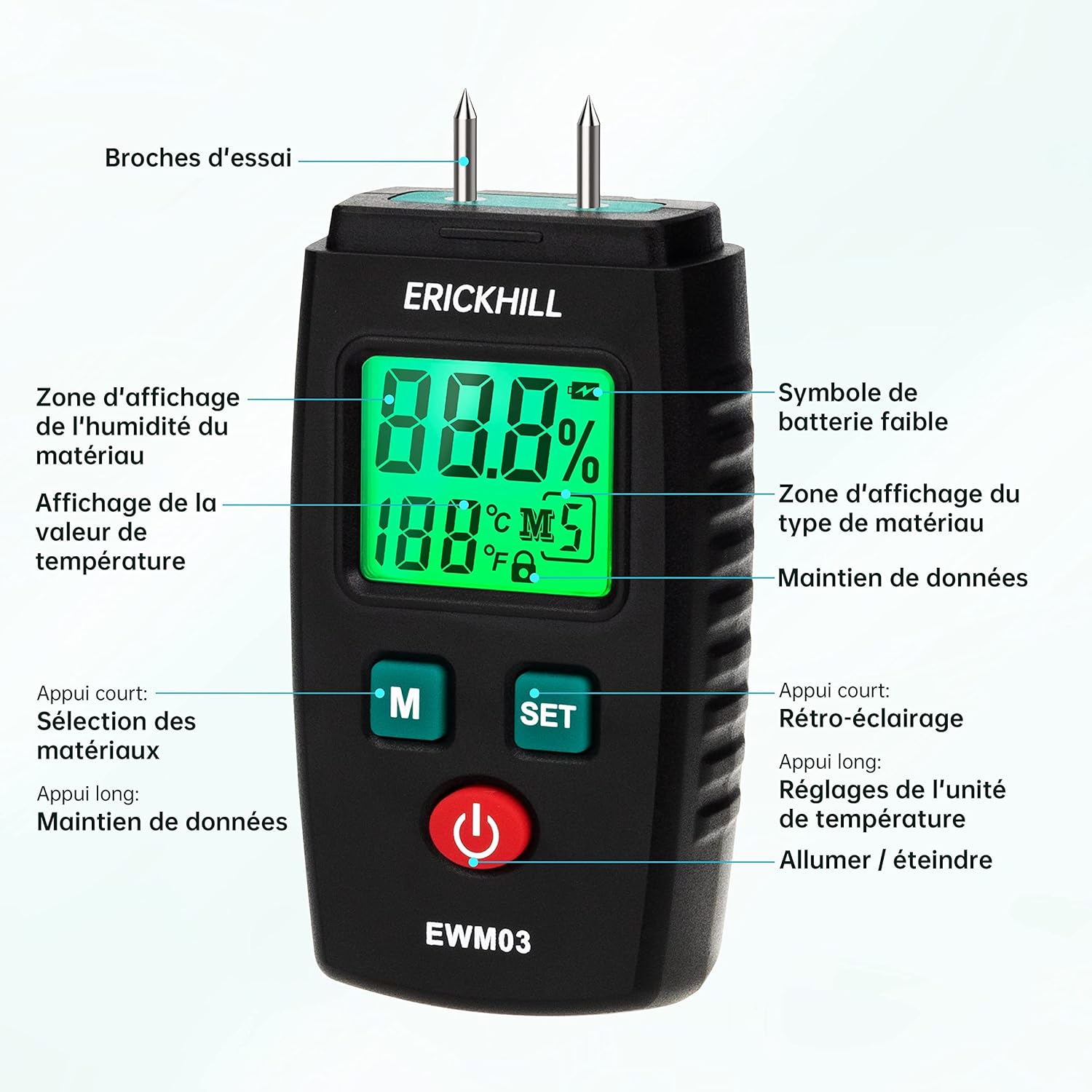
- Pins Whakamātautau: Used to penetrate the material for moisture measurement.
- Whakaaturanga LCD: Shows moisture percentage, temperature, battery status, and selected material mode.
- Pātene 'M': Short press to select material modes. Long press to activate/deactivate Data Hold.
- 'SET' Button: Short press to turn backlight on/off. Long press to switch temperature units (°C/°F).
- Pātene Hiko: Ka whakakā, whakaweto rānei i te taputapu.
- Potae Tiaki: Covers the test pins when not in use.
4. Tatūnga
4.1 Tāuta Pūhiko
- Kimihia te uhi o te wahanga pākahiko kei muri o te taputapu.
- Whakatūwheratia, paheke rānei te taupoki.
- Whakauruhia kia rua (2) ngā pākahiko AAA, me te tirotiro i te polarity tika (+/-) e whakaaturia ana i roto i te wāhanga.
- Katia kia mau te uhi o te wahanga pākahiko.
Tuhipoka: E rua ngā pākahiko AAA kei roto i te taputapu.
4.2 Kei te Hiko / Weto
- Hei Whakahiko: Press the red power button. The LCD display will illuminate.
- Hei Whakaweto: Press the red power button again. The device will also automatically power off after approximately 10 minutes of inactivity to conserve battery life.
5. Nga Tohutohu Whakahaere
5.1 Selecting Material Modes
The ERICKHILL EWM03 offers 5 calibrated modes for different material types. To select a mode:
- Whakakāhia te taputapu.
- Short press the 'M' button repeatedly to cycle through the 5 material modes (M1, M2, M3, M4, M5). The selected mode will be displayed on the LCD.

Refer to the table below for detailed information on each material mode:
| Aratau | Momo Rawa | Awhe Ine |
|---|---|---|
| M1 | Rhodesian Teak, White Red Bean, Brazilian Walnut | 6.0% ~ 39% |
| M2 | Walnut, Poplar, Teak | 7.0% ~ 48% |
| M3 | Fir, Lauan, White Fir, Maple, Ash, Sandalwood, Elm, Hemlock, Beech, Dipterocarp, Oak | 8.5% ~ 54% |
| M4 | Masson Pine, Chili Trees, White Pine, Larch, Birch, Linden | 9.5% ~ 65% |
| M5 | Bricks and other building materials | 0% ~ 15.2% |
5.2 Te Whanganga
- Remove the protective cap from the test pins.
- Select the appropriate material mode (M1-M5) using the 'M' button.
- Carefully push the test pins into the material you wish to measure. Ensure both pins are fully inserted and make good contact with the material.
- Read the moisture percentage displayed on the LCD screen. The temperature of the environment will also be shown.
- After measurement, gently pull the pins out and replace the protective cap.


5.3 Taumahi Pupuri Raraunga
Hei whakatio i te inenga o nāianei i runga i te whakaaturanga:
- While taking a measurement, long press the 'M' button. The 'HOLD' icon will appear on the display.
- To release the data hold, long press the 'M' button again.
5.4 Mana Whakamuri
The LCD backlight improves visibility in low-light conditions:
- Short press the 'SET' button to turn the backlight on.
- Short press the 'SET' button again to turn the backlight off.
5.5 Te Waeine Waeine Whiriwhiringa
Hei huri i waenga i te Celsius me te Fahrenheit:
- Long press the 'SET' button to toggle between °C and °F.
5.6 Whakaweto Hiko Aunoa
The device is equipped with an automatic power-off function to save battery life. If no button is pressed for approximately 10 minutes, the meter will automatically shut down.
6. Tiaki
6.1 Te horoi
- Horoia te taputapu ki te kakahu maeneene, maroke.
- Kaua e whakamahi i nga kai horoi me nga whakarewa.
- Ensure the test pins are clean and free of debris after each use.
6.2 Rokiroki
- Always replace the protective cap over the test pins when not in use.
- Whakaorangia te taputapu ki te waahi makariri, maroke, mawehe atu i te ra tika me te wera nui.
- Mena ka roa te rokiroki, tangohia nga pākahiko kia kore ai e pakaru.
6.3 Whakakapinga Pūhiko
When the low battery symbol appears on the display, replace the batteries as described in Section 4.1. Use only AAA alkaline batteries.
7. Te Raru
If you encounter issues with your ERICKHILL EWM03, refer to the following common problems and solutions:
- Kaore te taputapu i te hiko:
- Tirohia mēnā kua tika te tāutanga o ngā pākahiko, ā, kua tika hoki te polarity.
- Whakakapihia ki nga pākahiko AAA hou.
- No reading or unstable reading:
- Ensure the test pins are fully inserted into the material and making good contact.
- Verify that the selected material mode is appropriate for the material being tested.
- Clean the test pins if they appear dirty or corroded.
- Ko nga panui kore tika:
- Ensure the correct material mode is selected.
- Test on a known dry material to verify baseline.
- Consider ambient temperature and humidity, which can slightly influence readings.
- He atarua, he korikori ranei te whakaaturanga:
- Whakakapihia nga pākahiko.
- Ki te haere tonu te take, whakapā atu ki te tautoko a te kaihoko.
8. Whakatakotoranga
| Āhuahira | Whakatakotoranga |
|---|---|
| Tauira | EWM03 |
| Tikanga Ine | Pin-type (invasive) |
| Measurement Range (Wood) | 6.0% ~ 65% (depending on mode) |
| Measurement Range (Building Materials) | 0% ~ 15.2% |
| Tika | ± 2.0% |
| Awhe Pawera | 0°C ~ 50°C (32°F ~ 122°F) |
| Puna Mana | 2 x AAA pākahiko (kei roto) |
| Whakaweto Aunoa | Approx. 10 meneti kore mahi |
| Ahu (L x W x H) | 4.3 x 2.44 x 9.35 cm |
| Taumaha | 280 karamu |
| Rauemi Tohu | Kowiri tira |
| Casing Rauemi | PVC |
9. Pūtāhui me te Tautoko
ERICKHILL is committed to providing professional and high-quality meters. Your ERICKHILL EWM03 Moisture Meter comes with:
- 36-Month After-Sales Service: For any issues arising within 36 months of purchase, please contact our customer service for assistance.
- Tautoko Hangarau Ora: We offer lifetime technical support to ensure you get the most out of your device.
For warranty claims, technical assistance, or any questions regarding your product, please contact ERICKHILL customer support through your purchase platform or the official ERICKHILL webpae.


