1. Kupu Whakataki
This manual provides essential information for the safe and efficient operation of your KLIM K9000 Portable Air Conditioner. Please read it thoroughly before use and retain it for future reference. The KLIM K9000 is a versatile 3-in-1 unit offering cooling, dehumidification, and fan functions.
2. Nga Tohutohu Haumaru
To reduce the risk of fire, electrical shock, or injury, always follow these basic precautions:
- Panuihia nga tohutohu katoa i mua i te whakamahi i te taputapu.
- Me whakarite kia rite te toha hiko ki te voltage kua tohua ki te tapanga whakatauranga.
- Kaua e whakahaeretia te waeine me te taura pakaru, te mono ranei.
- Tiakina te taputapu mai i nga puna wera me te ra tika.
- Kaua e araia nga urunga hau, nga putanga ranei.
- Wewetehia te waeine i mua i te horoi, te mahi ranei.
- Ko tenei taputapu ehara i te mea mo te whakamahi ma te hunga (tae atu ki nga tamariki) he iti te kaha o te tinana, te tairongo, te hinengaro, te kore wheako me te mohiotanga, mena ka tukuna atu ki a raatau te tirotiro, te tohutohu ranei mo te whakamahi i te taputapu e te tangata whai mana mo to raatau haumaru.
- Kaua e whakamahia te taputapu i roto i nga taiao maku, i te taha wai ranei.
- Whakamahia nga taputapu anake e taunakihia ana e te kaihanga.
3. Ihirangi mokete
Manatokona kei roto katoa nga mea kei roto i te kete:
- KLIM K9000 Air Conditioner Unit
- Mana Mamao
- Ngongo ngongo
- Tauranga whakapau
- Tūhono Hiko Poka
- Hose Takutai
- Window Seal Fixing Plate
- Window Cover Extension
- 2 AAA Alkaline Batteries (for remote control, if included)
4. Hua Neke Atuview
The KLIM K9000 is a compact and efficient portable air conditioner designed to provide comfort in various environments. It integrates three primary functions: cooling, dehumidification, and fan operation.

Whakaahua 4.1: KLIM K9000 Portable Air Conditioner unit with remote control, illustrating air circulation.
Its 3-in-1 functionality allows it to cool rooms, circulate air as a fan, and reduce humidity levels, making it suitable for various climate control needs.

Whakaahua 4.2: The KLIM K9000 offers 3-in-1 comfort: cooling, dehumidifying, and fan functions, with a 9000 BTU cooling capacity.
5. Tatūnga me te Tāuta
Proper installation is crucial for optimal performance. Follow these steps for quick setup:
- Turanga: Place the unit on a flat, stable surface, ensuring at least 30 cm (12 inches) of space around it for proper airflow.
- Whakauruhia te ngongo ngongo: Connect the exhaust hose to the unit's exhaust port. Extend the hose and connect the window seal fixing plate or window cover extension.
- Tāuta Matapihi: Secure the window seal fixing plate or extension in a compatible window opening (sliding windows). For tilt windows, a separate seal kit is required and sold separately. Ensure the hot air is expelled outdoors.
- Hononga Hiko: Monohia te taura hiko ki roto i te putanga hiko kua tu.
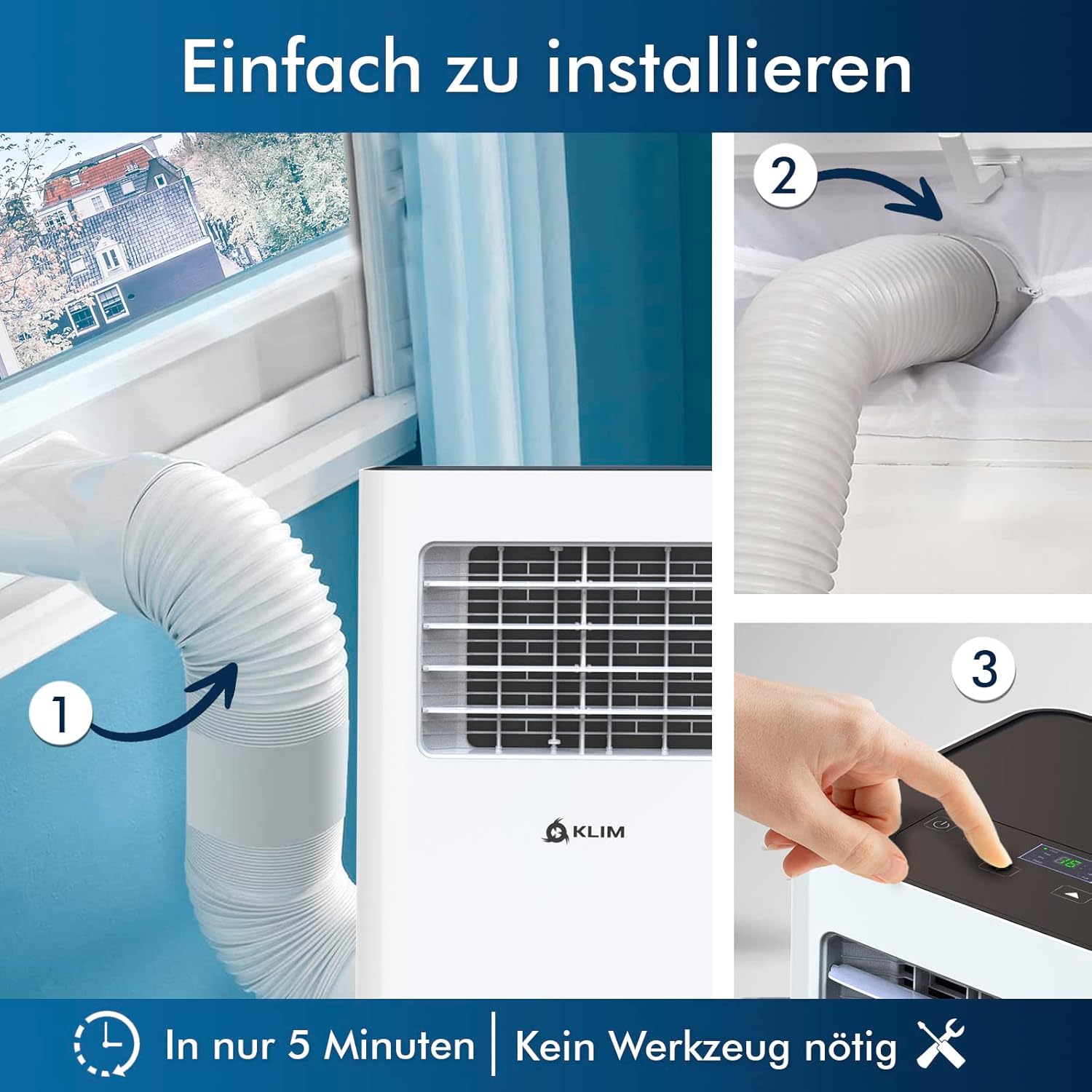
Whakaahua 5.1: Visual guide for quick installation, typically completed in 5 minutes without special tools.

Whakaahua 5.2: Illustration of window kit compatibility, showing options for sliding windows and mentioning a separate seal for tilt windows.
6. Nga Tohutohu Whakahaere
The KLIM K9000 can be operated via the control panel on the unit or the included remote control.
6.1. Paewhiri Mana me te Mana Mamao
The remote control allows convenient operation from a distance. Ensure AAA batteries are correctly inserted. The control panel on the unit provides direct access to all functions.
6.2. Aratau Mahi
- Aratau whakamatao: Activates the compressor to cool the room. Set your desired temperature (down to 16°C). This mode is effective for rooms up to 20 m² (80 m³).
- Aratau Fan: Circulates air without cooling. Adjustable fan speeds are available.
- Aratau Whakaahua: Removes excess moisture from the air. In this mode, the unit collects water, which will need to be drained.
- Aratau Moe: Designed for quiet operation during rest. The unit operates at a reduced noise level (approx. 65 dB) and may adjust temperature settings automatically for comfort.

Whakaahua 6.1: The sleep mode provides a cool and quiet environment for restful sleep, operating at approximately 65 dB.
To switch between modes, press the "Mode" button on the control panel or remote control.
7. Tiaki
Regular maintenance ensures the longevity and efficiency of your KLIM K9000.
7.1. Te horoi i te Tātari Hau
Me horoi te tātari hau ia rua wiki neke atu ranei i runga i te whakamahinga. Ka taea e te tātari paru te whakaiti i te pai o te whakamahana me te rere o te hau.
- Wewetehia te hau hau mai i te putanga hiko.
- Rapua me te tango i te tātari hau (i te nuinga o te waa kei muri, kei te taha ranei o te waahanga).
- Horoia te tātari ki te wai mahana, hopipi. Horoia rawatia ka waiho kia maroke rawa te hau i mua i te whakauru ano.
- Tāutatia anō te tātari maroke ka monohia te waeine ki roto.
7.2. Whakaheke Wai
The unit features an auto-evaporation system in cooling mode, reducing the need for frequent drainage. However, in high humidity or dehumidifier mode, water will accumulate and needs to be drained.
- Whakaheke Tonu: For continuous dehumidification, attach the drainage hose to the drain outlet and direct it to a suitable container or floor drain.
- Tuwai A-ringa: When the internal water tank is full, the unit may stop operating and display an indicator. To drain manually, unplug the unit, place a shallow pan or tray under the drain plug, and remove the plug. Be aware that the internal water container can be cumbersome to empty, and it may require two people to safely tilt the unit for complete drainage if using the bottom drain.
8. Te Raru
Tirohia tenei waahanga mo nga take noa me o raatau otinga.
| Raruraru | Take pea | Rongoā |
|---|---|---|
| Karekau te waeine e ka ana. | Karekau he hiko, he wehenga ara iahiko, he puna wai ki tonu. | Tirohia te taura hiko, te tautuhi i te pakaru, te taaka wai. |
| He iti rawa te whakamahana. | Dirty air filter, blocked air intake/outlet, open windows/doors, room too large, exhaust hose not properly installed. | Clean filter, clear obstructions, close windows/doors, ensure proper exhaust hose installation. |
| He haruru te waeine. | Normal operation sound (compressor/fan), unit not on a level surface. | The unit operates at approximately 65 dB, which is normal. Ensure it is on a flat surface. |
| Te rerenga wai. | Drain plug not securely closed, drainage hose improperly connected. | Check drain plug, ensure drainage hose is securely attached and not kinked. |
Mena kei te haere tonu te raru i muri i te whakamatau i enei otinga, tena koa whakapā atu ki te tautoko a te kaihoko.
9. Whakatakotoranga
| Waitohu | KLIM |
| Tau tauira | K9000WH |
| Te Whakamaoho | 9000 BTU |
| Rahi Rūma Manakohia | Tae atu ki te 20 m² (80 m³) |
| Nga Mahi | Te whakamatao, te whakamaarama, te Poihi |
| Karaehe Pungao Pungao | A |
| Te Whakamahi Hiko ia Tau | 960 Watts |
| Taumata Haruru | 65 Decibels |
| Whakamaoho | R-290 (Natural Refrigerant) |
| Ahu (L x W x H) | 29.5 x 32.5 x 70.4 cm |
| Taumaha | 25.58 kg |
| Rauemi | ABS |
| Puna Mana | Tauera Hiko |

Whakaahua 9.1: The KLIM K9000's high energy efficiency (Class A) contributes to cost savings and environmental protection.
10. Pūtāhui me te Tautoko
The KLIM K9000 Portable Air Conditioner comes with a 5-tau pūtāhui, whakarite i te rangimarie o te hinengaro mo tona kounga me te mahi.
For technical assistance, warranty claims, or any questions not covered in this manual, please contact KLIM customer support through their official website or the retailer where the product was purchased. Please have your model number (K9000WH) and purchase date ready.


