Kupu Whakataki
The Nanlite Forza 300 II is a powerful and versatile LED spotlight designed for professional photography and videography. It features a 5600K daylight-balanced output, advanced control options including Bluetooth app control and DMX, and built-in special effects. Its compact design and AC/battery power capabilities make it suitable for various production environments.
Nga korero haumaru
Please read this manual carefully before using the product to ensure proper operation and to prevent damage or injury. Keep this manual for future reference.
- Kaua e titiro tika ki te pūtake mārama ina whakakāhia te rama.
- Do not operate the fixture in wet or damp tikanga.
- Me whakarite kia tika te hau kia kore e wera rawa.
- Whakamahia anake nga urutau hiko me nga taputapu kua whakaaetia.
- Kaua e taea e nga tamariki.
- Momotuhia te hiko i mua i te horoi, te tiaki ranei.
Ihirangi mokete
Manatokona kei roto katoa nga taonga ki to kete:
- Forza 300 II LED Spotlight Fixture
- Waeine Mana
- Tauira Hono
- Waea Hiko
- Whakaata
- Puke Kawe
- Pukapuka Kaiwhakamahi
Ka mutu te huaview
Familiarize yourself with the main components of the Nanlite Forza 300 II.
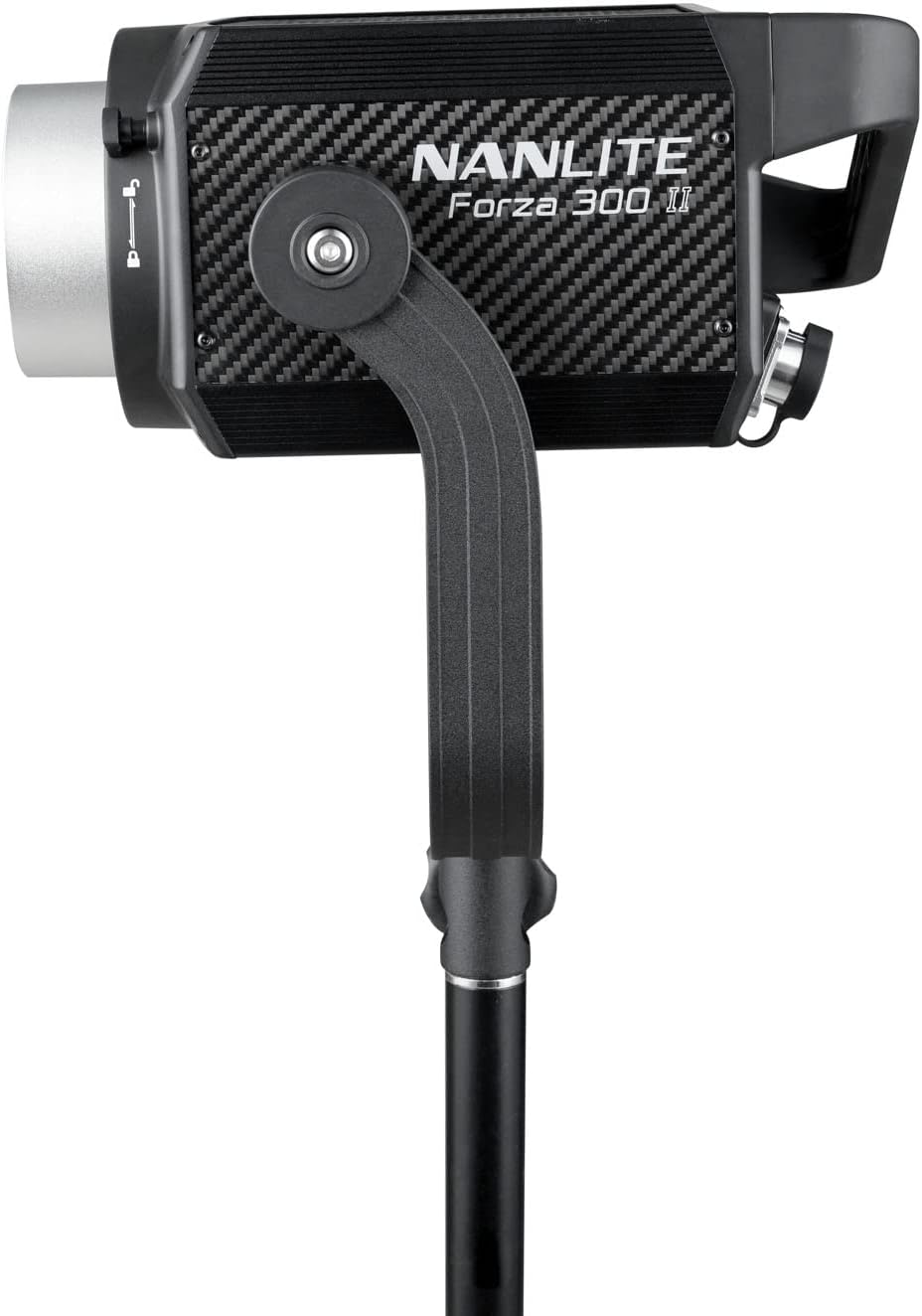
Whakaahua 1: Mua view of the Forza 300 II LED Spotlight, showing the light head with its yoke and stand mounting bracket.

Figure 2: The Forza 300 II Control Unit, featuring a display screen, control knobs for brightness and effects, and function buttons.

Whakaahua 3: Whakamuri view of the Forza 300 II Control Unit, highlighting the DMX input/output ports, power input, and output connections to the light fixture.
Wae matua:
- Maamaa: The main LED light source with Bowens mount for accessories.
- Waeine Mana: External unit housing the power supply, display, and control interface.
- Ioka: Adjustable bracket for mounting the light fixture onto a light stand.
- Quick-Release Clamp: Durable and versatile clamp mo te whakapuru haumaru.
Tatūnga
Follow these steps for initial setup of your Forza 300 II.
- Whakanuia te Maama: Attach the Forza 300 II light fixture to a sturdy light stand using the integrated yoke and quick-release clamp. Ensure it is securely tightened.
- Honoa te Wāhanga Whakahaere: Connect the light fixture to the control unit using the provided connecting cable. Align the connectors and twist to lock them securely.
- Hononga Hiko:
- Mana AC: Connect the power cable to the control unit's AC input and then to a suitable power outlet (100-240V AC).
- Mana Pūhiko: For portable operation, insert compatible V-mount batteries into the battery plates on the control unit. The unit can run on one battery for extended life.
- Attach Reflector: Align the reflector with the Bowens mount on the front of the light fixture and twist clockwise until it locks into place.

Figure 4: The Forza 300 II light fixture connected to its control unit, demonstrating the power and data cable connections.
Nga Tohutohu Whakahaere
Learn how to operate your Forza 300 II for optimal performance.
1. Te Hiko / Whakaweto
Locate the power switch on the control unit and flip it to the "ON" position to power on the light. Flip to "OFF" to power down.
2. Mahi Taketake
- Whakaritenga Tirohanga: Use the dedicated knob on the control unit to adjust the light intensity from 0% to 100%.
- G/M Adjustment: The W(RG) LED light source allows for Green-to-Magenta shift adjustment by +/- 80. Access this setting via the menu.
3. Aratau Mana
- On-Board Control: Use the display and knobs on the control unit for direct adjustments.
- Mana Taupānga Nihokikorangi: Download the free NANLINK app for iOS & Android. Pair your device via Bluetooth for comprehensive control over settings, effects, and firmware updates.
- DMX/RDM: Connect to a DMX console using the locking DMX ports for professional studio integration. Refer to the DMX chart in the appendix (not included in this manual) for channel assignments.
- Mana Ahokore 2.4G: Compatible with the optional WS-RC-C2 Remote Control and WS-TB-1 Transmitter Box (sold separately).
4. Ngā Pānga Motuhake
The Forza 300 II includes built-in practical effects. Press the "EFFECT" button on the control unit to cycle through or select effects such as:
- kohiko
- Putu
- Awha
- TV
- Paparazzi
- Umama
- Te rama
- Te ahi
- Pahūtanga
- Wehenga
Adjust parameters for each effect using the control knobs.
Te tiaki
Proper maintenance ensures the longevity and optimal performance of your Forza 300 II.
- Te horoi: Use a soft, dry cloth to clean the exterior of the light fixture and control unit. Do not use harsh chemicals or abrasive materials.
- Whakahau: Ensure the fan vents are clear of dust and obstructions to maintain efficient cooling. The Forza 300 II features a quieter fan design.
- Rokiroki: When not in use, store the light in its carrying bag in a cool, dry place, away from direct sunlight and excessive humidity.
- Tiaki taura: Avoid sharp bends or kinks in the power and connecting cables. The included cables are substantially longer and designed for durability.
Raparongoā
If you encounter issues with your Forza 300 II, refer to the following common problems and solutions.
| Raruraru | Take pea | Rongoā |
|---|---|---|
| Kaore e marama te rama. | No power, loose cable, faulty power supply. | Check power cable connection. Ensure AC outlet is working. If using batteries, check battery charge level and ensure they are properly seated. |
| Ka kemo te mārama, kāore rānei i te pumau. | Loose cable connection, power fluctuations, DMX signal issue. | Secure all cable connections. Try a different power outlet. If using DMX, check DMX cable and console settings. |
| Ka rahua te hononga Nihokikorangi. | Bluetooth not enabled, app issue, interference. | Ensure Bluetooth is enabled on the control unit and your mobile device. Restart the NANLINK app. Move closer to the light fixture. |
| Whakatūpato wera rawa. | Blocked vents, high ambient temperature. | Ensure fan vents are clear. Operate in a well-ventilated area. Allow the unit to cool down. |
Whakatakotoranga
| Āhuahira | Taipitopito |
|---|---|
| Hunga Hua | 13 x 9 x 4.84 inihi |
| Taumaha Tūemi | 26.3 pauna |
| Tauira Tuemi | FORZA300II |
| Waitohu | NANLITE |
| Hangarau Hononga | Nihokikorangi |
| Whakaahuatanga Aratau Kohiko | Te whakamārama tonu, te kanapa ka taea te whakarite, te pāmahana tae ka taea te whakarite |
| Atanga Pūmārō | Nihokikorangi |
| Kaihanga | Nanlite |
| Te Paemahana Tae | 5600K (Atea) |
| CRI | 96 |
| TLCI | 97 |
| SSI | 73 |
| Output (1 meter) | 69400 Lux, 6447.4 fc |
Pūtāhui me te Tautoko
Nanlite products typically come with a limited warranty. Please refer to the warranty card included with your product or visit the official Nanlite webpae mo nga tikanga me nga tikanga whakamana.
For technical support, service, or inquiries, please contact Nanlite customer service through their official webpae, kaitoha whaimana ranei. Puritia to riirii hoko hei tohu mo te hoko mo nga kereme whakamana.
Official Nanlite Webpae: www.nanlite.com