1. Kupu Whakataki
This manual provides essential information for the safe and effective operation of your NANLITE Forza 720B LED Spotlight. Please read this manual thoroughly before using the product and retain it for future reference. The Forza 720B is a high-output bi-color LED spotlight designed for professional photography and videography, offering adjustable brightness and color temperature for versatile lighting solutions.
2. Nga korero haumaru
- Tuku Hiko: Whakamahia anake te urutau hiko me te rōrahi kua tohuatage. Kaua e utaina nga putanga hiko.
- Whakahau: Ensure proper ventilation around the light fixture to prevent overheating. Do not block ventilation openings.
- Te whakahaere: Handle the light with care. Avoid dropping or subjecting it to strong impacts.
- Wai me te makuku: Do not expose the light to water, moisture, or high humidity. This product is not waterproof.
- Te pāmahana: Operate the light within the recommended ambient temperature range.
- Parenga kanohi: Do not look directly into the LED light source when it is on, as it may cause eye damage.
- Tiaki: Kaua e ngana ki te wetewete, ki te whakatika ranei i te waahanga. Tukuna atu nga ratonga katoa ki nga kaimahi whai tohu.
3. He aha kei roto i te Pouaka
- Nanlite Forza 720B LED Spotlight
- Take Hurihuri

Image: NANLITE Forza 720B LED Spotlight with standard reflector attached.

Image: The rolling padded case designed to transport the Forza 720B LED Spotlight and its accessories.
4. Tatūnga
4.1 Te Wetewete
Carefully remove all components from the rolling case. Inspect for any signs of damage during transit. Keep all packaging materials for potential future transport or warranty claims.
4.2 Te Whakaeke i te Marama
- Attach the Forza 720B light fixture to a compatible light stand using its advanced yoke with a junior mount.
- Secure the light fixture by tightening the one-sided lock on the yoke.
- If desired, attach the standard reflector or other Bowens mount modifiers by aligning the mount and twisting until it locks into place.

Image: Forza 720B LED Spotlight shown without a reflector, highlighting the Bowens mount.
4.3 Te Mana Hononga
- Connect the power cable to the control unit.
- Plug the control unit into an appropriate AC power outlet. The Forza 720B can also be powered by compatible batteries (sold separately).
- Whakakāhia te pana hiko i runga i te wae whakahaere.
5. Nga Tohutohu Whakahaere
5.1 Mahi Taketake
The Forza 720B features an intuitive control unit with a display screen and adjustment knobs. Use the knobs to navigate menus and adjust settings.
5.2 Dimming and Color Temperature
- Te auri: Adjust the light intensity from 0-100% in 0.1% increments using the dedicated dimming knob.
- Paemahana Tae: As a bi-color light, the Forza 720B allows adjustment of color temperature to match various lighting conditions or creative needs. Use the CCT (Correlated Color Temperature) knob to select your desired Kelvin value.
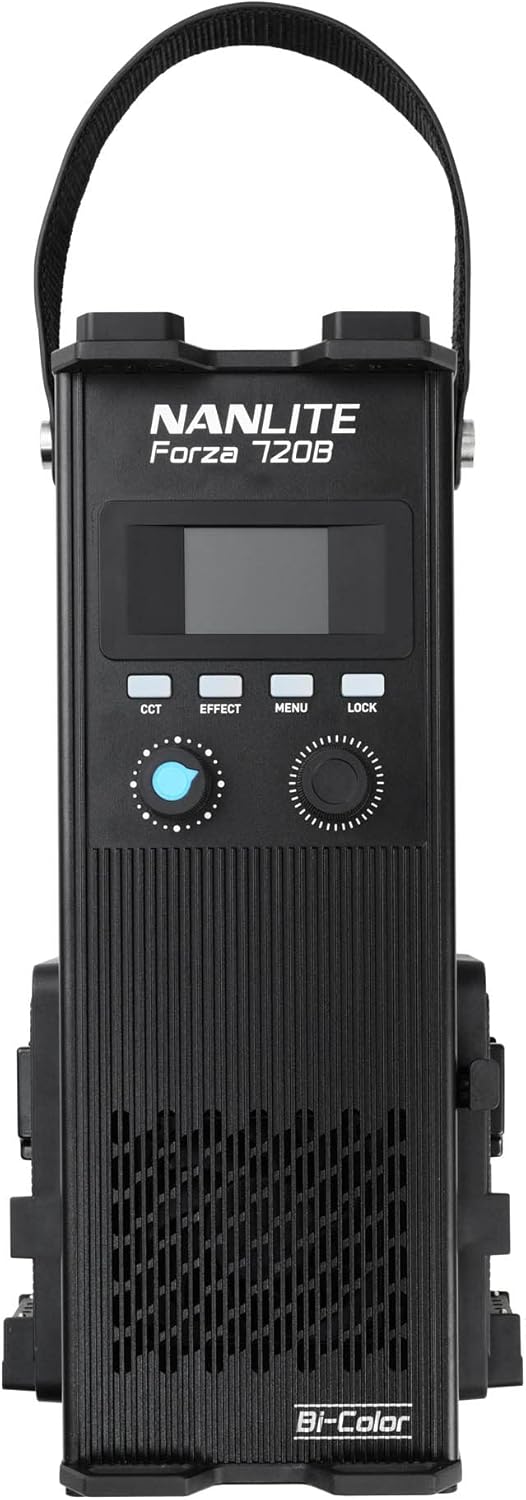
Image: Close-up of the Forza 720B control unit with display and adjustment knobs.
5.3 Kōwhiringa Mana
- Ngā Mana Whakahaere i runga i te Papa: Directly adjust settings using the knobs and buttons on the control unit.
- NANLINK Mobile App: For wireless control, download the NANLINK mobile app and connect via built-in Bluetooth.
- 2.4G Ahokore: Use compatible remotes or the WS-TB-1 Transmitter Box (sold separately) for 2.4G wireless control.
- DMX: For advanced integration into professional lighting setups, utilize the DMX control option.
Video: A Nanlite seller demonstrates portrait photography techniques using a Nanlite FS-200B, showcasing light setup and effects. This video provides insights into operating similar Nanlite continuous lights.
6. Tiaki
- Te horoi: Use a soft, dry cloth to clean the exterior of the light fixture and control unit. Do not use harsh chemicals or abrasive materials.
- Rokiroki: When not in use, store the Forza 720B and its accessories in the provided rolling case in a cool, dry place away from direct sunlight and extreme temperatures.
- Tirotiro: Tirohia ngā taura me ngā hononga i ia wā, mō ngā tohu o te pakaru, o te pakaru rānei.
7. Te Raru
| Raruraru | Take pea | Rongoā |
|---|---|---|
| Kare te rama e ka ana | Kāore he pūtake hiko; he koretake te hononga taura; kua whakaweto te pana hiko. | Check power cable connection; ensure power switch is on; verify power outlet functionality. |
| Ka whiti te marama, he koretake ranei | Unstable power supply; faulty cable; interference. | Use a stable power source; replace power cable; check for nearby electronic interference. |
| Ko te mana mamao kaore e mahi | Incorrect channel setting; low remote battery; out of range. | Verify channel settings on both light and remote; replace remote batteries; move closer to the light. |
8. Whakatakotoranga
| Āhuahira | Taipitopito |
|---|---|
| Hunga Hua | 0.39 x 0.39 x 0.39 inihi |
| Taumaha Tūemi | 11.7 pauna |
| ASIN | B0BTFBV7W8 |
| Tauira Tuemi | Forza 720B Kit-ST |
| Kaihanga | Nanlite |
9. Pūtāhui me te Tautoko
For warranty information and technical support, please refer to the official NANLITE website or contact your authorized dealer. Keep your purchase receipt as proof of purchase for warranty services.


