1. Kupu Whakataki
Thank you for choosing the MLOVE BV230 Portable Bluetooth Speaker. This manual provides essential information for setting up, operating, and maintaining your speaker. The BV230 is designed for portability, delivering high-quality audio with enhanced bass, and features IP56 dust and water resistance, making it suitable for various environments.
2. Ihirangi mokete
Me whakarite kei roto katoa nga taonga kei roto i te kete:
- 1 x MLOVE BV230 Bluetooth Speaker
- 1 x USB Momo-C Utaura Whakatau
- 1 x Raina
- 1 x Pukapuka Tohutohu (tenei tuhinga)
3. Hua Neke Atuview
Kia mohio koe ki nga waahanga me nga mana whakahaere a te kaikorero.
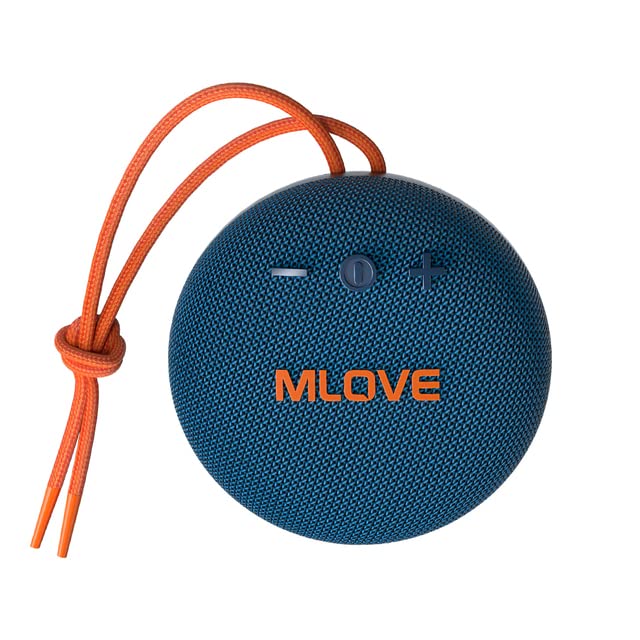
Whakaahua 3.1: Mua view of the MLOVE BV230 speaker, showing the power button, volume controls, and MLOVE branding.
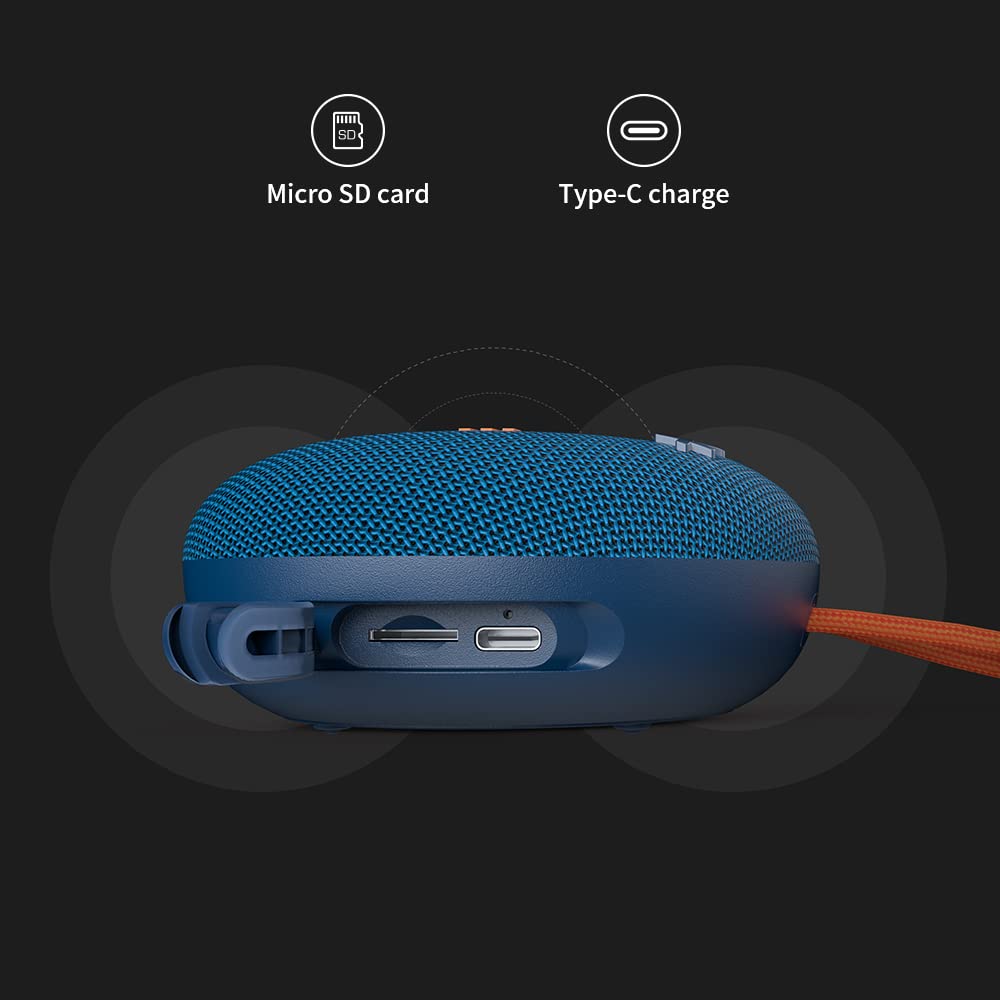
Whakaahua 3.2: Te taha view of the MLOVE BV230 speaker, highlighting the Micro-SD card slot and the USB Type-C charging port, protected by a rubber flap.
Patene Mana:
- Pātene Hiko: Pēhi me te pupuri kia whakakā/whakaweto. Pēhi poto ki te purei/tatari waiata, whakautu/whakamutu waea ranei.
- Rōrahi Whakarunga (+): Perehi poto hei whakanui ake i te rōrahi. Paa roa mo te riu panuku.
- Rōrahi Raro (-): Pēhi poto hei whakaiti i te rōrahi. Pehi roa mo te riu o mua.
4. Tatūnga
4.1 Te Whakataki i te Kaikorero
I mua i te whakamahinga tuatahi, whakakīia katoatia te kaikorero.
- Open the rubber flap on the side of the speaker to expose the charging port.
- Connect the included USB Type-C charging cable to the speaker's charging port.
- Honoa te tahi pito o te taura ki te urutau hiko USB (kaore i whakauruhia), ki te tauranga USB rorohiko ranei.
- The charging indicator light will illuminate during charging and turn off once fully charged. A full charge takes approximately 3 hours.
4.2 Kei te Hiko / Weto
- Hei Whakahiko: Press and hold the Power button for approximately 2-3 seconds until you hear an audible prompt.
- Hei Whakaweto: Press and hold the Power button for approximately 2-3 seconds until you hear an audible prompt.
4.3 Takirua Nihokikorangi
Connect your BV230 speaker to a Bluetooth-enabled device.
- Ensure the speaker is powered on and in Bluetooth pairing mode (indicated by a flashing LED).
- I runga i to taputapu (smartphone, tablet, etc.), whakahohea te Nihokikorangi me te rapu mo nga taputapu e waatea ana.
- Select "BV230" from the list of found devices.
- Once connected, the speaker will provide an audible confirmation, and the LED indicator will stop flashing.
- The speaker will automatically reconnect to the last paired device when powered on, if within range (up to 10 meters).
4.4 Whakahoahoa Waea Ahokore Tika (TWS).
Connect two MLOVE BV230 speakers for a true wireless stereo experience.

Whakaahua 4.1: Two BV230 speakers demonstrating True Wireless Stereo (TWS) pairing for enhanced audio.
- Ensure both BV230 speakers are powered on and not connected to any other Bluetooth device.
- On one of the speakers (this will be the primary speaker), double-press the Power button. The speaker will enter TWS pairing mode.
- The two speakers will automatically search for and connect to each other. You will hear an audible confirmation once TWS pairing is successful.
- Now, connect your Bluetooth device to the primary speaker (the one you initiated TWS pairing on) as described in Section 4.3.
- Ka purei te ororongo i roto i nga kaikorero e rua.
4.5 Micro-SD Card Playback
Play music directly from a Micro-SD card.
- Open the rubber flap on the side of the speaker.
- Insert a Micro-SD card (with supported audio files) into the Micro-SD card slot until it clicks into place.
- The speaker will automatically switch to Micro-SD card playback mode.
- Use the Power button for play/pause and the Volume +/- buttons for track control.
5. Nga Tohutohu Whakahaere
5.1 Purei Waiata
- Purei/Tatari: Patohia poto te paatene Mana.
- Runga Runga: Patohia poto te paatene '+'.
- Raro Raro: Patohia poto te paatene '-'.
- Riu Panuku: Pēhia roa te pātene '+'.
- Riu o mua: Pēhia roa te pātene '-'.
5.2 Waea-Waea-a-ringa
The built-in microphone allows for hands-free calls when connected via Bluetooth.

Whakaahua 5.1: The BV230 speaker facilitating a hands-free call, demonstrating its built-in microphone functionality.
- Whakautu Waea: Short press the Power button when an incoming call is received.
- Whakamutu Waea: Short press the Power button during a call.
- Whakakore Waea: Long press the Power button when an incoming call is received.
6. Tiaki
6.1 Te horoi
To maintain the speaker's appearance and functionality:
- Ūkuia te kaikōrero ki te ngohengohe, damp kakahu.
- Kaua e whakamahia nga kai horoi, te waipiro, te whakarewa matū ranei.
- Ensure the charging port and Micro-SD slot are dry before use or charging.
6.2 Atete Wai me te Puehu (IP56)
The MLOVE BV230 speaker is rated IP56, meaning it is protected against dust ingress and can withstand water jets from any direction. This makes it suitable for outdoor use and splashes.

Whakaahua 6.1: The BV230 speaker in water, illustrating its IP56 water resistance.
- Ensure the rubber flap covering the charging port and Micro-SD slot is securely closed to maintain water and dust resistance.
- Do not intentionally submerge the speaker in water for extended periods.
- Avoid exposing the speaker to saltwater or other chemicals, as this may damage the seals.
- If the speaker gets wet, wipe it dry before charging or opening the port flap.
6.3 Rokiroki
- Whakaorangia te kaikorero ki te waahi makariri, maroke atu i te ra tika me te wera nui.
- Mena ka roa te rokiroki, utua te pākahiko ki te 50% i ia marama torutoru kia roa ai te ora o te pākahiko.
7. Te Raru
If you encounter issues with your speaker, refer to the following solutions:
| Raruraru | Rongoa pea |
|---|---|
| Karekau te kaikorero e kaha ana. | Me whakarite kei te utaina te pākahiko. Tūhonohia te kaikōrero ki tētahi puna hiko mā te taura USB Type-C. |
| Kaore e taea te hono ma te Nihokikorangi. |
|
| Karekau he oro, he iti te reo. |
|
| Ka rahua te takirua TWS. |
|
| Take utu. |
|
8. Whakatakotoranga
Key technical specifications for the MLOVE BV230 speaker:
| Āhuahira | Taipitopito |
|---|---|
| Ingoa Tauira | BV230 |
| Ahu (L x W x H) | 100.8 x 100.8 x 46 mm (approx. 108D x 46W x 108H Millimeters) |
| Taumaha Tūemi | 198 karamu (tata ki te 280 karamu me te takai) |
| Mana Putanga Puoro | 5 Watts |
| Pūhiko Raukaha | 1500 mAh Lithium Polymer |
| Te wa takaro | Tae atu ki te 8 haora (i te 70% rōrahi) |
| Waa Whakatau | Tata ki te 3 haora |
| Tauranga Whakatau | USB Momo-C |
| Putanga Nihokikorangi | 5.0 |
| Mokowoko Korekore | Tae atu ki te 10 mita (33 putu) |
| Wai & Puehu Atete | IP56 |
| Rauemi | papanga |
| Tikanga Mana | Paa |
| Aratau Putanga Ororongo | Tirotiro (me te takirua TWS) |
9. Pūtāhui me te Tautoko
The MLOVE BV230 Portable Bluetooth Speaker comes with a 12-marama whakamana mai i te ra o te hokonga, e kapi ana i nga hapa hangahanga.
For technical support, warranty claims, or further assistance, please contact your retailer or the manufacturer directly. Please retain your proof of purchase for warranty service.


