Kupu Whakataki
This manual provides essential instructions for the safe operation, maintenance, and troubleshooting of your Hisense RVCG144AB Robot Vacuum Mop. Please read this manual thoroughly before using the product and retain it for future reference.
Nga Tohutohu Haumaru
Hei whakaiti i te tupono o te whara, i te kino ranei, kia mau ki nga tikanga haumaru e whai ake nei:
- Me mohio kua whakakiia te karetao i mua i te whakamahinga tuatahi.
- Kaua e whakahaerehia te karetao ki te taha o ngā mura ahi, o ngā rauemi mura rānei.
- Tiakina nga makawe, nga kakahu taratara, nga maihao, me nga wahanga tinana katoa mai i nga tuwhera me nga waahanga neke.
- Kaua e tukua nga tamariki ki te whakahaere i te karetao. Tirotiro i nga tamariki me nga kararehe i te wa e mahi ana te robot.
- Use only the original charging adapter and dock provided by Hisense.
- Tangohia ngā taura hiko, ngā mea ririki me ngā mea pakarukaru i te papa i mua i te horoinga hei ārai i te raranga, te pakaru rānei.
- Kaua e whakamahia te karetao ki te kohi i ngā paru nunui, i ngā wai, i ngā mea e mura ana rānei.
- Horoia ngā paraihe me ngā tātari i ia wā kia mau tonu ai te mahi tino pai.
Ka mutu te huaview
The Hisense RVCG144AB is a versatile robot vacuum mop designed for efficient floor cleaning. It features gyroscopic mapping for systematic navigation, adjustable power and water levels, and convenient control via a mobile application.
Ihirangi mokete
I te wetewete, tirohia kei te noho nga waahanga katoa:
- Hisense RVCG144AB Robot Vacuum Mop
- Te Kaare Kaimana
- Uera Whakatau
- Mana Mamao
- HEPA Filter (1 piece)
- Cleaning Pad (Mop Cloth)
- Paraihe taha (2 ngā wahi)
- Aratohu Tohutohu (tenei pukapuka)
Wae karetao
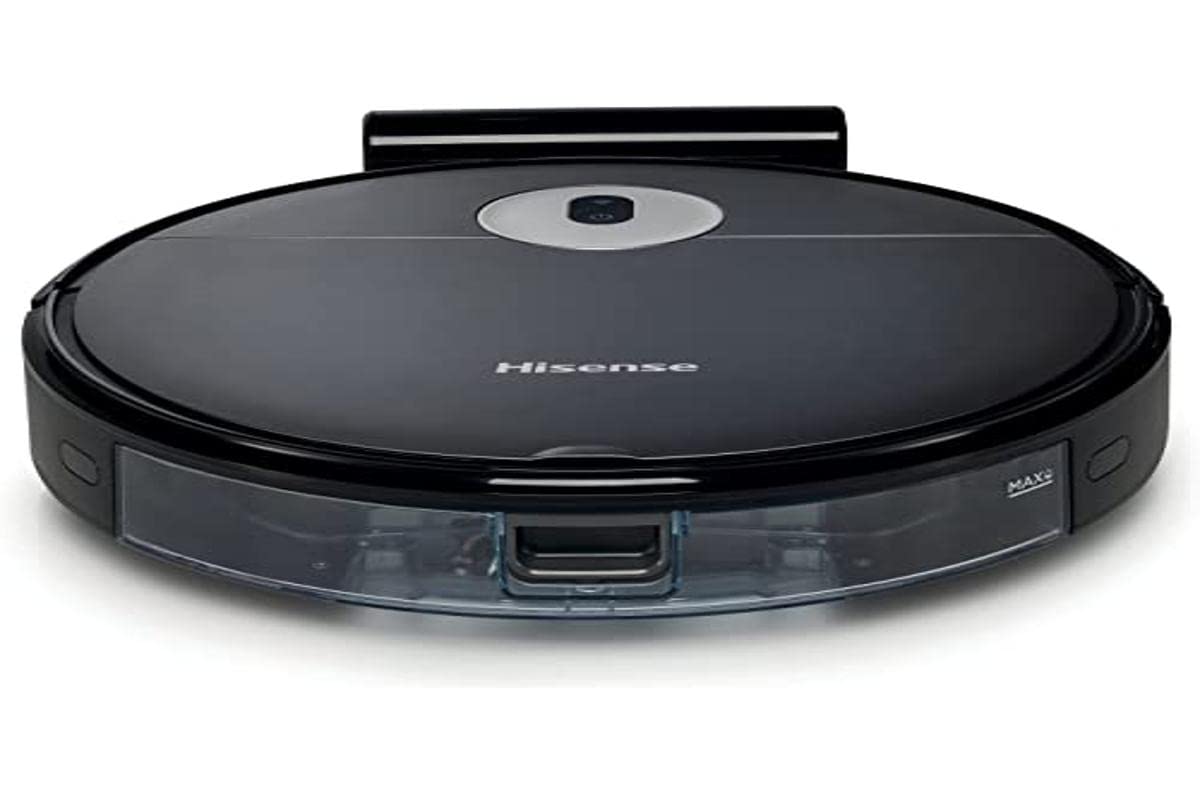
Image: The Hisense RVCG144AB Robot Vacuum Mop, showcasintōna hoahoa pango maeneene me tōna āhua kiato.
The robot includes a floating roller brush for adapting to different floor conditions and dual-sided brushes for edge cleaning and preventing hair entanglement.
Tatūnga
1. Whakataunga Teihana Teihana
Place the charging station against a wall in an open area, ensuring there are no obstacles within 1 meter (3 feet) to the sides and 2 meters (6 feet) in front of the station. Connect the charging cable to the station and plug it into a power outlet.

Image: Illustration of the charging station, showing its power connection and recommended clear space around it.
2. Whakataki Tuatahi
Place the robot onto the charging station. Ensure the charging contacts on the robot align with those on the station. The robot will begin charging automatically. For first use, allow the robot to charge completely, which typically takes several hours.
3. Whakauruhia nga Taapiri Taapiri
Pēhia ngā paraihe taha ki runga i ngā pou i raro i te karetao kia pāwhiri rā anō ki tōna tūranga.
4. Hononga Taupānga (Wi-Fi)
- Download the Hisense ConnectLife app from your smartphone's app store.
- Rēhita he pūkete ka takiuru.
- Follow the in-app instructions to add your RVCG144AB robot vacuum. This typically involves connecting the robot to your home Wi-Fi network.
- Ensure your Wi-Fi network is 2.4GHz for optimal connectivity.
Nga Tohutohu Whakahaere
1. Te Tīmata me te Whakamutu i te Horoi
- Timata A-ringa: Press the power button on the robot once to start cleaning. Press again to pause.
- Mana Taupānga: Use the Hisense ConnectLife app to start, pause, or stop cleaning from anywhere.
- Mana Mamao: Use the provided remote control to initiate or stop cleaning.
2. Whakapai Aratau
Ka tukuna e te karetao nga momo horoi kia rite ki nga hiahia rereke:
- Whakapai Aunoa: Ka whakatere atamai te karetao, ka horoi i te wāhi katoa e taea atu ana.
- Selective Room/Zone Cleaning: Use the app to define specific rooms or areas for cleaning.
- Whakapai Hohonu: For thorough cleaning of a specific area.
- Te Horoi Kōpikopiko: A systematic cleaning pattern to cover large areas efficiently.
- Whakapai Tapa: Ka horoi te karetao i ngā pakitara me ngā taha o ngā tāonga whare.
3. Adjusting Suction Power and Water Flow
The robot features 3 levels of suction power and water flow. These can be adjusted via the mobile app to match your cleaning requirements and floor type.
4. Scheduling Cleanings
Set up cleaning schedules through the Hisense ConnectLife app. This allows the robot to automatically clean at preferred times and days.
Te tiaki
Regular maintenance ensures optimal performance and extends the lifespan of your robot vacuum mop.
1. Te Putua i te Puehu
Open the top cover of the robot and remove the dustbin. Empty its contents into a trash bin. It is recommended to empty the dustbin after each cleaning cycle.

Whakaahua: He tata view of the robot's dustbin being removed for emptying, highlighting its capacity.
2. Te horoi i te Tātari HEPA
Remove the HEPA filter from the dustbin. Tap it gently to remove dust. Do not wash the HEPA filter with water; replace it every 3-6 months depending on usage.
3. Te horoi i te Paraihe Matua
Remove the main brush cover and then the main brush. Use the cleaning tool to remove hair and debris tangled around the brush. Reinstall the brush and cover.
4. Te horoi i nga Parai o te Taha
Periodically check the side brushes for tangled hair or debris. Remove them by pulling gently and clean as needed. Replace if damaged.
5. Te horoi i te Taaka Wai me te Mop Pad
Detach the water tank and empty any remaining water. Clean the mop pad by hand or machine wash. Allow all components to dry completely before reassembly.

Image: The water tank and mop pad assembly, illustrating how to detach and clean them.
6. Whakapai i nga Pūoko me te Whakataki Hoapā
Horoia ngā pūoko pari, ngā pūoko pakitara, me ngā hoapā utu o te karetao me te teihana utu ki te kakahu ma, maroke kia tika ai te mahi.
Raparongoā
Tirohia tenei waahanga mo nga take noa me o raatau otinga.
| Raruraru | Take pea | Rongoā |
|---|---|---|
| Kaore te karetao e huri, e utu ranei. | Battery depleted; charging contacts dirty; charging station not powered. | Ensure robot is on charging station; clean charging contacts; check power to charging station. |
| Ka mau te karetao i nga wa maha. | Obstacles on floor; robot caught on wires or rugs. | Clear floor of obstacles, wires, and thick rugs before cleaning. |
| He kino te mahi horoi. | Kī tonu te ipu para; raruraru ngā paraihe; purua te tātari. | Empty dustbin; clean main and side brushes; clean or replace HEPA filter. |
| App cannot connect to robot. | Incorrect Wi-Fi password; robot out of Wi-Fi range; 5GHz Wi-Fi network. | Verify Wi-Fi password; move robot closer to router; ensure 2.4GHz Wi-Fi is used. |
Whakatakotoranga
Technical specifications for the Hisense RVCG144AB Robot Vacuum Mop:
| Āhuahira | Taipitopito |
|---|---|
| Waitohu | Hisense |
| Tau tauira | RVCG144AB |
| Tae | Pango |
| Mana | 55 Watts |
| Te Mana Momo | 4000 Pa |
| Number of Speeds/Levels | 3 (Power and Wash) |
| Momo Pūhiko | Lithium-ion |
| Pūhiko Raukaha | 2600 mah |
| Wā whakahaere | Tae atu ki te 90 meneti |
| Te Puehu Puehu | 500 ml |
| Te kaha o te tank wai | 250 ml |
| Momo Tātari | HEPA |
| Whakaterenga | Gyroscopic Mapping |
| Momo Mana | App Control (Wi-Fi), Remote Control |
| Hunga Hua | 35L x 35W x 4H cm |
| Taumaha Tūemi | 5.4 Kirokaramu |
| Mata e taunakitia ana | Marble, laminate, linoleum, carpet, wood |
Pūtāhui me te Tautoko
For warranty information, please refer to the warranty card included with your product packaging or visit the official Hisense webpae. Mo te tautoko hangarau, mo nga patai ratonga ranei, me waea atu ki te ratonga kaihoko a Hisense ma o raatau waahana mana.
Ka kitea e koe etahi atu korero me nga rauemi tautoko i runga i te Hisense official webpae.


