1. Kupu Whakataki
This manual provides detailed instructions for the setup, operation, and maintenance of your Creative Sound Blaster Katana SE Multi-Channel Gaming Soundbar. Designed for an immersive audio experience, this soundbar features 180W peak power, a bi-amplified 4-driver design, Super X-Fi technology, and customizable RGB lighting. Please read this manual thoroughly before using your device to ensure optimal performance and safety.

Figure 1: Creative Sound Blaster Katana SE Gaming Soundbar
2. Nga Korero Haumaru Nui
- Pānuihia enei tohutohu.
- Kia mau ki enei tohutohu.
- Whakarongo ki nga whakatupato katoa.
- Whaia nga tohutohu katoa.
- Kaua e whakamahia tenei taputapu tata ki te wai.
- Horoia ki te kakahu maroke anake.
- Kaua e araia nga whakatuwheratanga hau. Tāutahia kia rite ki nga tohutohu a te kaihanga.
- Kaua e whakauruhia ki te taha o nga puna wera penei i nga radiators, nga rehita wera, nga umu, me etahi atu taputapu (tae atu ki ampkaiwhakaora) e whakaputa ana i te wera.
- Tiakihia te taura hiko kia kaua e hikoi, ka kowhakina mai ranei, ina koa ki nga moko, nga waahi waatea, me te waahi ka puta mai i te taputapu.
- Me whakamahi noa i nga taapiri / taputapu kua tohua e te kaiwhakanao.
- Wewetehia tenei taputapu i te wa e uira ana te tupuhi, i te kore ranei e whakamahia mo te wa roa.
3. Ihirangi mokete
Manatokona kei roto katoa nga mea kei roto i to kete:
- Creative Sound Blaster Katana SE Soundbar
- Subwoofer (wired)
- Mana Mamao
- Pūurutau Hiko
- USB-C taura
- Waea Optical
4. Hua Neke Atuview
The Sound Blaster Katana SE is an all-in-one soundbar designed for powerful and immersive audio. It features a sleek design with integrated controls and a front-facing display.
4.1. Soundbar Components
- Mana Paewhiri Runga: Power, Volume Up/Down, Source, Mode, SXFI.
- Whakaaturanga o Mua: Shows current source (USB, AUX, OPTICAL, BT, TV), volume level, and selected sound mode.
- Front Headphone Jack: For connecting headphones directly.
- Puoro-roto: Mo te whakawhitiwhiti reo.
- RGB Lighting Strip: Customizable lighting effects located at the bottom of the soundbar.
- Kaitaraiwa: -amplified 4-driver design for clear and precise audio.

Whakaahua 2: Mua view of the Sound Blaster Katana SE with RGB lighting
4.2. Hononga Paewhiri Whakamuri
The rear panel provides various ports for connecting to your devices:
- HDMI Out (ARC): For connecting to a TV with Audio Return Channel support.
- SXFI Out: Dedicated port for Super X-Fi enabled headphones.
- Te Ororongo USB: For digital audio connection to PC/Mac.
- Whakauru ki: 3.5mm analog audio input.
- Optical I roto i: Whakauru ororongo whatu mamati.
- Raro ki waho: For connecting the wired subwoofer.
- Whakauru Hiko: Mo te urutau hiko.

Figure 3: Rear panel with HDMI ARC, SXFI Out, USB Audio In, Aux In, Optical In, Sub Out, and Power Input.
4.3. Subwoofer
The included wired subwoofer enhances bass response for a more dynamic audio experience.

Whakaahua 4: Roto view showing the soundbar's bi-amplified drivers and the subwoofer's design.
5. Tatūnga
Follow these steps to set up your Sound Blaster Katana SE:
- Turanga: Place the soundbar on a stable surface below your TV or monitor. Position the subwoofer on the floor near the soundbar for optimal bass.
- Tūhono Subwoofer: Connect the wired subwoofer cable to the 'Sub Out' port on the soundbar's rear panel.
- Hono Hono: Connect the power adapter to the soundbar's power input and then plug it into a wall outlet.
- Tūhono Pūtake Ororongo: Choose your preferred audio connection method (HDMI ARC, Optical, USB, Aux, or Bluetooth) and connect the appropriate cable.
Video 1: Official product video demonstrating the Sound Blaster Katana SE's features and connectivity options.
6. Kōwhiringa Hononga
The Sound Blaster Katana SE offers a wide range of connectivity to suit various devices:
- HDMI Out (ARC): Connect to your TV's HDMI ARC port for high-quality audio and control.
- Te Ororongo USB: Ideal for connecting to PCs, Macs, or gaming consoles that support USB audio.
- Whakauru ki: Use a 3.5mm audio cable to connect to devices with an analog audio output.
- Optical I roto i: For digital audio connection from TVs, game consoles, or other media players.
- Nihokikorangi 5.0: Pair wirelessly with your mobile devices, tablets, or computers for convenient audio streaming.
- SXFI Out: Connect Super X-Fi certified headphones for a personalized holographic audio experience.

Figure 5: Soundbar showcasing versatile connectivity with gaming consoles and mobile devices.
7. Nga Tohutohu Whakahaere
7.1. Te Hiko / Whakaweto
Press the Power button on the soundbar's top panel or the remote control to turn the device on or off.
7.2. Mana Rōrahi
Use the Volume Up (+) and Volume Down (-) buttons on the soundbar or remote to adjust the audio level. The current volume will be displayed on the front panel.
7.3. Kōwhiringa Pūtake
Press the 'Source' button on the soundbar or remote to cycle through available input sources (HDMI ARC, USB, Aux, Optical, Bluetooth).
7.4. Aratau oro
The soundbar features optimized sound modes for different content types. Press the 'Mode' button on the soundbar or remote to switch between:
- Waiata: Enhanced for musical playback.
- Kiriata: Optimized for cinematic audio.
- petipeti: Tailored for immersive gaming soundscapes.
- Effects Off: Neutral audio profile.
7.5. Te whakamahi i te Mana Mamao
The included remote control provides full functionality for the soundbar, including power, volume, source, mode, SXFI, RGB lighting, and custom buttons.
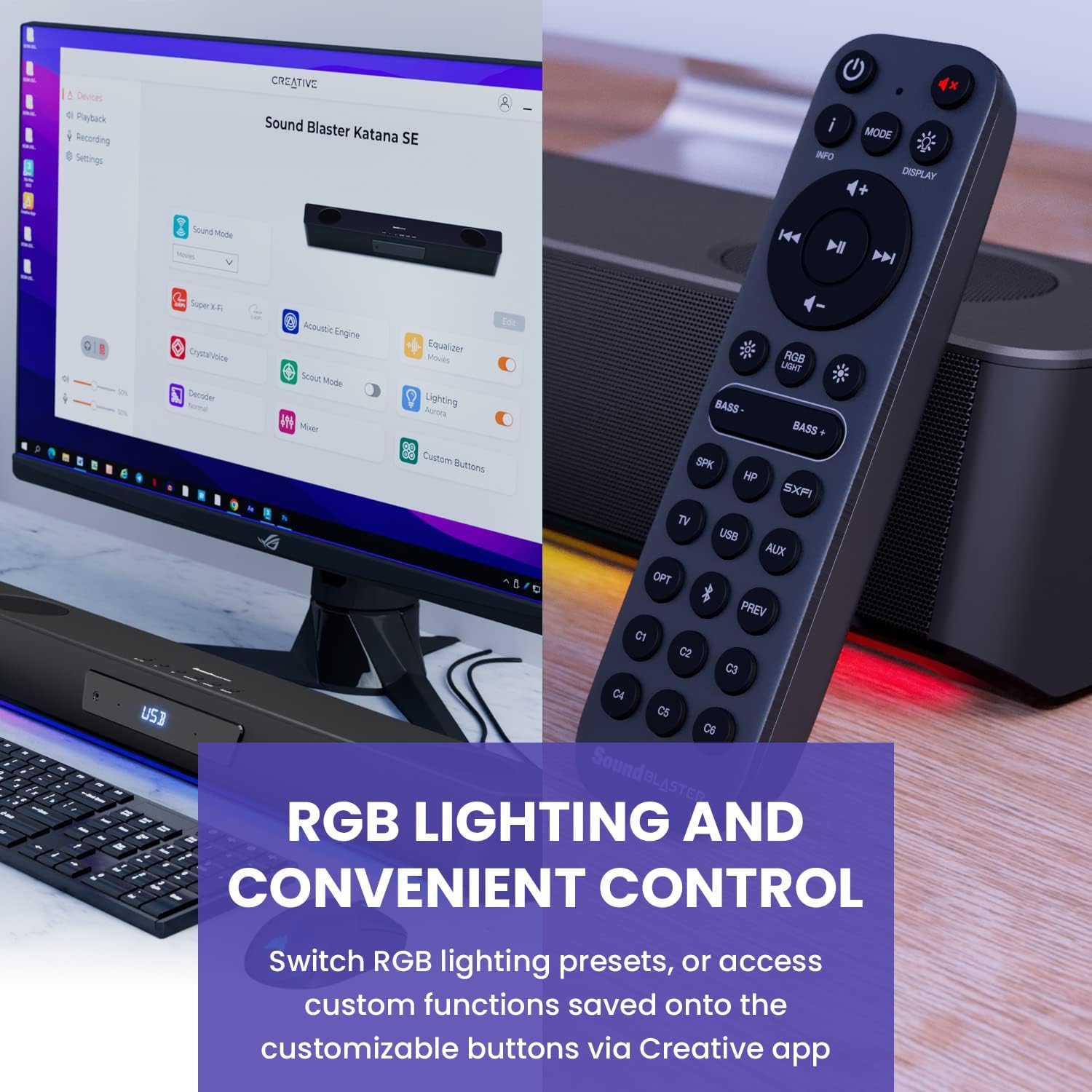
Figure 6: Remote control for the Sound Blaster Katana SE.
7.6. Creative App Customization
For advanced customization, download the Creative app on your PC or Mac. The app allows you to:
- Tune Audio Performance: Adjust EQ settings and activate Sound Blaster processing technologies.
- Whakaritea te Rarama RGB: Select from various RGB presets or create your own custom lighting effects.
- Map Custom Functions: Assign specific commands to the six customizable buttons on the remote control.

Figure 7: Creative app interface showing sound mode, Super X-Fi, Acoustic Engine, Equalizer, CrystalVoice, Scout Mode, Lighting, Decoder, Mixer, and Custom Buttons.
8. Super X-Fi Technology
Super X-Fi technology personalizes your headphone audio experience for optimized and realistic listening. It recreates the soundstage of a multi-speaker system in your headphones.
- SXFI Battle Mode: Whiwhi i te advan whakataetaetage in FPS games by accurately pinpointing enemy locations through enhanced audio cues.

Figure 8: Super X-Fi and SXFI Battle Mode for enhanced gaming audio.
9. Papaorooro Hono-i roto
The Sound Blaster Katana SE includes a built-in beamforming microphone, allowing you to participate in calls or in-game voice chat directly through the soundbar.
10. Rarama RGB
The integrated RGB lighting strip can be customized to match your setup or mood. Use the remote control to cycle through presets or the Creative app for advanced color and effect adjustments.
11. Tiaki
To ensure the longevity and performance of your Sound Blaster Katana SE:
- Kia ma te taputapu ma te muru ki te kakahu ngohengohe, maroke.
- Avoid using liquid cleaners or aerosols.
- Me whakarite kia kaua e araia nga tuwhera o te hau.
- Kaua e tukuna te taputapu ki te tino mahana me te makuku.
12. Te Raru
Mena ka pāngia koe e ngā raruraru me tō paeoro, tirohia ngā otinga noa e whai ake nei:
- Kore Oro: Check all cable connections (power, audio source, subwoofer). Ensure the correct input source is selected on the soundbar. Verify the volume is not muted or too low.
- Oro korikori: Try reducing the volume. Check audio cable integrity. Ensure the audio source is providing a clean signal.
- Nga Take Hononga Nihokikorangi: Ensure the soundbar is in Bluetooth pairing mode. Delete the soundbar from your device's Bluetooth list and re-pair. Move closer to the soundbar to reduce interference.
- Mana Mamao Kaore i te Mahi: Check battery levels and replace if necessary. Ensure there are no obstructions between the remote and the soundbar.
- Raiti RGB Kare e Mahi: Check settings in the Creative app. Ensure RGB lighting is enabled via the remote or app.
13. Whakatakotoranga
| Āhuahira | Whakatakotoranga |
|---|---|
| Ingoa Tauira | 51MF8415AA000 27585486 |
| Momo Kaikorero | Paorooro |
| Momo Whakaeke | Maunga Ripanga |
| Āhuahira Motuhake | Bass Boost, Built In Microphone, Radio, Stereo Pairing, USB Port |
| Whakamahinga Manakohia mo te Hua | For Gaming Consoles, For Computers |
| Pūrere Hototahi | Papamahi, Pona, Pūoro MP3, Pūwhakaata, Waea Atamai, Papaaho, Pouaka Whakaata |
| Tatau Waeine | 1.0 Tatau |
| Whirihoranga Hongere oro a tawhio noa | 5.1 |
| Tae | 180W Peak Power with Bluetooth 5.0 |
| Nga Waahanga kei roto | Mamao |
| Hunga Hua | 25.6"D x 4.3"W x 3.1"H |
| Taumaha Tūemi | 5.9 Pauna |
| He parewai | He teka |
| Momo Rarangi | He iti |
| Te maha o nga mea | 1 |
| Tikanga Mana | Mamao |
| Hangarau Whakawhitiwhiti Ahokore | Nihokikorangi |
| Rahi Kaioro | 1 Inihi |
| Puna Mana | Hiko Hiko |
| Diamita Tweeter | 1 Inihi |
| Taumata Atete Wai | Ehara i te wai ātete |
| Momo Momo Kaihoko | FFP |
| Momo Atekōkiri Ororongo | Atekōkiri Hihiko |
| Hangarau Hononga Subwoofer | Ahokore |
| Te maha o nga taumata hiko | 1 |
| Nga Whakamahinga Motuhake mo te Hua | Gaming Consoles, Computers |
| UPC | 054651195639 |
| Kaihanga | Hangahanga Taiwhanga |
| Hanga | tapawhā tapawhā |
| Taumaha Tūemi | 5.9 pauna |
| ASIN | B0C5DFMB93 |
| Tau tauira tūemi | MF8415 |
| Te Ra Tuatahi Wātea | Haratua 16, 2023 |
| Waitohu | auaha |
| Kaikorero Te Mana Putanga Morahi | 100 Watts |
| Whakautu auau | 20000 Hz |
| Hangarau Hononga | Nihokikorangi |
| Aratau Putanga Ororongo | Karapoti, Stereo |
14. Pūtāhui me te Tautoko
Your Creative Sound Blaster Katana SE comes with a Limited Warranty. For detailed warranty information, product registration, technical support, and customer service, please visit the official Creative webpaetukutuku tirohia ranei ki te kaari whakamana kei roto i to kete.


