1. Kupu Whakataki
Thank you for choosing the FLYLINKTECH BD10 6000A 12V Car Jump Starter and Power Bank. This device is designed to provide emergency jump-starting for vehicles and serve as a portable power bank for various electronic devices. Please read this manual thoroughly before use to ensure safe and optimal operation.

Image 1.1: The FLYLINKTECH BD10 Jump Starter unit with its smart battery clamps.
2. Nga korero haumaru
Me whai tonu i ngā mahi ārai haumaru e whai ake nei hei ārai i te whara, i te kino rānei o te taputapu, o te waka rānei:
- Kaua e ngana ki te whakaara anō i te pākahiko kua tio.
- Me whakarite kia tika te hononga polarity (whero clamp ki pai, pango clamp to negative). Reverse polarity can cause damage.
- Kaua e tukua te matapihi atamaiampkia pā tetahi ki tetahi ina honoa ki te tīmatanga peke.
- Tiakina te taputapu mai i nga tamariki.
- Do not expose the device to extreme temperatures (above 60°C / 140°F or below -20°C / -4°F) or direct sunlight for extended periods.
- Kaua e wetewete, whakarereke ranei i te taputapu.
- Use only the provided smart clamps and charging cables.
- Ki te wera rawa te taputapu i te wā e whakamahia ana, momotu tonu atu.

Image 2.1: The jump starter incorporates multiple safety features such as spark-proof, reverse polarity, overvoltage, short circuit, overload, and high-temperature protection.
3. Ihirangi mokete
Manatokona kei roto katoa nga mea kei roto i te kete:
- FLYLINKTECH BD10 Jump Starter Unit
- Maataki Papa Clamps
- USB-C ki USB-C Cable
- USB-A ki USB-C Cable
- 12V DC Car Charger Adapter
- Pukapuka Kaiwhakamahi
- Puhi Rokiroki

Image 3.1: The complete package includes the jump starter, smart clamps, various cables, user manual, and a protective storage case.
4. Tatūnga me te Whakatau
4.1 Utu Tuatahi
Before first use, fully charge the jump starter. The device features a 26800mAh battery capacity.
- Connect the provided USB-C cable to the jump starter's USB-C input port.
- Connect the other end of the cable to a compatible USB wall charger (not included). For fastest charging, use a PD 45W charger.
- The LED screen will display the charging status and battery percentage.
4.2 Charging Times
| Whakatauranga Kaitohu | Wā Utu Tata |
|---|---|
| 5W | 18 haora |
| 18W | 7 haora |
| 45W | 2 haora |
Note: A 45W wall charger is not included in the package.

Image 4.1: The device supports PD 45W fast charging, significantly reducing recharge time when using a compatible charger.
5. Nga Tohutohu Whakahaere
5.1 Peke Timata Waka
The FLYLINKTECH BD10 is capable of jump-starting all gas engines and diesel engines up to 12.0L.
- Ensure Sufficient Charge: Check the jump starter's LED screen to ensure it has at least 50% charge.
- Connect Smart Clamps: Whakauruhia te mono kikorangi o te rama atamaiamps into the jump starter's 12V output port. Ensure a firm connection.
- Hono atu ki te Pūhiko Waka:
- Whakapirihia te whero (+) clamp to the vehicle's positive battery terminal.
- Whakapirihia te mangu (-) clamp to the vehicle's negative battery terminal.
- Tohu Tirohanga: Ko te atamai clamp indicator light should turn solid green, indicating a correct connection. If it flashes or shows red, check connections and battery status.
- Press BOOST (if needed): If the vehicle battery is extremely low or completely dead, press the 'BOOST' button on the jump starter. Wait for the indicator light on the smart clamps to turn solid green.
- Tīmata Waka: Attempt to start your vehicle. If it doesn't start on the first try, wait 30 seconds before trying again. Do not attempt more than 3 consecutive starts.
- Tango Clamps: Kia tīmata te waka, tangohia tonutia te rama atamaiamps from the car battery, then disconnect them from the jump starter.

Image 5.1: The jump starter connected to a car battery, ready for operation. It supports 6000A peak current, 12V output, and is suitable for a wide range of engines.

Image 5.2: Visual guide illustrating the four steps to jump-start a vehicle: connect the plug, attach clamps, press boost, and start the engine.
5.2 Mahi Puke Hiko
The BD10 can charge multiple electronic devices via its USB-A and USB-C ports.
- Putanga USB1: Up to 18W (max)
- Putanga USB2: Up to 18W (max)
- Putanga USB-C: Tae atu ki te 45W (PD)
Connect your device using the appropriate USB cable to the desired output port. The LED screen will show 'OUT' and the wattage being drawn.

Image 5.3: The jump starter functioning as a power bank, simultaneously charging a smartphone and a tablet via its USB ports.
5.3 rama rama arahina
The built-in LED flashlight offers three modes: constant light, SOS signal, and strobe light.
- Press and hold the flashlight button to turn on the constant light.
- Press the button again to cycle through SOS and strobe modes.
- Pēhia me te pupuri ano kia whakaweto.

Image 5.4: The integrated LED flashlight provides illumination, an SOS signal, and a strobe function for emergency situations.
5.4 Informative LED Screen
The 6.0-inch LED screen provides real-time information about the device's status:
- Taumata Pūhiko: Ka whakaatu i te toenga pākahikotage.
- IN/OUT Indicator: Shows whether the device is charging (IN) or discharging (OUT).
- Wattage Whakaatu: Indicates the power (W) being drawn or supplied.
- Whakatupato Hapa: Displays specific error codes or symbols if an issue occurs.
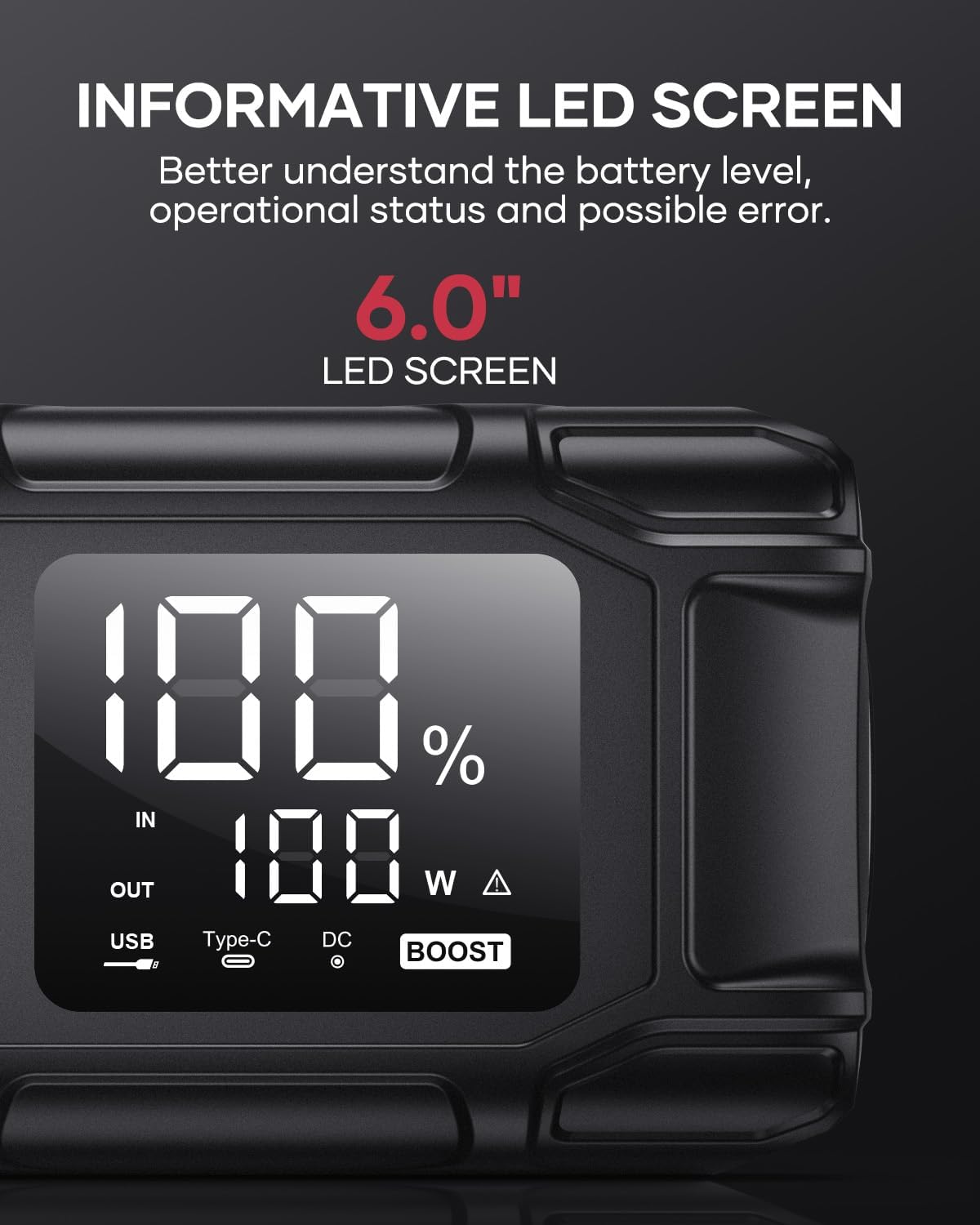
Image 5.5: The 6.0-inch LED screen provides clear information on battery percentage, input/output status, and power consumption.
6. Tiaki
- Whakahokia i nga wa katoa: To prolong battery life, recharge the jump starter every 3-6 months, even if not in use.
- Rokiroki: Store the device in its protective case in a cool, dry place, away from direct sunlight and moisture.
- Te horoi: Wipe the device with a soft, dry cloth. Do not use harsh chemicals or abrasive materials.
- Clamp Tiaki: Ensure the smart clamps are clean and free of corrosion before and after each use.
7. Te Raru
The device features multiple alarm situations indicated by audible signals and screen displays:
- Vol Rawatage Parenga: Audible signal "3". Recharge the device.
- Voltage Exceeds Vehicle Voltage: Audible signal "4". Check vehicle battery voltage.
- Parenga Iahiko Poto: Audible signal "5". Check clamp connections for short circuits.
- Safety Mode Activated: Audible signal "6". Device has entered safety mode due to an issue.
- Parenga Awa Tuwera: Audible signal "7". Reduce load or check connections.
- Pūoho Teitei/Hakarekare: Audible signal "8". Allow device to return to operating temperature range (-20°C to 60°C).
- Reverse Connection: Audible signal "9". Correct the clamp manaakitanga.

Whakaahua 7.1: Ka mutuview of the device's multi-alarm system, indicating various protection states with unique audible signals.
Mena ka mau tonu ngā raruraru i muri i te whai i ēnei mahi, whakapā atu ki te ratonga kiritaki.
8. Whakatakotoranga
| Āhuahira | Whakatakotoranga |
|---|---|
| Waitohu | FLYLINKTECH |
| Tauira | BD10 |
| Pukepuke o naianei | 6000 Ampmua |
| Pūhiko Raukaha | 26800mAh |
| Putanga Voltage | 12V |
| USB-C Whakauru/Putanga | PD 45W |
| USB-He Putanga | 18W (mōrahi) |
| Applicable Engine Types | All Gas, up to 12.0L Diesel |
| Te Waahi Mahi | -20°C ki te 60°C (-4°F ki te 140°F) |
| Hunga Hua | 23.95 x 10 x 5.69 cm |
| Taumaha Tūemi | 920 g |

Image 8.1: The device is designed to operate reliably in extreme climates, from -20°C (-4°F) to 60°C (140°F).
9. Pūtāhui me te Tautoko
FLYLINKTECH is committed to providing high-quality products. For any questions, technical assistance, or warranty claims, please refer to the contact information provided with your purchase or visit the official FLYLINKTECH webpae. Tena koa pupurihia to tohu hoko mo nga kaupapa whakamana.