1. Kupu Whakataki
Mauruuru koe mo te hokoasing the CANYON BSP-8 Bluetooth Speaker. This manual provides essential information for the safe and efficient use of your device. Please read it thoroughly before operation and retain it for future reference.
Āhuatanga matua:
- 10W Audio Output: Ka tukuna he oro mārama, kaha hoki.
- Nihokikorangi 5.2: For stable and energy-efficient wireless connection up to 10 meters.
- Rama Whakamuri RGB: Integrated lighting for enhanced ambiance.
- Tirotiro Ahokore Tika (TWS): Connect two BSP-8 speakers for a full stereo sound experience.
- Kōwhiringa Whakahoki Maha: Supports Bluetooth, AUX, USB, and MicroSD card inputs.
- Hoahoa Kawe: Compact size with a convenient hanger for easy transport.
- Roa te Ora o te Pūhiko: Tae atu ki te 3 haora o te wa takaro i runga i te utu kotahi.
2. Nga korero haumaru
- Kaua e tukuna te kaikorero ki te wera nui, te ra tika, te makuku nui ranei.
- A ape i te tuku, te tuku ranei i te kaikorero ki nga paanga kaha.
- Kaua e wetewete, kaua hoki e ngana ki te whakatika i te kaikorero māu ake. Whakapā atu ki ngā kaimahi ratonga whai tohu.
- Puritia te kaikorero kia matara atu i te wai me ētahi atu wai. Kāore e ārai-wai.
- Whakamahia anake te taura utu kua whakaratohia, te taura Momo-C rānei kua whakamanahia mō te utu.
- Makahia te pākahiko me te kaikorero kia rite ki ngā ture ā-rohe.
3. Ihirangi mokete
- CANYON BSP-8 Bluetooth Speaker
- USB Momo-C Taura Whakapae
- Pukapuka Kaiwhakamahi
4. Hua Neke Atuview
Kia mohio koe ki nga waahanga me nga mana whakahaere a te kaikorero.
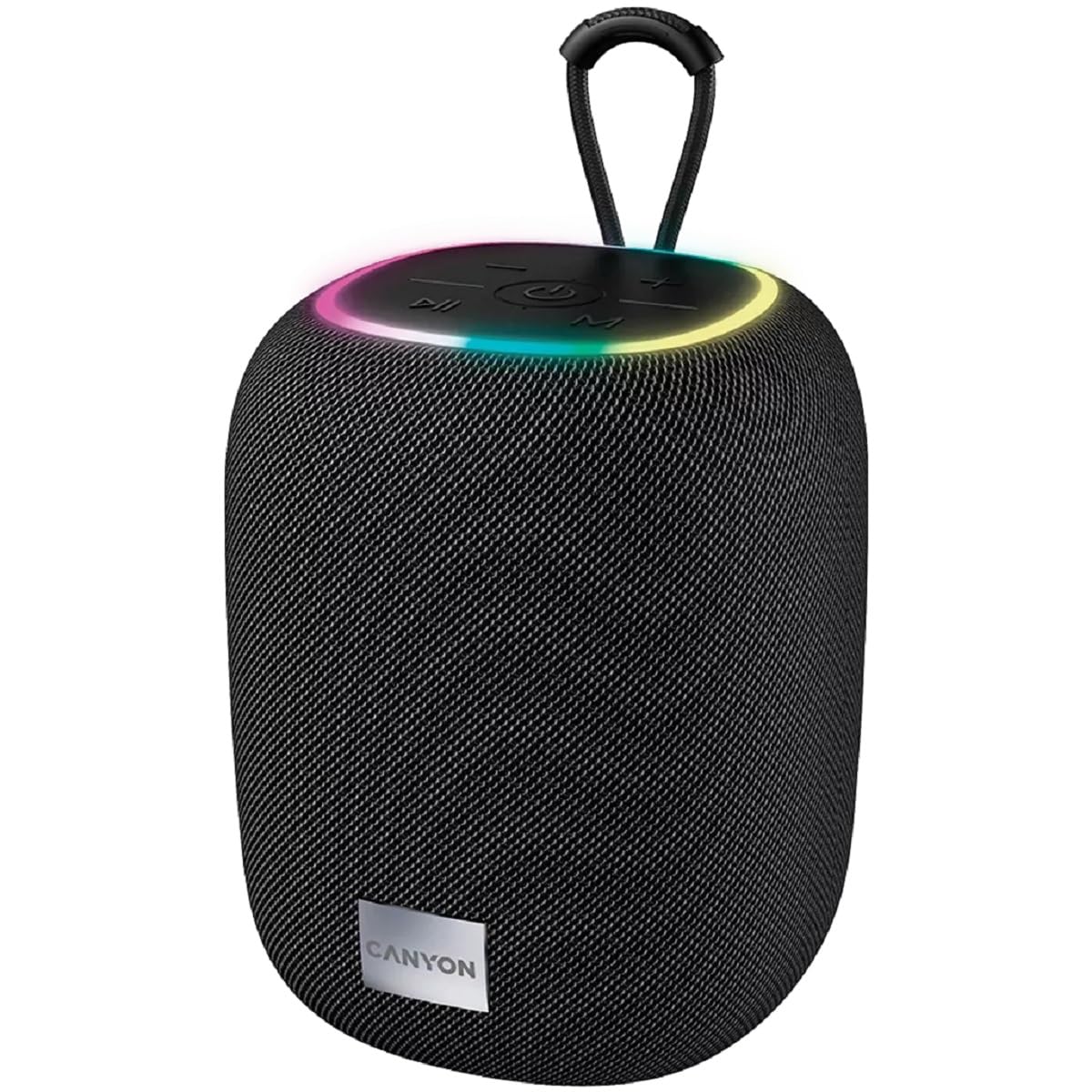
Whakaahua 1: Runga view of the CANYON BSP-8 speaker, showing the control buttons, RGB backlight, and integrated hanger.
Control Buttons (Top Panel):
- Pātene Hiko: Pēhia, ka pupuri tonu hei whakakā/whakaweto. Pēhia poto hei purei/whakamutu.
- Rōrahi Whakararo / Pātene Riu Mua: Perehi poto mo te whakaheke i te reo. Pehi roa mo te riu o mua.
- Rōrahi Whakarunga / Pātene Riu Panuku: Pihi poto mo te piki ake. Pehi roa mo te riu e whai ake nei.
- Pātene Aratau (M): Short press to switch between Bluetooth, AUX, USB, and MicroSD modes.

Whakaahua 2: Whakamuri view of the CANYON BSP-8 speaker, illustrating the various input ports including AUX, USB, TF (MicroSD) card slot, and DC5V Type-C charging port.
Input Ports (Rear Panel):
- Tauranga AUX: Mo te hono i nga taputapu oro o waho ma te taura ororongo 3.5mm.
- Tauranga USB: Mo te purei ororongo mai i te puku kohiko USB.
- Mokowā Kāri TF (MicroSD): Mō te purei oro mai i tētahi kāri MicroSD.
- DC5V (Type-C) Port: Mo te utu i te kaikorero.
5. Tatūnga
5.1 Te Whakataki i te Kaikorero
- Connect the provided USB Type-C cable to the DC5V port on the speaker.
- Honoa te pito o te taura ki tētahi urutau hiko USB (5V/1A te mea e taunakitia ana) ki tētahi tauranga USB rānei a te rorohiko.
- Ka tiaho te rama tohu utu. Ka tineia, ka huri rānei te tae ina utua katoatia.
Kia mōhio: Mō te roa o te pākahiko, whakakīia katoatia te kaikorero i mua i te whakamahinga tuatahi.

Image 3: Illustration showing the 1800 mAh battery capacity and up to 3 hours of playtime for the CANYON BSP-8 speaker.
5.2 Kei te Hiko / Weto
- Hei Whakahiko: Pēhia, pupuritia te pātene Mana mō te 3 hēkona pea. Ka rangona he tohu oro.
- Hei Whakaweto: Pēhia, pupuritia te pātene Mana mō te 3 hēkona pea. Ka rangona he tohu oro.
5.3 Takirua Nihokikorangi
- Whakakāhia te kaikorero. Ka uru aunoa ki te aratau takirua Nihokikorangi, e tohuhia ana e te rama LED e mura ana.
- Whakahohehia te Bluetooth i runga i tō pūrere pūkoro (waea atamai, papa, rorohiko).
- Rapua available Bluetooth devices and select "CANYON BSP-8" from the list.
- Once paired, the LED light will stop flashing, and you will hear a confirmation sound.
Note: The speaker will automatically reconnect to the last paired device if it is within range and Bluetooth is enabled.

Image 4: Illustration highlighting the stable and energy-efficient Bluetooth 5.2 connection with an operating range of up to 10 meters.
5.4 Whakahoahoa Waea Ahokore Tika (TWS).
To connect two CANYON BSP-8 speakers for a stereo sound experience:
- Ensure both BSP-8 speakers are powered on and not connected to any Bluetooth device.
- On one speaker (this will be the primary speaker), double-press the Power button. It will enter TWS pairing mode.
- The two speakers will automatically search for and connect to each other. You will hear a confirmation sound once connected.
- Once TWS is established, connect your mobile device to the primary speaker via Bluetooth as described in section 5.3.
Note: TWS mode only works with two identical CANYON BSP-8 speakers.
6. Nga Tohutohu Whakahaere
6.1 Whakatangi Ororongo
- Aratau Nihokikorangi: After successful pairing, audio from your connected device will play through the speaker.
- Aratau AUX: Connect a 3.5mm audio cable from your external audio device to the AUX port on the speaker. Press the 'M' button to switch to AUX mode.
- Aratau USB: Whakauruhia he puku kohiko USB ki te tauranga USB. Ka huri aunoa te kaikorero ki te aratau USB ka tīmata te purei oro. files. If not, press the 'M' button.
- Aratau Kaari MicroSD: Insert a MicroSD card into the TF card slot. The speaker will automatically switch to MicroSD mode and begin playing audio files. If not, press the 'M' button.
6.2 Mana Purei
- Purei/Tatari: Patohia poto te paatene Mana.
- Runga Runga: Patohia poto te paatene Rōrahi (+).
- Raro Raro: Patohia poto te paatene Volume Raro (-).
- Riu Panuku: Pēhia roa te pātene Rōrahi Whakarunga (+).
- Riu o mua: Pēhia roa te pātene Whakaiti Oro (-).
6.3 RGB Backlight
The speaker features an integrated RGB backlight on the top panel. The backlight activates automatically when the speaker is powered on. There are no specific controls for changing the RGB pattern or turning it off/on independently of the speaker's power state.


