Kupu Whakataki
This manual provides detailed instructions for the installation, operation, and maintenance of your DB Drive WDX200.4 4-Channel Speaker Ampwhakarara. Tena panuihia tenei pukapuka i mua i te ngana ki te whakauru, ki te whakahaere ranei i te amplifier to ensure proper function and safety. The WDX200.4 is a versatile 4-channel amplifier designed to deliver high-quality audio performance for various applications.
Tatūnga me te Tāuta
He mea nui te whakaurunga tika mo te mahi tino pai me te roa o to oranga ampkaiwhakarewa. E taunaki ana kia mahia e tetahi tohunga mohio te whakaurunga.
Whakaeke
Ko te amplifier features a surface mount design. Ensure the mounting location provides adequate ventilation to prevent overheating. Avoid mounting in direct sunlight or near heat sources.
Hononga Mana
The WDX200.4 operates within a voltage range of 9V to 16V DC. Connect the power and ground cables securely to the robust power and output connectors. Ensure proper gauge wiring is used for power and ground connections to handle the ampte kukume a lifier i nāianei.
Hononga Whakauru
Ko te amplifier supports both RCA (low-level) and high-level inputs. This allows for compatibility with both aftermarket and factory head units without the need for additional adapters.
- RCA Tāuru: Use RCA cables to connect your head unit's pre-amp putanga ki te ampKo nga whakauru RCA a Lifier.
- Tāuru Taumata-Teitei: If your head unit does not have RCA outputs, use the high-level input. This input typically connects directly to your head unit's speaker outputs.
Hononga Kaikōrero
The WDX200.4 is a 4-channel amplifier, providing 200 Watts RMS per channel at 2 ohms. It also supports bridging, allowing for 2 channels of 400 Watts RMS at 4 ohms. Connect your speakers to the appropriate output terminals, ensuring correct polarity.

Whakaahua: Runga me raro view of the DB Drive WDX200.4 4-Channel Speaker Amplifier, illustrating the various input and output terminals for connection.
Whakawhitiwhiti Whakatikatika
Ko te amplifier features integrated crossovers with High-Pass Filter (HPF), Low-Pass Filter (LPF), and Full-Range adjustments. These allow you to tailor the frequency response for your specific speaker setup (subwoofers, woofers, midranges, tweeters).
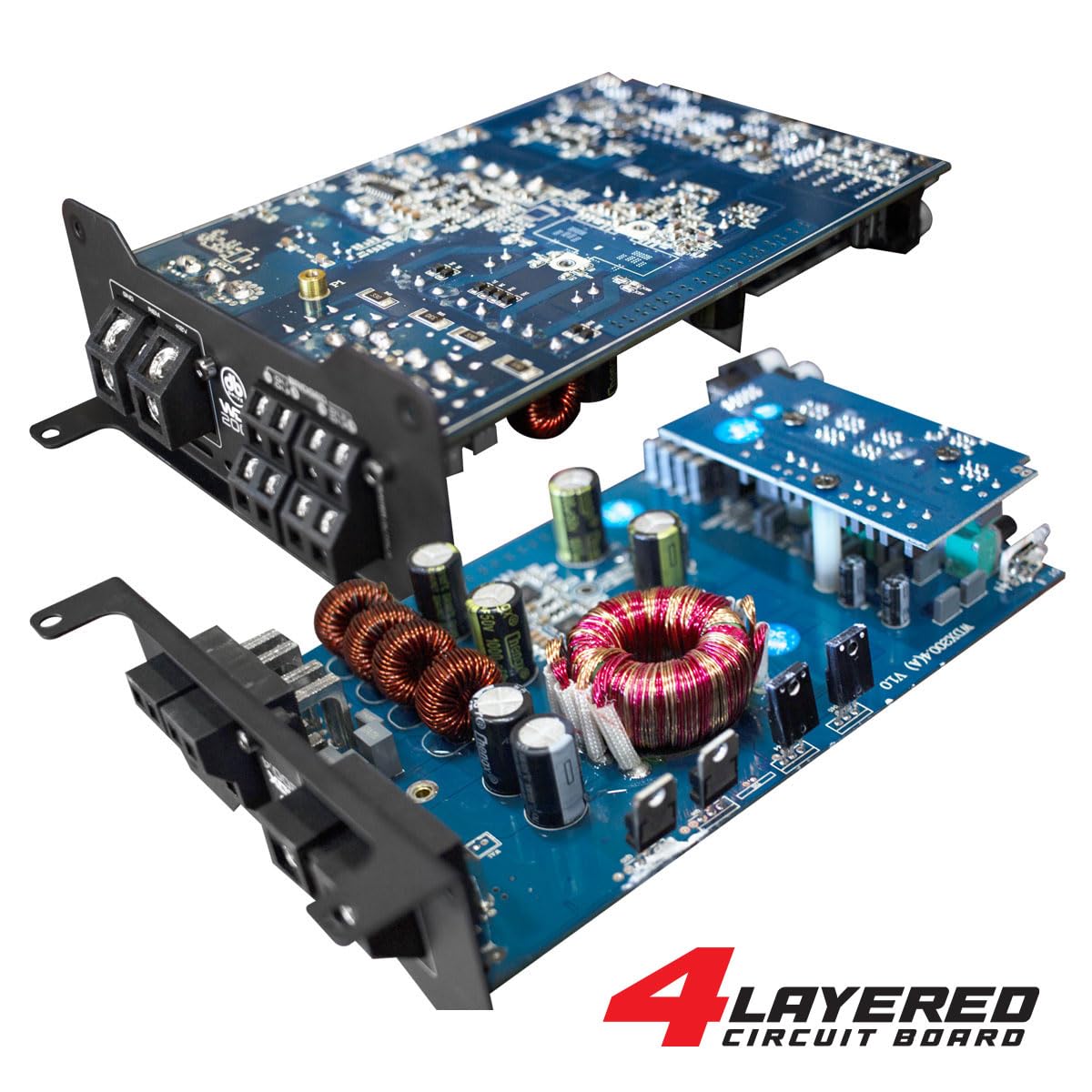
Whakaahua: He roto view of the DB Drive WDX200.4 amplifier, highlighting its 4-layered circuit board design for enhanced performance and durability.
Nga Tohutohu Whakahaere
Kia tāuta, te amplifier requires minimal user interaction for daily operation. The primary adjustments are for input level and crossover settings.
Whakatikatika Taumata
Adjust the input level controls to match the output voltage of your head unit. Start with the amplifier's level control at minimum and slowly increase it until the desired volume is achieved without distortion.
Tautuhinga Whakawhiti
- HPF (Tatari-Pae teitei): Use this setting for speakers that should only reproduce high frequencies (e.g., tweeters, mid-range speakers). This filters out low bass frequencies.
- LPF (Tatari-Pasiti): Use this setting for speakers that should only reproduce low frequencies (e.g., subwoofers). This filters out high frequencies.
- FULL (Full-Range): Use this setting for speakers that should reproduce the entire frequency spectrum.
Adjust these settings according to the specifications of your speakers and your desired audio output.
Te tiaki
To ensure the longevity and optimal performance of your DB Drive WDX200.4 amplifier, whai i enei aratohu tiaki:
- Te horoi: Horoia te taha waho o te whare i ia wā, i ia wā amplifier with a soft, dry cloth. Do not use harsh chemicals or abrasive cleaners. Ensure all ventilation openings are free from dust and debris.
- Hononga: Regularly check all power, ground, and speaker connections to ensure they are secure and free from corrosion. Loose connections can lead to poor performance or damage.
- Whakahau: Me whakarite te amplifier always has adequate airflow around it. Blocked vents can lead to overheating and thermal shutdown.
Raparongoā
Mena ka pa ki a koe nga raru o to amplifier, tirohia nga raru me nga otinga e whai ake nei:
- Kore Mana: Check the main fuse, power and ground connections, and the remote turn-on wire. Ensure the vehicle's battery has sufficient charge.
- Kore Oro: Verify all input and output connections. Check speaker wires for shorts or open circuits. Ensure the head unit is functioning correctly and sending an audio signal. Check crossover settings.
- Oro korikori: Reduce the input level (gain) on the amplifier. Check for proper crossover settings. Ensure speakers are not overdriven or damaged.
- Ampte whakawera whakawera: Me whakarite kia pai te hau huri noa i te amplifier. Check speaker impedance to ensure it matches the amplifier's capabilities. Reduce the volume or gain settings.
- Aratau Parenga: Mena ko te amplifier enters protection mode (indicated by a specific LED), it usually signifies an issue such as overheating, a short circuit in the speaker wiring, or an impedance mismatch. Disconnect power, inspect all connections and speaker wiring, and allow the amplifier to cool before reconnecting.
Ki te mau tonu ngā raruraru i muri i te whakamātau i ēnei otinga, whakapā atu ki tētahi tohunga hangarau ororongo waka whai tohu.
Whakatakotoranga
| Āhuahira | Whakatakotoranga |
|---|---|
| Tau tauira | WDX200.4 |
| Waitohu | Puku DB |
| Te maha o nga hongere | 4 |
| Te Hiko Putanga (Stereo) | 200 Watts RMS per channel at 2 Ohms |
| Output Power (Bridged) | 400 Watts RMS per channel at 4 Ohms (2 channels) |
| Voltage | 9 - 16 Volts (DC) |
| Momo Whakaeke | Maunga Mata |
| Whakawhitiwhiti | Integrated HPF, LPF, Full-Range |
| Nga whakaurunga | RCA (Low-Level), High-Level with Automatic Turn-On |
| Tiwhikete | FCC |
Pūtāhui me te Tautoko
For warranty information and technical support, please refer to the documentation included with your purchase or visit the official DB Drive webpae. Puritia to tohu hoko mo etahi kereme whakamana.


