1. Kupu Whakataki
This manual provides detailed instructions for the installation, operation, and maintenance of your LODADRA 20-inch Low Profile Ceiling Fan with Light and Remote. Please read this manual thoroughly before installation and use to ensure safe and efficient operation. Keep this manual for future reference.
2. Nga korero haumaru
- Me whakarite kia momotu te hiko i te whati ara iahiko i mua i te tāutanga, i te tiaki rānei.
- Me rite ngā waea katoa ki ngā ture hiko ā-motu me ā-rohe. Mēnā kāore koe i te tino mōhio, whakapā atu ki tētahi tohunga hiko whai tohu.
- Mount the fan to a ceiling joist or a securely anchored outlet box capable of supporting the fan's weight.
- Do not insert objects into the fan's enclosure while it is operating.
- Ko tenei taputapu mo roto anake.
- Keep children away from the fan during operation and installation.
3. Ihirangi mokete
Manatokona kei te noho nga waahanga katoa i mua i te tiimata o te whakaurunga:
- Ceiling Fan Unit with Integrated Light
- Mana Mamao
- Te Whakanuia o nga taputapu (ngiu, nati waea, aha atu)
- Pukapuka Tohutohu (tenei tuhinga)
4. Hua Neke Atuview
The LODADRA 20-inch Low Profile Ceiling Fan features a modern design with an integrated LED light, remote control operation, and a reversible DC motor for year-round comfort.
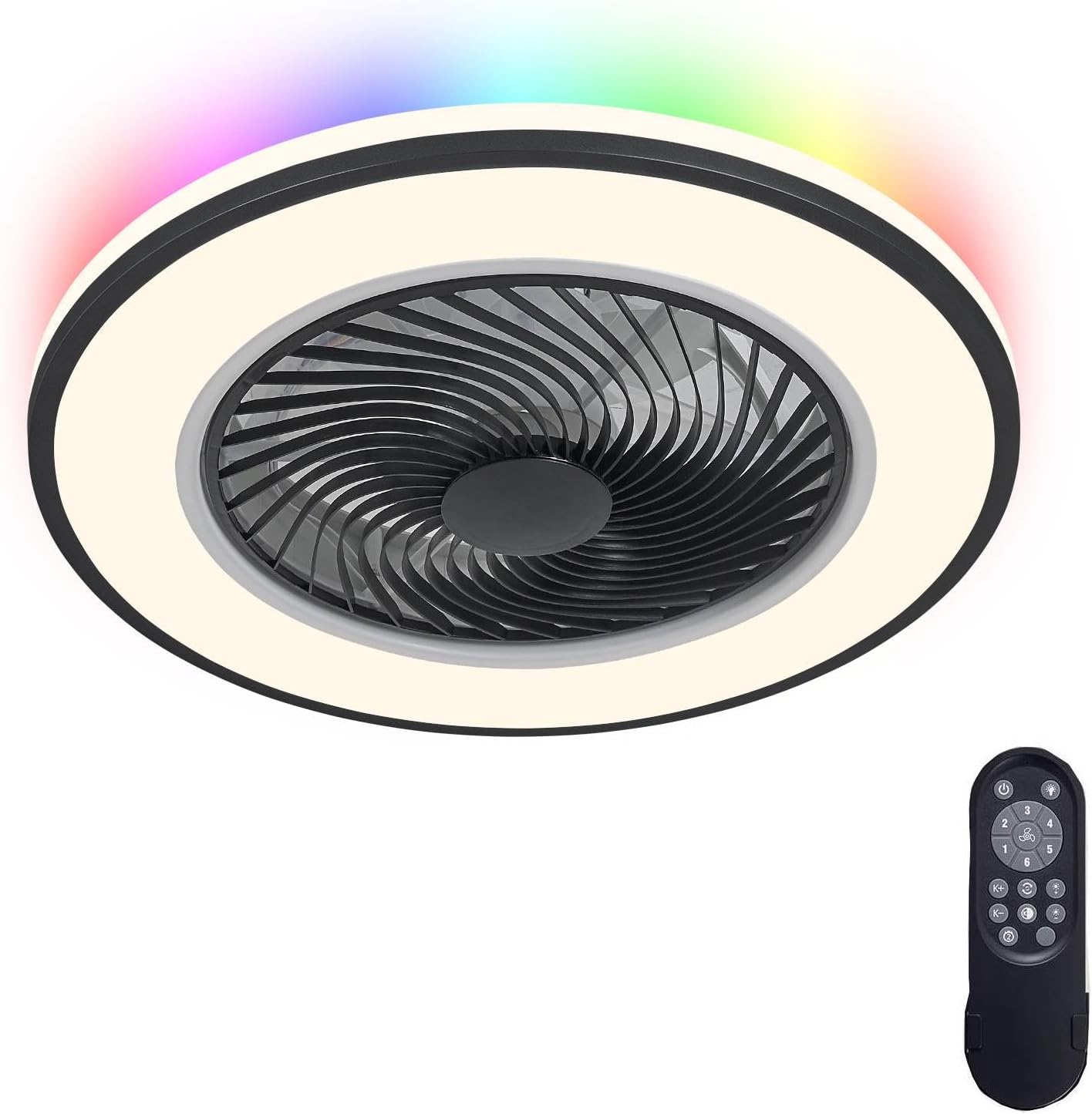
Whakaahua 4.1: LODADRA 20-inihi Low Profile Ceiling Fan and Remote Control.

Whakaahua 4.2: Product dimensions (19.6 inches diameter, 5.9 inches height) and recommended room size (up to 15ft x 15ft).
5. Tatūnga me te Tāuta
Most functional parts of this semi-flush mount fan are pre-assembled. Follow these steps for installation:
- Whakaweto Hiko: Before starting, ensure the power supply to the installation area is completely turned off at the main circuit breaker.
- Tāutatanga Taiapa Whakapuru: Secure the mounting bracket to the ceiling outlet box. Ensure the outlet box is securely fastened to the building structure and can support the fan's weight. Use appropriate screws and anchors provided, or suitable alternatives if necessary for your ceiling type.
- Hononga Waea: Connect the fan's electrical wires to the household wiring according to local electrical codes. Typically, this involves connecting live, neutral, and ground wires. Use the provided wire nuts to secure connections.
- Attach Fan Unit: Carefully lift the fan unit and attach it to the mounting bracket. Ensure all connections are secure and no wires are pinched.
- Huihuinga Whakamutunga: Secure any covers or decorative elements as per the specific design of your fan.
- Whakaora i te Mana: Kia oti te whakaurunga me te tirotiro i nga hononga katoa, whakahokia te hiko ki te arai iahiko.
Tuhipoka: If you are unfamiliar with electrical installations, it is recommended to consult a qualified electrician.
6. Nga Tohutohu Whakahaere
Your LODADRA ceiling fan is operated using the included remote control.
6.1 Nga Mahi Mana Mamao
The remote control allows you to manage all fan and light settings:
- Hiko Whakaka/Weto: Ka whakakā, ka whakaweto rānei i te pā hau me te rama.
- Tere Kiri: Ka taea te whakarerekē i waenga i ngā tere pā e 6.
- Rama / Weto: Mana motuhake te rama.
- Te Whakarereketanga Te Mahana Tae: Cycles through 3 color temperatures (3000K Warm, 4000K Neutral, 6000K Cool White).
- Whakaritenga Tirohanga: Stepless dimming from 10% to 100%. Hold the light button to change brightness.
- Aratau Whakahuri: Changes fan direction for summer (downdraft) or winter (updraft) operation.
- Aratau Maama Po: Ka whakahohe i te tautuhinga rama iti-kaha.
- Waka Moe: Sets a timer for the fan to turn off automatically.

Whakaahua 6.1: Light color temperature (3000K-6000K) and brightness (10%-100%) adjustment options.

Whakaahua 6.2: Reversible fan function for Summer (downdraft) and Winter (updraft) modes.
6.2 Mahi Mahara
The fan's light settings (color temperature and brightness) are memorized. The next time you turn on the light with the remote control, it will resume the last used setting.

Whakaahua 6.3: The light memory function retains the last brightness and color setting.
7. Tiaki
- Te horoi: Ensure the fan is turned off and power is disconnected before cleaning. Use a soft, damp he kakahu hei muru i nga mata o waho. Kaua e whakamahi i nga kai horoi me nga whakarewa.
- Fan Net: The fan features a removable fan net for easy cleaning and maintenance. Refer to the assembly instructions for details on how to safely remove and reattach the net.
- Puna Maama: Ko te puna rama rama whakauru kua hangaia mo te roa o te oranga me te nuinga kaore e hiahiatia he whakakapi.

Whakaahua 7.1: The LODADRA fan features a 360° wind deflector and removable fan net for easy cleaning, unlike some traditional designs.
8. Te Raru
| Raruraru | Take pea | Rongoā |
|---|---|---|
| Kare te Fan e huri. | No power supply; Remote control battery low; Incorrect wiring. | Check circuit breaker; Replace remote battery; Verify wiring connections. |
| Kaore e marama te rama. | No power supply; Remote control battery low; Light function off. | Check circuit breaker; Replace remote battery; Ensure light is activated via remote. |
| Ka haruru rerekee te Fan. | Loose mounting screws; Obstruction in fan blades. | Tighten all mounting screws; Ensure no objects are obstructing the fan. |
| Kaore e mahi te mana mamao. | Battery depleted; Remote not paired (if applicable). | Replace remote battery; Refer to remote pairing instructions (if provided separately). |
9. Whakatakotoranga
- Waitohu: LODADRA
- Ingoa Tauira: Pro Itifile Poihi tuanui me te Maama
- Rahi: 20 inihi
- Tae: Back RGB+Black (Note: Specific variant color)
- Rauemi: Kirihou
- Momo Tāuta: Maunga Huruhuru
- Tikanga Mana: Mana Mamao
- Momo Puna Maama: LED
- Paemahana Tae: 3000K-6000K (Ka taea te whakarite)
- Tirohanga: 10%-100% Te Maama Whakakore
- Nga Tere Kiri: 6 Nga tere
- Nga waahanga motuhake: Bladeless design, Reversible DC Motor, Memory Function, Night Light Mode, Sleep Timer
- Wattage: 36 watts
- Voltage: 12 Volts (DC)
- Taumaha Tūemi: 6.49 pauna
- Rahi Rūma Manakohia: Up to 15ft x 15ft
10. Pūtāhui me te Tautoko
For warranty information and customer support, please refer to the seller's policy on the purchase platform or contact LODADRA customer service directly. Keep your purchase receipt as proof of purchase.


