1. Kupu Whakataki
This manual provides essential information for the safe and effective operation of the KAIWEETS HT206D Smart Digital Clamp mita. Tena koa panuihia tenei pukapuka i mua i te whakamahi me te pupuri mo te tohutoro a meake nei.
2. Nga korero haumaru
Always adhere to local and national safety codes. Use appropriate personal protective equipment (PPE) when working with electrical circuits. This device is designed for professional use and requires a basic understanding of electrical principles.
- Kaua e neke ake i nga uara whakauru morahi kua tohua mo ia awhe inenga.
- Kia tino tupato i te wa e mahi ana me nga iahiko ora.
- Tirohia ngā taura whakamātautau mō ngā pakaru i mua i ia whakamahinga. Whakakapia tonutia ngā taura pakaru.
- Kaua e whakahaerehia te mita mēnā te āhua kua pakaru, kāore rānei e mahi tika ana.
- Me whakarite kia kati te taupoki pākahiko i mua i te mahi.
- Avoid using the meter in environments with high humidity, extreme temperatures, or explosive gases.
3. Hua Neke Atuview
The KAIWEETS HT206D is a smart digital clamp meter designed for accurate electrical measurements. It features a D-shaped jaw for easy clamping and a clear display for readings.

Image 3.1: KAIWEETS HT206D Smart Digital Clamp Meter highlighting key features like 6000 Counts T-RMS, Auto Shutdown, CAT.IV 600V safety rating, and Auto-ranging capability.
Ko nga ahuatanga matua ko:
- Aratau Maama: Automatically identifies AC/DC voltage/current, resistance, and continuity.
- RMS Pono: E whakarato ana i ngā inenga tika mō ngā kawenga kore-raina.
- 6000 Kaute Whakaatu: High-resolution digital display.
- D-Shaped Jaws: Designed for secure clamping and holding test leads.
- Kore-Whakapā Voltage (NCV) Rapunga: Detects electrical status without direct contact.
- Tātari Tuku Iti (LPF): For accurate measurements on variable frequency drives.
- Nga Mahi Apiti: MAX/MIN, Data Hold, Flashlight, Auto-Off.

Whakaahua 3.2: Ka mutuview of the KAIWEETS HT206D's multi-functional capabilities, showing icons for AC/DC voltage, resistance, continuity, frequency, temperature, NCV, and inrush current measurements.
4. Tatūnga
4.1. Tāuta Pūhiko
The meter requires batteries for operation. To install or replace batteries:
- Me whakarite kua whakawetohia te hiko o te mita.
- Rapua te wahanga pākahiko kei muri o te mita.
- Whakamahia he huriwiri hei whakatuwhera i te uhi o te wahanga pākahiko.
- Insert new batteries, observing correct polarity.
- Me tino kati te taupoki o te waahanga o te papahiko.
4.2. Hia Tuatahi
Press the power button to turn on the meter. The default intelligent mode will activate, automatically identifying common measurement signals.
5. Nga Tohutohu Whakahaere
5.1. Aratau Atamai
When the meter is powered on, it defaults to Smart Mode. In this mode, the meter automatically detects and measures AC/DC voltage, AC/DC current, resistance, and continuity, simplifying operation.
5.2. Kōwhiringa Mahi
Rotate the rotary dial to select specific measurement functions as needed. Press the SEL/FUNC button to cycle through sub-functions within a selected range (e.g., AC/DC voltagme).
5.3. AC/DC Voltage Inenga
Hei ine voltage:
- Insert the red test lead into the "VΩHz" input jack and the black test lead into the "COM" input jack.
- Tīpakohia te voltage measurement function using the rotary dial.
- Honoa ngā taura whakamātautau kia whakarara ki te ara iahiko, ki te wāhanga rānei e whakamatautauria ana.
- Pānuihia te voltage uara kei runga i te whakaaturanga.

Image 5.1: Demonstrations of AC/DC Voltage Test (top) and AC/DC Current Test (bottom) using the KAIWEETS HT206D clamp mita.
5.4. AC/DC Inenga o naianei
Hei ine i te nāianei:
- Select the current measurement function (A~) or (A=) using the rotary dial.
- Whakatuwheratia te clamp jaws and enclose only one conductor of the circuit. Ensure the jaws are fully closed.
- Pānuihia te uara o nāianei i te whakaaturanga.
5.5. Resistance and Continuity Measurement
To measure resistance or check continuity:
- Insert the red test lead into the "VΩHz" input jack and the black test lead into the "COM" input jack.
- Select the resistance/continuity function using the rotary dial.
- Connect the test leads across the component. For continuity, a beep indicates a continuous circuit.
5.6. Whakapā-kore Voltage (NCV) Rapunga
The NCV function allows detection of AC voltage kore whakapā tika.
- Pehia te NCV button on the right side of the meter.
- Move the meter's NCV sensor close to the conductor.
- Ka tohu te mita i te aroaro o te hiko ACtage through audible beeps and visual indicators (Low Voltage 'L' or High Voltage 'H').

Image 5.2: Non-contact Voltage Test demonstrating the meter's ability to detect both low and high voltage kore e pa ki te tinana.
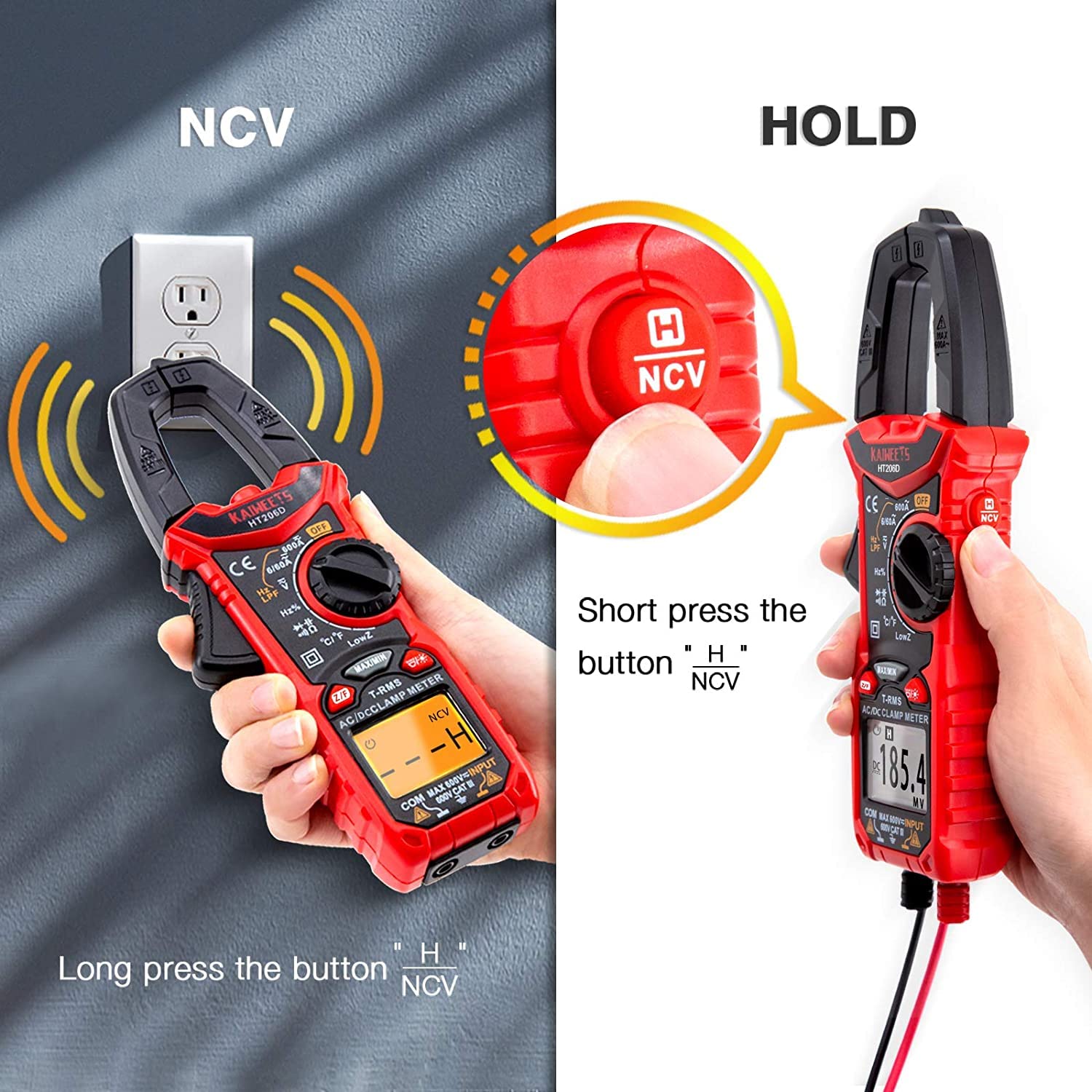
Image 5.3: Illustration of activating the NCV function with a long press and the Data Hold function with a short press of the NCV/HOLD button.
5.7. Tātari Paheke Iti (LPF)
The LPF function is used for accurate voltage measurements on variable frequency drives (VFDs) or other noisy circuits. It filters out high-frequency interference.
- Tīpakohia te AC voltage mahi.
- Pehia te LPF button to activate the Low Pass Filter.
- Proceed with AC voltage measurement as usual.

Image 5.4: Explanation of the Low Pass Filter (LPF) function, illustrating its effect on measurement accuracy for motor drive outputs.
5.8. Inrush Current Measurement
The Inrush function measures the initial surge current when a device is powered on.
- Select the Inrush current function using the rotary dial.
- Whakatuwheratia te clamp jaws and enclose one conductor of the device to be tested.
- Power on the device. The meter will capture and display the peak inrush current.

Image 5.5: Inrush Current Test in progress, demonstrating the meter's capability to measure the initial current surge with a range of 5-600A.
5.9. Pupuri Raraunga (PURI)
Pehia te KAUPAPA button (short press the NCV button) to freeze the current reading on the display. Press it again to release the hold function.
5.10. MAX/MIN Measurement
Pehia te MAX/MIN button to record the maximum and minimum values during a measurement session. Press again to cycle between MAX, MIN, and current readings.
5.11. Maama
Press the flashlight button to illuminate the measurement area. Press again to turn it off.
5.12. Auto-Off Function
The meter will automatically power off after approximately 15 minutes of inactivity to conserve battery life. Press any button or rotate the dial to reactivate it.
6. Tiaki
6.1. Te horoi
Horoia te mita casing me te panuiamp cloth and mild detergent. Do not use abrasives or solvents. Ensure the meter is dry before storage or use.
6.2. Whakakapinga Pūhiko
Replace batteries when the low battery indicator appears on the display. Refer to Section 4.1 for battery installation instructions.
6.3. Rokiroki
Ki te kore e whakamahia te mita mo te wa roa, tangohia nga pākahiko kia kore e pakaru. Whakaorangia te mita ki te waahi makariri, maroke, kia matara atu i te ra tika me te wera nui.
7. Te Raru
| Raruraru | Take pea | Rongoā |
|---|---|---|
| Kaore te mita i te hiko. | Nga pākahiko kua mate, kua he ranei te whakaurunga. | Whakakapihia nga pākahiko, kia tika te polarity. |
| Ko nga panui kore tika. | Incorrect function selected, damaged test leads, or external interference. | Verify function selection, inspect/replace test leads, move away from strong electromagnetic fields. |
| Karekau he tangi haere tonu. | Ara iahiko tuwhera, ātete teitei rānei. | Check the circuit for breaks or high resistance points. |
| NCV kore e kitea voltage. | Kore AC voltage present, or sensor not close enough to the conductor. | Ensure AC voltage is present. Move the NCV sensor closer to the live conductor. |
8. Whakatakotoranga
The KAIWEETS HT206D Smart Digital Clamp Meter offers the following general specifications:

Image 8.1: Key specifications of the KAIWEETS HT206D, including measurement ranges for current, voltage, capacitance, and display count, along with special features.
- Whakaatu: 6000 Tatau
- AC/DC Nāianei: Tae atu ki te 600A
- AC / DC Voltage: Tae atu ki te 600V
- Te kaha: Tae atu ki te 100mF
- Te pāmahana: Celsius/Fahrenheit
- Momo Ine: RMS pono
- Whakatauranga Haumaru: CAT.IV 600V
- Puna Hiko: Pūhiko Powered
- Nga waahanga motuhake: Smart Mode, NCV, LPF, LowZ, Inrush Current, Data Hold, MAX/MIN, Flashlight, Auto-Off
9. Pūtāhui me te Tautoko
KAIWEETS offers a 3-year after-sales service for the HT206D Smart Digital Clamp Meter, along with lifetime technical assistance.
For any questions, technical support, or warranty claims, please contact KAIWEETS customer service through their official channels or the retailer where the product was purchased.


