Kupu Whakataki
Mauruuru koe mo te hokoasing the JTEMAN Cell Phone Stand with Wireless Bluetooth Speaker and Alarm Clock. This multi-functional device is designed to enhance your daily routine by combining essential features into one compact and stylish unit. It serves as a high-quality Bluetooth speaker, a reliable alarm clock with a clear display, and a stable, adjustable stand for your mobile devices. Please read this manual carefully to ensure proper use and optimal performance.
Nga korero haumaru
- Kaua e tukuna te taputapu ki te wera nui, te ra tika, te makuku nui ranei.
- A ape i te tuku, te tuku ranei i te taputapu ki nga paanga kaha.
- Keep away from water and other liquids. If the device comes into contact with liquid, disconnect it immediately and allow it to dry completely before reuse.
- Kaua e ngana ki te wetewete, ki te whakatika, ki te whakarerekē rānei i te taputapu māu ake. Tukuna ngā mahi tiaki katoa ki ngā kaimahi whai tohu.
- Whakamahia anake te taura utu kua whakaratohia, he taurite whaimana ranei.
- Kaua e taea e nga tamariki.
Ihirangi mokete
- JTEMAN Cell Phone Stand with Wireless Bluetooth Speaker and Alarm Clock (Model: JT-L36)
- Momo-C Taura Whakapae
- Pukapuka Kaiwhakamahi
Ka mutu te huaview
Familiarize yourself with the components and controls of your JTEMAN device:
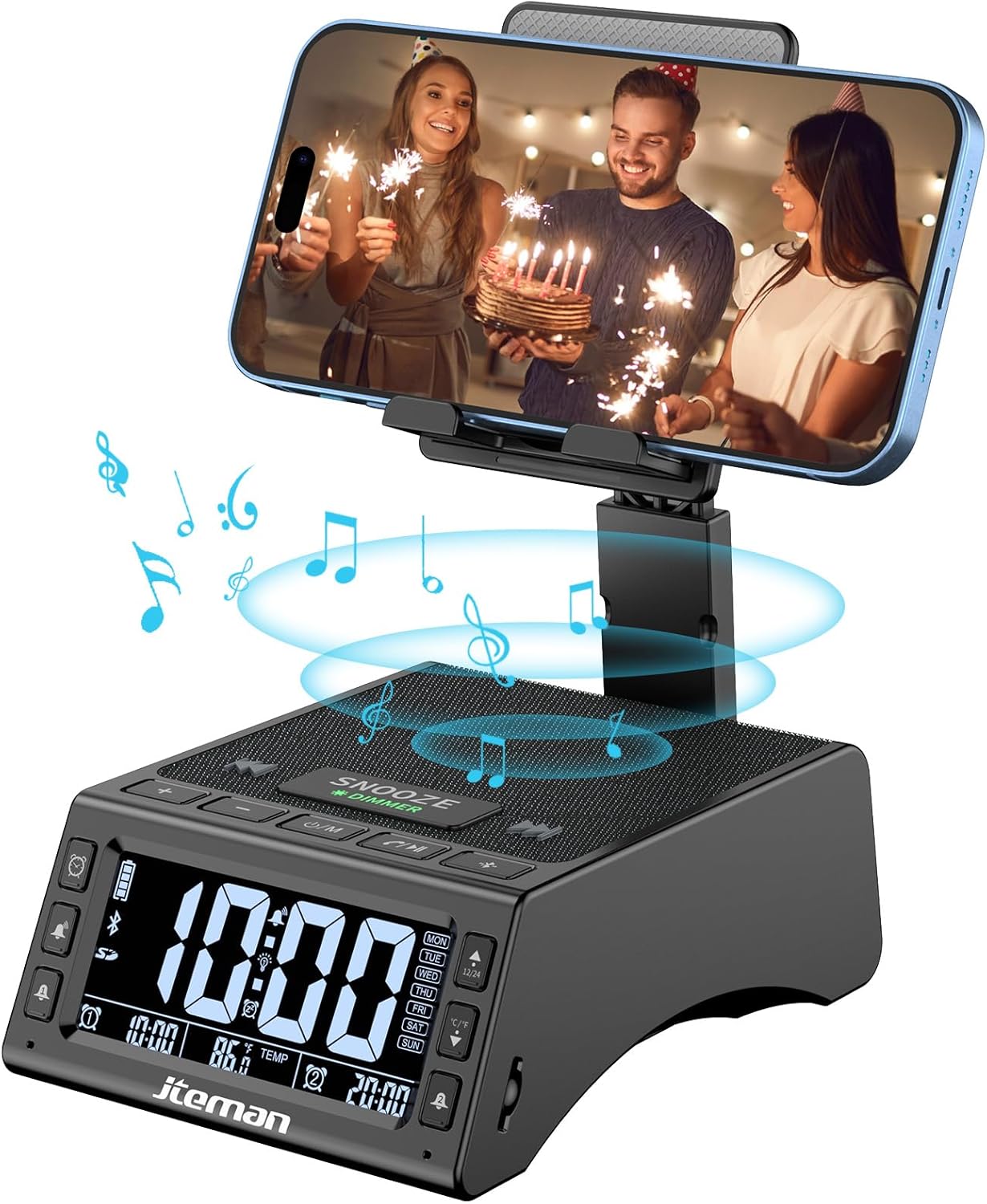
Whakaahua 1: Mua view of the JTEMAN device with a smartphone on the adjustable stand, displaying the time and temperature.

Whakaatu 2: Neke Atuview highlighting the multi-functional aspects including Bluetooth speaker, 12/24H time display, temperature display, foldable phone stand, TF card support, microphone, charging station, dual alarm clocks, and 9 ringtones.
Mana me Tauranga:
- Whakaatu Mata: Shows time, temperature, day of the week, and alarm indicators.
- Pātene SNOOZE/DIMMER: Press to snooze an active alarm (5 minutes); long press to adjust display brightness (4 levels).
- Power On/Off/Mode Button: Long press to power on/off; short press to cycle through modes (Bluetooth, TF Card).
- Play/Pause/Answer Button: Controls music playback; answers/ends calls.
- Rōrahi Whakarunga/Pātene Riu Panuku: Increases volume; short press for next track.
- Rōrahi Whakararo/Pātene Riro o mua: Decreases volume; short press for previous track.
- Patene Tauhoa Nihokikorangi: Ka timata te aratau takirua Nihokikorangi.
- Alarm 1 & Alarm 2 Buttons: For setting and managing dual alarms.
- hopuoro: Mo te waea kore-ringa.
- Tauranga Whakauru Momo-C: Mo te utu i te taputapu.
- Tauranga Huaputa Momo-C: Mo te utu i nga taputapu o waho.
- Kāniwha Kāri TF: Mō te purei puoro tika mai i tētahi kāri TF.
- Tu Waea Whakaritea: Foldable and extendable for various viewing angles. Features anti-slip pads and base for stability.
Tatūnga
1. Whakataki Tuatahi
- Connect the provided Type-C charging cable to the Momo-C Tauranga Whakauru i runga i te taputapu.
- Connect the other end of the cable to a compatible USB power adapter (not included) and plug it into a wall outlet.
- The display will indicate charging status. Fully charge the device before first use.

Figure 3: The device connected via Type-C for charging itself and an external phone.
2. Tautuhi Wā me te Rā
- Upon powering on, the device should automatically synchronize the current time.
- If manual adjustment is needed, refer to the detailed instructions in the full user manual (included in the package).
- To switch between 12/24 hour format or °F/°C temperature display, use the dedicated buttons or refer to the full manual.

Figure 4: The HD display showing time, temperature, and alarm settings with brightness adjustment levels.
Nga Tohutohu Whakahaere
1. Using the Phone Stand
- The integrated phone stand can be pulled up from the back of the unit.
- Adjust the height and angle of the stand to your preferred viewing position. The stand is designed to be stable and strong, accommodating devices from 4.0 to 13 inches.
- When not in use, the stand can be folded back into the unit for a compact form factor.

Figure 5: Demonstrates the adjustable height and angle of the phone stand, along with its anti-slip features and foldable design.
2. Bluetooth Speaker Function
- Whakahiko: Long press the Power On/Off/Mode button. The device will enter Bluetooth pairing mode, indicated by a flashing Bluetooth icon on the display.
- Takirua: On your smartphone or other Bluetooth-enabled device, search for “JT-L36” in the Bluetooth settings and select it to pair. A confirmation sound will indicate successful pairing.
- Whakahoki Waiata: Once paired, you can play audio from your device through the JTEMAN speaker. Use the Play/Pause, Volume Up/Next Track, and Volume Down/Previous Track buttons to control playback.
3. Te purei anō i te Kāri TF
- Whakauruhia he kāri TF (kāore i roto) me te oro files ki te TF Card Slot.
- The device will automatically switch to TF Card mode and begin playing music. If not, short press the Mode button to select TF Card mode.
4. Alarm Clock Features
- Tautuhinga Whakaoho: Use the Alarm 1 and Alarm 2 buttons to set up to two independent alarms. Follow the on-screen prompts to set the time and alarm frequency (e.g., Mon-Fri, Sat-Sun, Mon-Sun).
- Mahinga Tohu: When an alarm sounds, press the large SNOOZE button on top to activate a 5-minute snooze.
- Whakaritenga Tirohanga: Long press the SNOOZE/DIMMER button to cycle through four levels of display brightness, including an off setting for minimal light disturbance.
5. Waea Ringa-Kore
- When a call comes in while your phone is connected via Bluetooth, press the Play/Pause/Answer button to answer the call.
- Whakamahia te hopuoro hanga-i roto mo te korero marama.
- Press the Play/Pause/Answer button again to end the call.
6. Te Whakautu i ngā Pūrere o Waho
- Connect your external device (e.g., smartphone, tablet) to the Tauranga Huaputa Momo-C on the JTEMAN unit using a compatible charging cable.
- The JTEMAN device will provide power to charge your external device.
Te tiaki
- Horoia te taputapu ki te kakahu ngohengohe, maroke. Kaua e whakamahi i nga kai horoi me nga whakarewa.
- Me whakarite kia noho kore he puehu me nga otaota katoa nga tauranga.
- Whakaorangia te taputapu ki te waahi makariri, maroke ki te kore e whakamahia mo te wa roa.
Raparongoā
| Raruraru | Take pea | Rongoā |
|---|---|---|
| Kaore te taputapu i te hiko. | Low battery; power adapter/cable issue. | Charge the device fully. Check power adapter and cable connections. |
| Karekau he oro mai i te kaikorero. | Volume too low; not paired correctly; wrong mode. | Increase volume on both device and connected phone. Re-pair Bluetooth. Ensure correct mode (Bluetooth/TF Card). |
| Kua rahua te takirua Nihokikorangi. | Device too far; pairing mode not active; interference. | Ensure device is in pairing mode and within 10 meters. Turn off other Bluetooth devices. Try restarting both devices. |
| Kare e tangi te whakaoho. | Alarm not set; alarm volume too low; alarm disabled. | Verify alarm settings and ensure it's enabled. Increase alarm volume. |
| Phone not charging via output port. | Cable issue; device battery low; incompatible device. | Ensure the JTEMAN device is charged. Try a different charging cable. Confirm your phone is compatible with Type-C charging. |
Whakatakotoranga
| Waitohu | JTEMAN |
| Tau tauira | JT-L36 |
| Hunga Hua | 6.1 x 4.3 x 2.1 inihi |
| Taumaha Tūemi | 1.26 pauna |
| Tae | Pango |
| Atanga Pūmārō | USB 2.0 |
| Tauranga USB katoa | 2 (Type-C Input, Type-C Output) |
| Hototahi | 4.0-13 inch devices |
Pūtāhui me te Tautoko
JTEMAN products are manufactured with high standards of quality. For specific warranty information, please refer to the warranty card included in your product packaging or visit the official JTEMAN website. If you encounter any issues or have questions not covered in this manual, please contact JTEMAN customer support through the contact information provided on the product packaging or webpae.
Tena koa pupurihia to tohu mo te hoko mo nga kereme whakamana.


