Kupu Whakataki
Welcome to your AVID Products AE-711 Over-Ear Headphones. These headphones are designed to provide high-quality audio for various applications, including home, office, education, travel, and music listening. This manual provides essential information for setting up, operating, and maintaining your headphones.
He aha kei roto i te Pouaka:
- AVID Products AE-711 Over-Ear Headphones
- Taura Ororongo 3.5mm Whakauru
- Pukapuka Kaiwhakamahi (tenei tuhinga)
- Ngā Urunga Taringa (kua tāutahia i mua)
Nga waahanga hua
- Hoahoa Taringa-runga: Provides a comfortable fit and effective sound isolation for an immersive audio experience.
- Atekōkiri Hihiko: Equipped with 27mm dynamic drivers and neodymium magnets for clear and powerful audio across a frequency response of 20 Hz to 20 kHz.
- Hototahi Whānui: Features a standard 3.5mm audio output jack and 32 ohm impedance, making them compatible with a broad range of devices.
- Tae Pane Ka taea te whakarite: Allows for a personalized and secure fit for different head sizes.
- Padded Earpads: Vinyl-padded earpads ensure long-lasting comfort during extended use.
- Taura Roa: A 5-foot cord offers ample range of motion and flexibility.
- Hoahoa Kopa: Earcups fold inward for compact storage and enhanced portability.
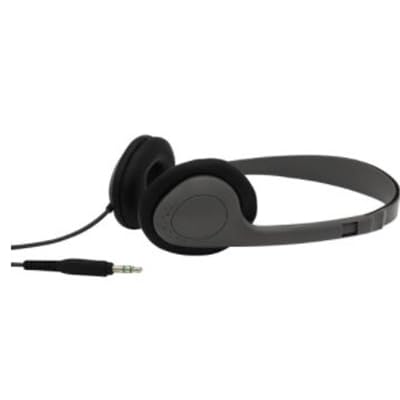
Image: AVID Products AE-711 Over-Ear Headphones, showcasintā rātou hoahoa me te hononga waea.
Tatūnga
1. Te hono ki tetahi Pūrere:
- Locate the 3.5mm audio output jack on your device (e.g., laptop, tablet, smartphone, desktop computer, smart speaker, television).
- Kōkuhuhia te mono 3.5mm o te taura paneoro ki te hononga oro o te pūrere.
- Kia mau te hononga kia kore ai e haukotia te ororongo.
2. Te Whakatikatika i te Taunga:
- Gently extend or retract the headband on both sides to fit your head comfortably.
- Position the earpads over your ears, ensuring they fully cover your ears for optimal sound isolation and comfort.
Nga Tohutohu Whakahaere
Whakahoki Ororongo:
- Once connected, audio from your device will be routed through the headphones.
- Control the volume directly from your connected device.
- To pause or play audio, use the controls on your connected device.
Te tiaki
Te horoi:
- Wipe the headphones and earpads with a soft, dry cloth.
- Kaua e whakamahi i nga matū kino, i nga whakarewa horoi, i nga horoi kaha ranei.
Rokiroki:
- When not in use, fold the earcups inward to reduce their size for compact storage.
- Store in a clean, dry place away from extreme temperatures.
Tiaki taura:
- Avoid sharp bends or excessive pulling on the audio cable to prevent damage.
- Do not wrap the cable too tightly around the headphones.
Raparongoā
Kore Oro:
- Ensure the 3.5mm audio jack is fully inserted into your device.
- Check the volume level on your connected device and ensure it is not muted.
- Whakamatauhia nga taringa ki tetahi atu taputapu hei whakakore i tetahi take motuhake.
Oro korikori:
- Verify that the audio cable is securely connected.
- Adjust the volume on your device; excessively high volume can cause distortion.
- Me whakarite he kounga pai te puna ororongo.
Whakararuraru Te Pai:
- Adjust the headband length until the earcups rest comfortably over your ears.
- Ensure the earpads are correctly positioned.
Whakatakotoranga
| Āhuahira | Taipitopito |
|---|---|
| Ingoa Tauira | AE-711 |
| Waitohu | Avid |
| Te Whakanoho Taringa | Ki runga Taringa |
| Tauwehe Puka | Ki runga Taringa |
| Hangarau Hononga | Waea (3.5 mm Jack) |
| Te aukati | 32 Ohm |
| Whakautu auau | 20 Hz - 20 kHz |
| Momo Atekōkiri Ororongo | Atekōkiri Hihiko (27mm) |
| Nga waahanga motuhake | Neodymium Magnets, Adjustable Headband, Comfortable Ear Pads |
| Rauemi | Vinyl (earpads) |
| Te roa o te taura | 5 waewae |
| Tae | Kerei |
| Taumaha Tūemi | 1 pauna |
| Ahu mōkihi | 7 x 6 x 2 inihi |
Pūtāhui me te Tautoko
AVID Products stands behind the quality of its products. For specific warranty details and to register your product, please refer to the warranty card included in your packaging or visit the official AVID Products webpae.
If you encounter any issues or have questions regarding your AE-711 headphones, please contact AVID Products customer support through their official channels. Keep your purchase receipt for warranty claims.


