1. Kupu Whakataki
The Wouxun KG-826B is a dual-band UHF/VHF business two-way radio designed for reliable communication in various professional environments. This radio offers both UHF and VHF capabilities, making it a versatile solution for businesses and organizations. It comes pre-programmed with 16 channels and supports up to 199 custom programmable channels, along with 155 CTCSS/DCS codes.
Key features include a lighted dual-channel LCD display, English voice prompts, VOX functionality, low battery alert, a programmable side key, a configurable front key, a built-in flashlight, and a stopwatch timer. The KG-826B is built with a superheterodyne receiver for enhanced communication performance and is rated IP55 for dust and water resistance.
Ka mutu te huaview
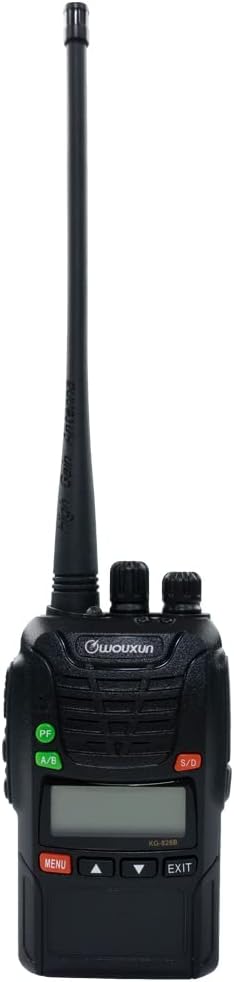
Whakaahua 1: Mua view of the Wouxun KG-826B Two-Way Radio, showing the display, buttons, and non-removable antenna.
2. He aha kei roto i te Pouaka
Upon unboxing your Wouxun KG-826B, please verify that all the following components are included:
- Wouxun KG-826B Two-Way Radio (with non-removable antenna)
- Lithium-ion Battery Pack (1700mAh)
- Topenga whitiki
- He Waehanga Papamahi
- Pūurutau AC
- Te here a ringa
- Pukapuka a te Kaipupuri (tenei tuhinga)

Figure 2: The Wouxun KG-826B radio with its standard accessories, including the desktop charger, AC adapter, belt clip, and wrist strap.
3. Aratohu Tatūnga
3.1. Te Whakataki i te Pūhiko
Before initial use, fully charge the lithium-ion battery pack. The radio comes with a 1700mAh lithium-ion rechargeable battery.
- Honoa te urutau AC ki te riihi papamahi.
- Monohia te urutau AC ki te putanga hiko paerewa.
- Place the Wouxun KG-826B radio into the desktop charger. Ensure the charging contacts on the radio align with those on the charger.
- Ka whero te rama tohu o te rihi i te wā e utu ana, ā, ka huri hei kakariki ina kua utua katoatia te pākahiko.
- Charging time may vary, but a full charge usually takes several hours.
3.2. Te Taapiri i te Topenga Belt
To attach the belt clip, align the clip with the designated screw holes on the back of the radio and secure it with the provided screws. Ensure it is firmly attached before use.
3.3. Te Whakapiri i te Taonga Wrist
Thread the wrist strap through the loop on the top or side of the radio to prevent accidental drops.
4. Nga Tohutohu Whakahaere
4.1. Te Hiko / Whakaweto me te Mana Rōrahi
- Whakahiko: Rotate the top-left knob (Power/Volume knob) clockwise until you hear a click. The radio will power on and emit a voice prompt.
- Weto Whakakore: Rotate the top-left knob counter-clockwise until you hear a click.
- Whakaritenga Rōrahi: Continue rotating the Power/Volume knob clockwise to increase volume and counter-clockwise to decrease volume.
4.2. Kōwhiringa Hongere
The Wouxun KG-826B supports 16 pre-programmed channels and up to 199 custom programmable channels. Use the channel selector knob (top-right knob) to select your desired channel. The LCD display will show the current channel number.
4.3. Te Tuku me te Whiwhi
- Kei te whiwhi: When a signal is received on the selected channel, the radio will automatically output the audio.
- Te tuku: Press and hold the Push-to-Talk (PTT) button on the side of the radio. Speak clearly into the microphone, holding the radio approximately 2-3 inches from your mouth. Release the PTT button to stop transmitting and return to receive mode.
4.4. VOX Function (Voice Operated Transmit)
The VOX function allows for hands-free transmission. When activated, the radio will automatically transmit when it detects your voice, without needing to press the PTT button. Refer to the radio's menu system for VOX activation and sensitivity adjustment.
4.5. Ko te rama rama-i roto
The KG-826B features a built-in flashlight. This function can typically be activated via a short press of a programmable side key or through the menu. Consult your radio's specific key assignments for activation.
4.6. Ngā Kī Ka Taea te Whakahōtaka
The radio includes a programmable side key and a configurable front key. These keys can be assigned various functions (e.g., flashlight, monitor, scan) through programming software. Default functions may vary.
5. Tiaki me te Tiaki
5.1. Tiaki Whānui
- Keep the radio dry. If it gets wet, wipe it dry immediately.
- Do not expose the radio to extreme temperatures (hot or cold).
- Avoid strong shocks or vibrations.
- Horoia te mata o te reo irirangi ki te ngohengohe, damp kakahu. Kaua e whakamahi i nga matū kino me nga horoi horoi.
- The radio is IP55 dust and water resistant, meaning it is protected against dust ingress and low-pressure water jets from any direction. However, it is not designed for submersion.
5.2. Tiaki Pūhiko
- Always use the original Wouxun charger and battery pack.
- Kaua e porotiti-poto nga pito o te pākahiko.
- Kaua e tukuna nga pākahiko ki te ahi.
- If the radio will not be used for an extended period, remove the battery pack and store it in a cool, dry place.
- Recharge the battery regularly, even if not in use, to maintain its lifespan.
6. Te Raru
If you experience issues with your Wouxun KG-826B radio, please consult the following common troubleshooting steps before seeking professional assistance.
| Raruraru | Take pea | Rongoā |
|---|---|---|
| Kare te reo irirangi e kaha ana. | Kua pau te pākahiko, kua kore ranei e tika te whakauru. | Me whakarite kua utua katoatia te pākahiko, ā, kua tika te whakanoho. |
| Kaore e taea te tuku, te tango ranei. | Incorrect channel selected; out of range; battery low. | Verify channel selection; move closer to other radios; charge battery. |
| He kino te kounga ororongo, he pateko ranei. | Weak signal; interference; volume too low/high. | Adjust volume; move to an open area; check for obstructions. |
| He poto te ora o te pākahiko. | Battery not fully charged; aging battery; frequent high-power transmission. | Ensure full charge; consider battery replacement; use lower power if possible. |
7. Whakatakotoranga Hangarau
| Waitohu | Wouxun |
| Tau tauira | KG-826B |
| Taumaha Tūemi | 1.45 pauna |
| Ahu mōkihi | 8.1 x 7.8 x 4 inihi |
| Pūhiko | 1 te pākahiko Lithium Ion e hiahiatia ana (kei roto) |
| Momo Whakaatu | LCD |
| Tae | Pango |
| Te maha o nga hongere | 16 (pre-programmed), supports up to 199 custom |
| Āhuahira Motuhake | Ka taea te utu |
| Awhe Auautanga | 136-174 MHz (VHF), 400-470 MHz (UHF) |
| Hangarau Tuner | VHF |
| Voltage | 3.6 Volts |
| Whakatauranga Tiaki o te Ao | IP55 (Atete Puehu me te Wai) |
| Kaihanga | Quanzhou Wouxun Electronics Co., Ltd |
| Te Ra Tuatahi Wātea | Akuhata 4, 2023 |
8. Pūtāhui me te Tautoko
8.1. Pūtāhui a te Kaihanga
The Wouxun KG-826B radio typically comes with a one-year manufacturer warranty for products purchased through authorized distributors. Please retain your proof of purchase for warranty claims. The warranty covers defects in materials and workmanship under normal use.
Note: Warranty terms may vary based on region and point of purchase. For specific details, refer to the warranty card included with your product or contact your retailer.
8.2. Tautoko Hangarau
For technical assistance, troubleshooting beyond this manual, or warranty inquiries, please contact the retailer from whom you purchased the product or visit the official Wouxun webpae mo nga rauemi tautoko.
Rauemi ipurangi: For the latest information, FAQs, and software updates, please visit the official Wouxun webpae ranei te website of your authorized dealer.


