1. Nga Korero Haumaru Nui
Please read this manual carefully before using the Midea M9 Robot Vacuum Cleaner and retain it for future reference. Adhere to all safety warnings and instructions to prevent injury or damage.
- Ka taea te whakamahi i tenei taputapu e nga tamariki 8 tau, neke atu ranei, me nga tangata he iti te kaha o te tinana, te tairongo, te hinengaro, te kore wheako me te mohiotanga mena kua tukuna ki a ratou te tirotiro me te tohutohu mo te whakamahi i te taputapu i runga i te haumaru me te mohio ki nga aitua e pa ana. .
- Me mataki nga tamariki kia kore ratou e takaro ki te taputapu.
- Ko te horoi me te tiaki kaiwhakamahi kaua e mahia e nga tamariki kaore he tirotiro.
- Whakamahia anake te urutau hiko taketake i whakaratohia e te kaihanga.
- Kaua e whakamahi i te karetao korehau i roto i nga taiao maku, tata ki te wai.
- Ensure the charging base is placed on a level surface against a wall, with clear space around it.
- Tangohia ngā taura wetekina, ngā mea iti, ngā mea pakarukaru rānei i te wāhi horoi i mua i te whakamahinga.
2. Ihirangi mokete
Verify that all items are present in the package. If any components are missing or damaged, contact customer support.
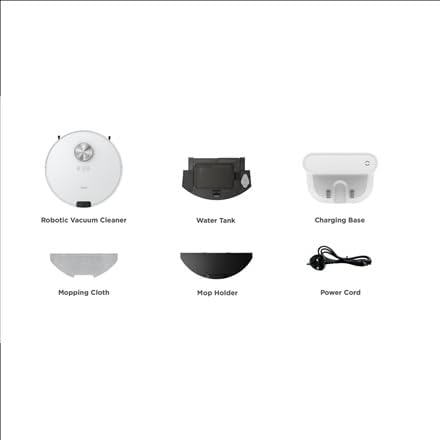
Atahanga: Ka mutuview of the Midea M9 Robot Vacuum Cleaner's package contents. This image displays the main robotic vacuum cleaner unit, a water tank, a charging base, a mopping cloth, a mop holder, and a power cord.
- Kaiwhakarite Kore Kore Kore
- Tane Wai
- Turanga Whakatau
- Kaka Mopi
- Kaiawhita
- Waea hiko
3. Hua Neke Atuview
3.1 Runga View
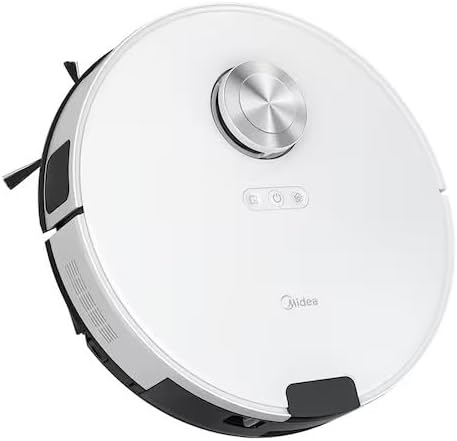
Atahanga: Runga view of the Midea M9 Robot Vacuum Cleaner. This image shows the circular design of the robot, with a central LiDAR navigation sensor tower, power button, and other control indicators on its surface.
The top of the Midea M9 features the LiDAR navigation sensor, which allows the robot to map your home and navigate efficiently. It also includes control buttons for starting/pausing cleaning and returning to the charging base.
3.2 Raro View

Atahanga: Raro view of the Midea M9 Robot Vacuum Cleaner. This image displays the two side brushes, the main rolling brush, the driving wheels, and the mopping pad attachment area.
The underside of the robot houses the main rolling brush, two side brushes for edge cleaning, driving wheels, and cliff sensors to prevent falls. The mopping pad attachment area is also visible.
4. Tatūnga
4.1 Te Whakatakotoranga Turanga
- Whakatakotoria te turanga utu ki te pakitara i runga i tētahi mata mārō, papatahi.
- Me whakarite kia 0.5 mita (1.6 putu) te wāhi wātea i ngā taha e rua o te turanga utu, me te 1.5 mita (4.9 putu) hoki i mua.
- Connect the power cord to the charging base and plug it into a power outlet.
4.2 Whakataki Tuatahi
- Whakatakotoria te mīhini horoi rōpoti ki runga i te turanga utu, me te whakarite kia tika ngā hononga utu.
- Allow the robot to charge completely before its first use. This typically takes 4-6 hours. The indicator light on the robot will change to indicate a full charge.
4.3 Hononga Taupānga (Whiringa)
- Download the Midea Smart app from your mobile device's app store.
- Follow the in-app instructions to connect your Midea M9 Robot Vacuum Cleaner to your home Wi-Fi network. This enables advanced features like remote control, scheduling, and cleaning mode selection.
5. Nga Tohutohu Whakahaere
5.1 Te Tīmata/Te Whakamutu i te Horoi
- Hei Tīmata: Press the power button on the robot or use the Midea Smart app. The robot will begin cleaning in Auto mode.
- Hei Tatari: Press the power button again during cleaning.
- To Stop/Return to Base: Press and hold the power button for a few seconds, or use the 'Return to Base' function in the app.
5.2 Aratau horoi
The Midea M9 offers various cleaning modes:
- Aratau Auto: Ka whakatere atamai te karetao, ka horoi i tō whare katoa.
- Aratau Wahi: Cleans a specific area more intensely. Place the robot in the center of the dirty area and activate Spot mode via the app.
- Aratau Tapa: The robot cleans along walls and furniture edges. Activate via the app.
5.3 Mahi Mopi
- Fill the water tank with clean water. Do not use detergents or cleaning solutions not approved by Midea.
- Attach the mopping cloth to the mop holder, then slide the mop holder with the cloth onto the water tank.
- Insert the assembled water tank and mop holder into the robot.
- The robot will automatically switch to mopping mode or combined vacuuming and mopping.
6. Tiaki
Ko te tiaki i nga wa katoa ka tino pai te mahi me te whakaroa i te roanga o to korehau karetao.
6.1 Dustbin and Water Tank Cleaning
- Putua te ipu puehu i muri i ia whakamahinga.
- Rinse the dustbin and filter with water as needed, ensuring they are completely dry before reinstallation.
- Empty and clean the water tank after each mopping session to prevent mold and odors.
6.2 Te Horoi Paraihe
- Paraihe Matua: Remove the main brush cover and lift out the brush. Use the cleaning tool to remove hair and debris. Clean weekly.
- Paraihe Taha: Check for tangled hair or debris. Remove and clean as needed. Replace if worn or damaged. Clean monthly.
6.3 Te Whakapai Sensor
- Wipe the cliff sensors, wall sensors, and charging contacts with a clean, dry cloth monthly to ensure proper function.
7. Te Raru
Mena ka raru koe, tirohia nga raru me nga otinga e whai ake nei:
| Raruraru | Take pea | Rongoā |
|---|---|---|
| Karekau te karetao e utu | Charging contacts are dirty; Power adapter not connected; Robot not properly aligned with base. | Clean charging contacts; Ensure power adapter is plugged in; Realign robot on charging base. |
| Ka mau te karetao i nga wa maha | Ngā taura wetekina, ngā mea ririki rānei i runga i te papa; Kua mau te karetao ki ngā paepae teitei. | Clear obstacles from cleaning path; Use virtual walls or no-go zones in the app. |
| He kino te mahi horoi | Kī tonu te ipu para; Kua raranga ngā paraihe; Kua purua te tātari. | Whakakorea te ipu para; Horoia ngā paraihe matua me ngā paraihe taha; Horoia, whakakapia rānei te tātari. |
| Kaore e taea e karetao te hono ki Wi-Fi | Incorrect Wi-Fi password; Router too far; Only supports 2.4GHz Wi-Fi. | Verify password; Move robot closer to router; Ensure router is set to 2.4GHz. |
8. Whakatakotoranga
| Āhuahira | Taipitopito |
|---|---|
| Waitohu | Midea |
| Ingoa Tauira | Midea M9 |
| Ahu (L x W x H) | 32 x 32 x 10 cm |
| Taumaha | 4 Kirokaramu |
| Nga waahanga motuhake | Smart mapping, Portable |
| Tohutohu Mata | whāriki |
9. Pūtāhui me te Tautoko
For warranty information and technical support, please refer to the warranty card included with your product or visit the official Midea webpae. Puritia to riiki hoko hei tohu mo te hoko.


