Kupu Whakataki
This manual provides detailed instructions for the safe and efficient installation, operation, and maintenance of your Lightkiwi 600 Watt Multi-Tap Low Voltage Landscape Lighting WiFi Transformer. This transformer is designed for low voltage outdoor lighting applications, including landscape, lawn, and garden lighting. Please read this manual thoroughly before installation and retain it for future reference.
Nga korero haumaru
WHAKATŪPATO: To reduce the risk of fire or injury to persons, read these instructions carefully before use.
- Mo te whakaurunga ki roto, ki runga ranei i nga rawa kore-tahu anake.
- He pai mo te whakamahi o roto, o waho hoki.
- Read installation instructions before connecting to the power supply.
- Mo te whakamahi me te iti voltage landscape luminaries and fittings.
- Karekau mo te whakamahi me nga taputapu ruku.
- Me momotu te hiko i mua i te mahi tiaki, i te tāuta rānei.
- Me whakarite kia mau nga hononga katoa me te whakamaarama tika.
- Do not overload the transformer. Refer to the maximum load specifications.

Whakaahua: Roto view of the Lightkiwi transformer, showing safety warnings and wiring terminals. This image highlights the internal components and the caution labels for safe operation.
Ihirangi mokete
Tena koa tirohia nga ihirangi o te kete kia mohio kei te noho nga taonga katoa me te kore e pakaru:
- Lightkiwi 600 Watt Multi-Tap Low Voltage Landscape Lighting WiFi Transformer
- WiFi Smart Mono
- Pukapuka Tohutohu (tenei tuhinga)
Ka mutu te huaview
The Lightkiwi 600 Watt Multi-Tap Transformer is a robust and efficient solution for your outdoor lighting needs. It features a heavy-duty stainless steel enclosure, a high-performance toroidal core for quiet and reliable operation, and multi-tap output voltages (12V-13V-14V-15V AC) to compensate for voltage drop over extended wire runs. It also includes dual protection with an auto-reset thermal circuit breaker and two 25A magnetic circuit breakers for enhanced safety.

Image: The Lightkiwi 600 Watt Multi-Tap Low Voltage Landscape Lighting WiFi Transformer shown alongside its smart plug accessory. This image provides a complete view of the product and its smart control component.

Image: A close-up of the Lightkiwi transformer, emphasizing its heavy-duty stainless steel construction and the attached power cord. This image highlights the robust build quality suitable for outdoor use.
Tatūnga me te Tāuta
Follow these steps for proper installation of your transformer:
- Kōwhiria he Tauwāhi: Select a suitable location for mounting the transformer. It should be close to a 120V AC power outlet and centrally located to your landscape lighting fixtures to minimize wire runs. The unit is weatherproof and suitable for outdoor installation.
- Maunga te Kaihuri: Securely mount the transformer to a wall or sturdy surface using appropriate hardware (not included) through the mounting holes on the top flange. Ensure it is mounted vertically with the wiring compartment facing downwards.
- Hono iti Voltage Waea: Open the transformer door. Connect your low voltage landscape lighting wires to the appropriate output terminals (Com1, Com2, 12V, 13V, 14V, 15V). Use the multi-tap voltages (13V, 14V, 15V) to compensate for voltage drop on longer wire runs. For example, use 12V for short runs, and higher voltages for longer runs to maintain consistent brightness.
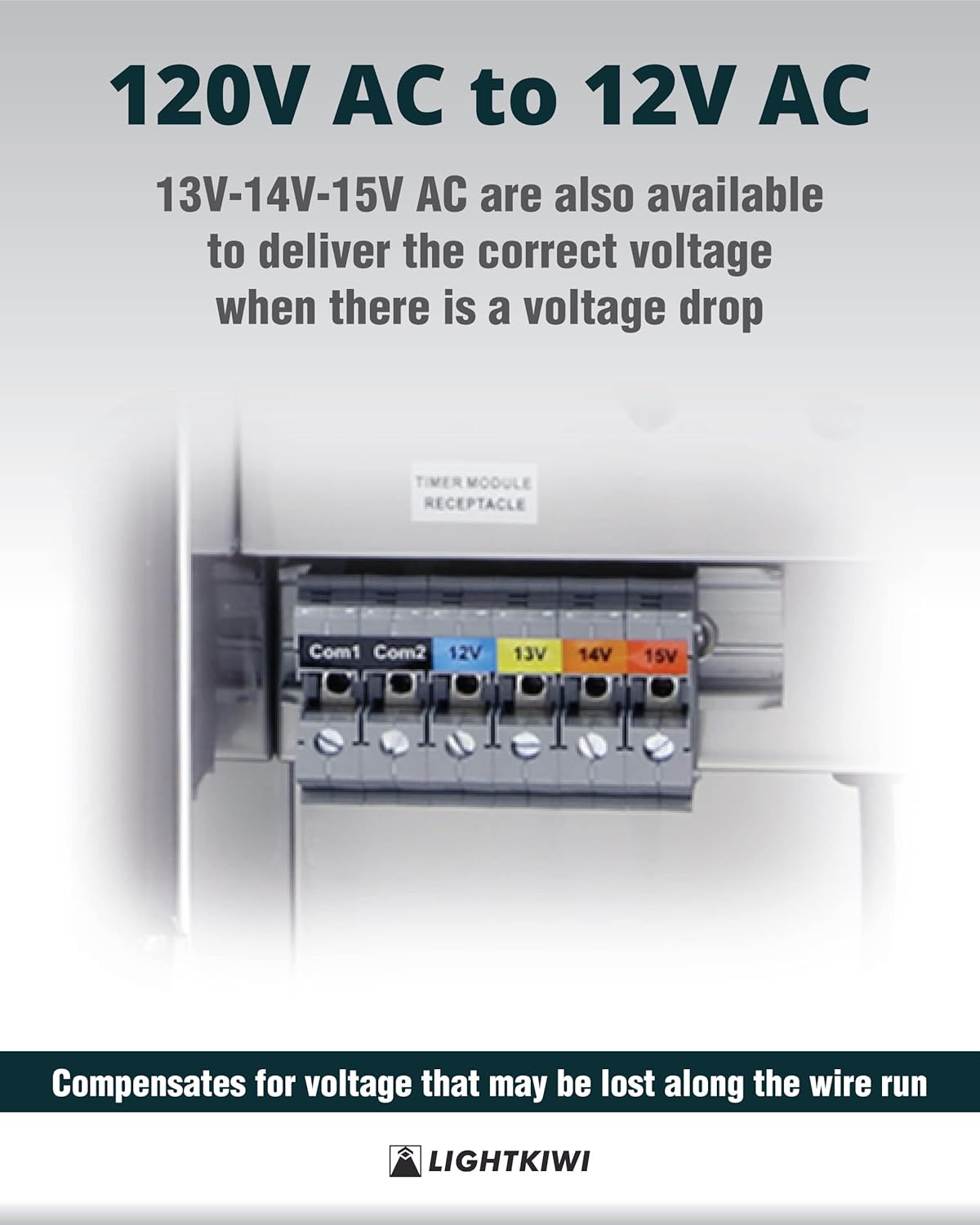
Whakaahua: He taipitopito view of the multi-tap voltage terminals (Com1, Com2, 12V, 13V, 14V, 15V) on the Lightkiwi transformer. This image illustrates where to connect the low voltage wiring for different voltage nga putanga.
- Connect the Smart Plug (Optional): If using the WiFi Smart Plug, plug it into the 'TIMER MODULE RECEPTACLE' inside the transformer. Then, plug the photocell plug (if applicable) into the smart plug.

Image: The Lightkiwi transformer with the smart plug and photocell connected to the internal receptacle. This image demonstrates the correct way to integrate the smart plug for remote control.

Image: A detailed composite image showing various configurations of the smart plug and photocell connections within the transformer. This provides clear visual guidance for connecting these components.
- Whakahiko: Plug the transformer's power cord into a grounded 120V AC outlet. The transformer is now ready for operation.
Nga Tohutohu Whakahaere
The Lightkiwi transformer is designed for simple operation. Once installed and powered, your low voltage lighting system will be active.
Using the WiFi Smart Plug
The included WiFi Smart Plug allows for remote control and scheduling of your landscape lighting via the Smart Life app.
- Tikiake i te Taupānga: Tikiake i te taupānga 'Smart Life' mai i te Toa Taupānga (iOS) i te Toa Play Google rānei (Android).
- Rēhita/Takiuru: Waihangahia he pūkete, takiuru rānei ki tō pūkete Smart Life o nāianei.
- Tāpiri Pūrere: Follow the in-app instructions to add the WiFi Smart Plug. Typically, this involves putting the smart plug into pairing mode (often by holding a button until an indicator light blinks rapidly) and then selecting 'Electrical Outlet' or 'Smart Plug' in the app.
- Control and Schedule: Once connected, you can turn your lighting system on/off remotely, set schedules, timers, and integrate with voice assistants (if supported by the app).
Te tiaki
The Lightkiwi transformer requires minimal maintenance to ensure long-lasting performance.
- Whakapai auau: Horoia te taha waho o te whakawhiti hiko i ia wā ki te pānuitangaamp kakahu hei tango i te paru me ngā para. Kaua e whakamahi i ngā kaihoroi whakakoi, i ngā whakarewa rānei.
- Tirotiro Waea: Annually inspect all wiring connections for tightness and signs of wear or corrosion. Ensure the power cord is not damaged.
- Maamaa nga Puawai: Ensure that any ventilation openings are clear of obstructions to prevent overheating.
- Taki Waahi iahiko: The transformer features magnetic circuit breakers. If the lighting system goes out, check if a breaker has tripped. Reset by flipping the switch back to the 'ON' position. If it trips repeatedly, investigate for a short circuit or overload in your lighting system.
Raparongoā
If you encounter issues with your Lightkiwi transformer, refer to the following common problems and solutions:
| Raruraru | Take pea | Rongoā |
|---|---|---|
| Kaore nga rama e ka ana. | No power to transformer; Tripped circuit breaker; Loose wiring connection; Faulty bulb/fixture. | Check power outlet and transformer plug. Reset circuit breakers inside the transformer. Inspect and tighten all wire connections. Test individual bulbs/fixtures. |
| Ko nga rama he muramura, he korikori ranei. | Voltage drop due to long wire run; Overloaded transformer; Loose connection. | Whakamahia he puo teitei aketage tap (13V, 14V, or 15V) on the transformer. Reduce the total wattage of connected lights. Check and tighten all wire connections. |
| Transformer makes unusual noise. | Overload; Internal issue. | Reduce the load on the transformer. If noise persists, disconnect power and contact customer support. |
| Smart Plug not connecting to WiFi. | Incorrect WiFi password; Out of range; Router issues. | Ensure correct WiFi password. Move transformer closer to router or use a WiFi extender. Restart router. Follow Smart Life app troubleshooting. |
Whakatakotoranga
Detailed technical specifications for the Lightkiwi 600 Watt Multi-Tap Transformer:
- Tauira: B0CG2PSV8B
- Whakauru Voltage: 120V AC
- Putanga Voltage: 12V-13V-14V-15V AC Multi-Tap
- Wat Mōrahitage: 600 Watts
- Uta Morahi: 70% of rated wattage
- Whakatauranga o nāianei: 25 Amps (per secondary breaker)
- Waea Hiko: 70" black 18AWG SJTW cord and plug set
- Rauemi Whakapiri: Kowiri tira Maamaa
- Momo Matua: High-Performance Toroidal Core
- Parenga: Primary: Auto Reset Thermal Circuit Breaker; Secondary: (2) 25A Magnetic Circuit Breakers
- Tiwhikete: ETL kua raarangi
- Ahu (Atatata): 14.60" (Teitei) x 6.80" (Whānui) x 6.50" (Hohonu)

Image: A technical drawing illustrating the dimensions of the Lightkiwi transformer, including height, width, depth, and power cord length. This provides precise measurements for installation planning.

Image: The ETL Listed certification mark and associated product information for the Lightkiwi transformer. This confirms the product's compliance with safety guidelines and standards.
Pūtāhui me te Tautoko
Lightkiwi stands behind the quality of its products. For warranty information, technical support, or any inquiries regarding your transformer, please contact Lightkiwi customer service. Refer to the product packaging or the official Lightkiwi webpae mo nga taipitopito whakapā o naianei.
We are committed to providing excellent service and support for your product.

