Kupu Whakataki
Mauruuru koe mo te hokoasing the Kogan MX10 Pro Cordless Stick Vacuum Cleaner. This manual provides important information regarding the safe operation, maintenance, and troubleshooting of your new appliance. Please read this manual thoroughly before use and retain it for future reference.
The Kogan MX10 Pro is designed for efficient cleaning of various surfaces, featuring powerful suction, a brushless motor, and a HEPA filtration system for a cleaner home environment.
Nga Tohutohu Haumaru
To reduce the risk of fire, electric shock, or injury, always observe basic safety precautions when using an electrical appliance.
- Panuihia nga tohutohu katoa i mua i te whakamahi i te taputapu.
- Kaua e whakamahi i waho, i runga ranei i nga papanga maku.
- Kaua e tukua kia whakamahia hei taakaro. Me aro nui ina whakamahia e nga tamariki e tata ana ranei.
- Whakamahia anake kia rite ki te korero i roto i tenei pukapuka. Whakamahia anake nga taapiri a te kaiwhakanao.
- Kaua e whakamahi me te taura pakaru, te mono ranei. Mena karekau te taputapu e mahi ana, kua makahia, kua pakaru, kua waiho ki waho, kua taka ranei ki te wai, whakahokia ki te pokapu ratonga.
- Kaua e toia, kaua e haria ma te taura, whakamahia te aho hei kakau, kati he kuaha ki te taura, toia ranei te aho ki nga taha koi, ki nga kokonga ranei. Kaua e rere te taputapu ki runga i te taura. Kia matara atu te taura mai i nga papanga wera.
- Kaua e wetewete ma te toia te taura. Hei wetewete, mauhia te mono, kaua ki te taura.
- Kaua e hapai i te mono me te taputapu ma nga ringa makuku.
- Kaua e maka tetahi mea ki roto i nga tuwhera. Kaua e whakamahi me tetahi tuwhera kua araia; kia noho kore te puehu, te kiri, te makawe, me nga mea katoa ka whakaiti i te rere o te hau.
- Tiakina nga makawe, nga kakahu taratara, nga maihao, me nga wahanga katoa o te tinana mai i nga tuwhera me nga waahanga neke.
- Kaua e kohia tetahi mea e wera ana, e kai paipa ana ranei, penei i te hikareti, te mati, te pungarehu wera ranei.
- Kaua e whakamahi ki te kohi i nga wai ka mura, ka wera ranei, penei i te penehīni, te whakamahi ranei i nga waahi kei reira.
- Me tino tupato ki te horoi i nga arawhata.
- Kaua e whakamahi me te kore kapu puehu me/ranei he whiriwhiringa.
- Aukati i te tiimata kore. Me mohio kei te noho kee te whakawhiti i mua i te hono atu ki te kete pākahiko, te tiki, te kawe ranei i te taputapu.
- Whakaorangia anake me te riihi kua tohua e te kaihanga. Ko te rihi e tika ana mo tetahi momo kete pākahiko ka puta he morearea ki te ahi ina whakamahia me tetahi atu kete pākahiko.
- I raro i nga tikanga kino, ka puta te wai mai i te pākahiko; karo whakapā. Mēnā ka tūpono te whakapā, horoia ki te wai. Mena ka pa te wai ki nga kanohi, me rapu awhina hauora. Ko te wai ka puta mai i te pākahiko ka whakapataritari, ka wera ranei.
Ka mutu te huaview & Waehanga
Familiarize yourself with the parts of your Kogan MX10 Pro Cordless Stick Vacuum Cleaner.

Figure 1: Fully assembled Kogan MX10 Pro Cordless Stick Vacuum Cleaner, showing the main unit, extension wand, and motorized brush head.

Figure 2: Kogan MX10 Pro with icons indicating 25000Pa suction power, up to 45 minutes battery life, dust detection & adaptive suction, motorized roller brush, and touchscreen display.
Ihirangi mōkī:
- Main Vacuum Unit (with dust bin and motor)
- Toronga Toronga
- Upoko Paraihe Motini
- Detachable Li-ion Battery (2000mAh)
- Pūurutau Hiko/Kaitohu
- Tauranga-Tautua
- Utauta kowhatu
- Utauta Paraihe 2-i-1
- Pukapuka Kaiwhakamahi
Tatūnga
Huihuinga:
- Whakauruhia te tokotoko toronga ki roto i te waeine korehau matua kia pāwhiritia rā anō ki tōna wāhi tika.
- Attach the motorized brush head to the other end of the extension wand, ensuring it clicks securely.
- Insert the detachable Li-ion battery into the battery slot on the main unit until it locks.
Te Whakataki i te Pūhiko:
- Connect the power adapter to the charging port on the battery or the wall-mounted dock.
- Plug the adapter into a power outlet. The LCD touchscreen will display the charging status.
- For first use, fully charge the battery (approximately 4-5 hours).
Wall-Mounted Dock Installation:
- Choose a suitable location near a power outlet for convenient storage and charging.
- Mark the drilling points for the dock on the wall.
- Keria ngā kōhao ka whakauru i ngā puru pakitara (mēnā e tika ana).
- Secure the wall-mounted dock using screws.
- Place the vacuum cleaner onto the dock for storage and charging.
Nga Tohutohu Whakahaere
Kei te Hia/Weto:
- Press the power button on the handle to turn the vacuum cleaner on.
- Patohia ano te paatene hiko hei whakaweto.
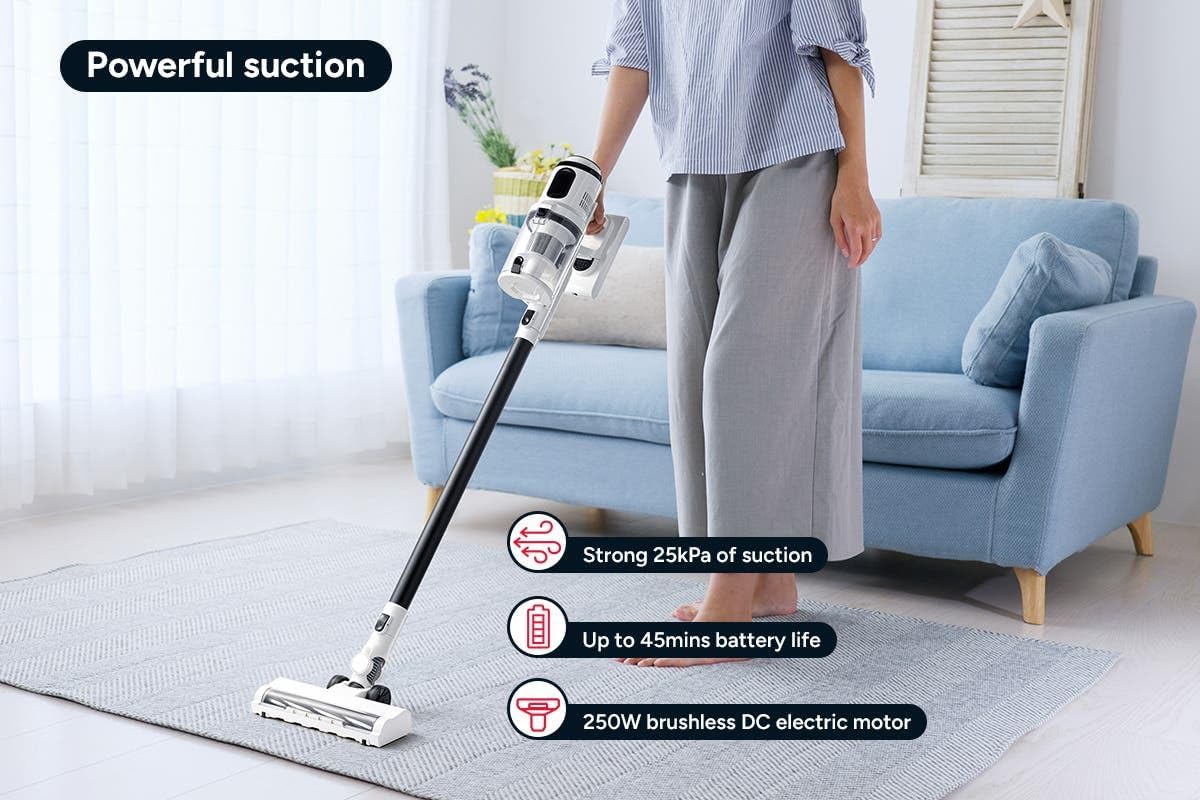
Figure 3: The Kogan MX10 Pro in use, highlighting its powerful 25kPa suction, long battery life, and efficient 250W brushless motor.
Suction Modes & LCD Touchscreen:

Figure 4: The LCD touchscreen provides real-time information on battery level, suction mode, and other operational indicators.
- The LCD touchscreen displays battery status, current suction level, and other relevant information.
- Tap the mode button on the touchscreen to switch between different suction modes (e.g., Eco, Standard, Max).
- The vacuum features dust detection, which automatically adjusts suction power based on the amount of dirt detected.

Figure 5: The brush head detecting dust on a hard floor, demonstrating the automatic suction adjustment feature.
Ma te whakamahi i nga taapiri:
- Upoko Paraihe Motini: Ideal for carpets and hard floors, providing powerful agitation to lift dirt.
- Utauta Kohanga: He tino pai mō ngā āputa whaiti, ngā kokonga, me ngā wāhi uaua ki te tae atu.
- Utauta Paraihe 2-i-te-1: Use the brush for dusting delicate surfaces or slide the brush back for upholstery and larger debris.
- To change attachments, press the release button on the current attachment and pull it off. Then, push the desired attachment onto the main unit or extension wand until it clicks.
Te tiaki
Ko te tiaki i nga wa katoa ka tino pai te mahi me te whakaroa i te oranga o to kai horoi korehau.
Te Putua i te Ipu Puehu:
- It is recommended to empty the dust bin after each use or when the MAX fill line is reached.
- Hold the main unit over a rubbish bin.
- Press the dust bin release button to open the bottom flap and allow debris to fall out.
- The ejection mechanism ensures dirt and dust are removed in a singular motion.

Figure 6: Demonstrating the easy bin emptying process by pressing the release button to open the dust bin flap.
Tātari Tātari:
The Kogan MX10 Pro features a cyclone filter system and a washable HEPA filter to ensure maximum performance and trap fine dust and allergens.

Figure 7: The HEPA filter captures up to 99.97% of fine dust and allergens.
- Twist and pull to remove the filter assembly from the dust bin.
- Separate the HEPA filter and the metal mesh filter.
- Rinse the HEPA filter and metal mesh filter under cold running water.
- Allow all filter components to air dry completely for at least 24 hours before reassembling and placing back into the vacuum. Important: Ensure all parts are completely dry before reinstallation to prevent damage.
Te horoi i te Upoko Paraihe:
- Periodically check the brush head for tangled hair or debris.
- To remove the brush roll, locate the release tab on the side of the brush head and open it.
- Carefully pull out the brush roll.
- Whakamahia he kutikuti, he taputapu horoi ranei hei tapahi me te tango i nga makawe kua marara me nga muka.
- Slide the brush roll back into place and secure the release tab.
Raparongoā
| Raruraru | Take pea | Rongoā |
|---|---|---|
| Korehau kore e huri | Kāore te pākahiko i utua; Kāore te pākahiko i tāuta tika; Kāore te pātene mana i pēhia tika. | Charge the battery fully; Ensure battery is securely clicked into place; Press the power button firmly. |
| Te mana momi iti | Dust bin full; Filters clogged; Blockage in nozzle, wand, or hose; Brush roll tangled. | Empty the dust bin; Clean or replace filters; Check for and remove any blockages; Clean the brush roll. |
| Kare te roi paraihe e huri | Brush roll tangled with hair/debris; Brush roll not properly installed; Obstruction in brush head. | Clean the brush roll; Reinstall brush roll correctly; Remove any obstructions. |
| Karekau te pākahiko e utu ana | Charger not properly connected; Power outlet not working; Damaged charger or battery. | Ensure charger is securely plugged into battery/dock and outlet; Test outlet with another device; Contact Kogan support if charger or battery is damaged. |
Whakatakotoranga
| Āhuahira | Taipitopito |
|---|---|
| Waitohu | Kogan |
| Tauira | MX10 Pro (KAVACSTM10P) |
| Te Mana Momo | 25kPa |
| Motini | 250W Brushless Motor |
| Pūhiko | 2000mAh Detachable Li-ion |
| Taumata Haruru | 80 dB |
| Momo Tātari | HEPA (Washable) |
| Nga waahanga motuhake | Lightweight, Cordless, LCD Touchscreen, Dust Detection, Cyclone Filter System |
| Taumaha Tūemi | 3.47 kg |
| Mata e taunakitia ana | Papa maro, whariki |
Pūtāhui me te Tautoko
For warranty information, technical support, or any inquiries regarding your Kogan MX10 Pro Cordless Stick Vacuum Cleaner, please visit the official Kogan website or contact Kogan customer support directly.
You can find more information and contact details on the Kogan store page: Kogan Official Store