Kupu Whakataki
Thank you for choosing the SUNOL GM20 True Wireless Earbuds. This manual provides detailed instructions on how to set up, operate, and maintain your earbuds to ensure optimal performance and longevity. Please read this manual thoroughly before using the product.
Ka mutu te huaview

Image: The GM20 True Wireless Earbuds in orange, shown with their matching charging case. The charging case features an LED display indicating battery percentage.
The GM20 True Wireless Earbuds are designed for a superior audio experience with advanced features:
- Hangarau Nihokikorangi 5.3: Ensures faster pairing, more stable connection, and lower power consumption with an effective range of up to 10 meters.
- Pukuoro Whakauru: High-quality microphone with environmental noise reduction for clear hands-free calls.
- Whakahoki Whakaroa: Up to 48 hours of total playback time with the 600mAh charging case, which can recharge the earbuds four times.
- Whakaatu LED: The charging case features an LED display to show the power levels of both the earbuds and the charging case.
- Hoahoa parewai: IPX8 waterproof nano-coating makes the earbuds suitable for various activities, including sports.
- Whakanoho pai: Ergonomic in-ear design with multiple ear tip sizes for prolonged comfortable wear.
He aha kei roto i te Pouaka
Upon opening your GM20 True Wireless Earbuds package, you should find the following items:
- GM20 True Wireless Earbuds (Left and Right)
- Puhi utu
- Uera Whakatau
- Multiple sizes of Ear Tips
- Pukapuka Kaiwhakamahi (tenei tuhinga)
Tatūnga
1. Te Whakataki i nga Paorooro me te Puhi
I mua i te whakamahi tuatahi, me whakarite kia whakakiia katoatia nga pukoro taringa me te putea utu.
- Place the earbuds into the charging case. Ensure they are correctly seated; the LED display on the case will show charging status.
- Connect the charging cable to the charging port on the case and to a USB power source. The LED display will indicate the charging progress of the case.
- A full charge for the case typically takes a few hours. The earbuds will charge automatically when placed inside the powered case.

Image: The GM20 charging case displaying "100" on its LED screen, indicating a full charge. An earbud is shown next to it, ready for use.
2. Te Honohono ki tō Pūrere (Te Honohono Kotahi-Hipanga)
The GM20 earbuds feature automatic pairing for convenience.
- Takirua Tuatahi:
- Whakatuwheratia te pouaka utu ka tangohia ngā pane taringa e rua. Ka whakakā aunoatia rāua ka uru ki te aratau takirua.
- I runga i to taputapu (waea atamai, papa, aha atu), whakaahei i a Nihokikorangi.
- Rapua Bluetooth devices and select "GM20 TWS" from the list.
- Ina hono ana, ka rongo koe i te tangi whakau, ka reri nga taringa mo te whakamahi.
- Takirua anō: The earbuds will automatically connect to the last paired device when taken out of the charging case.
- If the earbuds do not connect automatically, ensure Bluetooth is enabled on your device and select "GM20 TWS" from your Bluetooth settings.
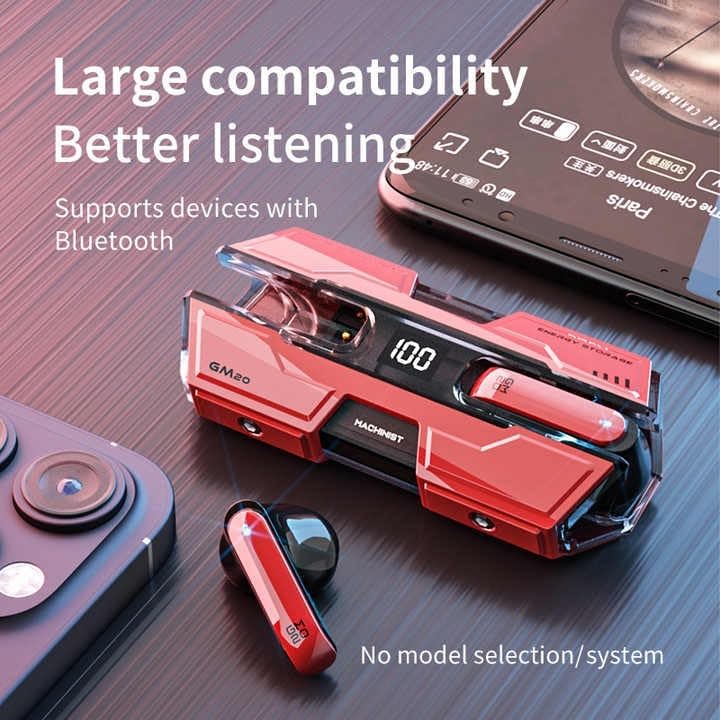
Image: The GM20 earbuds and charging case positioned near a smartphone, emphasizing their broad compatibility with Bluetooth-enabled devices.
Nga Tohutohu Whakahaere
Mana Pupuri
The GM20 earbuds feature a multifunction button on each earbud for easy control of audio playback and calls.
| Mahi | Mahi |
|---|---|
| Pēhi Kotahi (Taringa Mauī/Matau) | Purei/Tatari Waiata, Whakautu/Whakamutua te Waea |
| Pēhi Taurua (Punarongo Mauī) | Waiata o mua |
| Pehi Taurua (Pono Whakamatau) | Waiata Panuku |
| Panui Roa (2 hēkona) | Whakakahoretia te Waea, Whakahohe Kaiawhina Reo |
| Panui Roa (5 hēkona) | Te Hiko / Whakaweto |
E mau ana i nga Paorooro
For optimal sound quality and comfort, ensure the earbuds are properly seated in your ears. Experiment with the different sizes of ear tips provided to find the best fit for your ears.

Whakaahua: He pahū view diagram of an earbud, illustrating its internal components such as the 13mm moving coil and composite diaphragm, which contribute to high-resolution sound.
Te tiaki
Proper maintenance will extend the life of your GM20 earbuds.
- Te horoi: Me horoi i nga wa katoa nga pukoro me te pukoro utu ki te kakahu ngohengohe, maroke, kore-puru. Kaua e whakamahi i nga kai horoi me nga whakarewa.
- Ātete wai: The earbuds are IPX8 waterproof, meaning they are protected against prolonged immersion in water. However, the charging case is not waterproof. Avoid exposing the charging case to liquids. Always ensure earbuds are dry before placing them back in the charging case.
- Rokiroki: Mena karekau e whakamahia, penapenahia nga purongo ki roto i to pukoro hei tiaki kia mau tonu te utu. Whakaorangia ki te waahi makariri, maroke atu i nga wera nui.
- Tiaki Pūhiko: Hei pupuri i te roa o te pākahiko, kaua e tukua kia pau katoa te wai i ngā pane taringa me te pouaka utu. Utuhia i ia wā, ahakoa kāore e whakamahia tonutia.
Raparongoā
If you encounter issues with your GM20 earbuds, try the following solutions:
- Karekau e honoa nga taringa:
- Me mohio kei te whakakiia nga taringa e rua.
- Whakawetohia te Nihokikorangi i tō pūrere, kātahi ka whakakā anō.
- Forget "GM20 TWS" from your device's Bluetooth settings and attempt to re-pair.
- Whakahokia ngā pane taringa ki roto i te pouaka, katia te taupoki, tatari mō ētahi hēkona, kātahi ka huaki, ka ngana anō.
- Karekau he oro, he iti te reo:
- Tirohia te taumata oro i runga i to taputapu me nga purongo.
- Me mohio kei te hono tika nga taringa ki to taputapu.
- Horoia nga otaota mai i te mata o te tukuoro taringa.
- Sound distortion or crackling:
- Me whakarite kei roto nga taringa i te awhe Nihokikorangi 10 mita o to taputapu.
- Reduce interference by moving away from other wireless devices or strong electromagnetic fields.
- Ngana ki te hono ano i nga purongo.
- Karekau nga taringa e utu ana:
- Me mohio kei te hono pai te taura utu ki te take me te puna hiko.
- Tirohia mena he ma te tauranga utu i runga i te keehi me te kore he para.
- Whakamātauria he taura utu rereke, he urutau hiko ranei.
Whakatakotoranga
| Āhuahira | Taipitopito |
|---|---|
| Ingoa Tauira | K8 |
| Putanga Nihokikorangi | 5.3 |
| Awhe Nihokikorangi | 10 Mita |
| Te ora o te Pūhiko (Ngā taringa) | Approx. 8-10 hours (single charge) |
| Te Ora o te Pūhiko (me te Puhi Katoa) | Tae atu ki te 48 haora |
| Whakatauhia te kaha o te pākahiko | 600mAh |
| Taumata Atete Wai | IPX8 (Ngā taringa anake) |
| Whakautu auau | 20 Hz - 20 KHz |
| Te aukati | 32 Aue |
| Tikanga Mana | Paa/Patene |
| Rauemi | Acrylonitrile Butadiene Styrene (ABS) |
| Taumaha Tūemi | 14.4 hekere (tāpeke mōkihi) |
Pūtāhui me te Tautoko
For warranty information and customer support, please refer to the documentation included with your purchase or visit the official SUNOL website. If you experience any issues not covered in this manual, please contact SUNOL customer service for assistance.
Tena koa pupurihia to tohu mo te hoko mo nga kereme whakamana.


