Kupu Whakataki
Thank you for choosing the HyperGear Stealth2 ANC Wireless Headphones. This manual provides detailed instructions for setting up, operating, and maintaining your headphones to ensure optimal performance and longevity. Please read this manual thoroughly before use.

Image: HyperGear Stealth2 ANC Wireless Headphones, Bone color, showcasing key features like Active Noise Cancelling, 40mm Neodymium Drivers, Deep HD Stereo Sound, up to 24-hour playing time, rapid charge, and lightweight foldable design.
Ihirangi mokete
Manatokona kei roto katoa nga mea kei roto i te kete:
- HyperGear Stealth2 ANC Wireless Headphones
- USB-C Uira Whakatau
- Pukapuka Kaiwhakamahi (tenei tuhinga)
Ka mutu te huaview
Kia mōhio koe ki ngā momo wāhanga me ngā mana whakahaere o ō paneoro.

Image: Detailed diagram of the HyperGear Stealth2 ANC Wireless Headphones, highlighting the on-ear controls. Labels include Power On/Off, Enter Pairing Mode, Volume Up/Next Track, Play/Pause/Answer/End Call, Reject Call, Activate Voice Assistant, Gaming Mode On/Off, Volume Down/Previous Track, and Active Noise Cancellation On/Off. Also shows Quick Pairing and Auto Reconnection features.
Mana-taringa:
- Pātene Hiko: Press and hold to power on/off. Press and hold to enter pairing mode.
- Rōrahi Whakarunga / Pātene Riu Panuku: Press to increase volume. Press and hold to skip to the next track.
- Pātene Mahi-maha (Play/Tatari): Press to play/pause audio. Press to answer/end calls. Press and hold to reject calls. Double-press to activate voice assistant. Triple-press to toggle Gaming Mode.
- Rōrahi Whakararo / Pātene Riu Mua: Pēhia hei whakaiti i te oro. Pēhia me te pupuri kia haere ki te ara o mua.
- Pātene ANC: Press to toggle Active Noise Cancellation on/off.
Tatūnga
1. Te Whakataki i nga Paneoro
I mua i te whakamahinga tuatahi, kia whakakiia katoatia o taringa.
- Honoa te taura utu USB-C kua whakaratohia ki te tauranga utu i runga i nga taringa.
- Tūhonohia te pito o te taura ki te puna hiko USB (hei tauira, urutau pakitara, tauranga USB rorohiko).
- The LED indicator will show charging status. It typically takes about 2 hours for a full charge.
- A 10-minute rapid charge can provide approximately 3 hours of playback.

Image: A person wearing HyperGear Stealth2 ANC Wireless Headphones on an airplane, illustrating battery life: 18 hours with ANC on, 24 hours with ANC off. Also highlights rapid charge: 10 minutes of charging provides 3 hours of playback.
2. Takirua Nihokikorangi
Tāruatia ō pane whakarongo ki tō pūrere mō te oro ahokore.
- Me mohio kei te utu nga taringa me te whakaweto.
- Patohia me te pupuri i te paatene Hiko kia whiti te tohu LED ki te puru me te whero, e tohu ana i te aratau takirua.
- I runga i to taputapu (papa atamai, papa, rorohiko), whakaahei i te Nihokikorangi me te rapu mo nga taputapu e waatea ana.
- Select "HyperGear Stealth2" from the list of found devices.
- Once connected, the LED indicator will show a solid blue light or flash slowly.
Takirua Tere: The headphones are designed for instant connection with your device in seconds after initial pairing.
Hononga Aunoa: The headphones will remember and automatically reconnect to the last paired device when powered on and within range.
Nga Tohutohu Whakahaere
Te Hiko / Whakaweto
- Hei whakakā, pēhi me te pupuri i te pātene Mana kia mura rā anō te tohu LED.
- Hei whakaweto i te mana, pēhia me te pupuri i te pātene Mana kia mate rā anō te tohu LED.
Whakakahoretanga Noise Kaha (ANC)
- Press the dedicated ANC button to toggle Active Noise Cancellation on or off.
- When ANC is active, ambient noise is significantly reduced, providing a quieter listening experience.
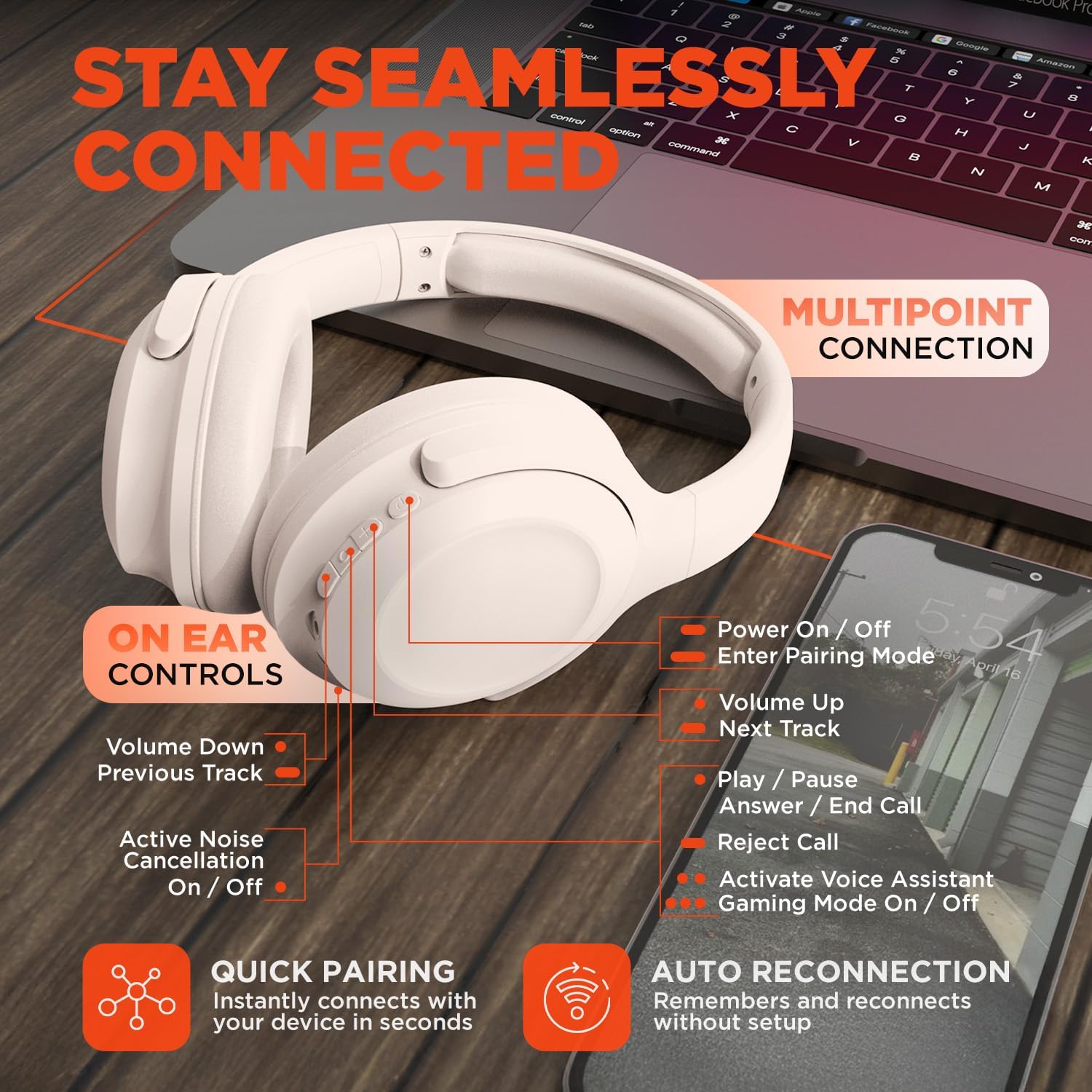
Image: HyperGear Stealth2 ANC Wireless Headphones highlighting "Pure Sound Anywhere" with Dual ANC Microphones for blocking unwanted noise and Adaptive Sound Control for real-time environment adjustment. Also shows compatibility with Siri and Google Assistant, and use cases for exercise, gaming, and travel.
Whakahoki Ororongo me nga Waea
- Purei/Tatari: Patohia te paatene Maha-mahi kotahi.
- Riu Panuku: Patohia me te pupuri i te paatene Volume Up.
- Riu o mua: Pēhia me te pupuri i te pātene Volume Raro.
- Mana Rōrahi: Pēhia ngā pātene Rōrahi Whakarunga, Rōrahi Raro rānei.
- Whakautu/Whakamutu Waea: Patohia te paatene Maha-mahi kotahi.
- Whakakore Waea: Patohia me te pupuri i te paatene Maha-mahi.
Kaiāwhina reo
- Double-press the Multi-function button to activate your device's voice assistant (Siri, Google Assistant, etc.).
Aratau petipeti
- Triple-press the Multi-function button to toggle the no-lag Gaming Mode. This mode optimizes audio synchronization for enhanced gameplay.
Hononga ira maha
The headphones support multipoint connection, allowing them to be connected to two Bluetooth devices simultaneously.
- Tāruatia ngā pane whakarongo ki te pūrere tuatahi e ai ki te whakaahuatanga i te wāhanga "Tauira Nihokikorangi".
- Monokia te Nihokikorangi i runga i te taputapu tuatahi.
- Whakahokia ngā pane whakarongo ki te aratau takirua, ka takirua ki te pūrere tuarua.
- Whakahohe anō i te Nihokikorangi i te pūrere tuatahi. Me hono ngā paneoro ki ngā pūrere e rua.
- Ka purei te oro mai i te pūrere e purei ana i ngā ihirangi.

Image: HyperGear Stealth2 ANC Wireless Headphones positioned between a laptop and a smartphone, demonstrating the multipoint connection feature. This allows the headphones to stay seamlessly connected to multiple devices.
Te tiaki
Mā te tiaki tika ka roa te ora me te mahi a ō pane whakarongo.
- Keep the headphones dry. Do not expose them to water or excessive moisture. They are not water resistant.
- Horoia ngā kapu taringa me te potae taringa ki te kakahu ngohengohe, maroke. Kaua e whakamahi i ngā matū kaha, i ngā mea whakakoi rānei.
- Whakaorangia nga taringa ki te waahi makariri, maroke ka kore e whakamahia. Ko te hoahoa kopaki ka taea te rokiroki kiato.
- A ape i te wera nui.
- Kaua e ngana ki te wetewete, ki te whakarereke ranei i nga taringa, na te mea ka kore te whakamana.
Raparongoā
Ki te pā mai he raruraru ki a koe, tirohia ngā otinga noa e whai ake nei.
| Raruraru | Rongoā |
|---|---|
| Kāore ngā pane whakarongo e taea te whakakā. | Kia tino utua ngā paneoro. Honoa ki tētahi pūtake hiko mā te whakamahi i te taura USB-C. |
| Kaore e taea te hono ki tetahi taputapu. |
|
| Karekau he oro, he iti te reo. |
|
| Kāore te ANC e whai hua. |
|
Whakatakotoranga
| Āhuahira | Taipitopito |
|---|---|
| Ingoa Tauira | HyperGear Stealth2 ANC Headphones |
| Tau tauira | 15860 |
| Hangarau Hononga | Ahokore (Nihokikorangi) |
| Putanga Nihokikorangi | 5.2 |
| Awhe Nihokikorangi | 10 Mita |
| Rahi Atekōkiri Ororongo | 40mm |
| Awhe Auautanga | 20 Hz - 20,000 Hz |
| Mana Haruru | Whakakore Haruru Hohe |
| Ora Pūhiko | Tae atu ki te 24 Haora (whakaweto ANC) |
| Waa Whakatau | 2 haora |
| Tauranga Whakatau | USB-C |
| Rauemi | Kirihou |
| Taumaha Tūemi | 0.38 Kirokaramu (13.3 hekere) |
| Hunga Hua | 7.88 x 2.25 x 10.51 inihi |
| Taumata Atete Wai | Ehara i te wai ātete |
| UPC | 633755158605 |
Pūtāhui me te Tautoko
HyperGear products are designed for reliability and performance. For warranty information and customer support, please refer to the warranty card included with your purchase or visit the official HyperGear webpae.
Kaupapa Whakahoki: This product typically includes a 30-day return policy for refunds or replacements. Please check your purchase details for specific terms.
Kaihanga: HYPERGEAR


